jmair
-
Posts
386 -
Joined
-
Last visited
Content Type
Forums
News
20th
EduGeek EDIT Conference
Blogs
Everything posted by jmair
-
It's a fix and I'll take it! Thank you. I read other solutions like this but assumed it was only for users that have already logged into that machine!. Thanks again!
-
I have searched for this issue, but it looks like everyone but me is using some form or roaming profile. Though we don't use roaming profiles, we do use mapped drived for their files. That's about it. Currently, evenever a student logs into a Win7 machine, they get a temp profile. This doesn't bother me any, however when the teacher is asking them to save favorites to a website or create folders on the desktop it gets wiped on restart. This is every Win7 machine in the lab, with every user. Any suggestions on how to save the user info?
-
turns out my DHCP was currupted. Backing up the DHCP db, removing and reinstalling DHCP was the only answer, but it worked. Thank you all for the assistance!
-
Yes, Name Servers, DNS Servers and DNS Domain Name. Agreed. This has only recently changed. I think some clients are grabbing that info from our gateway. Not sure why they aren't getting it from the DNS server.
-
My internal DNS server has one DNS as itself, 10.1.1.2. The Second DNS (set on the nic) is 127.0.0.1. As far as I know, I have no ither DNS server listed on my DNS server. If you have an idea where to look to double check this, I'll look, but I don't know why or where they would be.
-
Agreed. Internal DNS doesn't show. From the domain controller (Windows 2008 with AD, DNS, DHCP) client machines aren't seeing the internal DNS, and I haven't a clue why. It has been working fine for a few years, then, it has stopped. While at the DNS snapin, everything is running. .. Going to restart the entire network and hope that solves something.
-
First, thank you all for your quick replys. actually, these DNS IPs aren't anywhere on my DNS server (not even o nthe NIC configs).. They are however on my gateway. I just remoted into the gateway and disabled the VPN settings on it in case that was somehow causeing the fits. Not sure how quickly I'll see changes in my network though.
-
From the new machine that wont connect, here is the full Ipconfig: Windows IP Configuration Host Name . . . . . . . . . . . . : dmeads1 Primary Dns Suffix . . . . . . . : Node Type . . . . . . . . . . . . : Hybrid IP Routing Enabled. . . . . . . . : No WINS Proxy Enabled. . . . . . . . : No DNS Suffix Search List. . . . . . : parkcounty.int Wireless LAN adapter Wireless Network Connection: Media State . . . . . . . . . . . : Media disconnected Connection-specific DNS Suffix . : Description . . . . . . . . . . . : 1x1 11b/g/n Wireless LAN PCI Express Half Mini Card Adapter Physical Address. . . . . . . . . : D0-DF-9A-46-50-C4 DHCP Enabled. . . . . . . . . . . : Yes Autoconfiguration Enabled . . . . : Yes Ethernet adapter Local Area Connection: Connection-specific DNS Suffix . : parkcounty.int Description . . . . . . . . . . . : Realtek PCIe GBE Family Controller Physical Address. . . . . . . . . : E8-9A-8F-8D-80-C6 DHCP Enabled. . . . . . . . . . . : Yes Autoconfiguration Enabled . . . . : Yes Link-local IPv6 Address . . . . . : fe80::b460:5249:17d7:d177%11(Preferred) IPv4 Address. . . . . . . . . . . : 10.1.2.133(Preferred) Subnet Mask . . . . . . . . . . . : 255.255.0.0 Lease Obtained. . . . . . . . . . : Tuesday, August 30, 2011 6:45:10 AM Lease Expires . . . . . . . . . . : Wednesday, August 31, 2011 12:45:53 PM Default Gateway . . . . . . . . . : 10.1.1.254 DHCP Server . . . . . . . . . . . : 10.1.1.254 DHCPv6 IAID . . . . . . . . . . . : 250124943 DHCPv6 Client DUID. . . . . . . . : 00-01-00-01-15-BE-D6-D7-E8-9A-8F-8D-80-C6 DNS Servers . . . . . . . . . . . : 64.25.238.120 64.25.227.34 8.8.8.8 NetBIOS over Tcpip. . . . . . . . : Enabled Tunnel adapter isatap.{236FC1F9-C64F-44D0-BA89-BD512AACAC7E}: Media State . . . . . . . . . . . : Media disconnected Connection-specific DNS Suffix . : Description . . . . . . . . . . . : Microsoft ISATAP Adapter Physical Address. . . . . . . . . : 00-00-00-00-00-00-00-E0 DHCP Enabled. . . . . . . . . . . : No Autoconfiguration Enabled . . . . : Yes Tunnel adapter Local Area Connection* 11: Media State . . . . . . . . . . . : Media disconnected Connection-specific DNS Suffix . : Description . . . . . . . . . . . : Microsoft 6to4 Adapter Physical Address. . . . . . . . . : 00-00-00-00-00-00-00-E0 DHCP Enabled. . . . . . . . . . . : No Autoconfiguration Enabled . . . . : Yes Tunnel adapter isatap.parkcounty.int: Media State . . . . . . . . . . . : Media disconnected Connection-specific DNS Suffix . : parkcounty.int Description . . . . . . . . . . . : Microsoft ISATAP Adapter #2 Physical Address. . . . . . . . . : 00-00-00-00-00-00-00-E0 DHCP Enabled. . . . . . . . . . . : No Autoconfiguration Enabled . . . . : Yes Tunnel adapter Teredo Tunneling Pseudo-Interface: Connection-specific DNS Suffix . : Description . . . . . . . . . . . : Microsoft Teredo Tunneling Adapter Physical Address. . . . . . . . . : 00-00-00-00-00-00-00-E0 DHCP Enabled. . . . . . . . . . . : No Autoconfiguration Enabled . . . . : Yes IPv6 Address. . . . . . . . . . . : 2001:0:4137:9e76:82d:f0a:f5fe:fd7a(Preferred) Link-local IPv6 Address . . . . . : fe80::82d:f0a:f5fe:fd7a%28(Preferred) Default Gateway . . . . . . . . . : :: NetBIOS over Tcpip. . . . . . . . : Disabled
-
Also, when I run the Best Practices for our DNS the only error I get is that I do not have the 127.0.0.1 as my secondary dns set on the NIC.
-
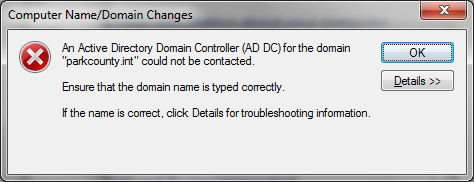
I’ve been having some odd DNS issues, I’m hoping for suggestions on where to look to solve these problems. VBs login scripts aren’t always triggering, unless the user has a static IP. New machines cann't join our domain, (though I do get a prompt for a user/password) From new machines (with ips designated by our DHCP) I can’t ping our FQDN of parkcounty.int, however the ipconfig on the machine that can not connect is as follows Ethernet adapter Local Area Connection: Connection-specific DNS Suffix . : parkcounty.int Link-local IPv6 Address . . . . . : fe80::b460:5249:17d7:d177%11 IPv4 Address. . . . . . . . . . . : 10.1.2.133 Subnet Mask . . . . . . . . . . . : 255.255.0.0 Default Gateway . . . . . . . . . : 10.1.1.254 Unfortunately, these DNS issues are also stopping our Web filtering appliance to work correctly and even some staff have to input their username/password to connect with Exchange several times an hour. Thanks in advance for any suggestions.

-
I have been using a VBscript login script that grabs the OU the account is in, then does certain things (mounts printers, creates shares etc.) I dont recal doing anything over the summer, but when I came back to school the script is now failing. It looks like it's not seeing our domain on this line. Set objUser = GetObject("LDAP://" & strUserName) Here is a compact version of the script I use (the portion that's giving the error). Set objSysInfo = CreateObject("ADSystemInfo") strUserName = objSysInfo.UserName Set objUser = GetObject("LDAP://" & strUserName) strOUName = objUser.Parent Set objOU = GetObject(strOUName) Wscript.Echo objOU.distinguishedName Here's an image of the error I get while running the above script now. Any suggestions on how to resolve this would be welcome.
-
I've been trying to get the VPN on Win7 to work, so i'll post a question here. I need to be able to VPN into work and have my network at home be 100% on the same network as at work. ip, subnet, gateway etc. .. I've found and tried several VPN portals, but they only grant access to computers, but I need to be able to troubleshoot issues on the network itself. I've been using RDC to solve this problem , but the delay on typing, dragging etc is hassle. Can anyone suggest a free solution to joining my computer at home onto the network at work?
-
I set up an Incoming VPN on my Windows 7 server at work (using windows built in vpn software on both sides). On my XP machine at home, I'm able to connect just fine... Untill I couldn't get internet access. So I checked the ipconfig of the client. IP: 10.1.1.45 Subnet : 255.255.255.255 Gateway: 10.1.1.45 Why did it use my IP as the gateway? How can I set up the gateway to match that of my work? Also: I'm not opposed to looking for another solution. I just need to be able to VPN into work as though I was 100% on site.
-
Exactly!.. and well put.
-
We're using credit recovery software. The fundimental problem I see with this, is that more often than not, the students who need credit recovery at our school are ADHD or Behavioral issue kids. The standard format simply sets them up to fail before they even walk into class. Can anyone suggest a program for these type of students?
-
I would like to record some step by step tutorials for our teachers on how to use their new SharePoint Teacher pages. Any suggestions on what type of free screen/audio capture device to use?
-

Software updates - How would you do it if you were me?
jmair replied to jmair's topic in How do you do....it?
Great info guys, thanks! -
I have old XP machines on up to Windows 7 machines on the same domain (we're a k-12 on one campus.) Currently I update all adobe products, windows updates, etc by hand. Good news is, I get my work out this way. Bad news is it's extreamly time consuming when I do this. How would you suggest I solve this problem?
-
Thanks you kindly!. This has got to be the fastest resolved DNS issue I've ever had. Thanks again!
-
@AngryTechnician , I would like them to resolve to the internal ip of mail.domain.org. And this is for OWA initially.
-
While on site, if I do a tracert mail.domain.org I get an external IP address. If my internal domain is domain.int, how can I make it so all users accessing mail.domain.org are routed to mail.domain.int? note: We have one DNS and one domain with one subdomain of mail.domain.int (and we only have that because I'm playing/learning/breaking around in the DNS at the moment.)
-
I've just purchased a new cert for our exchange server (our old one was Self Signed). All internal clients connect to the exchange server at server.domain.int. The new cert was made for domain.org. Now every client machine is getting a cert error when they open up Outlook. "The name on the security certificate is invalid or does not match the name of the site." Oops. What's the fastest way to fix this issue?
-
We need the ability to record shows to a box and then for teachers to be able to play it from their client machines. I don't even know where to start (except to start with you guys.)
-
Server 2008 R2 GPO - Reset Internet Explorer Setting?
jmair replied to jmair's topic in Windows Server 2008 R2
Thanks Sukh. What I'm wanting to do actually is to Automatically Reset IE for the students at login as that seams to be a fix. -
Server 2008 R2 GPO - Reset Internet Explorer Setting?
jmair posted a topic in Windows Server 2008 R2
We're having a problem with some 3rd party software that seams to only work after the student goes to internet explorer/tools/internet options/advanced/Reset Internet Explorer Settings. Reset. I've been poking around GPO, but can't find a 'reset' option, and Google hasn't shown me how to do it with 2008 R2. Anyone know where the option is to Rest IE? Edit: I'm looking for a way to automatically reset IE for the students.