Duke5A
-
Posts
1,598 -
Joined
-
Last visited
Content Type
Forums
News
20th
EduGeek EDIT Conference
Blogs
Everything posted by Duke5A
-
I manage a wireless network comprised of about 150 access points across six sites. We had the cabling done by a company, but I can tell you what it all entails. All the cabling is ran through the plenum like any standard network drop would be routed (wire ladders on long runs, through conduit when going through walls, etc). The lines are kept as far away as possible from light ballasts, have at least 20ft service loops before termination, and are terminated with a box and rj45 plug on the ends. Access points are jacked in with 5th patch cords. All the cable is plenum rated Cat6. At least here, the cabling needs to be plenum rated to pass fire code. Don't forget to use firestop in conduits as well. And get an expensive label maker to label the cables on both ends. This will make your life a lot easier in the long run.
-

School mobile application - Pro's and Con's?
Duke5A replied to Joe-WLS's topic in Internet Related/Filtering/Firewall
Couldn't the goals of this custom app be met with a free school Facebook and Twitter account? The devices you're trying to reach already have social media entwined with their functionality. -
Do you allow access to flickr?
Duke5A replied to reggiep's topic in Internet Related/Filtering/Firewall
We block all user generated content for students too. So no access to Youtube, FB, Flickr, etc. What we do allow though is teachers to have access to those sites. If there is something out there in user generated content land and it's worthy of making available/showing to a class, the teacher can present it. -
We're in the same boat and have separate policies with WMI filtering. Here is the filters we use: To match Windows Vista and Windows 7 Namespace: root\CIMv2 Query: Select * from Win32_OperatingSystem Where Version like "6.%" and ProductType = "1" To match Windows 2000 and Windows XP Namespace: root\CIMv2 Query: Select * from Win32_OperatingSystem Where Version like "5.%" and ProductType = "1" Everything works great under this setup. I hope this helps...
-
This looks promising, but I haven't been through it yet. Using Pictures from Active Directory » MSitPros Blog | MSitPros Blog
- 1 reply
-
- 1
-

-
I wouldn't think it so, but I've never used a 64bit boot WIM on my WDS server. All five boot images that I have to choose from are x32 and they'll deploy x32 and x64 images no problem. For as quick as it is to import a 32bit boot WIM, I'd say give it a try.
-
Just this past Easter break I was tasked with installing about 60 or so new machines in the media centers in our district. It wasn't until the end of the deployment that I discovered that mapped drives assigned via the login script weren't working properly as the card readers were taking up the letters. Moving the mapped drives higher up in the alphabet wasn't going to fly as it would affect every user on the network, and there wasn't any group policy setting that would allow you to set the first available drive for removable media, so I was looking at having to revisit every machine and disable the readers. Enter Microsoft's command line utility version of the device manager, Devcon. You'll need the deviceID for the card reader in question and this can be obtained through device manager. If all the readers you're tying to disable are the same make/model, then this will be same for all of them. Copy the entire string. Now the syntax to disable said card reader will look like this. Just replace the deviceID shown with your own. If the need arises, this utility also supports wild cards. devconx64 -disable "USB\VID_0644&PID_0200&REV_0408" This can be pushed out a number of ways; I wound up going ahead and creating a GPO and setting it up as a startup script. Startup scripts run with machine credentials and will have the permissions necessary to disable hardware. If you choose to incorporate this solution into a login script, then this will run with the user's credentials. So be sure the user logging in has local admin privileges. One last note, the download for Devcon from Microsoft includes x32 and an ia64 version. Obviously ia64 is for the Itanium architecture and won't do any good for the majority of us out there. There is an x64 build, but it is only available through a resource CD or something of the like and not as a standalone download. So I've attached a zip to this post containing both the x32 and x64 versions for convenience. I hope this helps. DevCon.zip
-
Symantec Endpoint Protection duplicate client hardware ID
Duke5A replied to Duke5A's topic in Enterprise Software
No I didn't, but I will in the future. The script was written more to fix existing machines that had duplicate hardware IDs. What really throws me for a loop is we never had this issue with the 11.x versions we ran, and I at least never noticed it for short time we ran 12.0. Live and learn.... -
It works great. It still blows my mind that this problem that has been hanging around since at least Java 6u17 hasn't been fixed yet. I guess I shouldn't expect much seeing as how Java still stores a ton of it's settings in a flat file in the user's profile directory. It would be nice if they pushed all of its settings back into the registry, fixed the installer, and gave us ADM templates to manage it. But I digress... Another issue I've seen is the installer doesn't register the file association correctly for .JNLP files. I've had users complaining of Java not properly launching when trying to pull up Java apps through a we browser. Well, this is why. Windows Registry Editor Version 5.00 [HKEY_CLASSES_ROOT\.jnlp] @="JNLPFile" "Content Type"="application/x-java-jnlp-file" [HKEY_CLASSES_ROOT\JNLPFile] @="JNLP File" "EditFlags"=hex:00,00,01,00 [HKEY_CLASSES_ROOT\JNLPFile\Shell] [HKEY_CLASSES_ROOT\JNLPFile\Shell\Open] @="&Launch" [HKEY_CLASSES_ROOT\JNLPFile\Shell\Open\Command] @="\"C:\\Windows\\system32\\javaws.exe\" \"%1\"" Rolling this reg export up into the end of the batch script that FN-GM provided will fix this issue. This export was for 32-bit Java. I don't know if there is a difference for the 64.
-
I wrote a custom launcher for TightVNC to solve just this problem. In a nutshell it will copy the server EXE to the target machine, write the configuration registry keys, register the EXE as a service and start it, and connect the viewer. When the viewer is closed, it'll clean up everything on the target machine by deleting the files and removing the registry keys. This requires you to have local admin to the target computer, the remote registry service started, access to the admin share, and remote management enabled. The source and a compiled version are attached to this post. You'll need .Net 4.0 installed to run it. You'll also need to enable Secure Attention Sequence in Group Policy for services on the client machine. Without this you will be unable to send control-alt-delete key sequences to the client to unlock it. As GrumbleDook said though, you have to make sure this doesn't violate any expectation of privacy and that your users have signed an acceptable usage policy that states this can be done. Don't use VNC over a public network either without tunneling it through a VPN as only the username/password is encrypted. ZenControl.zip
-
I was hit with this issue using Endpoint Protection 12.1 this past week. I guess there is a bug in the client where it will not generate a new unique hardware ID from a cloned image. As a result, after imaging about 100 machines with Windows 7 and SEP 12.1, they all had the same ID and the Endpoint server console believed them all to be the same system. Of course this created all sorts of issues that needed to be fixed before we returned from break. Nothing like having to work remotely over a major holiday... Anyways, I wrote a script to fix the issue and thought I should share it to help anyone else having the same issue. The support article detailing the problem can be read here. Enterprise Support - Symantec Corp. - Duplicate Hardware IDs result in only one client showing up in the Symantec Endpoint Protection Manager for multiple systems Const HKEY_LOCAL_MACHINE = &H80000002 strBlank = "" strHWKeypath = "SOFTWARE\Symantec\Symantec Endpoint Protection\SMC\SYLINK\SyLink" strHWValueName = "HardwareID" strVersionKeyPath = "SOFTWARE\Symantec\Symantec Endpoint Protection\CurrentVersion" strVersionValueName = "PRODUCTVERSION" Set objRegistry = GetObject("winmgmts:\\" & "." & "\root\default:StdRegProv") objRegistry.GetStringValue HKEY_LOCAL_MACHINE,strHWKeypath,strHWValueName,strHardWareID If strHardWareID = "2A1807A13128598D89F43A0A625D18DF" Then 'Get OS Version Set objWMI = GetObject("winmgmts:").InstancesOf ("Win32_OperatingSystem") For Each OSItem In objWMI strOSVersion = OSItem.Version strOSVersion = Left(strOSVersion, 1) Next 'Get SEP Version objRegistry.GetStringValue HKEY_LOCAL_MACHINE,strVersionKeyPath,strVersionValueName,strVersion strVersion = Left(strVersion, 2) 'Deduce Path If strVersion = "11" Then strpath = "C:\Program Files\Common Files\Symantec Shared\HWID" ElseIf strVersion = "12" Then If strOSVersion = "5" Then strPath = "C:\Documents and Settings\All Users\Application Data\Symantec\PersistedData" ElseIf strOSVersion = "6" Then strPath = "C:\ProgramData\Symantec\Symantec Endpoint Protection\PersistedData" End If End If 'Blank the hardware id reg key objRegistry.SetStringValue HKEY_LOCAL_MACHINE,strHWKeypath,strHWValueName,strBlank 'Delete the file Set objFSO = CreateObject("Scripting.FileSystemObject") objFSO.DeleteFile(strpath & "\sephwid.xml") End If Replace the hardware ID in the strHardWareID string with whatever your duplicate hardware ID is and set the script up in GPO as a start-up or shutdown script. I hope this helps someone out there.
-
Huh... Well, I don't use SCCM, but since it's just an EXE with command line switches, what about pushing it out using GPO and setting it as a start-up or shutdown script?
-
How are you trying to push it out remotely? I'm grasping at straws here, but it could be that it works when you run it by hand because it is using user credentials to access to the share that it sits on, but when trying to push it out it has to rely on machine credentials and those don't have access.
-
I'm a relative self taught noob when it comes to VB .Net and I have which is probably a very basic question. I'm coding an application that will import a CSV and add students to Active Directory. I've actually done this in the past with VB6, but I'm doing a total rewrite in .Net this time and designing it so its not customized to our AD structure. The goal is to have something universal that can work for just about anyone. Part of this goal involves loading and saving settings. In my main form I've got a few subs that will both load and save settings to an XML file. There is also another sub that will create the XML from scratch with default values if it is missing. Everything works, but the form is getting rather crowded and I was wondering if it would be considered best practice to take the existing subs and push them off into their own classes for the sake of organization. Or am I looking at this the wrong way? Thanks guys...
-
You can comment out the line in the driver INF that places they registry keys in start up. I do this with drivers I import into WDS to keep the crap out of the systray. Here is a snippet of an Intel graphics INF detailing the section. ; igfxtray.exe execution on startup ; HKLM,Software\Microsoft\Windows\CurrentVersion\Run,IgfxTray,,%11%"\igfxtray.exe" HKLM,Software\Microsoft\Windows\CurrentVersion\Run,HotKeysCmds,,%11%"\hkcmd.exe" HKLM,Software\Microsoft\Windows\CurrentVersion\Run,Persistence,,%11%"\igfxpers.exe" Comment these out in the INF, re-import into WDS, and you should be all set.
-
Group Policy logon script - Using multiple IP ranges
Duke5A replied to Kineas's topic in Windows Server 2008
I don't know how your AD and scripts are setup, but it might have something to do with how AD Sites are defined. Take a look at Active Directory Sites and Services and associate your new subnets with the site they're in. -
Its been a while, but at my previous district the music departments were big on a piece of software called Finale Notepad. It worked with MIDI keyboards and was easy to package and push out.
-
What does everyone use for VNC`ing into Windows 7 machines?
Duke5A replied to burgemaster's topic in Windows 7
Here it is. It's still a bit rough and I'm sure my coding skills can greatly be improved upon, but it does function as intended on both Windows XP and Windows 7 machines. If you don't have VB .Net 2010 installed, there is a compiled version in \ZenControl\Compiled. Everything you need to run it is in that folder. You need to have management, remote registry, and admin share access to the client you're trying to connect to. Windows 7 will need the remote registry service started through policy, as well as Secure Attention Sequence enabled and set to services. Without SAS enabled you will not be able to send CTRL-ALT-DEL key sequences through VNC to Windows Vista/7. Don't forget to open port 5900 on the client's firewall too if you have it running. That's all I can think of. Give it a try and drop me some feedback! ZenControl.zip -
What does everyone use for VNC`ing into Windows 7 machines?
Duke5A replied to burgemaster's topic in Windows 7
Absolutely... Let me read up on including GPL licensing since it'll have a copy of TightVNC rolled up with it. Once I've done that I'll attach it to this thread. -
What does everyone use for VNC`ing into Windows 7 machines?
Duke5A replied to burgemaster's topic in Windows 7
I use TightVNC 2.0.2 with Windows 7 32/64 and haven't had any issues with it. The only catch is you have to enable Secure Attention Sequence in Group Policy. This allows services to interact with the desktop, which will allow the TightVNC server service to unlock a workstation when you send a CTRL-ALT-DEL key sequence to it. For actually using TightVNC I didn't want to push out the server to all my clients so I wrote VB .Net app to handle this. It'll push out the server exe and DLL files to a temp directory on the target machine, create the registry keys for configuration settings, start/register the TightVNC server as a service, and connect the TightVNC client. Once the connection is closed it will go about cleaning up the registry keys and files from the target computer. Passwords are also randomly generated for every connection. It runs just like the original Gen Control did, but uses a newer version of VNC that supports Windows 7. The whole process is still a bit rough in spots though. Don't have much time anymore to undertake projects like this. -
Your policy should look something like this. The blacked out area under Restricted Groups is just hiding the domain name.

-
We use Cisco for our wireless. Probably just under 150 access points in six buildings handled by three wireless controllers which are in turn managed by Cisco WCS. Really, it just flat out works and we abuse it. It runs five wireless networks over it with about 600 or so wireless devices used daily. Every teacher here has a laptop and we make real heavy use of netbooks. From both a management and user aspect, I couldn't be happier with it.
-
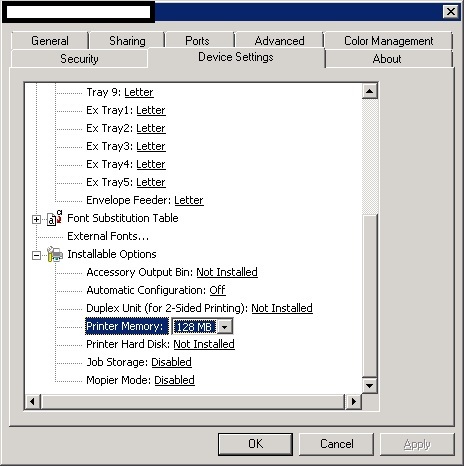
I can't speak on anything concerning PCounter, but we're utilizing the Microsoft provided PCL5 drivers in every printer that HP doesn't have a dedicated PCL6 driver written for. We've had nothing but problems with the universal driver. Using the PCL5 driver though I've noticed that the installable options don't get detected properly and if not configured correctly caused some goofy problems with the printers. Mopier mode, along with hardware accessories that don't exist are all enabled by default. I had to set it all by hand on the printers that use the PCL5 driver.
-
How many VMs do you plan on running and what kind of load? I always seem to saturate the disk before anything else.
-
I went through this a few years back and didn't care for the custom MMC approach. For the life of me I can't remember why though... Anyways, I wound up writing a VB app that lets teachers unlock and reset passwords for student accounts. It's been through a couple revisions and one total rewrite as it was written in VB6 in its first version, and then VB .Net 2010. It gives staff a breakdown by grad year in a treeview and allows partial searches for student names and ID numbers. It'll even show student pictures if they have one. The rights to change the lockout and password attributes on the student's accounts must be granted on whatever OU students accounts reside in. Don't be afraid to download VB .Net 2010 Express and give it a try. It was actually a lot of fun learning how to put this together.