iceman
-
Posts
99 -
Joined
-
Last visited
Content Type
Forums
News
20th
EduGeek EDIT Conference
Blogs
Everything posted by iceman
-
CommandReporter - How to specify the output format of reports
iceman replied to iceman's topic in MIS Systems
Thanks LosOjos, Yes I am importing into a database using sql but into one that doesn't have a straightforward way of importing csv. So I simply generate the required INSERT sql in my program and then execute it. I guess if the XSLT is used to convert XML to csv one might as well just output the sims report as csv in the first place. However, since researching this a bit I think I've decided to leave the reports in XML with schema (even changing the definition so that running by hand gives the same output as CR.) I managed to find good info on using the XML data Bindings wizard in Delphi that seems to take care of a lot of the complexity. See Using the XML Data Binding Wizard - RAD Studio Then reading in the required fields is as simple as one line and I was able to replace the code in my earlier posting with the very simple... var SIMSData : IXMLSuperStarReportType; i : integer; s : string begin SIMSData := LoadSuperStarReport (); //open xml as a IXMLSuperStarReportType for i := 0 to SIMSData.Record_.Count do begin s := SIMSData.record_[i].; //do something with s end; end; The Binding wizard even takes care of mapping actual fieldnames in the xml file to an alias which is what you 'see' when you read the file. That saved me changing all the code that uses the filenames present in the non schema XML. In case anyone else wants to do this, below are the comments that I put in my delphi program explaining to myself what to do. ////////////////////////////////////////////////////////////////// /// The xml file import uses units created by the XML Bindings wizard /// created by chosing File | New | Other | XML | XML Data Binding /// once for each of the xml files we want to import and selecting that file in the first screen /// (The units made by the XML binding wizard are the same as the XML filename so I /// renamed the Units to XML_Binding_ before saving so I could recognise them /// as different from other unints called 'students' or 'Contacts') /// /// Then to process the xml file use the following /// /// ........................................................ /// uses ; /// /// var /// SIMSData : IXMLSuperStarReportType; //in unit XMLBinding_students; /// i : integer; /// s : string /// begin /// SIMSData := LoadSuperStarReport ('); //open xml as a IXMLSuperStarReportType /// for i := 0 to SIMSData.Record_.Count do /// begin /// s := SIMSData.record_[i].; /// end; /// ......................................................... /// /// The data comes out as the type defined during completing the data binding wizard /// and can be any data type known to Delphi ////////////////////////////////////////////////////////////////////////////////////// The odd behaviour of SIMS and CR still remains but this makes a simple job of getting round the issue. -
CommandReporter - How to specify the output format of reports
iceman replied to iceman's topic in MIS Systems
I'm reading the xml with a Delphi program. The essential bit of that process is below (the a,b,c,d, is just to show the principle, the actual code is a bit more complex, dealing with generating sql from the data it gets from the xml) How do I "perform an XSL transform on CommandReporter's output" and what does that do? procedure TFrmImportSIMSdata.ImportStudents; var xml:IXMLDocument; node:IXMLNode; NodesList : IXMLNodeList; i: Integer; a,b,c,d: string; begin XMLDocument1.FileName := DownloadFolderRoot + 'students.xml'; XMLDocument1.Active := true; NodesList := XMLDocument1.DocumentElement.ChildNodes; for i := 0 to NodesList.Count - 1 do begin node := NodesList.Get(i); a := Node.childnodes['ID'].text; b := Node.childnodes['AdmissionNumber'].text) ; c := Node.childnodes['UPN'].text); d := Node.childnodes['LegalSurname'].text); ... etc ... end; -
I have several reports set to output as XML (not XML with schema) Running these by hand works as expected and an extenal program is able to parse the xml and process the xml data. However, when running the same report via command reporter, as a scheduled job, with a line like commandreporter.exe" /USER:"fred" /PASSWORD:"*****" /REPORT:"MyReport" /OUTPUT:"\MyFolder\Students.xml" results in the xml being output with its schema. This has several undesired effects. The xml contain loads of unexpected lines at the top; The output with schema contains extra fields I didn't ask for eg 'primary_id' as well as 'StudID' The field names in the xml with schema created by command reporter are different to those created when running the report by hand (and the hand run one contains different fieldnames to the sims fieldnames I asked for , but I have dealt with that issue!) The last one, having different fieldnames, is very important as this obviously breaks the extenal program when it trys to process the data and doesn't get the fieldnames it expects. Does anyone know how I can force commandreporter to output xml without a schema, the same as running the report manually does? For info below is the output when run by hand (ie what I want) and below that is the output when run via CR, note the field names. 99046 007777 X899123456789 Bloggs Fred Bloggs Fred WPH M Woolf 77 2 0 80 0 Year 7 F F F 96.25 Curriculum Year 7 99046 99046 007777 X899123456789 Bloggs Fred Bloggs Fred WPH M Woolf 77 2 0 80 0 Year 7 F F F 96.25 Curriculum Year 7
-
How to run SIMS sims reports from a sheduled batch file
iceman replied to iceman's topic in MIS Systems
That looks very cool! I'd love a copy when you're happy to release it - even half finished if it gets the batch file bit right! I was just about to give up and write a compiled executable in delphi that would run a command shell to call commandreporter in a loop with the reports as parameters that way I could avoid the batch file altogether and schedule my exe instead. But I'll wait for your app first. -
How to run SIMS sims reports from a sheduled batch file
iceman replied to iceman's topic in MIS Systems
But if you have to right click manually doesn't that prevent using the scheduler? I'll try pause as I saw that in other posts here but tended to ignore it as Pause by itself doesn't really make any difference to the operation of the command line, but I can see why you suggest it -
How to run SIMS sims reports from a sheduled batch file
iceman replied to iceman's topic in MIS Systems
The system admin technician was logged in running the task so he should have full rights over the server and we were setting the task to run with admin privileges. I can try sending the output to the sims server but that ought not to be an issue as the batch file works fin on its own using the two server paths. @Howatp yes, we tried refreshing. we were also looking at the folder where the output goes and refreshing that every second or so but the new xml file was never created. The logs indicate that the task started but never stopped -
Yes, that' what I though but it won't accept it now. I am going to Focus | assessment | Gradeset Then clicking 'New' Give the set a name Click 'new' against the 'Grades for selected version' and I get a row asking for Grade, Description, value, PG Try to enter a decimal point in the value column and it is ignored, 9.5 comes out as 95 Ah, just spotted it. Very feintly on my screen I can see there is a tiny decimal point already placed in the otherwise empty value column. I have to enter my number either side of it in two goes, not type the decimal point myself. I knew I'd entered decimals in the past! Thanks for the reply anyway
-
I am trying to schedule the running of several SIMS reports that output xml to a folder. Because there are about 9 reports I want to put all the commands to run them into a batch file and schedule the batch file. However, although the command INSIDE the batch file works correctly I cannot seem to get the batch file to run correctly without modification and even then I cannot get Windows scheduler to run the batch file. To be specific; This is a line to run one the reports (with personal details changed) "\\4666sims01.myschool.local\e$\Program Files (x86)\SIMS\SIMS .net\CommandReporter.exe" /user:fred /password:thepassword /report:"StudentList" /output:\\4666fs01.myschool.local\staff share$\simsexports\students.xml Entering this line into a command prompt window works fine, the report is run and the export file gets created. But when I put that exact line into a batch file called mybatch.bat on drive C: (same as \\4666fs01.myschool.local\) and tried to run the batch file via the command prompt it did nothing. A quick flash of the screen but no report is run, no error messages, nothing Playing around, I put into the batch file the extra line '@echo', (even though this shouldn't make any difference) so the batch file contents became @echo "\\4666sims01.myschool.local\e$\Program Files (x86)\SIMS\SIMS .net\CommandReporter.exe" /user:fred /password:thepassword /report:"StudentList" /output:\\4666fs01.myschool.local\staff share$\simsexports\students.xml and now the batch file ran correctly from the command prompt, the sims report was run and the output was produced. Whoopie I thought! However, I then tried to use the Windows task sheduler to run the same batch file from the same location instead of running it by hand. Once again nothing happened, not even a flash on the screen this time. The task scheduler simply says 'running' forever until I kill it. We are running Server 2013 and windows 8.1 Can anyone help me to create a batch file that can be scheduled to run several sims reports?
-
To accomodate anew assessment and reporting system I have created a gradeset for the new 1-9 GCSE grades. This uses using a grade of 1 to 9 plus the underscore (for not yet reached level 1) and corresponding 'values' of 1 to 9 plus 0 for the underscore. Now SLT was to store a sort of 'target' grade as well but want that one to be fine grades eg 9, 8+, 8-, 7+, 7- etc. What I want to do therefor is allocate a decimal value to these grades so that other software can make direct comparisons between assessed grades 1-9 without + /- and target grades with +/- eg I want to say grade 8+ has a value of 8.25 whereas 8- has a value of 7.75 (just under an 8) I don't seem to be able to enter anything but integers in the value column of the gradeset designer. Can I do what I want to do?
-
I'd love to do that but how do you send SQL to the sims database - and get the results back. What protocol does it use? I've written applications to talk to MySQL, SQLSever, SQLite and even MSAccess but am not aware how to interrogate the sims database.
-
Yes, I started doing that and then thought it'd be quicker just to open each report in turn, select and copy the name and paste it into notepad. This is what I did in the end but then wondered if there was an easier way by asking sims to tell me all the names via a report! Odd that I can get a report of all the aspects / templates / marksheets / categories etc that I have made but it doesn't seem possible to get a report of all the reports I have made.
-
The SIMS reports are ones that I made. They export data to xml files which are then processed by an external MIS application that I wrote in order to produce some specific managment reports for SLT in a specific format. I need the data from SIMS to be up to date on a daily basis, hence the need to have the reports scheduled overnight. The scheduling isn't a problem (well apart from the nornal issues discussed in places like this edugeek thread http://www.edugeek.net/forums/mis-systems/115030-sims-scheduled-reports.html !) My slight 'problem' is the accurate copying of the many report names so that we can arrange for them to be scheduled outside of SIMS if we have the expected hassel doing it inside. However It would also be handy to have the list of report names to go into the documentation that I am writing that records how the system operates and how the different parts interact - I can hear the gasp of incredulity at the thought of documenting a system for future managers of the system, but it's being done anyway.
-
I have made quite a few reports that all begin with the same word. Is there a way to get a textual report that lists the names of all reports? Preferably this would be filtered by a certain owner/author or better still by some sort of 'report name begins with...' filter. This would be very handy to get the names of the reports that I need to give to the network manager so he can set them up as scheduled reports, rather than copying the name of each of them out by hand.
-
Thank you, Yes I was beginning to suspect that. I have argued for many years that the data team & timetabler should make much better use of course mananager and try to separate, both in their minds and also in SIMS, the concept of 'course' from that of 'examination title' in order to make the analyses they subsequently want me to do even remotely possible. Although I have admin rights to SIMS, my main role is in the mathematical processing of what gets put in there, not the day to day setting up. So I tend to advise others in what's best to do, not directly tinker myself. Oh well it looks like if they want reports by department then I shall have to hold the mapping of departments to subjects in a table of my own making which they populate as they wish each year. I am sure this table will have to be edited each year as the timetabler has a habit of inventing new 'subjects' and class codes ad hoc to make the timetable work, without really considering whether these are really already part of an existing subject, already belong to an existing course or even letting me know they've done it. So then when they want a report of all grades given in the Applied Mathematics department they wonder why I ask if DT is a subject within the Applied Mathematics department and if the separate subjects of Design, Food, Engineering etc are for reporting purposes, in fact all the same subject as DT!
-
Using SIMS reports I'm exporting loads of stuff for analysis and reporting via another system I'm building and so need to match up things like results to student or subject to result. So far its going OK but I now need the my application to group subject results by department and I'm stumped on how to get a SIMS report of department names and subjects - or department name and anything else for that matter - or even get a simple list of departments names! I've gone through what things can get reported in every focus I can think of and can't find Department or Faculty mentioned anywhere. The concept of Department must exist as its used for timetabling, but how can I make a report that tells me what subjects names or subject codes are in which department? (If it can be done, how about which staff are in which department as well?)
-
I think you are right. I've just tried opening the xml on the server in Notepad (via remote connection) and it was OK. selected it all, copied it and pasted it into a new notepad file with a txt extension. copied that file and pasted it onto my laptop and the same thing happened, except the bit that got corrupted was in a different place. It could be to do with memory in the remote desktop, virtual OS thing that I connect to. I guess I'll have to speak to the ICT admin person. I won't hold my breath though, if shutting it down and restarting doesn't sort a problem then the problem can't be fixed!
-
Just the file itself.
-
I generate an XML file from a sims report on my work server and copy/paste it onto my laptop. Every time I do so it increases in size and a large chunk gets copied from inside the text and appended after the final closing tag - obviously making the XML unusable. The only way I can stop this is to zip the file before copy/paste. The effect is quite reproducible and seems to happen to any xml output more than a couple of hunderd lines long. Anyone any idea why this is happening and how to stop it? A snippet from one of the received files is below (with UPNs changed). See how part of a previous UPN field is appended after what should be the final tag and the last line of the file finishes part way through the tag This is a shortend version of the received file. [code] 24046 X879991678001 100.00 0 0 0 2 ... other records 23259 B879991606710 100.00 0 0 0 2 9991606724 <---- Final tag but it starts repeating records here, starting with part of a upn 100.00 0 0 0 2 22608 N879992106025 100.00 0 0 0 2 ... other records 23182 M879992106735 100.00 0 0 0
-
Thank you LosOjos, Its been a while since I used SIMS in anger and I have forgotten the peculiarity of 'suppress duplicates' I remember now and agree that its a pointless thing to do when transferring data somewhere else, especially into an SQL database. Having all the cells filled in makes it easy to normailse into separate tables. OK that sorts that bit. I did try to use templates as a focus but there seems no way to get the ResultSet being used with each Aspect except by having a subreport based on Results. But then of course you only get resultsets for for the results that have been entered. I need them for all the results that could be entered The gradeset I made (same one for all aspects) does have a symbol representing 'empty' so I could populate all my marksheets with that as a default and the the template focus report would work. However there seems to be no easy way to enter a default result in all marksheets without manually clicking all over the place on every marksheet I have made. I'm already going grey but I'd like to get this done before I lose all my hair completely so that method is not really on. Besides, me entering a value into every possible result pretty much by hand except for a little help from 'Copy column' is not really my idea of a default.
-
Using SIMS I have made result sets and aspects, made templates that use those aspects and resultsets and assigned marksheets. I am now trying to get a report to show me where each aspect and each result set is used (This will be put into an external system so I can find out exactly which results to expect to get, before results are entered.) I couldn't see how to get a report showing simply which result sets are used where so I designed a report according to the following design. However the output seems to show that some aspects are not used in any marksheet - when I know they are! This is the report design and here is a snip of the output showing aspect AO1_PE is used with class 8S/PE2 but apparently not on any template or with any result set. It is also duplicated even though the report has suppress duplicates on. To prove it below is one of the templates showing the aspects used and the marksheets assigned An additional confusion is that the preview of the report seems to show the correct data - different to the real output. Please can anyone (a) help explain what is going on here (b) help me design a report that shows me AspectID, AspectName, ResultSetID, ResultSetName for all the combinations of resultSet and Aspect that I have used in templates

-
SIMS Report output has different columns to those used in the design?
iceman replied to iceman's topic in MIS Systems
I work for a school developing bespoke MIS systems for them in reponse to particular requests from the Head. My systems provide SLT with special reports, ones that SIMS cannot produce, regarding their own students. In my systems I export the UPN to use (electronically) in SQL databases hosted on that school's servers. It might be used, for example, as the PK in a table of students and as a FK in tables of things like assessment results or attendance figures allowing SQL queries to join the students table to other tables. So it would appear that my use of the UPN in this way is perfectly legal. I am also registered independently under the DPA as a Data Controller in my own right, with permission to store and process Sensitive Personal Data, with particular reference to children. So my development databases and the electronic transfer of UPNs into them over a remote connection is also legal. Having said that, note that I export the SIMS ID as well. This PK picked up from SIMS's own tables is going to be used as my own PK instead of the UPN in the system currently under development but I am exporting the UPN as well in this case is so that I can cross check against other tables that the correct students are being selected in queries. The data in my original post was already anonymised - yes, you can use the upn to find out a real county and even a real school but you wouldn't find Ellie Bloggs-Smith there. The UPN D330244305989 is also valid, with a real LA and establishment. I generated it using random data taken from EduBase2. The DfE guidlines do need some interpretation. Pg 8 says schools should ensure that 'Pupils’ UPNs are not printed or written on any reports or similar document'. But the guidelines for a SAR, pg 7, say 'Pupils have the right to receive, on request, a copy of any information the school/academy holds about them (including their UPN)' and pg 36 of the ICO's document 'Subject access code of practice' says 'You may comply with this [a SAR] requirement by supplying a photocopy or print-out of the relevant information'. -
SIMS Report output has different columns to those used in the design?
iceman replied to iceman's topic in MIS Systems
Thanks for checking this out for me. (The way SIMS is designed, aka thrown together, never ceases to amaze me) Just to confirm, do you mean that even running the xml report through CommandReporter the correct field names (ie the captions) are exported ? That is indeed the way this report will eventually be run, as a scheduled report using CR, so if I can assume it will work as expected with CR that's good I need to ask as I can't test using CR myself at the moment because I'm currently developing over a remote connection into the school and County has disabled the DOS prompt and direct access to drive C: - helpful! -
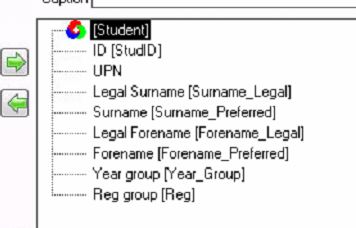
I have found that when outputting a report as XML the column names are different to those used in the design of the report. Sometimes the output is even seriously ambiguous! Also any column captions that I might have added for clarity are ignored. eg here is a screen shot of my report design Note that I ask for Forename and Surname, but to clearly distingush the legal from the preferred names I changed the captions, additionally placing an underscore instead of the spaces so that the software importing the xml does not need to use field delimiters: Actual column: Legal Surname - Caption: Surname_Legal Actual column: Legal Forename - Caption: Surname_Legal Actual column: Surname - Caption: Surname_Preferred Actual column: Forename - Caption: Forename_Preferred However the XML output not only ignores my captions but uses the column name Forename to mean the Legal Forename whereas in the report design the column Forename refers to the Preferred Forename. It also removes the spaces between words in column names. An example of one record is below 11904 T123456789123 Bloggs-Smith Bloggs Eleanor Ellie Year 10 CPS Outputing the report as csv uses the captions as the column headings and ignores the real column names entirely (as does Excel or Word output) ie "StudID","UPN","Surname_Legal","Surname_Preferred","Forename_Legal","Forename_Preferred","Year_Group","Reg" 10986,"Z123456789123","Bloggs-Smith","Bloggs","Eleanor","Ellie","Year 11","DNR" I find it hard to believe SIMS contains a bug but this seems pretty serious if external software imports Forename expecting it to be the preferred name and actually gets the legal name. Is there a way to force xml to use the same column names, or captions, that the report was designed with? Anyone any idea where the xml is even getting its names from as ChosenName does not even seem to be a valid data field in SIMS?
-
[sims] Best practice in making Templates and Marksheets?
iceman replied to iceman's topic in MIS Systems
@bobsmith Thanks for reading my post so carefully. I had to re-read it several times before I saw that you are probably right I got the 7 x 20 from your post. I have 7 assessment points & 20 subjects so I assumed you were suggesting I use subject/Assessment Point combination. It does seem more logical though to use Subject/Assessment Objective combination, ie 6 things being measured (AO) for every subject each time there is an assessment point (AP) so its about 6x20 = 120 (not 140) I'll edit my earlier post if I can. I can see the benefit of using grades instead of integers. I'll change that as I haven't made many aspects yet. @vicPaw I did see these links. They are probably the ones you were referring to. If not then they are useful anyway, as is the one in your last post. http://www.edugeek.net/forums/mis-systems/43559-good-am7-data-structure.html http://www.edugeek.net/forums/mis-systems/43373-assessment-manager-7-assigning-marksheets-teachers.html http://www.edugeek.net/forums/mis-systems/35596-historical-data-sims-net.html -
[sims] Best practice in making Templates and Marksheets?
iceman replied to iceman's topic in MIS Systems
Thanks to all who replied. @Banjo I did go on quite a bit of AM training years ago when I was a data manager - even gave some training at LEA events. But since then have been working mainly with SQL databases. Now I need to work with AM again to interface SIMS with an SQL database and I've forgotten what a nightmare SIMS is to deal with. In SQL you would simply have one field that stores the actual score, indexed via other fields for the Yeargroup, Subject and AssessmentPoint. Yes you'd have multiple records totalling Num Yeargroups x Num Subjects x Num AssessmentPoints but only one name for the actual data. That would give me about 600 records inserted each year SIMS seems to require a separately named storage unit for everything! Anyway, combining the helpful replies from everyone am I correct in saying that for about 5 yeargroups 20 subjects 9 classes in each subject in each yeargroup 6 assessment points per year I will need.. Aspects - around 120, one for each Subject/Assessment Objective combination - (but these won't need changing unless we get new subjects or assessment objectives) Result sets - 35, one per Yeargroup/Assessment point combination - (won't need changing unless we get new yeargroups or assessment points) Templates - around 100, one for every year/subject combination - (won't need changing unless we get new yeargroups or subjects) Marksheets - around 900, one for every classcode, with groups of 9 allocated to one template - (will need re-making every academic year as class codes inevitably change) OR is the last one Marksheets - around 100, one for every subject/year combination. Subject overview with all student can be seen by the HOD but individual teachers will be able to see a marksheet with just their class in it, even if more than one staff member teaches that class. @bobsmith my naming convention is actually Y_07_AP_01 (I put 'Year' in the post to make it easier for others to understand). When designing the naming convention I was more concerned with how easy and foolproof it will be for the external software I've developed to automatically parse the names and extract parts from them to build IDs for use in my SQL database. (had a nightmare with legacy stuff from someone else that used just single digits like Y7, Y8, Y9. OK until you get to Y10 and Y11 and then not only do you have different length names from which its more tricky to to extract the integer part of the year but the sort order goes up the spout!)