talksr
-
Posts
1,565 -
Joined
-
Last visited
Content Type
Forums
News
20th
EduGeek EDIT Conference
Blogs
Everything posted by talksr
-

Can I add a W12k server as a member to more than one domain?
talksr replied to talksr's topic in Windows Server 2012
It is not so much a separation of student and staff networks as curriculum and admin. We have never really had any issues and it has actually worked to our benefit such as the numerous times teachers have created loops on the network. It completely shuts down the curriculum network, meanwhile the admin (office staff, head teacher etc) are able to continue on with their work with no effect on them. This obviously works vice versa and is extremely useful in connecting to the servers as if one network is down, you can communicate with the servers via the other one. I am sure once we upgrade our network and get proper layer three switches, loops and the like will be a thing of the past, but it has not been all trouble and problems. -
Hi there, I am looking for some advice on the best management software/apps or profiles to use on our growing number of iPads. In the past I used Meraki which enabled me to install a profile on each iPad which talked to their centralised website which would tell me where the iPads are, what is installed on them and how much they have been used. Sadly the licence expired for Meraki and I am just about to order a new batch of iPads. Can anyone recommend any other management software or should I stick with what I know? We have around 40-50 iPads used in multiple areas throughout the school.
-
Thank you, this is what it shows:

-
hmmm ok, that could be troublesome as taskmanager is disabled via policy for everyone but administrator. I will look into this. Do you have any copies of the GPO settings you used? I would like to give it a go.
-
If it was, it would be every computer (different makes and models) in the whole school as anywhere they go, this issue is following them. Can't be the user as it has happened to a couple of staff members now - tends to be the ones who log in to multiple stations and tend not to log off when they are finished on a computer.
-
Ok, how can I check if I have AD-integrated DNS, I don't think I have this, certainly cant remember configuring this.
-
I make sure the user is not logged in anywhere. I take ownership of the profile (which is located in the server share) and then rename it by adding "_old" to the end. Then I log back in as the user in question, the profile is re-created and Chrome works. Here is a screenshot of the profile folder and a user you can see has had Chrome problems a number of times:
-
Hello, No proxy in advanced settings and yes IE works perfectly well. Chrome also works perfectly well on any machine on the network, but not if you use an account which has gone wrong. Only way to resolve this seems to be to recreate the roaming profile. The problem just follows the user from computer to computer, but if I log in as any other user, Chrome works with no issues - so it can't be a machine issue.
-
Ok thanks, what would I need to enter in? Have never done one before ever.
-
Ah I see, the client machines. OK, took a look, but as expected it is disabled on all of mine. Control Panel -> Sync Center -> Manage Offline Files -> Enable Offline Files is the only option available. It says below that Offline Files is currently disabled. So it can't be that. Thanks for your thought and suggestion. Does anyone know if I definitely need a reverse lookup zone on DNS?
-
Hi, thanks very much for your suggestion. I have had a good look on the server, but it doesn't appear to have Sync Center anywhere, so I am assuming it has never been installed or enabled.
-
If I put in the FQDN, I get the following error: If I add a share-name to the end such as: \\stm-sr-002.stm.internal\data I get the following error:
-
No firewalls anywhere! It is even disabled in GP. No vlans either, flat network. Strange as I can browse using IP but not hostname. I just get the above error.
-
Thanks, all makes sense to me. I have changed where appropriate, on the FRDC the dns is 127.0.0.1 which is the same as 10.75.44.10. However, at the moment, I am still unable to resolve the hostname of server two: stm-sr-002. IP works fine, but not the hostname.
-
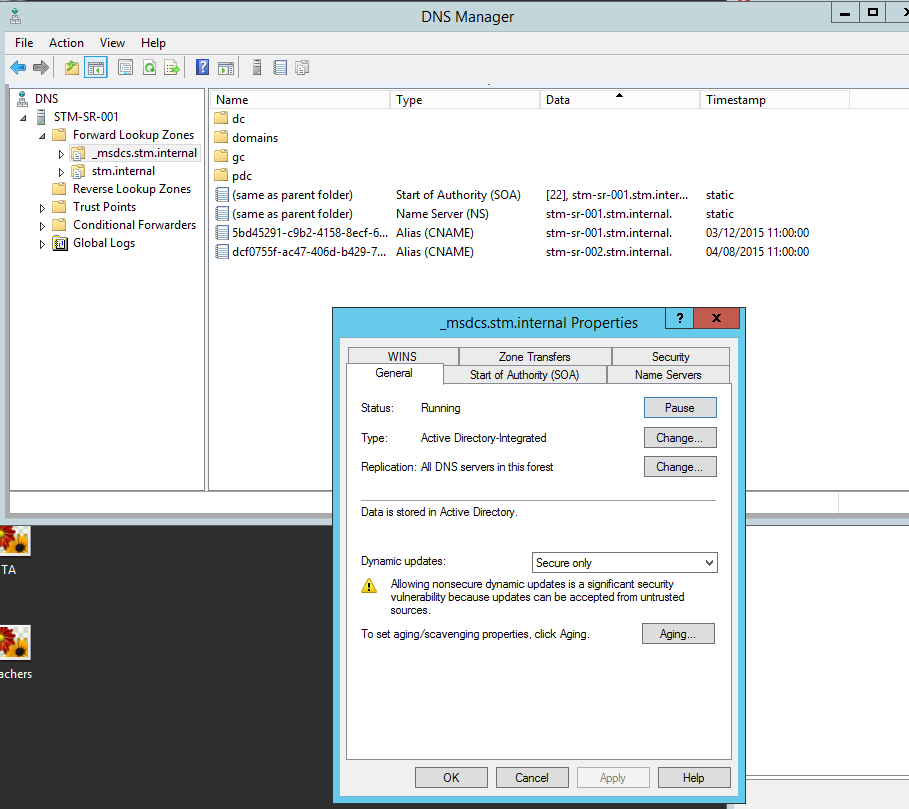
Hello, Yes we have just one DNS server which is on our FRDC server 1 named stm-sr-001. 172.30.178.53 is our external LGFL ISP dns. DIdn't realise this should be in forwarders. If I put it in forwarders as the top IP, what would I put in the static part of ipconfig?
-
I have run the command you suggested. Here are the details: Server 1 (Windows 2012 FRDC with Ranger 8, DHCP, DNS, Active Directory and Group Policy: Connection-specific DNS Suffix . : Description . . . . . . . . . . . : HP Ethernet 1Gb 4-port 331i Adapter Physical Address. . . . . . . . . : 30-8D-99-FC-47-B2 DHCP Enabled. . . . . . . . . . . : No Autoconfiguration Enabled . . . . : Yes Link-local IPv6 Address . . . . . : fe80::c88d:8338:ba95:2bd3%12(Preferred) IPv4 Address. . . . . . . . . . . : 10.75.44.10(Preferred) Subnet Mask . . . . . . . . . . . : 255.255.255.0 Default Gateway . . . . . . . . . : 10.75.44.1 DHCPv6 IAID . . . . . . . . . . . : 305171865 DHCPv6 Client DUID. . . . . . . . : 00-01-00-01-1D-4B-BA-52-30-8D-99-FC-47-B2 DNS Servers . . . . . . . . . . . : ::1 127.0.0.1 172.30.178.53 NetBIOS over Tcpip. . . . . . . . : Enabled Server 2 (Windows Server 2012, Backup Exec 2015, Sophos Enterprise Console, connected to FRDC as a member (just like a desktop computer): Connection-specific DNS Suffix . : Description . . . . . . . . . . . : HP Ethernet 1Gb 2-port 330i Adapter Physical Address. . . . . . . . . : 40-A8-F0-75-CE-E8 DHCP Enabled. . . . . . . . . . . : No Autoconfiguration Enabled . . . . : Yes Link-local IPv6 Address . . . . . : fe80::2896:b51:4fbc:2b61%12(Preferred) IPv4 Address. . . . . . . . . . . : 10.75.44.11(Preferred) Subnet Mask . . . . . . . . . . . : 255.255.255.0 Default Gateway . . . . . . . . . : 10.75.44.1 DHCPv6 IAID . . . . . . . . . . . : 306227440 DHCPv6 Client DUID. . . . . . . . : 00-01-00-01-1D-52-3F-D9-40-A8-F0-75-CE-E8 DNS Servers . . . . . . . . . . . : 10.75.44.10 NetBIOS over Tcpip. . . . . . . . : Enabled I notice again in the DNS for our FRDC we have "::1" I am going to take it out.
-
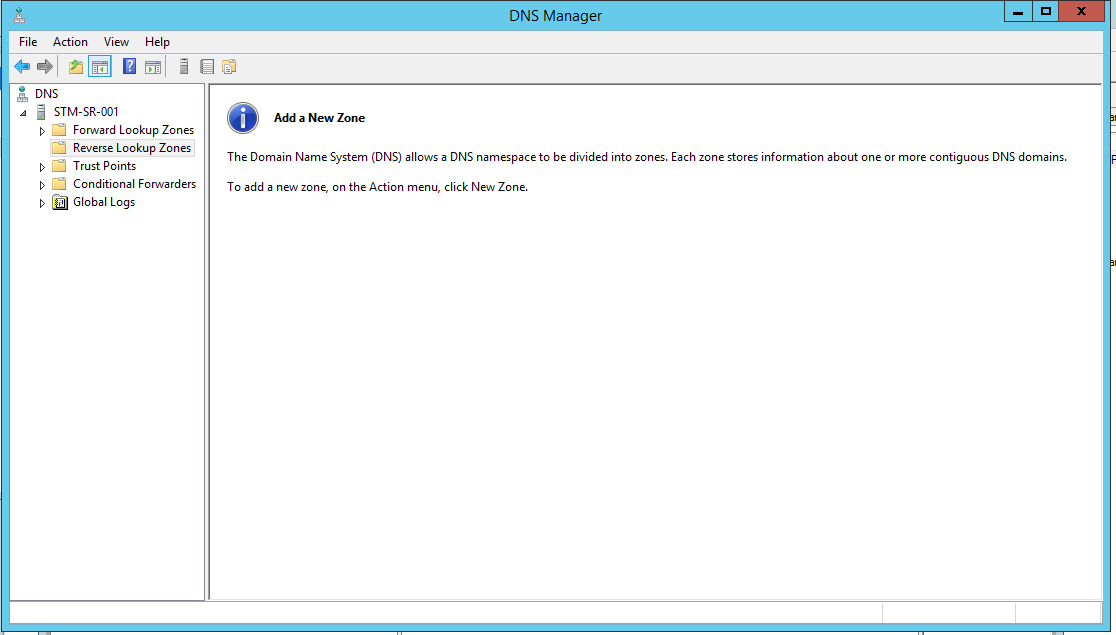
The DNS server is on our primary server stm-svr-001, it has an empty reverse section as below. I have never seen anything in this area:
-
Sorry for my late reply, I have had more critical issues to deal with. I can't use the FQDN as this is a secondary server added to the domain as a member. Its hostname is: stm-sr-002. I have tried: stm-sr-002.stm.internal which is as close as the FQDN I can get, but I just get the same error...
-
I have attempted to reinstall Chrome, but it has made no difference. Logged in as affected user - chrome did not work. Logged out Logged in as another user - chrome worked well Logged out Logged in as administrator - chrome worked well, removed Chrome Logged out Restarted Computer Logged in as administrator - reinstalled chrome Logged out Restarted Computer Logged in as affected user -chrome did not work exactly as before. What can I do to resolve this. This is happening across the network, we have a large number of systems, so not enough time to re-image every single system.
-
Hi, I have a server I would like to use for AV and Sophos EC (provided by LGFL). The school in question has two physical networks, an admin (for office staff) and a curriculum one. As such, there are two separate servers with two separate domains, DHCP etc. I would like to run a dual NIC server in the middle which can provide AV protection, Backup via BE15 and WSUS. I have the server with quad NIC, the BE licences, Sophos EC, just not sure if I can connect as a member to two domains? I am guessing not as if it was possible, I would already know.
-
No I don't think they were. I am sure someone said that you don't need to sysprep anything after Windows XP. Seems odd that it is only Chrome which is misbehaving.
-
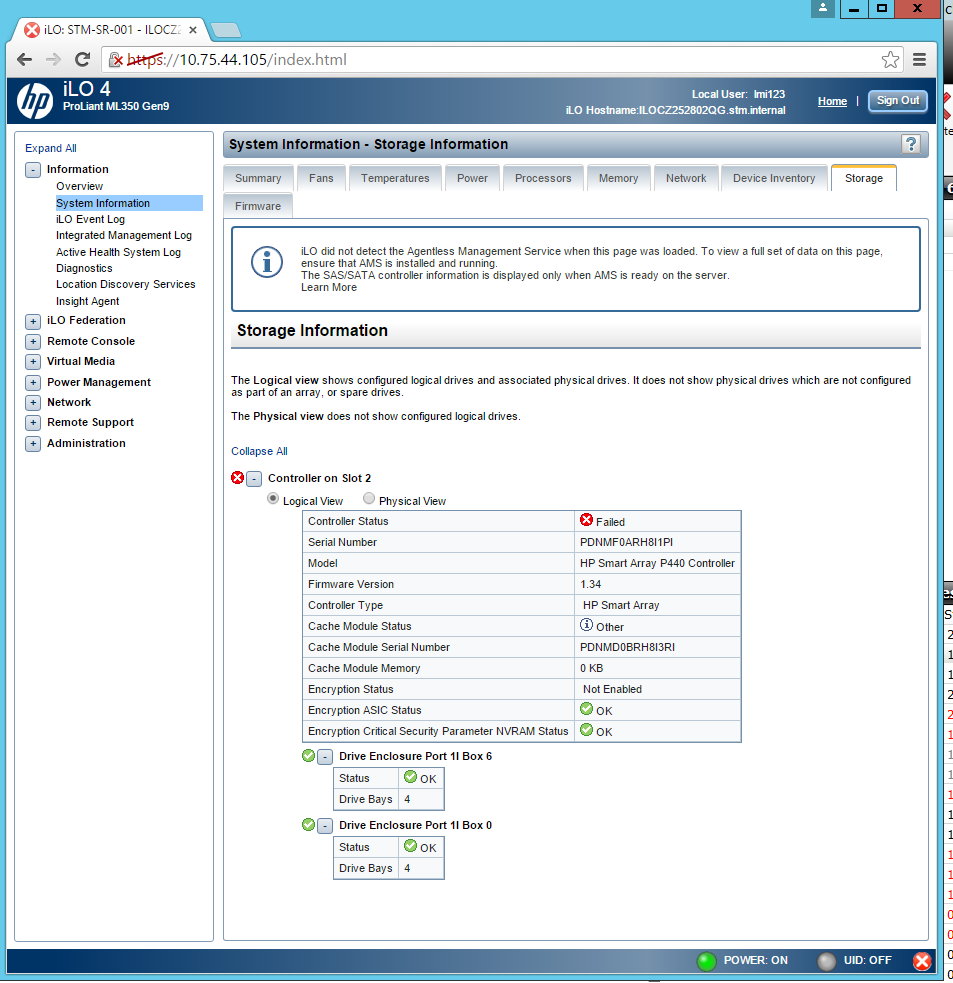
Hi, Just to give you all an update on this.... After spending over four hours talking to HP support, they have established that the raid controller is faulty. They confirmed they would be sending me one on 26th November, but are now asking for more evidence that we own the hardware. They asked for this today (24th), and the replacement is due to come tomorrow. I am not on site until tomorrow and as if things could not become more stressful, the school have reported that the server is down. I have connected via VLAN, authenticated the iLO page and note that the Storage Status has now changed to Failed. I am crossing my fingers that firstly, the honour their promise and send me the part tomorrow as they had told me and secondly that the raid will not have been wiped out by this.
-
You can, but we have had nightmares. It took the poor guys at RM support literally weeks as although the NIC drivers worked, there were various faults with Graphics ones etc, it was just a total nightmare. Would rather install something they 'recommend' as it is less likely to cause issues.
-
Hi, I thought I would come to this forum rather than RM as I may get a more un-biased reply! We have a CC4 network, our current HP systems are almost 8 years old. They have worked reliably and unfortunately, are too old for us to continue with. I would like to get some replacements, but I note that these days RM only support the hardware they sell which is primarily Dell and Lenovo. RM use in their CC4 system, WDS to help build systems over the network. This is a really helpful feature in a large school and I am keen to keep this functionality, however I fear that if I go with more HP systems, I am going to be disadvantaged as the drivers required, will not be included in RM's Hardware Support Packs. Does anyone have any experience of this? I have taken a look on their site and note that the two (closest to HP) midrange systems they have are: Lenovo ThinkCentre M73 10B4 - Core i5 4430 3 GHz - 4 GB - 500 GB Mid-Range Dell Optiplex 3020 Small Form Factor If I were to purchase these systems from another hardware supplier, would the deployment functionality still work? To be frank, I would rather get something a little more powerful with a good warranty. We spent a little on our current HPs and they have done us proud, so I would like to go with a similar approach.
-
Not yet, there has been quite a major Windows 10 update which I am hoping may resolve the issue, however now the computer refuses to download updates. It is getting to the stage where it may be more time effective to just wipe it.