talksr
-
Posts
1,565 -
Joined
-
Last visited
Content Type
Forums
News
20th
EduGeek EDIT Conference
Blogs
Everything posted by talksr
-
I have not applied any patches but it is fully updated. Is this a manual patch? Do you think it could be a RAM related issue? Thought the minimum ram requirement for WSUS was 2gb, this system has 4.
-

Best practice for bulk activating Windows 10 on Server 2016?
talksr replied to talksr's topic in Windows Server 2016
Thanks, after I ran: slmgr.vbs /ipk 12345-12345-12345-12345-12345 I got back Installed Product Key Successfully. When I ran the second line, I got back the following: Activating Windows ServerStandard edition. Product activated successfully. Is that it now or must I do anything more? Thanks for your help. -
Best practice for bulk activating Windows 10 on Server 2016?
talksr replied to talksr's topic in Windows Server 2016
Kind of, I was referring to this one... If I put in the one you mention, I get the following screen: I can't click the Activate Product radio button. Only Review Config is available. If I press next on that, I get another error: Indicated two revision levels are incompatible.
-
Best practice for bulk activating Windows 10 on Server 2016?
talksr replied to talksr's topic in Windows Server 2016
I have tried doing the Windows 10 KMS code, I get the following error: The following error has occured. Please resolve the error and try agian. Description: The Software Licensing Service reported that the licence is not installed. Any ideas? This seems to be nothing but a nightmare. On our 2012 server, we used Volume Activation Tools and it seemed to work really well. -
Hi there, getting really fed up with this issue. Every time I log in to our 2016 server and check WSUS, I am getting the following error: Error: Connection Error. An error occurred trying to connect the WSUS server. This error can happen for a number of reasons. Check connectivity with the server. Please contact your network administrator if the problem persists. I am only able to get it to work by bouncing the server, but within hours, it is doing it again. Copy of error below, any ideas? The partition WSUS folder is on has 400gb of free space, IIS has not been messed about with and the server is only running WSUS and Sophos EC for AV purposes. This is not a DC, just joined to domain as member.
-
Best practice for bulk activating Windows 10 on Server 2016?
talksr replied to talksr's topic in Windows Server 2016
Thank you. I have just followed through this guide and I have gone on to a couple of my domain connected systems and tried to activate them but they are just sitting there doing nothing. The guide doesn't mention what will happen if the systems are already part of AD. Should this be a problem? -
Hi there, I have not yet installed server 16 and Windows 10 together. I have all my clients deployed via WDS - all working very well. I have a Microsoft eOpen WDS and KMS key. What is the best way to bulk activate my systems?
-
Thanks for your post. We have a Server 2016 Standard GUI licence, so I am guessing we would not be able to download SCCM for Server 2016 as it would be another licenced product we would need to pay for. Is that correct?
-
Hi, I have set up WDS on my 2016 server with a Windows 10 Pro image. It works like a dream, but I was wondering how difficult it would be to improve on the following: Is there any way to set the hostname as at the moment, it comes up with some default one which I must then change via PowerShell as it automatically adds the workstation straight onto the domain with the default hostname. Also, how easy would it be to make a Windows 10 image with some basic pieces of software already pre-installed (VLC, Adobe Reader, Java, Shockwave etc)? Any advice would be great.
-
Thanks everyone, I went with the original suggestion of using Rufus and it worked a treat. Will certainly consider these other options though. Thanks so much.
-
Can't say I have ever heard of it. Just given a it a go, but I get the following error when selecting the latest Windows 10 ISO image from Microsoft eOpen... Any ideas?
-
Hi there, I have made a couple of bootable Windows 10 USB drives before, but I note now that there are different release versions of Windows 10. The last release according to Microsoft VLSC was in November 2016. Does anyone know a working method for getting this onto a bootable USB key? If I use the usual method and download the Microsoft tool, it doesn't seem possible to select which version it will install. Any ideas would be great.
-
Server 16 Group Policy for setting default printer based on location
talksr replied to talksr's topic in Windows Server 2016
Ah interesting. I have just sent you a PM now. Would be good to have a look. We have quite a few locations, but this is only really happening in two particular locations. Not sure if it would be easier just to run something for these two specific places rather than doing something school-wide. -
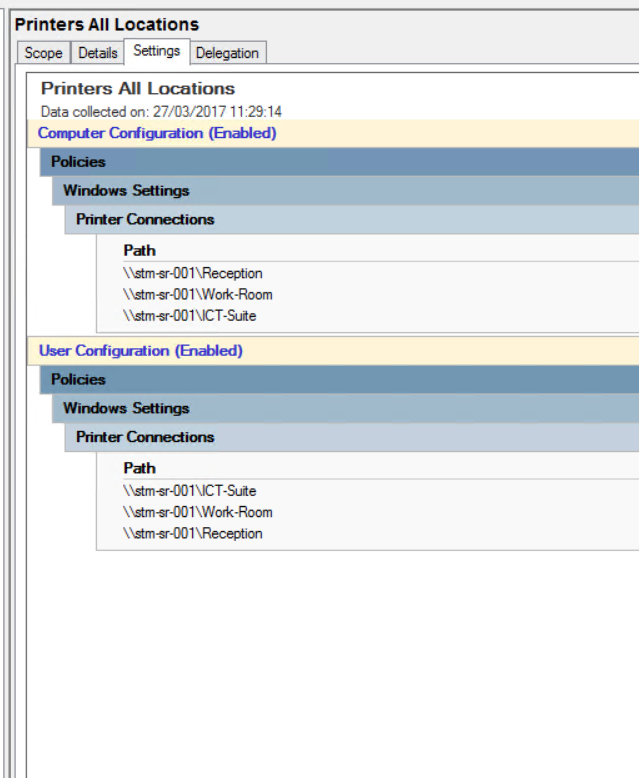
Hi there, I have been having some issues whereby staff are logging into particular rooms or locations and printing to a different room because the default printer is saving on their roaming profile. At the moment, I have one GPO which shares printers to all domain systems: I do have location folders on Group Policy so I could create a GPO in each location. Does anyone have any advice on how I could go about this and where I could configure the correct settings? We only have three main printers, so it should not be anything too difficult.
-
Server 2016 PolicyDefinitions folder missing
talksr replied to talksr's topic in Windows Server 2016
Thanks. Ok that is very useful to know. Presumably, you just take the en-US folder not all of the other foreign ones and then the admx files which are at the root? -
Server 2016 PolicyDefinitions folder missing
talksr replied to talksr's topic in Windows Server 2016
Just out of interest... There are quite a few Microsoft Administrative Template downloads. As an example, these two apply to the Windows 10 OSs I am supporting: Administrative Templates (.admx) for Windows 10 Version 1607 and Windows Server 2016 Administrative Templates (.admx) for Windows 10 and Windows 10 Version 1511 How can I add both of these sets of templates to the same PolicyDefinitions folder? I am assuming it can't be possible right? -
Half working, about three of the policies are showing as being applied, but not the others. Very strange.
-
I have been doing: Del GPReport.html Gpupdate /force Gpresult GPReport.html and refreshing chrome Have done this about five times and finally three of my policies have applied. Have taken some pics on my iPad as I am working on two different computers so can't screenshot and get it all on here. Chrome policy seems to be working but the Start Menu and Task Bar pol is clearly not working as the Internet Explorer icon and Market place icons are still visible on the task bar.
-
Hi, under Applied GPOs there is just nothing. When I go on as domain administrator, everything that should be there is there. I only have one testing system at the moment and this has not happened before as it is a brand new set up, so nothing to cross-compare with. I have tried creating users in different OUs, with different permissions etc, but has made no difference.
-
According to GPReport, no applied GPOs at all when I log in as a domain user. When I go on as domain administrator, they are all coming over as expected in GPResult. I have removed it from domain and re added and nothing has changed.
-
Hi there, I have a few personal laptops: non-domain which despite being just a few months old, are so slow to boot up. They have 8gb ram and i5 processor so well specced, but I wonder if the older 500gb hdd is taking a while to spin up. Does anyone know if it is possible for me to switch the conventional 500gb hdd with a 250gb SSD without having to re-format and re-image the laptops? This would take quite some time as they are set up with finger print recognition, links to Microsoft Live, which would all take a while to re-set up. I normally use CloneZilla, but I am not sure it would work as I would be cloning from 500 to 250. Any suggestions would be greatly appreciated.
-
It's very odd. If I run a gpupdate /force and then check the Event Viewer, it is showing: Evt 15702 Group Policy The Group Policy settings for the computer were processed successfully. Sew settings from 11 Group Policy objects were detected and applied. It is showing as though everything is fine. This is a gpupdate /force as one of the effected users.
-
Hi, yes I have and when I run the GPMC is comes back with all policies applied which is what is confusing me. Everything seems to be a success. I am running GPMC on the same computer I am physically testing on.
-
I am out of ideas on this... I have a 2016 server and Windows 10 client systems. I have a number of GPOS: Enable RDC Disable Firewall Google Chrome MSI Set Default Browser Start Menu and Task Bar Pol to name just a few. They are in the correct AD locations to match the locations of my systems. The security filtering is set to Authenticated Users. I have also added for some, the security group I created for our domain users. If I log in as an administrator, and run GPResult, everything is coming over as expected. If I log in as a domain user on the same system and do the sane, there are no applied and no denied GPOs in the report. It is as if there is just nothing there. Does anyone have any ideas on what could be wrong?
-
Hi, I am running Windows 10 clients on a 2016 server. All users have membership of both Domain Users and Remote Desktop Users, however if I try and connect to a Windows 10 client computer, it refuses to let me log in as a domain user, showing this error: Remote Desktop Connection The connection was denied because the user account is not authorised for remote login. If I log in as domain administrator via RDC, there are no issues. Where am I going wrong? Firewall is switched off via Group Policy for all systems. I also have a GPO enabled for Computer Config>Windows Settings>Security Settings>Local Policies>User Rights Assignment>Allow log on through Remote Desktop Services> Everyone & my user security group.