talksr
-
Posts
1,565 -
Joined
-
Last visited
Content Type
Forums
News
20th
EduGeek EDIT Conference
Blogs
Everything posted by talksr
-

Server 2008 to 2012/16 swing - how do you do it?
talksr replied to talksr's topic in Learning Network Manager
No didn't do Windows update as it wanted to restart whilst installing Hyper-V. Didn't actually check Dev Man. The server is: HP DL320e Gen8v2 E3-1241v3 Perf EU Svr Model No: 768645-421 -
Server 2008 to 2012/16 swing - how do you do it?
talksr replied to talksr's topic in Learning Network Manager
Bad news... installed without intelligent provisioning. Installed well with no problems. But again, once I installed Hyper-V, it stalls at bootup. iLO is showing the firmware version as: iLO Firmware Version 2.50 Sep 23 2016 Seems quite recent to me?
-
I am noticing on quite a few of our Windows 10 clients, that we are getting a build up of profile folders in documents and settings on our local computers Does anyone have any idea what could be causing this? We are using Ranger 8.0.0.1 with Server 2012 R2
-
Server 2008 to 2012/16 swing - how do you do it?
talksr replied to talksr's topic in Learning Network Manager
More than happy to update the iLo. Will take a look tomorrow and see if I can be done. I hate having out of date stuff, all it does is causes future problems! Do you think I should be able to do it via the iLO integrated website for the hardware? -
I have recently been helping a school who used to keep their hardware on all day every day "for spyware, antivirus scans and updates". Seems a little over kill to me. The majority of their desktops or laptops were i3 or i5 processor based with average ram. Some of the systems have seen very little use and look brand new yet run terribly slow. Naturally, rather than mess around tidying up the OS, I opted for a clean install but find they are still as slow as anything. There is no dust build up inside and at another site (who don't leave their stuff on 24-7), I found that the identical models they have, run far more smoothly. The computers in question have good old fashioned hard disks, no SSD technology here. It is my thought that the hard drives are possibly quite worn out and as a result, this is making the systems so slow and tired. Does anyone know if that could be the case? I just find it curious that at another site, identical models (which are not left on all the time) work so well.
-
Server 2008 to 2012/16 swing - how do you do it?
talksr replied to talksr's topic in Learning Network Manager
.....ok, round three, here we go. This time no HP provisioning!! Keeping my fingers crossed. I am away for 2 days training so will update on the state of play when I am back! -
Server 2008 to 2012/16 swing - how do you do it?
talksr replied to talksr's topic in Learning Network Manager
Ok that is interesting. When I first ran the install, I visited the HP page for this server, and ensured I ran all of the updates (that would run). It would seem they have not helped as this time round, same problem. Maybe I should just install directly onto the HDD without using the provisioning as you suggest? -
Server 2008 to 2012/16 swing - how do you do it?
talksr replied to talksr's topic in Learning Network Manager
Yes, I was sure it was on and it is switched on the BIOS - - - Updated - - - Yes I am. Interesting, never installed Core, how difficult is it to configure without the gui?
-
Server 2008 to 2012/16 swing - how do you do it?
talksr replied to talksr's topic in Learning Network Manager
Ok, I have got a problem. Server installed perfectly, as soon as I added Hyper V via server manager and the server rebooted, it went onto an endless bootup process. It just does this for hours and hours and never changes... I assumed it could have been a one off fault, so I re-formatted, re-raided in raid 5 and went back through the HP provisioning to install Server 2016 Data Center. Again, it worked like a dream, but as soon as I installed Hyper V, it went back to the same problem as above with the screenshot. What could be the problem here? The server is an HP ProLiant DL320e Gen8 v2 The only thing I noticed during setup which caused me slight concern was that Server 2016 was not listed in the provisioning drop down, so I selected the next best thing. P.S. I don't know why my images are showing upside down. They are the correct way round on my system
-
Thanks, very useful. It currently has none assigned, so curious that it just changed two days ahead out of nowhere?!
-
Does anyone know where on Server 2008 I can check if it is syncing with an external NTP source? We should be using the lgfl one: time.lgfl.org.uk
-
Ah, time is well off on server. It thinks it is the correct time but on Saturday 12th November. Not sure how this happened as it was correct last week. I have changed it and ran w32tm on a couple of stations followed by gpupdate /force and it looks as though we are back on track. Will continue to check and will update on here the result.
-
Really not sure what is going on here, If I manually run gpupdate /force on any of our Windows 10 clients, I get the following: Microsoft Windows [Version 10.0.10586] (c) 2015 Microsoft Corporation. All rights reserved. C:\WINDOWS\system32>gpupdate /force Updating policy... Computer policy could not be updated successfully. The following errors were encountered: Windows was unable to determine whether new Group Policy settings defined by a network administrator should be enforced for this user or computer because this computer's clock is not synchronized with the clock of one of the domain controllers for the domain. Because of this issue, this computer system may not be in compliance with the network administrator's requirements, and users of this system may not be able to use some functionality on the network. Windows will periodically attempt to retry this operation, and it is possible that either this system or the domain controller will correct the time settings without intervention by an administrator, so the problem will be corrected. If this issue persists for more than an hour, checking the local system's clock settings to ensure they are accurate and are synchronized with the clocks on the network's domain controllers is one way to resolve this problem. A network administrator may be required to resolve the issue if correcting the local time settings does not address the problem. User Policy update has completed successfully. To diagnose the failure, review the event log or run GPRESULT /H GPReport.html from the command line to access information about Group Policy results. I have opened an administrator cmd and tried both w32tm /resync and w32tm /resync /force, but all I get is the following: The above group policy update response would suggest that the time is being set via Group Policy, but I am struggling to find it configured in any of our policies. The majority of computers, do appear to be displaying the correct time, yet they are giving the above response. Does anyone have any ideas?
-
Server 2008 to 2012/16 swing - how do you do it?
talksr replied to talksr's topic in Learning Network Manager
Great minds think alike. I set up a raid five via the HP controller and installed the host OS onto this raid using 250gb (it may have been 350 can't remember). I have left the rest to be a partition for the hosts. It is somewhat silly they only have four boxes in these servers. There always used to be a couple of slots on the rear for the host, but not with these smaller HP servers. I just need to install the appropriate roles now. And give it a bit of a test run. The server in question is an HP Proliant DL320e Gen8 v2 Server with a good processor and 16gb of RAM which should be enough for the one virtual server I plan on installing. There are lots of slots to add more RAM in future if needs be. -
Ok, thanks for the clarification Ok, so let me try and get my head around this.... so you would use one of the networks, say 10.232.164.0 and presumably segment it up for the V-lans? Would you segment it based on the subnet?
-
Ok, makes sense, but admin and curriculum have different servers with different domains. Can more than one domain operate with your suggested setup? The majority of the switches are HP Procurve 2510G-48 The model no is J9280A. We then have a couple of 8 port HP ones connected to the servers and APC network UPS: HP 2530-8G model no: J9777A.
-
Hi, thanks for your reply. Your suggestion sounds like a good idea to me. My only question is, with the scheme you suggest is how would the vlans cross communicate? As an example, at the moment the devices on the curriculum network include all wireless devices. If we put managed wireless son a separate vlan, I would still need all of this traffic to talk to the curriculum network for DHCP and file shares etc. How would I achieve this, through an inter-vlan route? In terms of the gap between the two networks, I have no idea. You are correct, and I have left it exactly as it is since I took on the network. From what I can see, it has been like it for a very long time, so not sure if it was something LGFL implemented, or if maybe there was a separate administration network for the administrator? Had looked at merging both admin and curriculum, but we have always tended to keep them appart as a few years back, we had lots of network loops on curriculum which would bring down both curriculum and admin, grinding the school to a halt. Not long after taking on the job, I added the l3 switches and enabled STP and loop-protect, which did away with this, but have always kept things separate as it seems a more simple solution without too many complications.
-
Hi there, We currently have two physical networks running off of our 200mbps LGFL broadband connection. 1.One is an admin network for the admin server and office computers and office photocopiers: 10.232.162.0/255.255.255.0 2.The other is a curriculum network for our curriculum servers and class computers/laptops/iPads/printers: 10.232.164.0/255.255.252.0 All of our servers (both admin and curriculum) are dual NIC and as such, are wired into both networks such that I can connect to either regardless of which physical network I am connected to. We have a rack of 7 48 port layer 3 network switches running as a stack. I would very much like to v-lan our network, but I am looking for some suggestions on the best way to go about it. LGFL have suggested routing our network as a full /21 which would allow us to request the creation of a stub network such that we can create the vlans we require. Does anyone have any suggestions on what I should do in terms of getting things set up? I expect we would need the following vlans: Admin Vlan Curriculum Vlan Managed Wireless Vlan Future Cisco IP Telephony Vlan Any suggestions would be very much appreciated. I really want to do this and do it right so it doesn't need much future thought or time investment.
-
Server 2008 to 2012/16 swing - how do you do it?
talksr replied to talksr's topic in Learning Network Manager
Thanks everyone for your advice. I have installed Server 2016 Datacenter. Not sure on the RAID yet, so just installing to have a look. The server is an HP ProLiant DL320e Gen8 v2 and as such it only has 4 bays for HDDS. Each have a 1tb drive installed. May be tricky to use one as the host OS and raid the rest. Must I install Hyper-V as a server role to get the bits I need? -
Why do HP server fans go crazy when a network loop is created?
talksr replied to talksr's topic in Learning Network Manager
That was what I was thinking? But didn't expect them to make such a noise over a few loop packets. Could understand it if you were transferring 1tb worth of data or something. -
I have been deliberately creating some loops on the network to check that STP and loop-protect are working on our HP Procurve switches. Interestingly, if I turn off STP and loop-protect and cause a nasty loop on the network, within seconds of the loop taking hold, both of our new HP servers begin to make a very loud noise from their fans - identical to when they first boot up. The fans will continue to run at full spin until the loop is disabled. What would cause this? It is actually quite a useful indicator as if I am sat in the server room and the fans spin up, I know something is going on.
-
Hi there, can anyone give me some recommendations on good SNMP software to use? I have a number of stacked managed switches, three HP Server 2012 systems and a 2008 server. Will soon be getting fortinet managed wifi also so would like somewhere central to monitor all of this hardware.
-
Server 2008 to 2012/16 swing - how do you do it?
talksr replied to talksr's topic in Learning Network Manager
Ok thanks. Makes sense. What do you do re raid? Do you just set it up as normal on the host OS Server Datacenter as though it was a standard server? -
Server 2008 to 2012/16 swing - how do you do it?
talksr replied to talksr's topic in Learning Network Manager
I see. Thanks, very helpful. I am going to download a copy on eOpen and have a mess around and see how it works. I am assuming it uses HyperV for the virtualisation? -
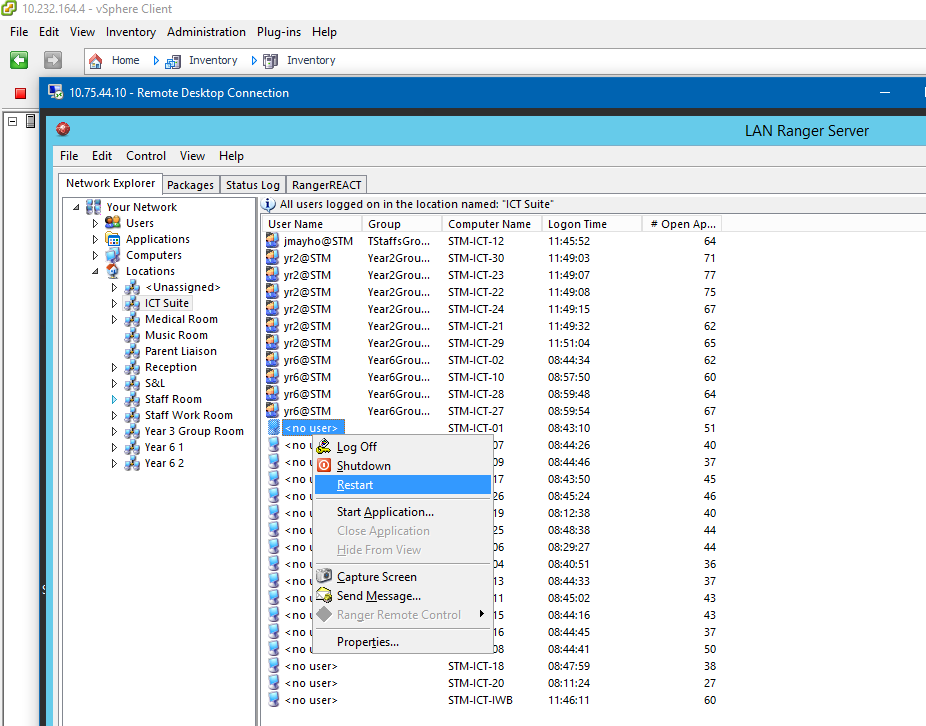
With Ranger on the way out, I am starting to look at what alternative options may be out there in terms of detecting whom is logged into systems and if they are on or not. Ranger is incredibly basic, but this has been one of the most helpful features... The ability to organise and list locations with computers. Quickly and easily see which computers are on and if someone is logged into any of them. The ability to log out or bounce a computer. The ability to capture a screen for a host, if you think there could be a problem. Does anyone know how I can achieve some of these points without having Ranger/CC4 installed on a vanilla server?