Zourous
-
Posts
745 -
Joined
-
Last visited
Content Type
Forums
News
20th
EduGeek EDIT Conference
Blogs
Everything posted by Zourous
-
Anyone know if it's possible to do this free and easily and be able to boot properly afterwards? It's an XP image I need to transfer.
-
Thanks for that Arthur, I didn't know that handy tip.
-
Cheers I'll try that. I only really need bog standard XP anyway and I have a disc for that.
-
I've been given a laptop by a nice member of staff who doesn't want their personal laptop anymore (has viruses and dead battery). It has a Windows XP media center 2005 sticker on it and of course there are no CD's and the recovery process seems to be shafted. What is the easiest way of obtaining the software as I have the license to use it. In the past I've used a torrent, but I hate using them for fear of viruses or bad links. Is there a easier way I'm missing. I won't use serial cracked versions as I want to sell this laptop legitimately and not have a bad reputation or comeback on it.
-
Depending on the model, try writing lines on the scratchpad that is intergated with the board to rule out the any software being the cause. If you have another board somewhere try doing a swap test. The boards (in my experience) come off quite easily, two screws at the bottom under the pen tray and lift off. They have to make it easy so the smart engineers can swap out all the faulty boards quickly :-p
-
Just wondered if anyone has tried W7 on these yet? Dell doesn't support W7 on them. I work on a 320 with W7 installed and it seems there is intermittant video problems using the vista driver. Everything else seems to work ok. Does anyone else have any similar issues?
-
We cleared all local profiles and reinstalled the same drivers (on the print server) that are the latest anyway.
-
Since writing this post, a number of other rooms have experienced strange driver symptoms / behavior so I'm putting this down to a server issue. Maybe an update knocked them out.
-
Has anyone come across this. We only have Vista installed in one room (thank god) but we keep suffering printer driver issues. Last time round it wanted to reinstall both mono and colour printer drivers on install (which students can't do) for no apparant reason on 30 workstations. Now today it has done the same again, but this time only for the colour printer. The printers are installed on our print server, but no other printers have issues like this on our network so I suspect Vista is to blame. We haven't installed SP2 yet, but would like to know more info before I try this route.
-
It may be similar to a problem I experienced on a HP 2600 model printer. We had unexplained fading on the magenta output and had done the usual checks as you have done. A quick look on the net showed this was a common fault with toner particals getting onto the internal scanner mirrors inside the printer. This is because a fan was placed too nearby the mirrors and toner particals blew onto it. The magenta was the worst affected because it was the closest to the bottom of the stack of toners and nearest the fan. I found a PDF on the net on how to clean the internal mirrors that involved various stages of taking the printer apart to get to the mirrors. When I got to the mirrors eventually I cleaned them as advised and although it was hard to see I was removing any debris at all, the solution worked and I had a perfect working printer again.
-
Are you getting any error pages spill out? I had a similar problem last week, but was getting PCL XL error messages when printing. I resolved the problem by changing the printer driver from PCL6 to PCL5. From my experience PCL6 causes a lot of strange issues. PCL5 is meant to be more relaxed in error checking and printing tends to run through better.
-
I think the saying is "white elephant" rather than "red herring", got me thinking though and had to check the definition. Red herrings are what staff post onto our helpdesk and then we realise they are just making it up and just dreamt it all. In fact, I think each member of staff should have a red herring rating on the helpdesk so we know whether to trust what they are saying or not.
-
Here's the situation, We planning to move onto our new managed wireless network (Aruba) for laptops. We have noticed, quite regualry but intermittantly, that when opening "My Computer" it will freeze for a random amount of time, say an average of 30 seconds, on a XP build running purely off the wireless. If it is wired, there isn't a problem. To add to the confusion the same doesn't happen on a Windows 7 build with the same set-up. We are thinking it is something to do with the mapped network drives, but are not sure. Off the top of your heads, can anyone advise?
-
We played around with group policy but couldn't find anything that would work for us. Even stranger is the fact that some PC's are validating under a student login and some are not in the same room. It seems like a permission issue but at the same time I don't see how it can be on identical PC's.
-
Any ideas roughly where it is in GP?
-
Yeah, that's a fine solution but this issue is on at least 90 PC's and maybe more, so I'm looking a the best way of getting this resolved.
-
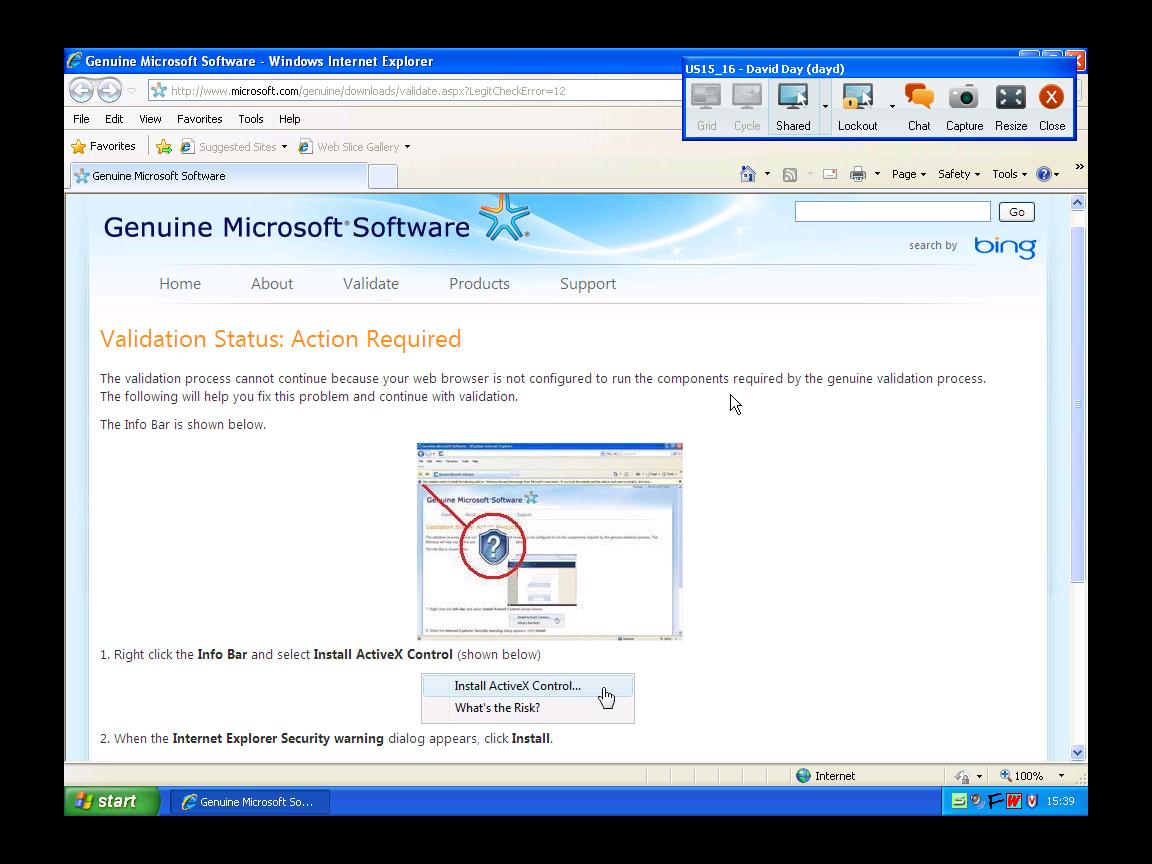
Here's the error I get after attempting validation.

-
This started happening recently, not sure why. We use local profiles here so as soon as a new profile is created and wmp is opened, it will go through the usual questions, but now it is asking for validation. It seems that staff are ok as they have enough access to validate and finish the process. Students obviously have less access, but on testing with a test student account it seems that sometimes I can complete the validation and other times it gives up. From what I can work out at the moment, whether I can validate on a student account or not seems to be specific to PC/Image in a room. has anyone else experienced this and can throw any light onthe situation? I've read and tried a fix where I can rename a dll and it will almost abort the process, but I hoping there is a simpler fix out there.
-
An update although no solution on a larger scale, I sent one laptop off just before the warranty expired. Got it back and the report said that the display had been replaced. Checked it for a while since the repair and it hasn't reproduced the same problem over a good length of time. This is all good and well, but I can't start sending off laptops just for screens to be replaced as we have 70 of them here. In fact I can't now because the warranty has expired. I'm sure also that HP would only deal with each one as it occurred and you wouldn't be able to say it happens to all our laptops of this model. I don't really like these laptops, they have crappy buttons that don't always work unless you press them in the middle, sometimes the laptop doesn't boot properly and you have to reseat the memory & or hard disk and the kids seem to like to rip the mesh bit off around the power button. All in all one big headache. I have resigned myself to just advise people to put the laptop into standby and take it out again.
-
I can only suggest plugging in another working monitor the moment it happens to see if it's an issue with the monitor or the graphics output. Are these CRT's or TFT's, could be the backlight failing if they are TFT's.
-
We've just got some new W7 64bit laptops in and now comes the task of connecting to our existing HP Colour laserjet CP3525 on our print server. Looking on the HP site for a driver and it all looks good. It seems to indicate that W7 64bit is supported under the universal driver. When you download it, it seems not to mention or show any indication that is has the W7 64bit driver included although other OS's are mentioned. I carry on regardless and try adding the driver to the exisiting CP3525 printer on the print server and it fails to load in properly. Am I going badly wrong somewhere or is it typical HP? If there isn't a 64 bit driver, I'm wondering if I can extract it from the windows 7 OS somehow. On the W7 64bit laptop you can add a local driver for this printer. Any pointers anyone?
-
Does anyone use reliable compatible \ remanufactured cartridges for this printer yet? We installed around 7 of them in the last year and I'm sure it's killing our budget with prices around £165 ex vat for each genuine colour.
-
The consistent repetition of the pattern would suggest it's making the mark whilst going around a roller of some sort. If possible try stopping the printer (open a door) whilst it has a page running through it and see if you can catch it just before it goes through the fuser at the end. Open the printer up and study the jammed bit of paper to see what has happened so far in the process. It may help you narrow down the problem. I would say it looks like some sticky debris or label has got onto the fuser, but you say you've swap tested the fuser, so I'm confused.
-
Try taking the black toner out and then inspect the cartridge. Try pushing the toner door open and look at the roller inside. If you can't see anything obvious try moving the roller around by using the knobs on the outside of the cartridge. Sometimes I've found a strange bit of debris or something defective about the cartridge.
-

200 Pieces of Advice for Network Managers and Techies
Zourous replied to Dos_Box's topic in General Chat
Remember that staff like to change offices regularly and sometimes this means moving 10 other people to satisfy 1. With this in mind don't spend too much time making cables nice and tidy because it won't be too long before you will be undoing your work. Don't be surprised if you come across what I call the "full circle effect" when a person ends up back in a room they were in before. Don't get in this situation: 1. A major college wide problem has occurred that has affected all PC's in the college. 2. You start to gather your thoughts to work out where the problem has started from. 3. Knock at door \ telephone rings with a member of staff asking you what the problem is and how long before it is all working again although they are quite happy to not get straight to the point and waffle about what they were doing leading up to said college wide problem. 4. You tell them you don't know how long it will be because you haven't yet found the source of the problem. 5. Go back to 2 If you are working on an ongoing problem or issue and you need to ask staff or even students feedback to what they've experienced: forget getting anything useful back expect complete red herrings to throw you completely off the scent expect exaggerations of time in relation to the real time expect descriptions of the situation no more detailed than 'It's not working' If someone says all their emails are gone, don't believe them.