Greenbeast
-
Posts
659 -
Joined
-
Last visited
Content Type
Forums
News
20th
EduGeek EDIT Conference
Blogs
Everything posted by Greenbeast
-
I believe that's what i did when i was initially configuring everything but i've had issues since then and may have un-bound and re-bound it to AD, should i demote and promote it back to OD master?
-
I've got a magic triangle pretty much working, but i have small query that someone else who is set up can answer for me. My Mac server appears to still be running Kerberos (i.e. in Server Admin it says Kerberos is: Running) When i do klist -kt the realm shown is the mac server name, is this correct or should it be the main windows PDC address?
-
We're encountering problems with iPhoto libraries, it obviously wants to create a local library on the workstation which is not allowed (and would no doubt be unmanageable) So i'm looking to create a Mac Server home directory for our users and just use a 'mapped drive/alias' for their windows home directory (same as other shared drives they've got access to How can i go about configuring a Mac server home for every user that logs in to a mac? How can i determine the location for a windows home directory for mapping a drive?
-
With all the reimaging i'm doing at the moment to get these macs working right i could do with copying the machine image down to each machine once and just use that as the source when reimaging. Is this possible? How would i go about it?
-
Clients are now showing me a Mac OSX Server login screen
Greenbeast replied to Greenbeast's topic in Mac
Ok i might be getting somewhere. Just realised my iLife 08 package wasn't installed on this machine i was tinkering with (and was behaving itself), so i rolled it out from ARD and restarted and bam! the issue presented itself. Then i realised i created the iLife package on the server. -
Clients are now showing me a Mac OSX Server login screen
Greenbeast replied to Greenbeast's topic in Mac
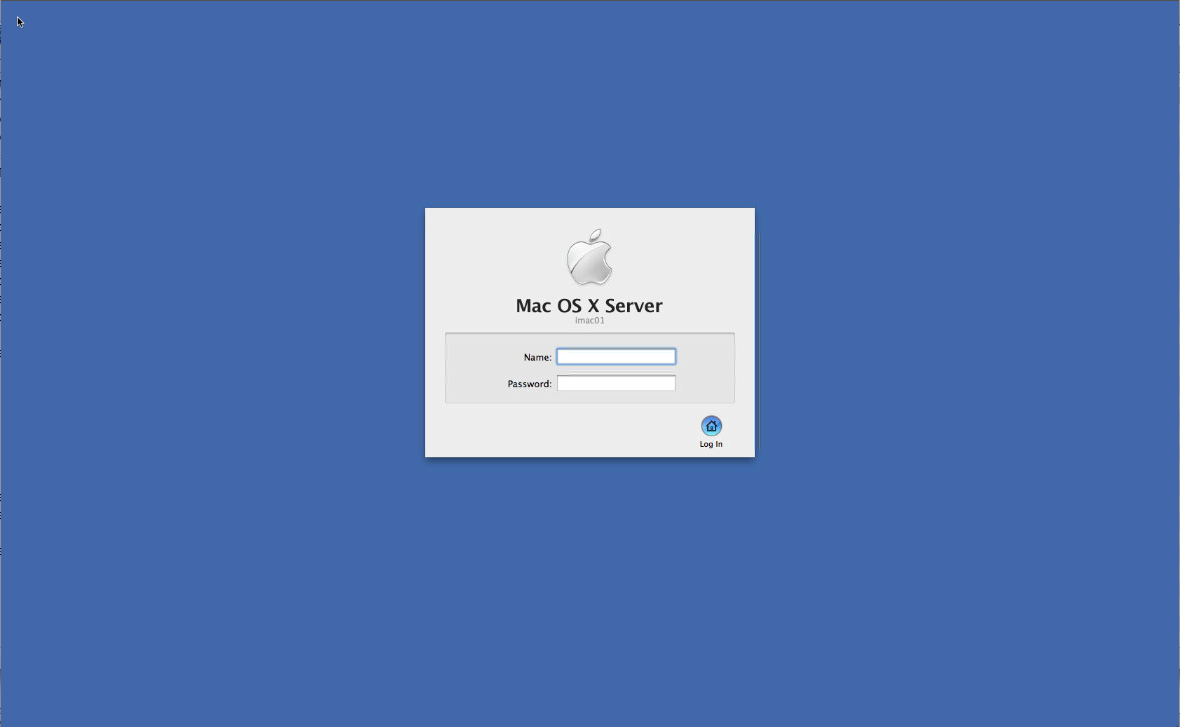
I don't have any images of the server whatsoever, i've created a total of three, two from workstations and one for a macbook, i've since deleted the duplicate workstation image. Also the machine does not do this unless i bind to AD/OD. They stay sitting with a normal login screen until i bind them, then some short while later if i restart they get the server login screen. They then fail to use AD accounts, but as tested late yesterday can use OD accounts. If i unplug the Mac server from the network they then fail to log on at all unless locally. -
Clients are now showing me a Mac OSX Server login screen
Greenbeast replied to Greenbeast's topic in Mac
Right, i reimaged them, added them to AD, then to OD. At this point i was able to log in and access shared network drives and the users windows home drive. I then sent out a package for iLife '08 and restarted them. Now i'm back to the originally stated problem, the Server login screen. I can't believe the iLife package has caused this but thought i'd mention it as that's the only thing that changed between the stations working and not working. -
Clients are now showing me a Mac OSX Server login screen
Greenbeast replied to Greenbeast's topic in Mac
Yes pretty sure i have. I'm now re-imaging the machines, so we'll have to see if the same problem occurs later today. -
Clients are now showing me a Mac OSX Server login screen
Greenbeast replied to Greenbeast's topic in Mac
No, i have NetInstall enabled but not NetBoot, 10.6.8 -
Clients are now showing me a Mac OSX Server login screen
Greenbeast replied to Greenbeast's topic in Mac
This is what i'm seeing on my clients
-
Thanks!
-
Clients are now showing me a Mac OSX Server login screen
Greenbeast replied to Greenbeast's topic in Mac
I will sort one out this morning -
As above really, was just on the verge of having these machines working correctly with AD (network drives and authentication) and OD (settings) and when i restarted them they've now all got a Mac OSX Server login window. Why would this be? How can i fix it? Help really appreciated!
-
So install it on the client and just make sure noone else has access to use it? And it won't conflict with ARD running on the server already?
-
I'm managing our mac suite using the mac server in my office but while i'm figuring out image deployment i'm often down in the room with no access to the server to change settings, is there any way i can VNC or 'RDP' to the server from a client machine?
-
Thanks for that Ashm, this seems to be working, i'm now having trouble with OD binding, it's complaining about the machine name already existing....
-
hmmm, i have the local hostname and computer name set in the computer list in DS and yet it ignores these when rolling out an image. I'm going to try again.
-
I don't understand the purpose of the Hostname screen in the DS workflow then? That's what i used so that when they'd all had the image downloaded it would ask for a computer name and then i could go round the room and type the, in in sequential order. Can i not do that?
-
ditto!
-
I guess building a client on to a domain, i've got 20 machines but had been working and perfecting one only, to then image and roll out
-
I thought i had figured out enough of deploystudio to get my new suite ready for term but maybe not... I've setup the workflow to restore an image, ask for a machine name, bind to OD and then bind to AD. It does all those steps successfully, except that when it's finished and brings up the login screen the machine name is the same as the master machine, with a number in brackets, different for each machine i.e. imac-04 (5), imac-04(121). I thought the point of adding the machine name stage into the workflow was to configure this, where am i going wrong?
-
Could i use WGM to manage the local users on these macbooks?
-
Thankyou, yes i have ARD and agree it's pretty handy. I will have a play with your ideas.
-
The netboot image is what allow the machine to boot from the network. You need to install deploystudio on a client first and create a netboot image (don't need to start netboot service when it asks), then you need to copy that up to the server (there'll be a netboot folder) To be honest you're best off reading the documentation or finding and online guide
-
you've created a netboot image on that machine and uploaded it to the server netboot folder i assume?