mbedford
-
Posts
237 -
Joined
-
Last visited
Content Type
Forums
News
20th
EduGeek EDIT Conference
Blogs
Everything posted by mbedford
-
o365 Incorrectly disabling\sign in blocking an account - repeatedly
mbedford replied to mbedford's topic in Cloud Services
Do you happen to know where the logs are kept on the local machine? I have checking the documentation and it appears to point primarily to to the Azure portal which is where I found the posted info. -
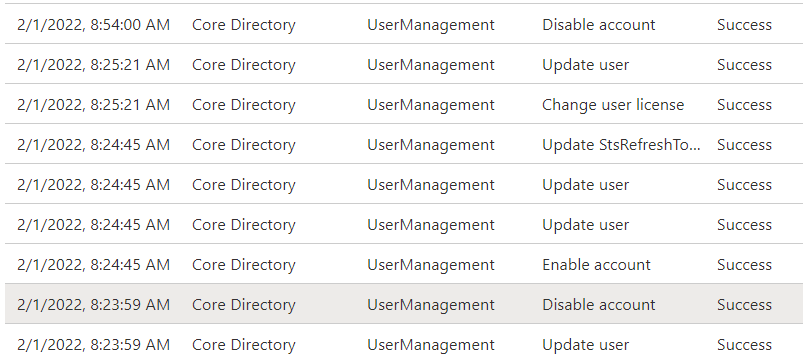
Hi, I need some assistance here. O365 Dirsync is consistently blocking the ability to sign in a specific user. We are syncing our active directory domain to the O365 tenant (almost 1000 users) its only affecting this one. The person is not disabled on prem and there is nothing this side of o365 suggesting he should be blocked. I can enable sign in via the admin portal and his account works, for a few hours and then it goes again (probably around the time dirsync runs its update) Looking at the logs this is what i can see Anyone have any idea what could be causing this? I have ruled out the usual suspects of bad password on a mobile device, almost certain its a dirsycn issue, but only 1 user out of nearly a 1000 seems unlikely.

-
Deleting user profiles via powershell at shutdown via GPO
mbedford replied to IT_Man_Dan's topic in Windows 10
I use this quite frequently on a TS server used by hundred's of logins every day $profiles = Get-CimInstance Win32_UserProfile | Where-Object { $_.Loaded -eq $False} foreach ($item in ($profiles | select LocalPath, LastUseTime, SID | Sort-Object LastUseTime | where {$_.LastUseTime -lt ((get-date).AddDays(-4))})){ Get-CimInstance Win32_UserProfile | Where-Object { $_.SID -eq $item.SID} | Remove-CimInstance Write-Host "Deleted" } Change the AddDays(-4) to any number of days you want (it deletes any profile over x days old, 4 in this case) Takes about 20 - 25 mins to run and recovers easily 20-30gb of space each time for me. Been running this for months with no reported ill effects. You can omit the "Write-Host "Deleted", i put that in so I could see the script was actually doing something. -
We print our own, these are good enough for most use cases in our environment https://www.amazon.co.uk/Avery-L6009-20-Extra-Strong-Adhesive-Silver/dp/B0002S4DIU/ref=sr_1_10?crid=2YA1AI7JA8G5U&keywords=Avery+security+labels&qid=1642506560&sprefix=avery+security+labels%2Caps%2C66&sr=8-10 They can be peeled, but its difficult enough that they tend to not be very often
-
can you drop the email into a pastebin?
-
I used to go down the route of a category for every problem. Then when I was migrating our helpdesk to a new solutions (OSTicket for the win BTW), I realised, I wasn't really helping, was actually slowing down the call logging process. So now it's Problem Request Project Misc Nice and simple, all the other work is done in the assigning of priorities and SLAs etc. Have a think about what you are trying to achieve, a pretty report breaking down all of your jobs logged into a graph that no one looks at. Or an efficient and user friendly service. I don't mean to sound like I'm knocking anyone's idea, but speaking from experience, it was just a waste of time IMO.
-
CRITICAL - 1 - 2 - 3 - PROJECT CRITICAL - Preventing teaching and learning, needs immediate response and workaround\fix within the hour 1 - VIP, try and resolve ASAP, but not stopping T&L 2 - Priority for that day, 4hrs response\workaround\fix 3 - Standard response, software installs and other non urgent things PROJECT - No real time frame, more a place holder As for how you decide who gets what, try to keep names out of the decision making and focus more on the outcome. Yes the principal might be important and will want to be treated as such, but a your business is T&L, that has to come first. Obviously that's easier said than done. A decent supervisor\manager will back you up on this one. I do with my tech's, as long as they justify why they have done something, I am on there side.
-
Backing up Hyper-V - Your preferred methods
mbedford replied to CyBeRkId2002's topic in How do you do....it?
+1 Veeam. To be honest, most questions that involve the words backing up and VM's are going to have the answer of Veeam... -
Quick bit of feedback, we purchased the Vestel's, they are absolutely fine, teachers are happy and the quality so for appears good enough. My only niggle, the USB connectivity for touch uses a Micro USB port on the device, works fine, but they are not the most resilient of ports. A bit of hot glue on the cable to stop it stressing the port will probably resolved that issue. Thumbs up from me.
-
Get the class moved to a room with at least one PC, so the teacher can take registers and teach students. Having IT for the kids is preferred, but teaching can still take place without it. In that kind of situation, its about managing the problem, not returning 100% service. Or if there are no rooms available, get the room affected to be safe (facilities and environment wise) and get a laptop and projector screen bought in. This is going to require involvement from other departments (caretakers for power etc...) but from the IT point of view, we have provided a solution as quickly as possible, need the other teams to respond in a similar fashion.
-
Critical - Fix or workaround within 60 mins - This is reserved solely for issues that prevent teaching and learning 1 - 4hrs - Urgent but not critical 2 - 8hrs - Need to be working tomorrow 3 - 16hrs - This is our default, expected turnaround time on the majority of calls 4 - 24hrs - We rarely use this one Project - At least 3 months, more of a placeholder than an expected completion time, a completion time has probably been agreed in the project scope. All of these are measured directly in our ticketing system (OSTicket) and are business hours (measured between 0830-1700hrs, so a 4hrs timer starting at 1600hrs, would run until 1130hrs the following working day), we don't change the due date, if we miss the target, that's not always a bad thing. Perhaps we need more resources to ensure it doesnt happen in the future. The critical calls are honestly looking at a 99%+ compliance rate, teaching and learning is our bread and butter, so we put a huge effort into that.
-
Agreed, to be fair to the teachers, they don't tend to mind, as long as they are interactive. We standardise the software offer across the estate, that has a bigger impact IMO.
-
Price isn't the only consideration, but at 30% difference, I'd be mad to not at least look. What negative feedback have you had with the iiyamas? On the whole our findings have been quite positive
-
Looking at 75" touch panels, we already have 30 odd of several different generation of Iiyama's. A supplier has replied to a recent RFQ with Vestel 75" Model IFM75TI663. Does anyone have any real world experience with these devices? They are going into a campus where they will be used in classrooms next to rooms which already have modern Iiyama's so is the direct comparison going to cause me problems with the user experience? The price decrease for the Vestel's is around -30% so its a difficult argument to make not to go for them. I'd like to go Iiyama, but need to make sure we are getting good value.
-
Will Access Points ever need two data points?
mbedford replied to kennysarmy's topic in Wireless Networks
IMO. Always run a double, even if not for WiFi, at some point you are going to be glad you ran that second line. -
Thank you
-
Hello, We have 360 Managed Chromebooks, is it possible to produce a report showing the last user for each one from within the Admin Console? Thanks Mike
-
Toner recycling since the coronavirus pandemic
mbedford replied to Bompalompalomp's topic in Green Computing
I am genuinely shocked to hear that. I don't hear a word from then unless I call them. -
+1 this, if you are struggling with PowerShell I fully recommend this book https://www.amazon.co.uk/Learn-Windows-PowerShell-Month-Lunches-dp-1617294160/dp/1617294160/ref=dp_ob_title_bk £30 well spent, PowerShell can be a great tool, and learning it really is easier than you would think. Back to your original question, Katy has it spot on, this is very achievable in PowerShell and in fact would be a great project for you to use to learn.
-
+1 this, its essentially a tattoo at the point in time BGInfo is run, its great for static (ish) data, AssetTag, IP Address, etc... but anything like performance stats, its a waste of time. What is it you are trying to achieve, on a desktop PC, free RAM is not really a metric of much use. Yes its nice to say "I have 3.6GB available" but what I would focus on is a problem (assuming you have one). Id the machine running slow and you think RAM is the issue? Advice I try to stick to - Fix the problem, not the numbers.
-
Toner recycling since the coronavirus pandemic
mbedford replied to Bompalompalomp's topic in Green Computing
Enviro Electronics - FREE IT Disposal Service Doncaster, Scunthorpe, Sheffield, North linconshire, Grimsby, Leeds, We use for all our electrical waste, including toners. No complaints so far. They leave us a big bin in the goods yard, we fill it up with all sorts of junk, give them a call and they come and swap for an empty bin. A few days later I get a report on all the assets, how they were disposed of and if required data destruction certs. Ignore the locations in the URL Header, we are in West Midlands and they collect from us. -
We use both, RDP for out students\staff who don't have a domain laptop and Direct Access (Microsoft) for domain joined laptops. DA, was a pain to setup but after that, its a breeze. We have about 100 people offsite and barely get any calls about accessing the network remotely.
-
Trial and error, try one stick in isolation, then the other, try the memory in a known working other PC. There are plenty of memory testing applications, but lets be honest, do you really care what the actual problem is, or do you just want to know if the problem is with the RAM or elsewhere?
-
In my experience charging trolleys are more hassle than they are worth. More often than not, the devices don't last long enough on battery so you end up removing the charging cable from the cabinet and then it never gets put back properly in the cabinet. There isnt really an ideal solution that I have found, however, I have used these before https://www.amazon.co.uk/Anker-Charger-PowerPort-Interchangeable-Adapter-White/dp/B01MXXOQTE/ref=sr_1_5?crid=H5WT0WXE1ULY&dchild=1&keywords=4+port+usb+charger&qid=1602072677&sprefix=4+port+USB+%2Caps%2C151&sr=8-5 Plugged into a 4 gang extension block you have 16 charging points. Cabling is going to be a mess, but, you cant win every battle. Just be aware of the following info in one of the reviews... It can charge at maximum of 2.4A per port. However since the total output power is 27W and it charges at 5V, the total A power to split is 5.4A. So if you plug 2 devices that charge at 2.4A, for another 2 ports there will be just 0.6A left to split (half needed to charge smartphone, but enough to charge things like apple watch, TV remote or to supply power to other appliance which requires just 0.5A in Actually, given that you are not realistically going to get 4 ports charging at the same time, how about this 2 port version, a bit cheaper https://www.amazon.co.uk/Anker-PowerPort-Charger-Compact-Samsung/dp/B07X1RW3RL/ref=sr_1_5?dchild=1&keywords=2+port+usb+charger&qid=1602073036&sr=8-5 I have no particular attachment to Anker as a brand, but when it comes to USB chargers, there are some absolutely awful and downright dangerous products on the market (as per usual, cheap Chinese knockoffs) Anker have a decent reputation for quality so its less likely to burn the place down!!
-
Used to get this a fair bit at my employer. ALTools were great as people have mentioned above. In order of frequency this is what it usually was 1. ActiveSync\Email on a mobile device - Check that you dont have device which is auto syncing with an old password 2. WiFi authentication where your username \ password is the authentication method 3. Service account on some process or scheduled task. If you are on a domain, ALTools will work and the security log will point you in the right direction. Remember that if it is due to email syncing, the origin machine may not be what you are expecting, it could be an Exchange server which is the origin as that is handling the authentication, not the mobile device itself. Mike