-
Posts
221 -
Joined
-
Last visited
Content Type
Forums
News
20th
EduGeek EDIT Conference
Blogs
Everything posted by RowlandoGloom
-

Windows 8/8.1 Deleted Printers Reappearing Multiple Times
RowlandoGloom replied to RowlandoGloom's topic in Windows 8
Ok deployed a different way, but exactly the same problem. -
Windows 8/8.1 Deleted Printers Reappearing Multiple Times
RowlandoGloom replied to RowlandoGloom's topic in Windows 8
Yep, exactly the same problem. Ok deployed a different way. - - - Updated - - - We use RM CC4 which uses its own desktop agent service. -
Windows 8/8.1 Deleted Printers Reappearing Multiple Times
RowlandoGloom replied to RowlandoGloom's topic in Windows 8
It is the RISO which is the biggest pain. It was hosted on the 2012R2 server, it kept re-appearing, losing jobs, getting jobs stuck, plus not even connecting etc. Moving it to a 2008R2 server, changed a few settings on the advanced tab fixed all of the problems, no problems printing to it at all (Untick "Print spooled documents first" and untick "Enable advanced printing features"). Annoyingly, the RISO keeps reappearing from the 2012R2 server, which is no more.
-
Windows 8/8.1 Deleted Printers Reappearing Multiple Times
RowlandoGloom replied to RowlandoGloom's topic in Windows 8
Cheers. I have moved a few printers to a 2008R2 box, including the RISO mentioned above. Funnily enough, all of our shared drives etc. are hosted on the same server - which all work as expected. On some occasions when printers reappear, they were on a server that no longer exists, show that in the path and still won't go away. (Removed both server and printer from domain, AD, ADSI, everything etc.) Unfortunately we use RM CC4 for printer deployment, I believe this is via the RM Desktop Agent service - neither GPO or GPP (which I'd prefer one of the latter two anyway.....) William, as you have the same problem, how do you deploy printers? Many thanks. Paul. -
Windows 8/8.1 Deleted Printers Reappearing Multiple Times
RowlandoGloom replied to RowlandoGloom's topic in Windows 8
Cheers, I had previously removed the queue from the server, so unable to deselect Client Side Rendering. I'll try the registry settings and update you. Paul. -
Windows 8/8.1 Deleted Printers Reappearing Multiple Times
RowlandoGloom replied to RowlandoGloom's topic in Windows 8
I've looked at profiles and reset several (through the CC4 system, which deletes the old version and copies a default) I've then removed the profile from the PCs through "Advances System Settings" with no breakthrough. It seems to be on a PC basis, not a profile - which is strange, because shared printers are profile based aren't they? Thanks, Paul. -
Windows 8/8.1 Deleted Printers Reappearing Multiple Times
RowlandoGloom replied to RowlandoGloom's topic in Windows 8
Cheers for the updates. At least in one way I know it's not me being daft! If I have any breakthroughs - I'll keep everybody updates too. -
How many people have actually updated their network to Windows 8?
RowlandoGloom replied to abillybob's topic in Windows 8
Love it, All of our servers (except DCs being CC4 :-( ) are now 2012R2 and working lovely. We have 1 XP machine due to there being a laser cutter not being compatible with even Vista About 50 Windows 7 machines About 100 Windows 8 Machines About 400 Windows 8.1 Machines (all Classrooms and office PCs when people need a rebuild etc.) Now it's mandatory :-) Just love it (except really bad printing problems in a thread I created) - "Windows 8/8.1 Deleted Printers Reappearing Multiple Times" Other than that - love it! -
Hi, I'm wondering if anybody has the same problem I have, which I am tearing my hair out over. Several Windows 8 and 8.1 machines (about 50%) have the issue where deleted printers suddenly reappear. When I say reappearing, I also mean multiple times too. Quite a few times, it will reappear 20/30 times on a PC! I have unshared the printer, removed the printer and the queue from the print server, but it still keeps coming back. The server "SHARED" is 2012R2 - but I sometimes have the problem when the print server is 2008R2. Every single queue there doesn't exist - so how it's connecting to it, I don't know. I have attached 2 example screenshots. I have also searched the internet and can't find any answer, other than moving back to Windows 7 (which doesn't have the problem). It is so frustrating. I really appreciate any help and support anybody may have. Paul.
-
Hello, One thing I have noticed on our system is slow log on times, with a PC displaying 'Applying Internet Explorer Branding Policy' when logging on'' This is due to Server 2012 no longer supporting IE Maintenance in Group Policy. Windows 8 machines don't know what to 'do', so get stuck for a bit when logging on - putting errors in the Group Policy logs. Problem is, if a GPO previously used those settings (i.e. on a previous 2003/2008 system) - they are still there, but appear to be stuck forever. Normally, one would make a note of the policy's settings, delete it and create a new one. I have tried removing the settings via a 2003 server on the domain (where you can 'see' it), but once again, no difference when running rsop.msc and seeing an error still suggesting the policy still says so etc. These settings can be removed using adsiedit.msc as per the below links. Use the first link to help with finding out which the GPO it, so you can get GUID when the search results appear. Don't follow the removal steps though. Use the second link to actually remove it from ADSI (as per the last comment on the page it links to) - you have the GUID, so no need to search for it at the command prompt. No more slow logons (specifically due to that error, obviously other factors affect login times.) Just thought it may help, as I spent 2 days on Google! Paul. Tracking Down Rouge CSEs: IE Maintenance GPO in Windows 8 - DeployHappiness Internet Explorer Branding failed due to the error listed below Server 2012 R2
-
I did notice in the MS article - there is a registry setting to make the change manually should you not wish to actually install the update itself: 'HKEY_LOCAL_MACHINE\System\CurrentControlset\Services\ProfSvc\Parameters' As per the article, the value 'UseProfilePathExtensionVersion' should be set to '1', which makes the change and causes the problem. If you change it to '0' instead, the setting wont be applied - making the machine work as before. If it's not there (which it probably is) create it and set it to '0' You can then set this in group policy preferences, so all machines pick it up and change it back to '0' should the update ever put it back to '1' Hope this helps. If you want more info, I.ve created some below: Paul. It's simply so profiles are the following: user. WinXP user.v2 Win 7 user.v3 Win 8 user.v4 Win 8.1, so they use different profiles for each version. If you manually create the respective .v3 folder for a test user for example, it will let the user log on a Win 8 machine if the value above in the registry is set to 1. Changing that value above to 0 stops it (trying to) using .v3 and .v4 profiles, sharing the .v2 with Win7, 8 and 8.1 Probably a .v5 for 8.2 or Win9!
-
Hi sted, Local printers are PC based, network printers are deployed using RM CC4 - the print server is 2012. My test machine shows the same issue. Is is out of the usual OUs in the AD so nothing should apply. If I add a printer using "Devices and Printers" it doesn't show up on the second screenshot titled "Printers" It sort of lead me to believe, maybe an app is running as, i.e. Admin, hence different network printers. Nope. Got me driven mad! Cheers, Paul.
-
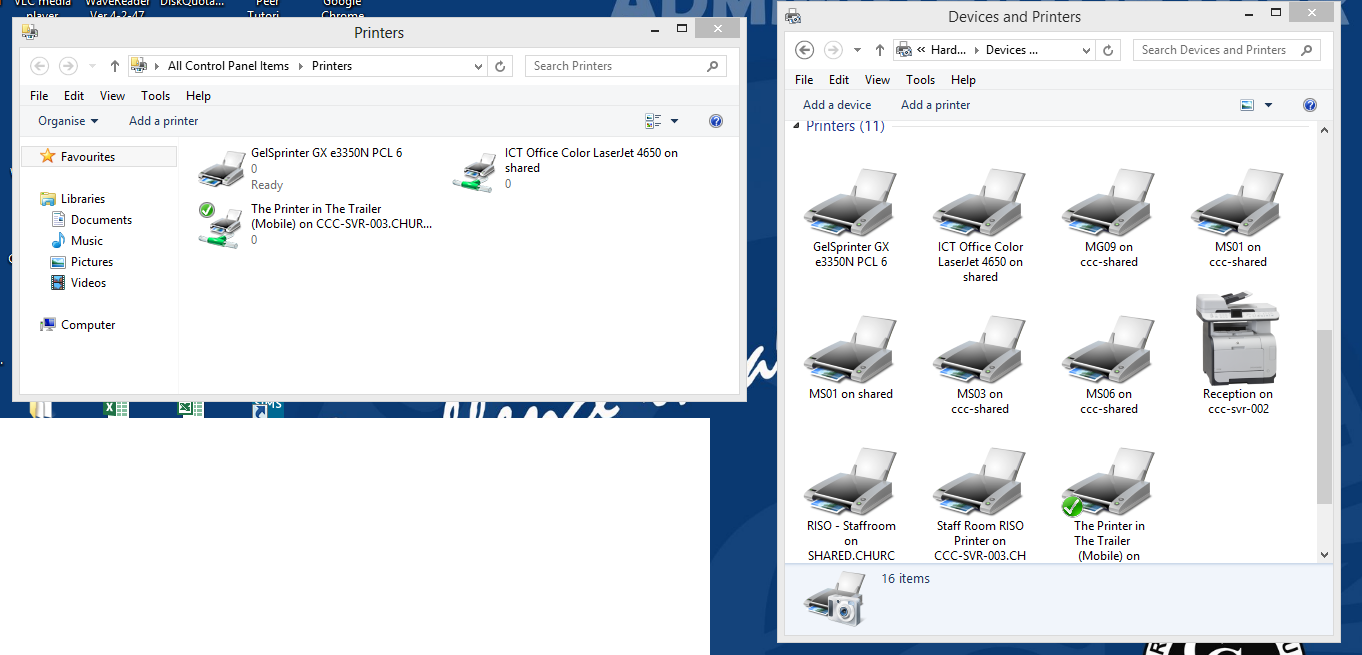
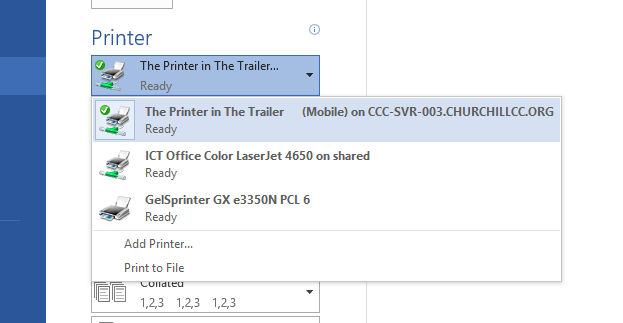
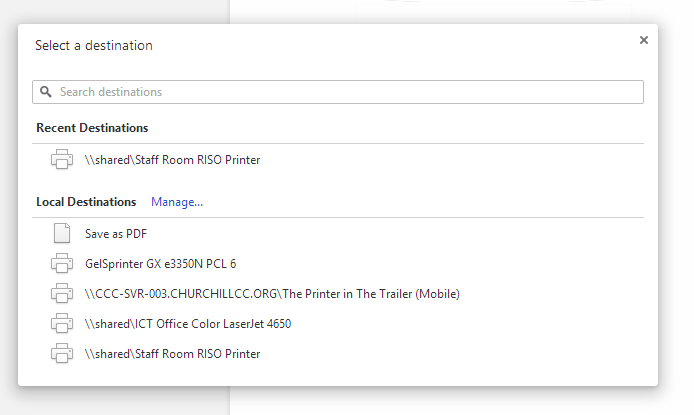
Hi Everyone, Here's an interesting one which is driving me mad! We have rolled Windows 8 out to the system and have got it working very well. Until.... An example, I have a PC with 11 network printers appearing in the "Devices and Printers" app. When I use, for example, Google Chrome - it will only allow me to use 4, of which 1 doesn't even exist in "Devices and Printers." In Chrome, it will give me the option "Local Destinations Manage". Clicking it, gives me the Control Panel item labelled "Printers" - with the 3 of the printers just mentioned: As you can imagine - it is driving me mad. Staff not being able to print to most printers on the system. If anybody has any ideas - I'd really appreciate any advice you may have. Many thanks, Paul.
-
Hi Everyone, Here's an interesting one which is driving me mad! We have rolled Windows 8 out to the system and have got it working very well. Until.... An example, I have a PC with 11 network printers appearing in the "Devices and Printers" app. When I use, for example, Google Chrome - it will only allow me to use 4, of which 1 doesn't even exist in "Devices and Printers." In Chrome, it will give me the option "Local Destinations Manage". Clicking it, gives me the Control Panel item labelled "Printers" - with the 3 of the printers just mentioned: As you can imagine - it is driving me mad. Staff not being able to print to most printers on the system. If anybody has any ideas - I'd really appreciate any advice you may have. Many thanks, Paul.
-
We are currently trailing it in a couple of the ICT Suites. Surprisingly staff and students are liking it. I have 2 networks, a CC4 and Vanilla - both with Win8 - working great. I have managed to convince RM to allow me to field trial it for CC4 and it managed the same way as other clients. The Start Screen is controlled through the Program Sets as usual. I created a custom WIM, removing all "featured" apps via DISM - plus deploying with WDS and a custom answer file. Working fab. Just a shame Office 2013 is so slow, ie Excel and navigating spreadsheets etc. Paul
-
Hi, I have an interesting one with 2012. I had a server running 2008R2 and upgraded to 2012 a few weeks ago. This was hosting shares and printers. All was working until I came in one day to find there were no printers any more. Thought I'd check the Spooler service, and it wasn't even there in the MMC. The spoolsv.exe was present, so I exported the HKLM\System\Curr..\Services\Spooler registry key from another 2012 machine to recreate the service. The spooler then starts, then immediately stops. Looking the the eventvwr - it suggests this "has done so 40odd times" I rebooted the server to no avail. Removed all drivers, ports, monitors, and printers from the registry, renamed folders containing print drivers etc., still the same problem. Chose to do an in-place reinstallation again to 2012 - only to find the same problem. Shared folders, management, everything else works perfectly. I've just moved my printers for now! Cheers for any advise people may have. Paul
-
RM CC4 Server 2003R2 and Server 2008R2
RowlandoGloom replied to kai91's topic in Network and Classroom Management
I have 8 vanilla servers on my network. Only the 3 2003R2 DCs are actually running CC4.2 The others are just domain members, which I have added them to a different OU in the AD, allowing some form of central managing via GPO. I now have 2008R2 and 2012 running on the system - albeit without RM support for the vanilla machines. It also helps as you don't need to buy CC4 Additional Server licenses because they're not running CC4 -
iRIS Connect - Teacher CPD lesson Ob software
RowlandoGloom replied to timbo343's topic in Enterprise Software
Many thanks for the reply. We have managed wireless across the site - so locations won't be a problem. From our previous setup, I have a few old Netgear APs lying around, so will give it a go. I assume you just connected the camera AP in Ad-Hoc mode to the wireless. Cheers. Paul -
iRIS Connect - Teacher CPD lesson Ob software
RowlandoGloom replied to timbo343's topic in Enterprise Software
Hi mrbios I know this is an old post, but will see how I get on! We are looking at attaching a wireless AP to our iris, as it is a pain as you say having to plug it into a switch, unplug the PC etc..... How are you getting on with the wireless setup? Cheers. -
Cc4 virtualising the servers
RowlandoGloom replied to ful56_uk's topic in Network and Classroom Management
Tbh I've had no problems at all, we're using 2 high spec. HP servers with a 4 TB NAS with everything spread across it with 9 VMs All I would make sure you do, is check disk quotas in the RMMC once you have finished, as the size of the partitions will have increased etc. -
Cc4 virtualising the servers
RowlandoGloom replied to ful56_uk's topic in Network and Classroom Management
Any time. Paul -
Cc4 virtualising the servers
RowlandoGloom replied to ful56_uk's topic in Network and Classroom Management
No it doesn't affect support from RM, all support is still there, however if VMware had a problem, i.e. destroying data / RM software as a result, they wouldn't help (or charge to) Ours runs as expected, and all support calls with RM are addressed as usual and the system works better than it did. -
Cc4 virtualising the servers
RowlandoGloom replied to ful56_uk's topic in Network and Classroom Management
I think RM'd charged a fortune for doing it for you. RM Support is there for CC4 as usual. -
Cc4 virtualising the servers
RowlandoGloom replied to ful56_uk's topic in Network and Classroom Management
Totally without the support from RM -
Cc4 virtualising the servers
RowlandoGloom replied to ful56_uk's topic in Network and Classroom Management
Hi, We have 3 CC4 DCs running 2003R2. About 18 months ago, we P2Vd them, VMware ESXi and have had no problems at all. Paul.