-
Posts
361 -
Joined
-
Last visited
Content Type
Forums
News
20th
EduGeek EDIT Conference
Blogs
Everything posted by JazzFlute
-

Google Workspace for Education Fundamentals (Free)
JazzFlute replied to JazzFlute's topic in ChromeOS & Cloud Based OS
Yeah from the research I've done this all sounds right. No edu licenses came with them just the devices and nothing else. I just don't want to spend anything really for the sake of 2 years use and they only really going to be used by a small group of students so probably end up being something simple I implement to just log whose using what etc. and when. -
Google Workspace for Education Fundamentals (Free)
JazzFlute replied to JazzFlute's topic in ChromeOS & Cloud Based OS
Yeah I originally tried to sort it last year and gave up when wasn't receiving any support emails back but think I'm a bit further forward now as just added a DNS record to hopefully prove to them I own the domain. Only want the Chromebooks to do a bit of online learning and nothing else and as they are 5 years old probably plan to "retire" them in a couple of years and replace them with Windows devices so just trying to "manage" them the best I can for the next couple of years without paying. Ideally just Browser management and generic Year user accounts till I retire them. -
I have 15 Chromebooks to manage (Covid Lockdown devices) and in the process of trying to persuade Google I own the school domain as previously registered by an ex SLT employee and seem to be going round in circles filling forms in etc. but think nearly there. Just asking as its a small amount of Chromebooks to manage and I don't want to purchase a £20 or whatever it costs license for each device so wondered if I can "manage" them sufficiently with the fundamentals (free) subscription. Not really wanting to do much with them apart from some basics (set homepage) create generic user accounts. Can I add them to Entra using Fundamentals?
-
Cant believe the main education ISP's (the big 2 come to mind) and filtering companies have so much downtime after implementing "upgrades" whether hardware of software.....These guys post testing procedures obviously don't take place or is the world we are in when this is normal and they just act on issues once schools open in the morning and log support calls.
-
DfE Standards Updated To Include IT Support Standards For Schools
JazzFlute replied to PrimaryNetMan's topic in General Chat
I know schools are putting a non technical teacher as digital strategy and paying them a tlr for it! I imagine this will be commonplace. I would imagine schools employ IT Staff because they are qualified and experienced and all of a sudden find themselves explaining things to someone not technical or even being led by them in terms of how they want things to happen in the future etc. and IT Support being further pushed down the chain of command for want of a better phrase. -
Thought so as I'm just hearing second hand. Problem will probably be the latest Ai filtering they put in place yesterday I imagine 🤣
-
Had a report a few schools experiencing broadband problems, anyone confirm if its a total outage or just Google?

-
agree with this as so easy to chase a score to "show" or "prove" to SLT/Heads that you are implementing the right recommendations and keeping your tenant secure as with the cyber security essentials they are now all made aware of they are all of a sudden interested where as I'd be happy if teachers locked there classroom computers when they leave them unattended for starters!
-
unfederate_m365domain_from_rmunify.zip PowerShell Script attached but use at at own risk as this is what i had at the time
-
Just checked my back ups! How to unfederate your Microsoft 365 domain from RM Unify.pdf
-
That quote is a joke as remember them doing this for me a couple of years back and approx. £500 to un-federate. Just looked for the instructions as i usually keep everything but remember i deleted everything RM from network as was glad to be rid of them 🤣
-
Does anyone religiously go through Microsoft Secure Score in Microsoft Defender Admin and address all the actions available if you have the correct licenses? I'm also working on improving my Secure Schools Cyber Score which i believe is linked with DFE recommendations. Just wondered what others are doing as its a lot of tasks when you add them all up.
-
Think Ol Mr Gates needs to buy up some more Farmland or back gardens and get these Data Centres built to keep up with demand
-
down again last 5 mins
-
Just started working again for me. Seems like a lot of temporary outages these days with Cloudfare/AWS and other Apps causing intermittent problems. Maybe this is the future when so reliant on just a few services that control most of the Internet and Cloud based Apps.
-
Been getting a "Sorry, I wasn't able to respond to that. Is there something else I can help with?" using Copilot for the last half hour, anyone else receiving the same?
-
Office 365 "Your School account is no longer active"
JazzFlute replied to supportman's topic in Cloud Services
Or Microsoft 365 Apps for Faculty license which I use along with Office 365 A1 for Faculty for every staff user. -
Windows Quick assist is good, details below. ✅ What is Quick Assist? Quick Assist is a remote assistance tool that lets someone you trust take control of your PC over the internet to help troubleshoot issues. ✅ Availability: Windows 10 Home: Included by default. Windows 11 Home: Included by default. You can find it by searching Quick Assist in the Start menu. ✅ Requirements: Both parties need a Microsoft account. Internet connection is required. No extra cost or third-party software needed.
-
I think this is definitely the way to go as Microsoft are pushing the M365 Copilot App and I get the feeling the old Office 365 landing page wont exist soon. The new Edge "Copilot preview" toggle button when switched on only gives you 1 row of shortcuts to add websites to instead of the 2 rows in the current version so when the latest version is enabled by default which is soon I believe then staff will only see 1 row of website shortcuts instead of the 2. I've added all our schools websites etc. using the Admin portal so staff can then pin all the websites they need and everything appears on the left hand side in the M365 App. I like the idea that the Message Copilot chat window is in front of your face to encourage staff to use it as there's no way to hold this back if using AI/Copilot isn't your preference.
-
Authenticating Office 2024 LTSC Pro Plus - No KMS?
JazzFlute replied to Miscbrah's topic in Office Software
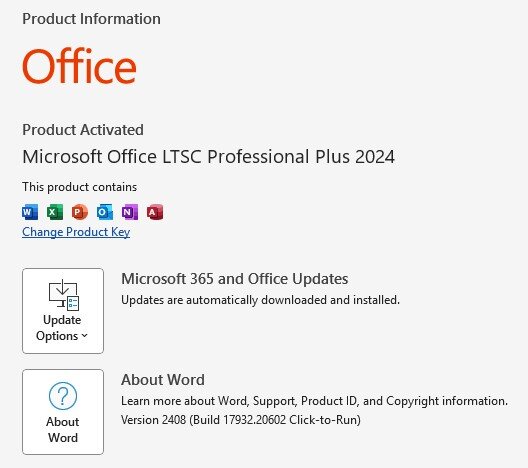
My Office Pro Plus 2024 Screenshot
-
Experienced intermittent problems with the "App Launcher" on Edge for a year with sometimes apps not showing. Decided to gradually move to the M365 Copilot App for everyone to use so can pin all Office apps there as well as add website shortcuts in Admin Selected so staff can pin those too so is a one stop shop for everything as well as Copilot chat being in front of your face to encourage staff to use it.
-
Authenticating Office 2024 LTSC Pro Plus - No KMS?
JazzFlute replied to Miscbrah's topic in Office Software
I've only just noticed that 😂I remember I always check after an office install that the @ key is where its supposed to be and then I know its UK so never changed the XML being as I didn't notice anyway. Just checked a recent install and everything is set to UK in windows settings and in office languages, I wonder as in highlighted in yellow office takes it language settings from your office profile so doesn't matter what set up language is used? Never had an issue in 2 years using the same setup.
-
Authenticating Office 2024 LTSC Pro Plus - No KMS?
JazzFlute replied to Miscbrah's topic in Office Software
My Working Office Professional Plus 2024 xml for reference rolled out using the Office Deployment tool with commands of. • setup /download configuration.xml • setup /configure configuration.xml <Configuration> <Info Description="Office Professional Plus 2024 (64-bit)" /> <Add OfficeClientEdition="64" Channel="PerpetualVL2024" SourcePath="C:\OfficeSetup"> <Product ID="ProPlus2024Volume" PIDKEY="YOUR MAK KAY"> <Language ID="en-us" /> </Product> </Add> <RemoveMSI /> <Display Level="Full" AcceptEULA="TRUE" /> </Configuration> -
Exactly this! those that missed out or didn't qualify for the latest CTC to upgrade switches/Wi-Fi etc. depending on school size having to find anything from £40,000 for a primary to the maximum allowed for secondary schools. These expectations and costs are massive when i imagine a lot of schools are still rolling out new Windows 11 devices in the next few years which probably cost them a fortune on top of everything else. I get the impression schools are cutting back on local IT staff/hours or paying lower to help with these costs when if anything more skill/expertise is required to implement these changes.
-
Yes KCSIE isn't new but it seems the latest few revisions/updates require IT expenditure which some school leaders aren't aware of or maybe think they can be achieved without spending money so when you ask them for things like a 2nd internet line, back ups for your Microsoft/Google tenant then it becomes a new ongoing yearly cost and a question if you can "save" elsewhere. Personally I think anything to comply with KCSIE and DFE recommendations are not "optional extras" but should be considered in the schools budget and included in the running of the school and are non-negotiable operational costs and not to pay for it all by moving backwards and using IT to pay for it by scrapping systems which benefit the school so you end up just paying for the Core things needed and any "extras" are unaffordable. I'm just working on a document so school leaders are aware of what we need to comply by 2030 (Internet redundancy, cloud Microsoft Backups etc.) so they are aware these are not "extras" but what is needed and need to be budgeted for yearly.