mikkydoos
-
Posts
2,616 -
Joined
-
Last visited
Content Type
Forums
News
20th
EduGeek EDIT Conference
Blogs
Everything posted by mikkydoos
-

More Projector Woes - The Black Blob
mikkydoos replied to simonw's topic in AV and Multimedia Related
You can get an Epson EB-S04 on ebuyer.com for 245.00 right now. In fact just bought 2. Very very bright and great resolution - good price too. Setup is as per my post above. -
Hhmm. I've got a new hub coming on Tuesday. This shall be my password: e6SWmtLSyLUT7dVf5TCw9QGEEK5rAhcW8SVf2GXwTCw9QGEEK5rAhcW8SVf2GX Damn! Hacked!
-
More Projector Woes - The Black Blob
mikkydoos replied to simonw's topic in AV and Multimedia Related
No. This was in my school. -
Staff Well-being - Out of Hours email usage
mikkydoos replied to Arcolite's topic in Enterprise Software
^^^ Like bombarding me with mails and phone calls when I'm in the shower in the morning half an hour before I'm due in ??? -
More Projector Woes - The Black Blob
mikkydoos replied to simonw's topic in AV and Multimedia Related
Quick corner keystoning is a god send. Installed one yesterday. took 5 mins (after I managed to get the thing mounted on possibly the cr@ppest bracket known to man). That blob to me looks like something has burned internally. Mirror, lens ????????? Doesn't look like the DLP chip. You get 'dead' pixels when they go. -
CAT6. Why not?
-
Hey all, Contest: Who's is the best ? What do you guys do with power cable management in your racks? Mines a rats nest and needs sorting so I can slide servers out on their rails without pulling the plug ! Mixture of switches, servers, UPS etc. Need some good idea's. Any pics out there ? Cheers in advance
-
Its designed for physical servers and can integrate with Veeam Backup & Replication. I've used it for backing up partitions on VM's. It works well. You need a boot disk to restore a full machine though, or you can restore to a VM.
-
It will run on 1 CPU, just slower. Have you looked at Veeam Endpoint Backup. Its free and quite useable. Even on VM's.
-
Best way of asking person to turn down music in heat?
mikkydoos replied to nicholab's topic in General Chat
That is a pretty damn good idea. @nicholab ever heard of a hosepipe -
* You don't have to run Veeam in a VM. I just prefer to. * No you can't just copy them. Veeam backup archives are incremental compressed snapshots of your virtual disk files and require Veeam to decompress and restore them to a host location. * Minimum recommended hardware for Veeam is 2 x CPU's and minimum 4Gb RAM - so if your physical servers are light on hardware it wont run well - but you could install it on one of them. Again... is there a point having good backups but nowhere to restore in case of a failure ? " could we simply install Hyper-V on something suitable and 'copy' them straight to it from the NAS? " ---> No but you could put Veeam onto a PC and restore them to a host from the NAS - or run the VMs from the backup archive itself temporarily.
-
And this is why we don't allow USB sticks at all. +1 for your AV tho'
-
You can install on the host. I run it in its own VM on a host with local storage (replicated to another host each night). If you do lose your host, you can install Veeam on your PC, restore a configuration backup, and perform restores / recovery from there as long as you can navigate to the backup location. What would you restore to though ? ... although you can run the backup file as a VM this shouldn't be relied upon wholesale.
-
Cheers @Fazza but I need the whole kit as mentioned above. I think I have a couple of suppliers now anyway. Coo they're expensive for such an old chip !
-
Its an HP 360e Gen8. I do need the whole kit - heatsink and fans. Correct P/N: is 660664-B21. PM me please with a quote if you can get them. Cheers.
-
Hi all, Need some opinions of what might be going on here. Via GPP / scheduled tasks: I'm instigating a shutdown of all workstations daily at 20.00pm - All clients are Windows 7. EDIT: A few, not all /EDIT machines are shutting down in the morning after the staff member has logged on and set up for their class. I was thinking that the machines might have been set to a different timezone but they're not. Or I was thinking it was running the task thinking it had missed the scheduled time then running when the machine was available.... but it doesn't seem to be. Action is 'Start a program' ---> 'shutdown.exe' --> Arguments: -s -t 300 -f -d p:04:01 Any ideas? Cheers in advance

-
Provisioned disk space ??
-
Best way of asking person to turn down music in heat?
mikkydoos replied to nicholab's topic in General Chat
Oh yeah! Slayer - Necrophobic - should do it! Up to 11 ! -
Hi all, I need to source an HP Xeon E5-2407 2.2Ghz CPU kit. (With heatsink and fans etc - hence 'kit') HP P/N: 676948-001 The CPU is obsolete but I have a perfectly good server in need of another CPU. Any idea's where I might find one? (Not really too keen on ebay and amazon - must be new - not refurbed.) Cheers in advance
-
Does restarting a print server clear the print queue ???
mikkydoos replied to mikkydoos's topic in Windows Server 2012
I've found the answer a couple of days ago -- it doesnt. Papercut retains the queue. @Big_Ted is spot on. Cheers all -
OK I've solved it. The network adapter was changed from E1000 to vmxnet3 which worked initially. The machine was networking happily but I noticed that the antivirus updates wouldn't update either. No relevant ports were blocked and no firewalling was occurring. I removed the network adapter within the VM, uninstalled VMWare tools, reinstalled everything and bingo! Cheers for the comments guys. Sorted now.
-
Yep. They're pretty good when adopted wholesale.
-
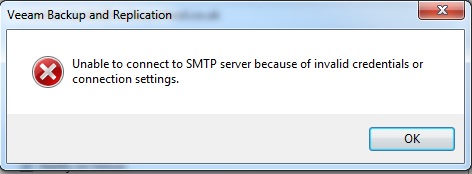
@bossman ... Don't think so. Its was working fine until about 11.00 this morning. Then just stopped. When I ran a test it gave the error above. I'm stumped. Its gotta be a Veeam fault. For comparison, my Papercut server is sending mail via O365 without error.
-
Hi all.... Veeam stopped emailing alerts via smtp.office365.com after VM hardware change ?? I changed network card type on its VM. It worked all through the night then stopped mid morning today - probably not the hardware change then. Is anyone else getting this ? Server and auth details are definitely correct. Veeam support cant find anything wrong either. Is it O365 ? Everything else is working with it though. Cheers in advance
-
Want to compare my ESXi RAM allocation with others
mikkydoos replied to mikkydoos's topic in Enterprise Software
Hhhmmm. Seem to have found a sweet spot on this one. 2 CPUs/1 socket, 8Gb RAM. Any less and it just doesn't have it. Thanks again all