

We all know that Microsoft have been bringing Windows 10 along in leaps and bounds since its release two years ago and aside from the more visible features in the Creators Update such as Paint 3D they have also been actively working on creating some extra features and facilities that you may not be aware of such as making the built-in security features better than in any previous versions of Windows.
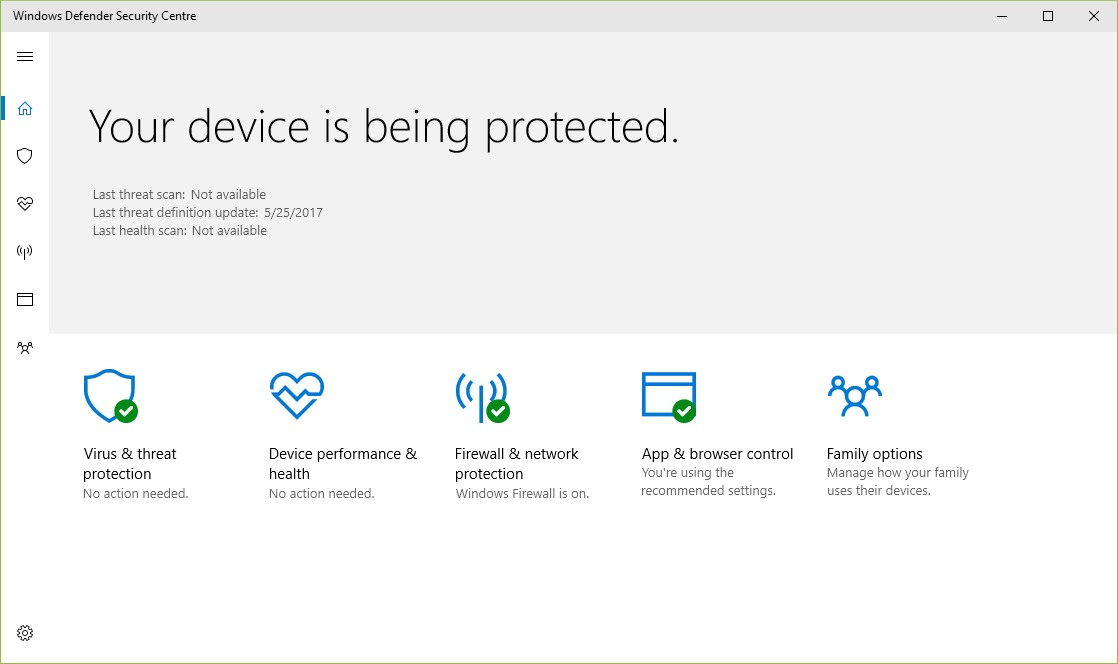
Windows Security Center - Firstly, they have created a centralised management and monitoring area called the Windows Security Center which first made an appearance in the Anniversary Update last year.
To quote Microsoft ‘…the Windows Security Center will link to Office 365 Advanced Threat Protection, via the Microsoft Intelligent Security Graph, to allow IT administrators to easily follow an attack across endpoints and email in a seamless and integrated way.’
You can find the Security Centre in Settings > Update and Security > Windows Defender > Open Windows Defender Security Centre
*Note that if you are using a third party security solution this may not be available until you uninstall it
From here you can monitor and control all the security options for your Windows 10 computer whereas previously you had to use several separate and disparate facilities but from this one console you can now configure and set:
- Windows Defender scans
- Firewall, network and app rules (controlling which apps can use the internet)
- App and browser controls
- Family options (previously Parental Controls)
https://www.youtube.com/watch?v=QE-3zbvtdKI
Also introduced in the Creators Edition is the Windows Defender Advanced Threat Protection. This is a facility for enterprise/education customers which allows Windows Defender to operate on a much higher level and allows for much more centralised control by IT departments.
It utilises a much more in-depth security engine which monitors for not only ‘regular’ viruses and malware but also analyses for potential new and as yet, unrecognised attacks.
You can find out more here:https://www.microsoft.com/en-us/windowsforbusiness/windows-atp
A brief overview can been seen in the video below:
https://www.youtube.com/watch?v=2CzqJmNBpzc
And a more in-depth look here:
You can also find an interesting whitepaper here dealing with actions you can take once threats have been detected: http://wincom.blob.core.windows.net/documents/Post_Breach_Dealing_with_Advanced_Threats_Whitepaper.pdf
Windows Upgrade Analytics – This new facility which will, via the Windows Analytics Dashboard within the Microsoft Operations Management Suite (https://www.microsoft.com/en-gb/cloud-platform/operations-management-suite) , allow you to scan your network to ensure that you know which Windows devices are capable of being upgraded to Windows 10 and what steps you need to take to ensure that they are compatible.
You can find out more about this here: https://www.microsoft.com/en-gb/windowsforbusiness/upgrade-analytics
UEFI Conversion – This will allow IT departments to take advantage of UEFI features on older hardware where, for example, Windows 7 had been installed using legacy BIOS options and will convert the OS via an automated process when upgrading to Windows 10 with System Centre Configuration Manager (SCCM).
You can find more information and instructions here: https://docs.microsoft.com/en-us/sccm/osd/deploy-use/task-sequence-steps-to-manage-bios-to-uefi-conversion
Differential Downloads – This means updates after the Creators Update will only include the changes that have been made since the last update, decreasing the download size by approximately 35%. We’re also working to improve System Center Configuration Manager express updates to help reduce the monthly update size by up to 90%.
these will apply to both Windows desktop operating systems and mobile platforms
You can find out a brief on these and other updates in this Microsoft blog article here: https://blogs.windows.com/business/2016/12/06/windows-10-creators-update-advances-security-best-class-modern-tools/#M2LYpgGCcKuis3Qu.97


Recommended Comments
There are no comments to display.