

Following on from last year’s anniversary update, which many saw as primarily as a roll up of bug fixes and optimisations and, yes, the addition of a few new features, Microsoft are to roll out what can be seen as quite a big expansion to Windows 10’s capabilities in the form of the Creators Update.
You can see a preview the Creators Update overview at the Microsoft October 2016 Event here.
Be warned it’s over 2 hours long, but well worth the viewing:
https://www.youtube.com/watch?v=SNeVaadNHg8
Due in early 2017 this Windows 10 update will focus squarely at the space currently occupied by Apple and the design community.
They are doing this by introducing several new features and apps which will allow users to work with 3D natively within Windows.
Some of these are obvious, such as Paint 3D and some are based a capabilities to be introduced later in the year such as VR headsets.
One of the features I like best is Microsoft utilising a 3D scanning app which, by all accounts, will be available not just on Windows phones but Android and iOS too. The specifics of how these will tie into Windows and Paint 3D directly remains to be announced.
You can see a demo of this here:
https://www.youtube.com/watch?v=mik8NQrY41c
What is apparent though, is that with the introduction of the new Surface Book and Surface Studio as well as the existing Surface range, all with the capability of becoming devices used for design with pen input, this is a huge boon for schools who have rolled these out to the classroom.
Enhanced BYOD device support - application management
With the Creators Update Microsoft are introducing mobile application management, a new feature that will protect data on personal devices without requiring the device to be enrolled in a Mobile Device Management solution. This will allow you to have more oversight and apply policies to the applications staff use to be productive. A large part of this is managing data control without requiring you to fully manage staff/pupil devices. This feature has been initially pitched for business but could have uses in schools. You can see a video about it below:
https://www.youtube.com/watch?v=J5AppC_0bn0
As the only way you can catch a glimpse of the new features is via the Windows Insider Program (https://insider.windows.com/) I have installed the Creators Update (build 14986) to my Surface to try out what is the most visible and immediately accessible feature of the Creators Update, Paint 3D.
A quick look at Paint 3D:
I’ve been playing with Paint 3D as part of the Insiders Program for the past week or so and am quite impressed so far.
A couple of caveats I have to cover first though:
- Firstly, it is still in its preview phase with features possibly not present or as yet incomplete
- Details of what the tech specs of systems which can run it fully are not yet released but I am using a Surface (Atom version not Pro) with no issues yet, although I have been informed by Microsoft that it should run on any Windows 10 device
As with previous versions of Paint in the past, the layout has been kept simple with all tools readily available via an icon driven menu bar at the top of the screen.
Clicking on one of these will then produce a side menu on the right-hand side with the extra options for each.
The side menu is very clearly laid out and makes for a very uncluttered interface and leaves no uncertainty as to what each option does allowing users to dive straight in.
One particular feature I really like is the timeline option at the top allowing you to roll back through your creative process easily and start back at a particular point when things go awry (however I have noticed in the preview version this does not always work correctly, so please do not rely on this yet!).
The top menu consists of:
- Tools
- 3D Tools
- Stickers (2D Shapes, cartoon icons such as eyes, mouths and backgrounds)
- Text
- Canvas
- Effects
.jpg.83c72d5e7123ad2608afeef96fededda.jpg)
As a (very) quick example of how easy to use 3D Paint is to get working on custom 3D models is to select - 3D Tools – Cube and drag the cube shape to size:
.jpg.d081cab3de769388493aea8a286f15b1.jpg)
Once inserted you will see that the cube now has 4 navigation sliders added. These sliders will allow you to manipulate the object in all dimensions. Note the left hand slider controls the distance from the background, in this case the white rectangle)
To make your object look better you can add custom stickers or graphics. In this case I have rotated the cube and added an EduGeek case sticker graphic.
Once more to ease of use of this program comes to the fore as it immediately allows you to manipulate the dimensions and location of the graphic very easily indeed.
.jpg.517529290978940b23337ffecbc9ce02.jpg)
Paint 3D is also intelligent enough to work out which surface it is being applied to as you can see below:
.jpg.fc186872f00b79be945feaeb9a2b7c9f.jpg)
And within a few minutes I have created this:
.jpg.84095d092613910f5b0bc96db74f3a2c.jpg)
Once you have created your model you can then either save it locally in a suitable file format, either as a ‘flat’ image (.jpg, .png etc., 3D format (.fbx, .3mf, .stl, .obj) or publish it to Remix 3D:
.jpg.9b133b987089b0b0497ea98e494a227a.jpg)
Remix 3D (www.remix3d.com) is a free online repository of 3D models created by Microsoft and other contributors which allows you to import these from the large library held there and you can grab these easily simply by going to Remix 3D, selecting the model you want to use and clicking the ‘Remix in Paint 3D’ button:
.jpg.a3765e739a077cb7f5c18ab307c119de.jpg)
And it imports this model directly into Paint 3D:
.jpg.688efa2c64f377b933356eb3f4bf345c.jpg)
And this is just scratching the surface of what Paint 3D can do!
If you are in a hurry to look at 3D models from the basic file itself Microsoft have also very kindly included a View 3D Preview app which allows you to open and view 3D models in all dimensions without the risk of accidentally editing them!
All in all, I found Paint 3D to be a very powerful, friendly yet easy to use application which has taken the old and basic Paint program we all know and given it a whole new lease of life.
With a new interface which has clearly had a lot of thought gone into it enabling users of almost all ages to dive straight in, this will be a feature of Windows 10 Creators Update heavily used in classroom in the very near future I think.
Other features to look out for in the Creators Update are the inbuilt live game streaming facility (watch from 40:20 on the Microsoft Event video for a demonstration) and the introduction of a range of VR headsets (not to be confused with Microsoft’s own HoloLens) from Microsoft partners such as Dell, Asus, Lenovo and Acer.
These headsets are to be ‘affordable’ with some rumours putting them in the £200-£250+ range with several manufacturers set to launch them at some point this year but will require some quite up to date hardware to run on. This requirements are rumoured (again, no hard for final official specs are currently available) to be:
- DX 12 Compatible graphics chipset
- Quad core CPU
- An Intel Haswell CPU if using integrated graphics
- AMD Users would require a 6000 series APU
- USB 3.0
By all accounts these headsets will also be more powerful than current devices from the likes of Oculus, with them employing more sensors to actually position you is space (moving around) rather than just detecting your head movements.
Windows 10 Creators Update is coming, and it’s going to introduce a whole raft of features that will be useful not just only in the classroom, but in the home too. A very real Windows update indeed.
In preparation for this article we put a few questions to Microsoft that we thought you may have wanted some answers to:
*Note that these answers may be subject to change
Q. Will Microsoft be demonstrating the Creators update at BETT?
A. No we won’t be actively showing this at BETT as it still at preview build, through Windows Insiders
Q. What file formats will Paint 3D be capable of outputting in regards to 3D printing?
A. We currently support .fbx, .3mf, .stl, and .obj file types. We may add more file types in the future. Windows Insiders can leave feedback on the Feedback Hub for other file types requests
Q. Will the 3D scanning app be available for all phone formats (Windows, Android and iOS) on launch and will it just be phone only or can you use tablets such as the Surface as well?
A. We have not confirmed which platforms, devices or specs required. But as Microsoft Research released Microsoft Fusion (3D Scanning APP for IOS) you could make the assumption it will be cross platform
Q. Will the 3D capabilities work over all Surface devices (even the earlier ones)?
A. We have not confirmed the full requirements yet, but if your device can run Windows 10 you can use 3D, you should expect better performance when using DirectX 10 or greater though
Q. Will Paint 3D be mouse and pen driven or just pen when used in conjunction with the scanning app?
A. Mouse & Pen
Q. Is there any launch date announced for the Creators Update yet or is it still pencilled in for ‘early’ 2017?
A. Early 2017 (possibly April)
The Windows 10 Creators Update will be more than just a new fancy version of Paint, and we hope to bring you more information on its whole capabilities once the additional hardware and features become available.
*UPDATE*
As is typical with any article about to go live, we were suddenly caught out when Microsoft launched an updated preview version last week (build 15007) with quite a few new features and tweaks to be included with the Creators Update.
Thankfully this update does not really add to the 3D features we wanted to focus on in this article but it does containing a significant amount of new things, so, to ensure we don’t leave anything out this new update includes the following tweaks, and if you want to learn more, please visit the Microsoft blog here: https://blogs.windows.com/windowsexperience/2017/01/12/announcing-windows-10-insider-preview-build-15007-pc-mobile/#ZPcYUbOwHuSfy2Mi.97
*Please note I have left out many smaller and developer related updates to focus on the main points.
Edge Browser Enhancements:
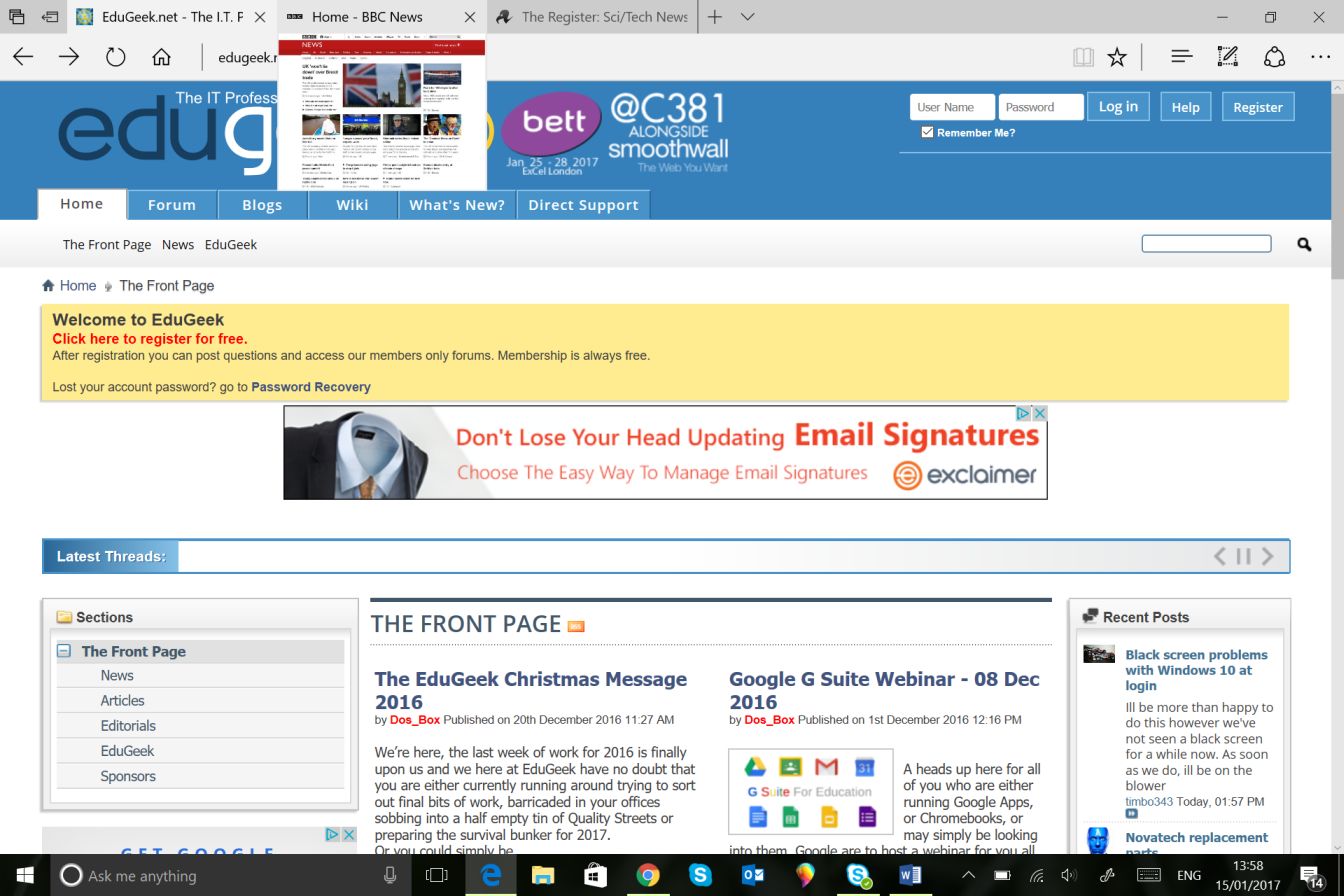
- Tab previews. Hovering over a tab will give you a preview of the page content (see below):
- Share Tabs improved features
- Import data from other browsers
- You can now opt to ‘Run’ a downloadable link without having to save it first
- Web Notes to now offer the same Windows Ink features that you can use in Maps and Photos
- Improved text scaling and zoom on mobile devices (up to 500%)
- Web to App linking. If you have an app that utilises the site content this app will can open automatically
- Downloadable themes from the Windows Store (not yet fully working but I don’t really need to explain what this is!)
- Cortana to follow you around (in a non-creepy way). What this means, for example, is that should you use Cortana at work and logon with the same account at home on a laptop, your previous searches and interactions will be available to you
- Windows Hello setup improvements. If you use Windows Hello facial recognition to access devices then these improvements should help you setup Hello easier
- New rainbow flag emoji!
- Snipping Tool keyboard navigation improvements


Recommended Comments
There are no comments to display.