


It’s been a big day for Microsoft in education today with several announcements which you should all find very interesting and helpful indeed!
Firstly, here is a raft of new features for teachers and students to be included in Office 365 Education:
---
As part of today’s Microsoft’s Education announcement, we are announcing new and unique experiences and updates to Office 365 Education coming summer 2016* that will make it easier for teachers to manage their classroom; students to learn; and IT administrators to set it all up.
Classroom automation with School Data Sync:
We have heard that administrators want the flexibility to set up and manage their online classroom. That’s why today we are announcing School Data Sync (SDS), which will also be included in Office 365 Education, to enable the class creation and updates in Microsoft Classroom. By syncing user profiles and class rosters from a Student Information System (SIS) into Office 365 Education through Azure Active Directory, SDS automates management of classes and class materials for teachers, freeing up time for lesson planning and teaching.
Students logged in to Office 365 Education are automatically logged in to other supported classroom applications—saving instruction and administrative time. Since IT admins can determine what student data to sync and which apps can access the data, it is easy to remain in compliance with your standards and policies.
We have a list of the SIS partners on the School Data Sync website here and will continue to add more throughout the preview. A primary goal of ours is to deliver value to educators by delivering assignments (and grades) created in Office or OneNote in other education applications. Already, for launch, we have over 25 education partners committed to integrating with Office 365 Education.
Here is an example of how Omaha Public Schools is using both Microsoft Classroom Preview (formerly referred to as “Class Dashboard” in private preview) and School Data Sync Preview in Office 365 Education:
https://www.youtube.com/watch?v=ID-xCwPfxIg
Office 365 Education - now with Microsoft Classroom
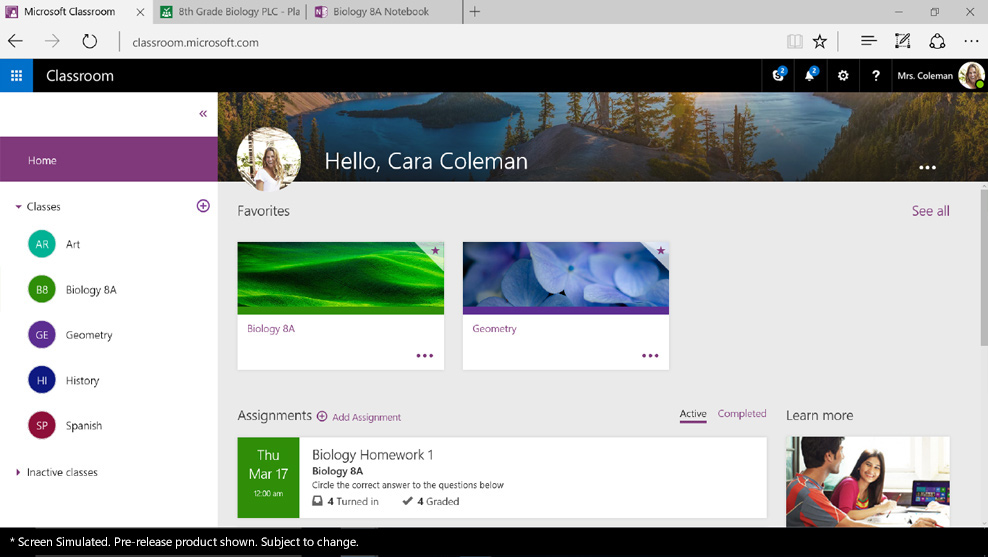
Office 365 Education now includes Microsoft Classroom, a single experience for managing all classes and assignment workflow—with a teacher and student view.
Microsoft Classroom has a OneNote Class Notebook built into every class, allowing teachers to create assignments with due dates, complete with Outlook calendar events and reminders. The assignments can reference materials from the Class Notebook, Office documents and interactive content. You can create assignments for multiple classes at the same time, easily grade them, or give them private feedback and ask them to resubmit.
Students can receive, complete and submit assignments on their favorite devices, including mobile devices via the Microsoft Classroom app. Throughout the workflow, they have the ability collaborate with classmates in real time within Office documents, online or offline, without worrying about losing formatting.
Also launching:
Quick quizzes and surveys with Microsoft Forms - Microsoft Forms is a new part of Office 365 Education that allows teachers or students to easily and quickly create custom surveys, quizzes, questionnaires, registrations and more
Educator and staff collaboration with PLC Groups and Staff Notebooks - Just as teachers have been using Class Notebooks in their classrooms, they have also been using a similar digital notebook with their fellow staff members. OneNote Staff Notebooks help them save time, get organized, collaborate more effectively and capture activities, such as professional development and classroom observations.
OneNote Class Notebook - Now, with the new Class Notebook add-in announced last month, built based on teacher feedback, teachers can share, track and grade assignments across classes wherever is most convenient (OneNote, Microsoft Classroom or their existing LMS)—without having to jump between websites and applications.
To read more about the new products you can see the full blog article at: Office Blogs
The individual product information can be found at:
- Microsoft Classroom - https://classroom.microsoft.com/
- OneNote Class Notebook - https://www.onenote.com/classnotebook
- Microsoft Forms - https://forms.office.com/
- School Data Sync - https://sds.microsoft.com/
- OneNote Staff Notebooks - https://www.onenote.com/staffnotebookedu
- OneNote Learning Tools - Learning Tools for OneNote


Recommended Comments
There are no comments to display.