


In this article, we discuss how to get a handle on the problem that compromised passwords present to educational establishments, how to easily identify them in Active Directory (AD) alongside additional password vulnerabilities, and how to future-proof your password security with continuous compromised password scanning.
The compromised password problem
The education sector is becoming an increasingly attractive target for cyberattacks. This year the UK government reported that breaches for educational institutions were significantly higher than the average UK business.
Research from Verizon’s Data Breach Investigations Report (DBIR) 2023 found that 44.7% of data breaches involve the use of stolen credentials. These credentials, exposed in previous data breaches, phishing attacks, or weak password practices, are considered low-hanging fruit by malicious actors to gain unauthorized access to networks.
Unauthorized access to student and staff data, financial records, and other confidential information can lead to identity theft, fraud, and reputational damage. Moreover, compromised passwords can also result in disruptions to teaching and learning activities, as well as potential violations of regulatory compliance requirements, such as the General Data Protection Regulation (GDPR).
Unfortunately, many educational institutions lack the robust password management policies or tools that help protect their networks from these types of attacks. To mitigate these risks, it is crucial to conduct regular audits of AD accounts, identify password-related vulnerabilities, and any compromised passwords that may be lurking within systems.
Regular password audits help proactively detect and address compromised passwords, ensuring the security and integrity of data. By implementing strong password policies, and educating users about password best practices, the education sector can enhance its cybersecurity posture and mitigate the risk of emerging threats.
Finding Compromised Passwords in Active Directory
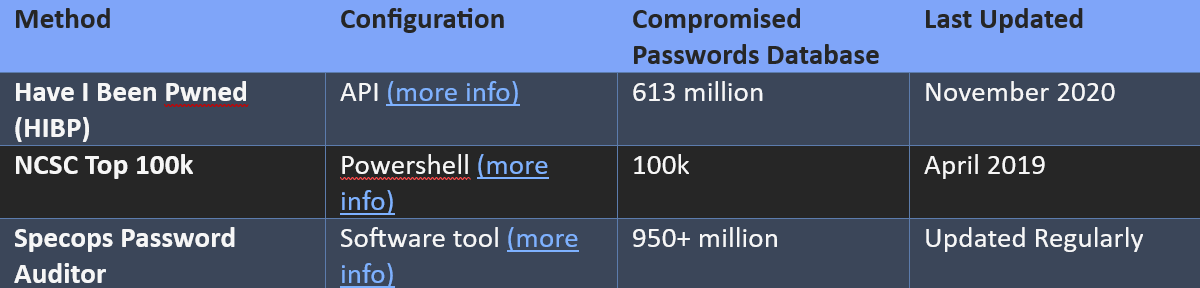
There are numerous methods, freely available, for identifying whether compromised passwords are in use within Active Directory. The most widely known, Troy Hunt’s HaveIBeenPwned (HIBP) database consists of over 847M+ (December 2021) compromised password hashes that can be checked against using an API, and the NCSC’s Top100k list (based on the HIBP list) via PowerShell. Database size, frequency of updates, resources required for configuration, and streamlined reporting capabilities are of critical importance when performing an extensive audit to gain situational awareness and posture for remediation. For this, a purpose-built tool is the way forward.
<img src="https://awscdn.cdngeek.com/img/spon/specops_table.png?v=2" usemap="#image-map">
<map name="image-map">
<area target="_blank" alt="More Info" title="More Info" href="https://specopssoft.com/blog/checking-pwned-passwords-active-directory/?utm_source=edugeek&utm_medium=referral&utm_term=spa" coords="275,35,368,56" shape="rect">
<area target="_blank" alt="More Info" title="More Info" href="https://specopssoft.com/blog/configure-ncsc-password-list-in-ad/?utm_source=edugeek&utm_medium=referral&utm_term=spa" coords="334,66,427,87" shape="0">
<area target="_blank" alt="More Info" title="More Info" href="https://specopssoft.com/product/specops-password-auditor/?utm_source=edugeek&utm_medium=referral&utm_term=spa" coords="353,98,447,118" shape="0">
</map>
Specops Password Auditor is a powerful free software tool, built specifically to assist you in the auditing process by providing valuable insights into the state of your user passwords, and other potential vulnerabilities within your AD environment.
Widely used in the UK education sector, Password Auditor incorporates multiple leaked lists (including the HIBP database) as well as passwords collected via honeypot networks in recent attacks. Today, consisting of over 950 million compromised passwords, the tool provides a complete overview of your password vulnerabilities in an interactive dashboard with additional functionality for checking your password policies against industry standards. The tool also includes export capabilities in CSV or executive-level PDF summary.
Operating in read-only mode, ensuring no modifications are made to Active Directory. Specops Password Auditor does not transmit any data externally, meaning you can comfortably run it on a computer without an internet connection. Additionally, there are no advertisements, or any other bothersome elements typically encountered in freeware.
How to run an audit using Specops Password Auditor
Step 1: Download and install Specops Password Auditor.
Sign up for your free copy of Specops Password Auditor here for free. Once downloaded, run the installer and follow the on-screen instructions to install the application on your domain-joined workstation or server.
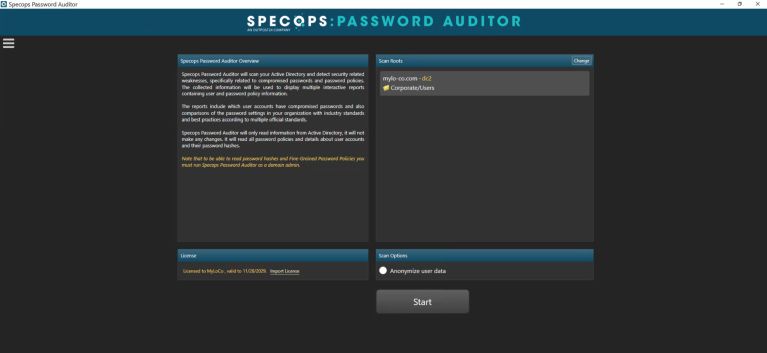
Specops Password Auditor: Initial Screen
Step 2: Launch Specops Password Auditor
After installation, launch the Specops Password Auditor application on your workstation or server. You can run it either as a regular user or as a domain admin if you would like to use the advanced reports for compromised, identical and blank passwords.
Step 3: Configure Specops Password Auditor
Upon launching the application, use the free activation key you received via the download confirmation email and connect to your Active Directory. If this is the first time you’ve run Specops Password Auditor you will be prompted to select a download directory for the breached password database, make sure you have at least 6.2GB of local disk space.
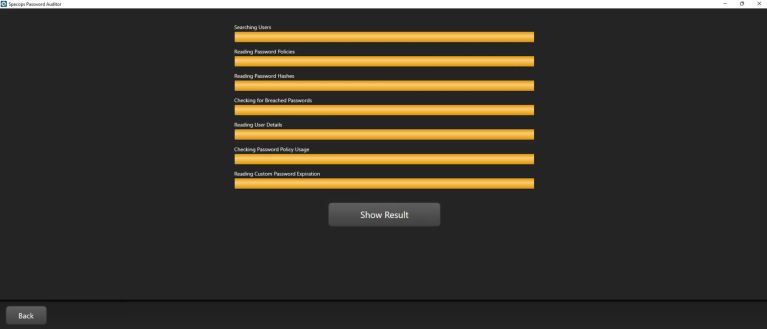
Specops Password Auditor: Scanning
Step 4: Run the Audit
Initiate the audit by clicking ‘Start Scanning’. The application will analyse the user passwords and password policy settings in your Active Directory and quickly generate a comprehensive report.
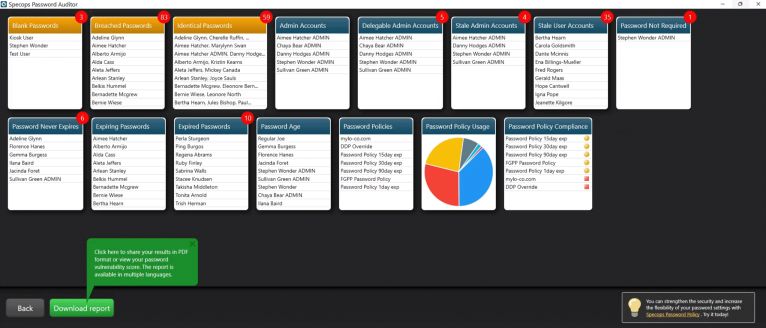
Specops Password Auditor: Results dashboard
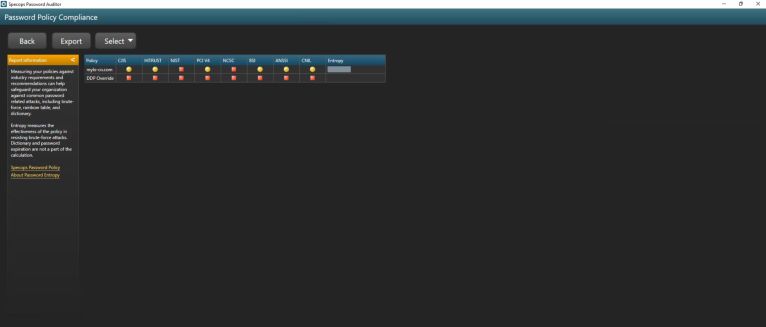
Specops Password Auditor: Password Policy Compliance
Step 5: Review the Audit Results
Once the audit is complete, review the generated report. Specops Password Auditor provides insights into compromised passwords, identical passwords, blank passwords, as well as account-related vulnerabilities like stale admin and user accounts. Analyse the results to identify weak points in your password security.
Step 6: Take Action
Based on the audit results, take appropriate action to address any vulnerabilities identified. This may include requesting users to change compromised or identical passwords, enforcing stronger password policies, or implementing additional security measures.
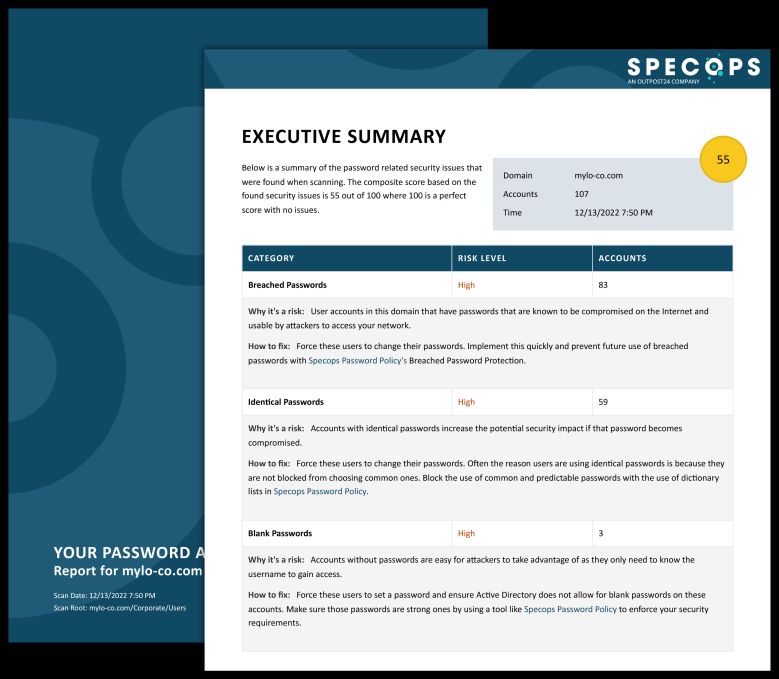
Specops Password Auditor: Executive Summary PDF
Step 7: Generate Reports (Optional)
Specops Password Auditor allows you to generate detailed reports in various formats, such as CSV or PDF. These reports can be useful for further analysis or for presenting the audit findings to the relevant stakeholders.
By following these clear steps and running regular audits with Specops Password Auditor, you can proactively identify and address password vulnerabilities within your Active Directory.
For a more in-depth guide to installing Specops Password Auditor, you can refer to the impact of running Specops Password Auditor on Active Directory or the support page.
Future-proofing password security
Auditing passwords in your organisation is a great first step to uncovering areas of potential compromise to remedy, but it doesn’t prevent the issue from reoccurring again in the future.
Microsoft cites 4,000 password attacks happen every second. Regardless of user awareness around password security, relying solely on users to create secure passwords puts an unnecessary and unrealistic burden on them. Instead, technical controls need to be put in place to ensure that a user-friendly process is offered in setting both strong passwords (such as passphrases) and passwords not already compromised from the outset.
Specops Password Policy enables users to do just this, placing the burden on authentication systems with dynamic, informative client feedback throughout. With an option of continuous compromised password protection against a database exceeding 4 billion and updated daily, you can rest easy by going way beyond point-in-time audits. The solution offers a more comprehensive defence against the threats of password attacks and the risk of password reuse. If you’re interested in seeing how this might work for you request a free trial or demo of Specops Password Policy today.
To conclude, a concerning mindset observed is that passwords can be overlooked when additional methods of authentication are in use. A multi-factor authentication (MFA) approach is certainly advised wherever possible, but it is of critical importance to know, MFA isn’t bulletproof – no single layer of security is.
Adding MFA does not remove the need to protect the password, and protecting the password does not remove the need to add MFA.
If you would like to get in touch to learn more about how Specops Software supports the UK educational sector and public sector, contact us here and we’ll be happy to help.





Recommended Comments
There are no comments to display.