Bedders
-
Posts
1,065 -
Joined
-
Last visited
Content Type
Forums
News
20th
EduGeek EDIT Conference
Blogs
Everything posted by Bedders
-
Thankfully my hayfever hasn't been too bad this year (yet) - although I may just be passing it off as the remainder of this cold from a couple of weeks ago. May have been on it until midnight... I'd forgotten how addicted I can get to Minecraft I'm going to be on again tonight, need to get some machines going - if I'm on after 10pm, yell at me
-
Wonderful, been on it a bit this evening and have a decent start going. Thanks and looking forward to gaming alongside some of you
-
The embarrassing thing is, I remember reading that thread as well... Sorry for duplicating! As an organisation we only went to Windows 7 a couple of years or so ago. There's no way we're considering upgrading to Windows 10 because it's only one computer that's affected. I'd rather just disconnect it from the Internet and leave it vulnerable. That link is useful, thanks - I'll take a proper look at it when I get chance tomorrow.
-
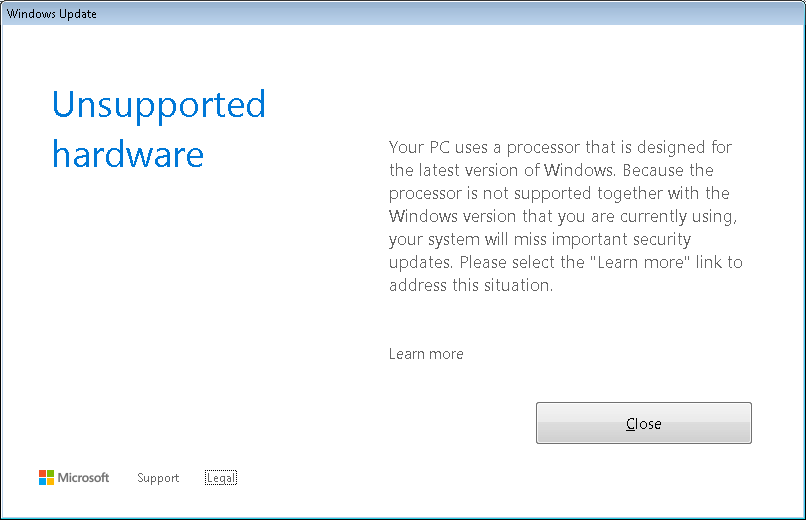
Moving this discussion here rather than in the Annoying Things thread, to see if anyone else has come across it or has a solution. Background to the problem: We have a custom built computer for our Marketing Manager running Windows 7. The processor it has is an Intel Pentium G4600 Kaby Lake. Today I was told that whenever she logs in to the machine she gets the following error: The error is because Microsoft are no longer allowing Windows Updates to search if Windows 7, 8 or 8.1 is running on an Intel Kaby Lake or an AMD Ryzen processor, and trying to force users to upgrade to Windows 10. Sources: https://arstechnica.co.uk/information-technology/2017/03/windows-7-8-ryzen-kaby-lake-support/ https://www.gizmodo.com.au/2017/03/microsoft-blocking-windows-7-and-8-1-updates-on-ryzen-and-kaby-lake-processors/ And from Microsoft themselves https://support.microsoft.com/en-us/help/4012982/the-processor-is-not-supported-together-with-the-windows-version-that- https://support.microsoft.com/en-gb/help/22801/windows-7-sp1-and-windows-server-2008-r2-sp1-update-history Specifically: This isn't an issue with hardware support, it's an issue where Microsoft are not allowing updates to be installed on Windows 7, 8 or 8.1 - despite the fact that Windows 7 is in Extended Support, and 8.1 is in Mainstream.

-
For complete chaos... https://minecraft.curseforge.com/projects/agrarian-skies I'm in favour of The 1.7.10 Pack on Technic - it has TreeCapitator!
-
I'll take a look back on Technic's website - Myself and a friend built a few modpacks years ago, I'll see if any of them are still around (and still work without the Solder server being online ). If any are worth mentioning I'll throw them here as ideas. Or we could go for something like Tekkit Classic back to the good old days
-

The 404 Page: Creative or funny 'Page not found' pages you have found
Bedders replied to 6Foot2's topic in General Chat
I clicked on this thread hoping to get a 404: Thread Not Found error from Edugeek... -
Nicely done No news is good news!
-
Hmmm.... I know that you can delete or rename files on Windows using Command Prompt where the path or filename is too long, but why it would work when moved between file systems I have no idea... What are the disk formats (e.g. FAT32)? Doubt it's related but it's a start.
-
I always sync everything to "uk.pool.ntp.org". I'm not 100% sure if it requires the UK. at the start, otherwise it may be going off GMT rather than BST if it's an hour out?
-
Technicians non-technical guide - Helpdesk
Bedders commented on simpsonj's blog entry in Technically Technical
Hi simpsonj, I came across this a while ago and thought it was a great useful read - although we don't employ a helpdesk at my current small business, there's only myself as the technician so it's less of an issue! Have you got any plans to continue with the TNTG as a series? It has massive potential! Many thanks for authoring it Bedders -
Would love to attend one of these, but unfortunately it's a 4 hour drive or train ride away... Quicker to fly from Manchester Airport!
-
[video] Orchestra plays Microsoft Windows™ - the waltz
Bedders replied to BKGarry's topic in Jokes/Interweb Things
Made my day -
Harvard University: Introduction To Computer Science
Bedders replied to 6Foot2's topic in Courses and Training
Just registered for this. Will have to see how long my commitment to completing it holds out. Thanks for sharing! -
The Academy in the North-West I used to work at used Virtue Technologies. The company I'm working at now uses ITLabs who are based in Manchester. I would highly recommend both in terms of support provided.
-
What did you do after leaving Educational IT Support?
Bedders replied to flyinghaggis's topic in General Chat
I worked as an IT Technician in an 11-16 secondary school which became an academy during my time there. I got involved in all kinds of things such as anti-virus maintenance (server & clients, upgrades, compliance, installation etc.), the school website, desktop support ranging from switching a PC on to training staff how to use software, iPad purchasing and deployment, running CAT5e & CAT6 through the building, CCTV handling including data protection... The experiences I learned during 7 years in Education have stood me in fantastic stead. I initially left to do data entry (it seemed like a good idea at the time - the job was offered to me on a plate, including a higher salary, closer to home etc) but I got bored so after 6 months moved to my current position providing IT Support to a small company (<100 employees). I currently work on versions of Windows Server 2003 through to 2012, have dived into SQL and VB.NET (my manager is an excellent developer and has written a large amount of our software) and work as part of a team of 2 (just myself and my manager. I provide the daily IT support and just ask him where there's things I don't understand). The major shock I found when starting here was how out-of-date everything was compared to the school. All our hardware was second-hand from eBay - old Dell Optiplex 755's. All that we had done was put SSD's in them and they're good to go Our servers were second-hand Dell PowerEdge's. I believe our switches were new (HP and gigabit in case you were wondering), but only one is managed. We are running old versions of Windows Server and have no plans to upgrade because they work fine. We have two physical servers functioning as Hyper-V hosts, and a DPM server for backups. There's probably a couple of other old physical servers lying around too that are running some archaic service that we still use. Servers are multi-roled and some have names unrelated to their functions. We deploy operating systems manually using Macrium Reflect (capturing images manually every 6-months or so to make sure there's never too many updates to do). We have no plans to install WDS and certainly not SCCM as it costs way too much and we rarely image machines anyway. Even running the old desktops that we do, the failure rate is generally so low that it's not worth it. It's been difficult for me too to adapt to a business environment. Here everything is based on 'will it bring value to the business', but this also includes 'if it costs £500 to buy software, and will take you 100 hours to develop, your wages in terms of time spent will cost more than the software so just buy it'. Back in education it didn't seem like our time had such a value placed on it. Leaving education was a fantastic decision that has turned out very well for me. I still keep in touch with the Network Manager at the school (he even lurks on here occasionally - Hello if you're reading!) and would definitely go back to education in a few years - yes, the pay isn't great but the variety of work and the feeling of job satisfaction was unmatched. EDIT: wow, long essay! -
They swapped the ones around my house a few weeks ago. I must say that I dislike them - the light is too directional leaving dark patches in between brightly lit patches. And when I'm driving, as I pass under the lights, they're almost too bright as they go overhead.
-
Happy birthday from someone else who is 24 I'd say something like "make the most of your life" but in reality - if you enjoy what you're doing, stick with it. If not, change it now whilst you've got time to correct any mistakes you make!
-
I have no idea what version I'm running! I've also had to move the SetPermissions function above the IF statement, as it couldn't see it. This only occurred after I added a prompt to press any key to continue at the end. Anyways, thanks again!
-
Wow pleach, many thanks - worked almost perfectly! I had to change the line if($foldersToBeGivenPermissions.Contains($folder.name)) to if($foldersToBeGivenPermissions - contains $folder.name) for it to work - "The error was Method invocation failed because [system.Object[]] doesn't contain a method named 'Contains'." was the error that I was getting, apparently something about only having one object in an array and powershell takes it out of being an array? You're amazing! And thanks to admars too for the assistance!
-
I read that edit after I've done some research into SAMAccountName. I've tried "Firstname Surname", "Logonname", "[email protected]", "domain\Logonname" all with no permissions being applied. I'm beginning to think it's the $permissionsToApply section that isn't correct.
-
Hi all, Very new to Powershell (today, in fact!) and having some trouble with a script I'm working on. Now, I do know that I could have had this done manually in a much shorter time - but where's the fun in that? The Problem I have a directory, inside which is a load of other folders. The staff member needs to have Read&Execute access to the root directory (to view the folders that they can access), and specific folders, but no access to the others. The root directory is a shared folder. What I have so far: ### The root directory containing all of the folders $directory = Get-ChildItem "D:\" ### @edugeek: Not sure if this needs to be their logon name? ################# $username = "USERNAME" ### The permissions to apply to this user $permissionsToApply = "ReadAndExecute" ### The list of folders that the user needs specific access to, comma separated $foldersToBeGivenPermissions = "TestFolder" ### DO NOT MODIFY BELOW THIS LINE $accessRule = New-Object system.security.accesscontrol.filesystemaccessrule($username, $permissionsToApply, "None", "None", "Allow") foreach ($folder in $directory) { $foldername = $folder.name switch ($foldersToBeGivenPermissions) { $foldername {$accessRule} } } However nothing seems to change when I run this. Obviously I'm running it on my machine locally first to test it. My question is: Does the $username need to be something different, or will it take the user's Active Directory login name? Do I need to put the domain in there also? Am I missing something else crucial? Many thanks to any and all kind folks out there who can help me out
-
In the past when this happened to me, I asked our HR person to send them an email containing simple instructions for removing a device from their iCloud account - something like the following: - log in to http://www.icloud.com - click on X at the top - find and click delete - please reply when this is done Then we said that if they did not confirm that this was done within 30 days we would consider pursuing legal action, as they have left school property unusable by others (tantamount to vandalism or something, I just know that they had to return all school equipment in the state that it was given to them according to their contract). Although I don't know if this will clear the Activation Lock, the instructions I got were for removing a device from their iCloud account so we could wipe it, but it had no passcode on or anything... Good luck getting it sorted!
-
Too late now (I've only just had chance to test this) but unplugging the network cable and plugging it back in again does reconnect a computer to the network. Just for anyone who comes across this thread
-
At the secondary school I used to work at, we had 6 Sharp MFP's with Follow-Me Printing managing it all - one queue, go to any printer to release a document. Since we already had biometrics in the canteen, fingerprint readers were added to the side of every printer. Each printer could print, scan, copy, all in either colour or black&white (default to B&W, changed in Print Options from the computer when it was sent) and had 3 x A4 500-capacity trays and an A3 500-capacity tray. User logged in with their fingerprint (linked to Active Directory) or could manually enter their Active Directory username & password - it did mean staff were initially handing their logins to 'trustworthy' students to collect their printing but this died down once we reset any staff's password that were caught doing this. Documents were sent to the print queue under the credentials of the user logged in to the computer and could only be release from a printer by that user account. We also had the paper trays locked away with a key (giant metal bar that was raised to cover the right side of the paper trays) which prevented a lot of staff going 'Oh we need some paper. Let's not go down to Reprographics and get charged, let's nick some from the printer'. A couple of them were trying to be clever and printed 30 blank pages to get paper, without realising their department would still be charged. Made me chuckle...