-
Posts
1,927 -
Joined
Content Type
Forums
News
20th
EduGeek EDIT Conference
Blogs
Everything posted by DavR
-
It's an option, although I think ultimately we're going to O365 next summer, so most likely I'll sync our domain with O365 accounts rather than Google. Nothing's finalised yet though.
-
I must admit, we still use a generic login for KS1 and KS2. In an ideal world I'd move to individual logins, but for us we're moving more and more towards Google Classroom and Chromebooks, and each child has their own Google account for that. KS2 children at least seem to be OK remembering their Google logins, if not, teachers have access to the list of usernames and passwords. That being the case I'm less bothered about pushing for individual Windows logins, as the children are using Windows devices less and less, so it doesn't seem worth the argument.
-
Not sure if anyone else has seen this one? We upgraded to 20H2 over the summer, and when our users logged back in this week and last with their roaming profiles (yes I know it's unsupported but it still mostly works for us), a lot of the UWP apps won't run for them. They can see them there in the Start Menu, but clicking them causes no response. I know UWP apps only register in new profiles, which can mess with roaming profiles a bit, but after previous upgrades, clicking on the UWP app in the Start Menu would cause it to install and register in the user profile without a problem. I could get around this with a script to re-register apps that are missing, but I'd much rather find out why the old way wasn't working and fix that if I can....
-

[free] Promethean ActivBoard 1/2 power supplies & accessories
DavR posted a topic in Classified Adverts
Just thought I'd advertise these here before they go to the scrap man, as I know they are getting increasingly hard to find. Promethean power supplier for 1st and 2nd generation ActivBoards - https://www.ebuyer.com/174869-promethean-power-supply-unit-and-cable-for-eu-activboard-interactive-whiteboard-activ-psu-ukl Pulled from working boards that are being scrapped. Free, just cover postage. Also available are other Promethean cables, pen holders, etc. -
20H2 here also. It added to Windows just find on its own using Add-AppxProvisionedPackage, but I found it didn't register in new user profiles without the correct VC Libs version also provisioned.
-
Glad to be of help! There is a postscript on this btw. When I was playing with my new build in production, I found that for the HEIC/HEIF app to install into the new user profile, you needed to have the correct version of VC Libs 140 as a dependency provisioned in your build as well. Find it on the rd-adguard site when downloading the appx packages.
-
[2004, 20h2] Installing network printer hangs at "Device Setup In Progress"
DavR replied to DavR's topic in Windows 10
It's a fair shout, you never know. That update only seems to be for LTSC version though, unless I'm missing a link. I'm using regular Enterprise 20H2. -
[2004, 20h2] Installing network printer hangs at "Device Setup In Progress"
DavR replied to DavR's topic in Windows 10
From a share on our print server. -
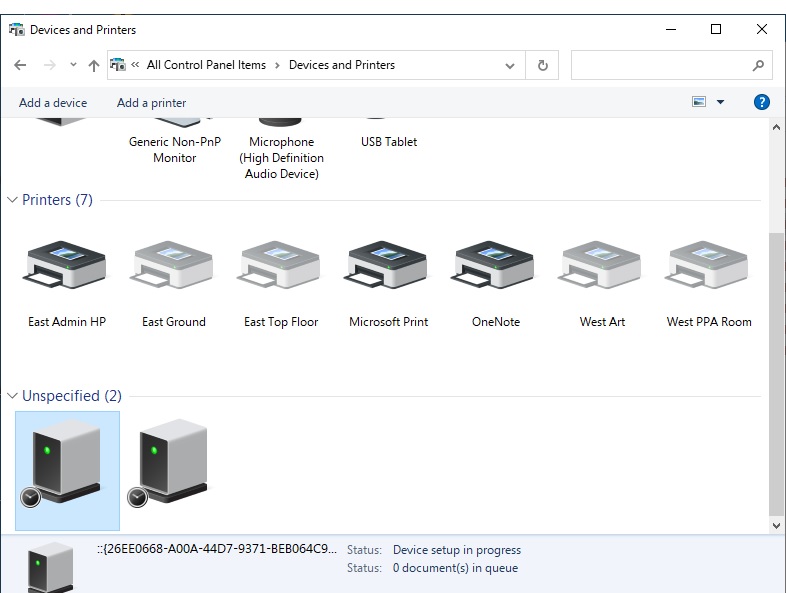
I'm just on the cusp of rolling out 20H2 (currently on 1909) and have just noticed this problem today on my first few machines. When installing a network printer, either manually or by GPO, it hangs at "Device setup in progress" for AGES, like, more than 15 minutes, when you look at it through Devices & Printers in Control Panel. The odd thing is though, when you look at the printer list from a standard print dialogue, they are there and ready to use, so I guess at least it's not impacting the user experience too much. Reading around, I've seen it discussed where this is caused by Windows looking online for metadata (printer icons etc) so have disabled this as per the GPO setting in this link, which has at least stopped some weird behaviour around printer names not showing up correctly. It mainly seems to be the driver for the HP LaserJet M404-M405 series that is behaving like this, which is annoying as we're on the latest version and found they behaved poorly on the HP Universal driver. So I guess maybe it's an incompatibility between that driver and 20H2? Worked OK on 1909! Anyone else seen or have any wisdom on this? I'm trying to decide whether this is something I can shrug off and hope doesn't cause too much hassle, or if I need to spend more time working on it.....

-
Are you looking forward to getting stuck in to all your Summer jobs!
DavR replied to kennysarmy's topic in General Chat
Six years I've worked here. You can tell the people who actually listen in conversation, they're the ones who don't say "how was your break" at the start of each new term! -
Are you looking forward to getting stuck in to all your Summer jobs!
DavR replied to kennysarmy's topic in General Chat
I'd say rationalise the workload, and let the least important bits of it drop. Then when questioned on why it hasn't been done, be honest and say you didn't have enough notice. But we never do that do we? We always put ourselves out until it's done. -
Are you looking forward to getting stuck in to all your Summer jobs!
DavR replied to kennysarmy's topic in General Chat
-
Are you looking forward to getting stuck in to all your Summer jobs!
DavR replied to kennysarmy's topic in General Chat
I am looking forward to it actually, as much as I ever look forward to coming to work. Reinstalling all Windows devices with new image, wiping all the shared iPads, (hopefully) junking some terrible laptops that have been a real burden, a bit of AV work (touch wood), clearing out the junk, a couple of classroom moves. It's nice to put things straight once a year before the users trash them again. A bit of freedom from harassment, plus I'm due at least two weeks off somewhere in the middle! -
Outlook prompting for logon credentials each time
DavR replied to DavR's topic in London Grid for Learning (LGfL)
Yup. Can confirm that people are starting to report that it's fixed here. -
Outlook prompting for logon credentials each time
DavR replied to DavR's topic in London Grid for Learning (LGfL)
In our case, yes, our email domain is also registered in O365, which may be where some of the confusion comes in. -
Outlook prompting for logon credentials each time
DavR replied to DavR's topic in London Grid for Learning (LGfL)
I've had another user here who was getting prompted for login each time, but after installing KB5001980 and rebooting earlier today, no longer has the issue. So either something has changed Microsoft's end, or that patch is fixing it (for us anyway). -
Outlook prompting for logon credentials each time
DavR replied to DavR's topic in London Grid for Learning (LGfL)
I haven't had much luck with the "Disable AutoDiscover" GPO settings. I updated my ADMX files this morning to get all the new settings, and I've tried several of them, to no avail. BUT, I did get a Windows Update for Outlook in the background, KB5001980. After installing and rebooting, my test machine stopped asking for login in Outlook. Bit muddied by the fact that I was playing with GPO settings at the same time, but, I think this update might be the fix. -
Outlook prompting for logon credentials each time
DavR replied to DavR's topic in London Grid for Learning (LGfL)
I've tried this one as well, ExcludeLastKnownGoodUrl doesn't seem to fix it for us. -
Outlook prompting for logon credentials each time
DavR replied to DavR's topic in London Grid for Learning (LGfL)
As far as I can see, there does seem to be some confusion between Staffmail and Office 365, hence the ExcludeExplicitO365Endpoint registry change. We do have our email domain registered in O365, although we're not using it yet. I think it's something in autodiscovery and/or the Outlook profile. Junking the Outlook profile and starting again looks to fix it, but I don't want to be doing that for every member of staff... -
There is currently a known problem where Outlook prompts for login credentials each time when loading for Staffmail accounts. Normally these credentials are saved, and you only have to put in your password if it's been changed. Atomwide service desk have acknowledged this is a problem for Staffmail, but their registry fix doesn't work for us. HKEY_CURRENT_USER\Software \Microsoft\Office\16.0\Outlook\AutoDiscoverHere you should create a new DWORD parameter labelled ExcludeExplicitO365EndpointThe value of this should be set to 1 Reading around the subject, this fix is for versions 16.0.6xxx and above, ie, the O365 channel - https://docs.microsoft.com/en-us/outlook/troubleshoot/profiles-and-accounts/unexpected-autodiscover-behavior. We're using the standalone version though, which is currently at 16.0.5xxx. Are any other LGfL schools suffering from this, and has anyone found a workable solution?
-
We're a few years away from this yet, but we'd probably be looking to keep using them til we can't, unless there is a specific security threat beyond just being out of date.
-
I would install it manually on one device, then check from there which version it's installed. By the look of it, you should also which dependencies you're going to need to go with it.
-
What was the package you were looking for? If you can find the link to the package via Microsoft Store pages, and put it into https://store.rg-adguard.net/, you can download the installer files for most things. I had success with HEIC/HEVC by downloading the appx and BlockMap files from there, then installing using the command: Add-AppxProvisionedPackage -online -PackagePath [path to files]\Microsoft.HEIFImageExtension_1.0.40978.0_x64__8wekyb3d8bbwe.Appx -SkipLicense
-
My preference would always be to add the app to the Windows 10 image before deployment. For instance, having seen some of the comments on this thread, I will be adding the HEIC / HEVC packages to my new Windows 10 image, which I shall be using to reimage all of our devices over the summer. If that's not possible though, you can add them to an existing installed OS using "Add-AppxProvisionedPackage -Online". The syntax to add either can be found here - https://docs.microsoft.com/en-us/powershell/module/dism/add-appxprovisionedpackage?view=windowsserver2019-ps
-
I think the official, supported, solution to deploy appx packages is through SCCM. You can set this up to link to your Windows Store account for your organisation. I found that whole process a bit of a pain, frankly. When I need to roll out appx packages (rarely) I either put those apps into my Windows 10 build using DISM, OR, get the appx files from https://store.rg-adguard.net/ and install via PowerShell startup script. There is some provision as well, if you have purchased apps, to download appxbundle files from Windows Store, which can be installed via PowerShell script. It's very fiddly whatever path you take though. The whole appx concept is very much built around users going to the Windows Store and downloading things themselves.