-
Posts
1,936 -
Joined
Content Type
Forums
News
20th
EduGeek EDIT Conference
Blogs
Everything posted by DavR
-
This thread on Reddit seems to describe a similar problem to yours. The solution proposed seems to be "disable co-management".
-
I wonder, for testing, could you put a delay then a reboot, between the hashed uploading in your TS, and the user logging in? I wonder if this might give it time for the device group memberships to complete. Alternatively, I suppose it could be that Intune membership "proper" doesn't complete until after the OOBE runs. Would be a pain if that's the case, but I wouldn't discount it yet.
-
Honestly, I've had apps working just fine, that then started to cause errors when running during ESP, it's a pain. The latest batch I had were some print drivers, which didn't fail, they just hung, and hit the 30 minute timeout I had set on the app. Could timeouts be your issue rather than hard errors? Here's a thought - you can look at which apps have failed to install in the Intune console. It can take a little while to register, but under individual apps, you can look for install failures, and the error codes attached.
-
Long time Veeam user here - Yes, you do need to complete to wizard for the file level restore, before it will allow to choose the files you wish to restore, they come up in the next wizard. Nothing to do with local, cloud, or whatever, that's the behaviour whatever you're doing.
-
You may also find this page in your M365 console useful, telling you when your last sync ran. https://admin.microsoft.com/AdminPortal/Home#/dirsyncmanagement
-
Are you installing your Windows 11 devices into a domain first, and then syncing them with Entra to achieve Hybrid joined devices, or do you have a method in place that does a straight Entra only join? If the former, I'd say it's probably the config of your sync tool, somewhere along the way, rather than some hidden script in the Windows 10 image. The Azure AD Sync tool can be targeted to OUs, so if your WIndows 11 devices are in different OUs to Windows 10, it's probably that. Have a look on your Domain Controllers, and see what the properties are for the Azure AD Sync Tool. If you've done nothing with it recently, you may also find that the tool itself needs upgrading.
-
I'm assuming you're starting at an OOBE page, or the ESP wouldn't otherwise run. So this is on a fresh device, which you've only just uploaded the hardware hash for. How are you targeting your apps? Are you using All Devices, or, do the devices need to be a member of a specific group? Could it be that that the group membership isn't there in time for the step which enumerates which apps need to install, hence an ESP with zero apps in it? By the time you hit first logon, the membership could have been set correctly, and thus apps install. This might also explain why on a rebuild, using the same Intune device record, the ESP runs and the correct apps install (or at least try to), because by this point device group memberships are correct. At a guess, I'd say this was a secondary problem. One of your apps is failing, but they won't tell you which one, because that would be too easy. You can troubleshoot which app/s fail by seeing how many are installed at first logon, or, my preference, going through the Event Logs | Application to read the Windows Installer logs, telling you which apps installed and when.
-
Could you share the steps of your SCCM build sequence, plus how you're enrolling vanilla devices into Intune?
-
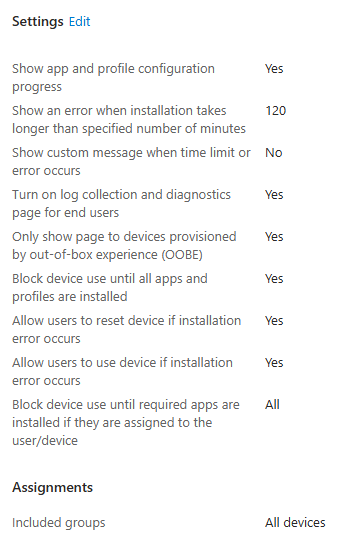
When you say, the member of staff signs on, is this part of an OOBE first run sequence, or, have you pre-prepped the laptop in some way and they're going straight to a standard user logon? When we changed ESP to OOBE Only = YES, that will mean that apps etc will only install either during the OOBE process, OR, they'll run in the background after first login. If we're not doing OOBE, then under this setting there is no chance for the apps to installed pre user's first login. I'm enrolling all of mine using an enrolment account via OOBE at first run. This means the ESP sequence runs for that enrolment account user, and that user only. When that's done, it's fully prepped, no further installs required.
-
You know, that totally makes sense now. Only show during OOBE = Only show for device setup, plus for the user that enrolled. If you set that to No, then people who are simply new to the device also get an ESP screen, rather than just processing whatever it needs to do in the background. Having never tweaked that setting, it would never have occurred to me that this behaviour might exist. Well remembered.
-
Ah, great news! So does this mean that this removes the ESP from your deployment scenario? Or just confines it to the correct part of the process? Best of luck with the deployment starting tomorrow. Do let us know how many different outcomes you get, running the exact same sequence on the exact same hardware 😉
-
I have mine set to "Yes", but then, I think the only route my devices have into Intune is via OOBE. I can't think of another one, off the top of my head. Your scenario may be different if you're building the device in SCCM then registering via scripts. Even so, though, I would only expect that ESP screen to run once (re-starting at successive logons if it hasn't completed). Are you still seeing the ESP at unexpected times then, I thought you'd had a clean install on your last test?

-
I don't know if it makes a difference, but I've never heard of updating the OneDrive client via C:\Windows\System32\OneDriveSetup.exe /allusers. I've always downloaded the latest version from the Microsoft page, and installed that via startup scripts using the /allusers /silent switches. Two thoughts - could that minor difference of source file be causing your issue? And - Are you using the /silent switch on your installer? Could it be that OneDrive install isn't actually completing, and your first run that doesn't sign in properly is actually a repair?
-
Yep, that sounds about right. Sometimes it pays to just send it round again and hope for the best 🤣 As long as it's working, that's the main thing.
-
Are all of these appearing in the ESP, after the user logs on for the second time, after enrolment? I'm wondering if this is to do with that unexpected reboot in the process again. I'd try and resolve that as a priority.
-
Questioning one's sanity also seems to be a normal feature of Intune, I have noticed.
-
New one on me. What kind of apps are we talking, Win32, LOB, or Microsoft Store? If you check in the settings of the app itself, under Properties and below the install commands, is the install behaviour set as System or User? Could be a user-focused app that you've deployed to a device group, maybe?
-
Fair play. We've never had this happen with personal OneDrives, but it certainly did happen when I initially tried to access our Staff shared drive and others as a OneDrive synced folder, they were never the same on any two machines. CDM was purchased quite swiftly after I realised how badly the latter did not work. Thanks for the tip re Mail Merges - looks like I can put those back onto my mapped drives, rather than cached in OneDrive, at last! Interesting re CDM doing folder redirection. I'll not rush out and make any changes, but that's two more nails in the OneDrive sync tool's coffin you've handed me today
-
Maaaate. The Thursday group will behave to the Tuesday group in Intune. I've had to reconcile myself to "it works 95% of the time" tbh.
-
I've been going through the same thing just recently, trying to perfect my Intune build. If you have to login to continue the enrolment process (I'm assuming you've got the Enrolment Status Page (ESP) and a handful of software that has to install before ESP can finish), this suggests that there's been an unexpected restart somewhere in the process. This is normally caused by a software title installing and causing a reboot. Check the logs to see what was installing just before the process was interrupted. I did our AutoPilot slightly differently to you. I created an AutoPilot profile and dropped it into the device's C:\Windows folder during imaging, which causes it to enroll during OOBE. I then have a policy set, to register all devices to AutoPilot. But that aside, none of my devices in AutoPilot are registered to a user. They're registered to the enrolling user in Intune Devices, but nothing under AutoPilot Devices.
-
Unless something changed in the recent version upgrade, Mail Merge doesn't work via CDM mapped drives, as it recognises that they're SharePoint underneath. This is one reason why I keep the OneDrive sync going, whilst also doing a mapped drive. Sidenote, but, @speakercon I didn't know there were folder redirection options in CDM now! Do you have any links to info?
-

Windows Server 2022 not download WSUS updates
DavR replied to Theldron's topic in Windows Server 2022
Looking on my config, I replaced that line on mine. You may want to save that string somewhere just in case you need to put it back, though! -
Windows Server 2022 not download WSUS updates
DavR replied to Theldron's topic in Windows Server 2022
I've got Server 2022 downloading from WSUS server just fine here. Have you got the ESD filetype fix in place? There was at least one fix like this that needed doing so that certain large files would flow through WSUS correctly - https://community.spiceworks.com/t/fix-wsus-clients-stuck-on-0-download/1012611 Do you have any WUfB settings in your policies? If so, remove these immediately as they will try and bypass WSUS as a source. -
Install Windows Store App for all new and existing users
DavR replied to petben's topic in Windows 11
Sure.... The Add-AppxPackage line is the key thing, the others are just detect version/presence, and do not install if exists and is at or above required version. $currentVersion = (Get-AppxPackage -Name Microsoft.XboxApp).Version If ($currentVersion -gt 48) {exit} Add-AppxPackage -DisableDevelopmentMode -Register "C:\Program Files\WindowsApps\Microsoft.XboxApp_48.49.31001.0_x64__8wekyb3d8bbwe\AppxManifest.xml" -
Fair enough. I think if it were me, I'd mandate that all files, including video, need to be on server or cloud storage, and if the infrastructure creaks because of it, use is a business case for upgrading the infrastructure. Might cause a little frustration at upload and download speeds, but fewer tears at files lost from local storage that can't be recovered. Sounds like some of this is more the bosses decision than yours, though.