-
Posts
2,674 -
Joined
-
Last visited
Content Type
Forums
News
20th
EduGeek EDIT Conference
Blogs
Everything posted by DrBeaker
-
Thanks for the responses so far. I did think about a normal TV stand with wheels, but it's going to be in the eyeline of the students then. The wheels bit is purely due to the fact if it's designed that way, all they have to do is wheel it across from the side of the hall and then wheel it back once done. That's it. No calling IT to "setup the monitor thing" so I'm trying to preempt that excuse from them. We know how teachers think and we have to simplify things for them, so they don't have an excuse NOT to do something.
-
I'm sure they'd have done a better job of it too!
-
This is hilarious. So this is the end result of all that "talent" within BT? So the BT new chief executive, who is paid £1.1m salary as well as an annual bonus of up to 240 per cent of his wage - has signed off on this new logo? "We have to pay the high salaries to get the best talent" strikes again. I swear this needs to be made into a meme. BT names Worldpay chief Philip Jansen as its new group CEO, to replace Gavin Patterson in 2019 | City A.M. - - - Updated - - - That's BT to a T isn't? "experts in procrastination"
-
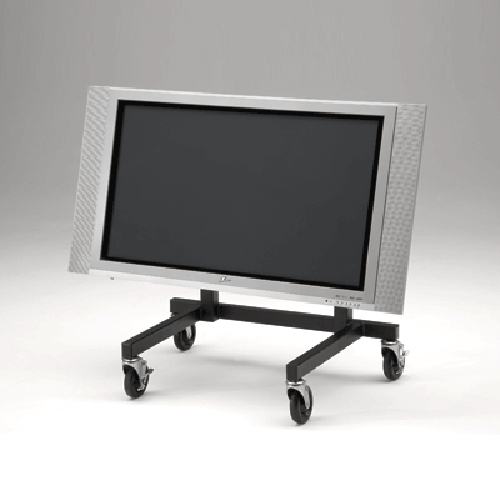
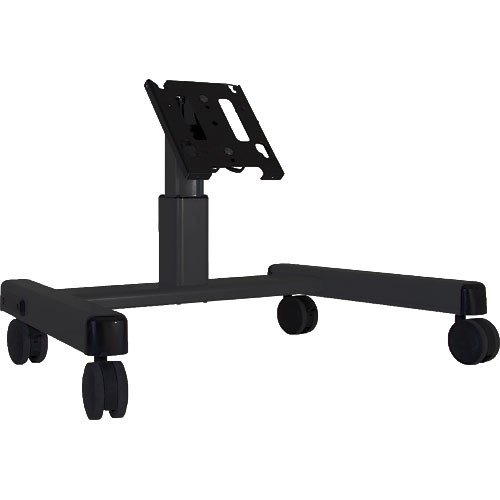
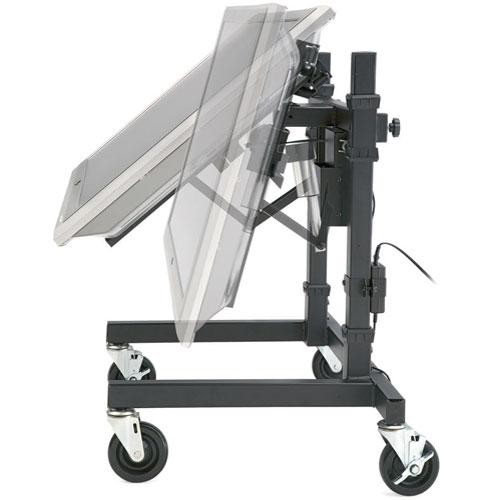
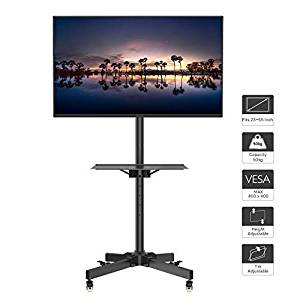
OK folks, I'm after the thoughts of the community and fantastic people here on edugeek for ideas and comments. :DI'm after something like this: a small monitor stand that has wheels/casters on it to make it movable mounts for/to put a 22" monitor or larger, or a large TV 28-32" likely size Low-down so as not to obstruct the view of the front of the hall. Ideally black in colour but not a deal-breaker. Able to be angled down/up with some movement It has to be easily movable and not fixed as it's going to be moved in and out at least once a day. It's to put a 22" monitor or larger on as a "Confidence monitor" at the front of our main hall for assemblies etc. I've done some googling, but I'm struggling to find anything decently priced and that's not in the USA - other than that I'm drawing a blank. The pics below are the only sort of thing I've been able to find. Has anyone used any companies, or got any suppliers they've used for stuff like this in? Mods - feel free to move this post to "AV and Multimedia Related" if you deem it more related - I couldn't decide!

-
These PCs were our "upgrades" from 10-year old Core2 Duos that I've got rid of over the past few months - over 120x of the things. As we know we have to work with what we've got unfortunately. That's the stock spec we were given by our Trust, I'm trying to extend the life and usability of them to resolve the user complaints.
-
Running Windows 8.1 x64 at current. Then Windows 10 x64 after the upgrades (kill 2 birds with 1 stone) All on an RM CC4 network.
-
After some second opinions here folks... If you've got the funds to buy some upgrades - would you either buy the RAM upgrade or an SSD upgrade for the computers? Replacing them is out of the question at current, so upgrades it is. I don't think we're going to be able to afford both of them right now, purely due to numbers required. Current spec of the baseunits in question is an i3 2nd gen, 4GB RAM, 250GB HDD. Ideally I'd like to do both, which is what I've done in the past few years. But budgets are tight now so we're likely only able to do one.
-
Sorry guys, you know how it is - I'm waiting on an answer from the powers that be to decide. Will update when I have some more info.
-
I'm looking at these purely due to numbers required. https://www.amazon.co.uk/Kingston-SA400S37-240G-Solid-State/dp/B01N5IB20Q/ref=sr_1_3?crid=2QDJ4T5D2P237&keywords=kingston+ssd&qid=1557774457&s=gateway&sprefix=kingst%2Caps%2C206&sr=8-3 We've used the old Kingston model in our sixth form at an old job (looks like the V series yes) and the difference was amazing. Yes they're not high end SSDs like Samsung etc, but they're going into PCs that are 7x years old so I expect the SSD to outlast the PC now.
-
Knew one guy previously who was all for it, but he loved his open source stuff, regardless of whether it actually fixed the issue or not. Sometimes open-source/free isn't the best solution. Myself I've heard mixed things. I've heard of 3CX being right with some customers for some reasons.
-
Used this a fair few times! Sometimes with mixed results! Yes, how are you imaging the machines at current?
-
Would you mind if I asked which ones you went for? I've got my eye on the Kingston 240GB ones from Amazon as they're about £25. used them in another job and seemed fine for getting most bang for your bucks. I want to upgrade ours before rebuilding them as Windows 10 during the summer.
-
Did you upgrade the RAM at the same time out of interes? Or just spring for the SSDs? What amount of RAM do those systems have? I'm trying to decide myself between the SSD OR the RAM upgrade, as I don't think we're going to be able to afford both.
-
That's all and good. Not knocking that at all, I've setup some similar home-brew software stuff but nothing like that. However surely in the event you leave that school, who's to say the new IT person has the skills or even wants to update/maintain a home-brew software system like that?
-

Looking for Helpdesk software for my team
DrBeaker replied to m0bov's topic in Learning Network Manager
Interesting to see other people's thoughts on it then. Funny how you mention that, it was mentioned this week as a possibility of using it. Even in the demo it looked like a pile of . They'd been told it has LDAP/AD integration....that was a lie. Big one for me right there, but eh oh - I'm not in charge. -
Looking for Helpdesk software for my team
DrBeaker replied to m0bov's topic in Learning Network Manager
Spiceworks in one role. Far better than the paid-for solutions another role used to use. And for that one they had somebody employed full-time to "administer" the system. Also used AdventNet servicedesk years ago. I'd still give my +1 to Spiceworks. The larger the org the less Spiceworks works but I've yet to come across a solution that actually works properly for large orgs anyway. -
My old school I set whatever the Menu company sent through in PowerPoint on and scheduled it in to show all day.
-
Walkie-talkies and a member of staff on-duty.
-
2x devices that I know of - An old standalone PC in my office and a laptop in school. We're on 8.1 for everything else and migrating to Windows 10 along with upgrades/new PCs at the same time.
-
I believe these were the ones or very similar we had with the low profile bracket. https://www.amazon.co.uk/dp/B01AY7927A/?coliid=I3QDG6G87YOJTK&colid=3IVYZUA6JR74O&ref_=lv_ov_lig_dp_it&th=1 We did install them but they seem to have stability issues.
-
Hardware isn't changing as fast any more. Some of the older i3/i5 units with a RAM and SSD upgrade are still very usable with those upgrades. I've got 7-year old HP 8200 SFF's I've upgraded to 8GB RAM and an SSD - and they're fairly nippy. The ones I've done I don't have any complaints. It's going to cost £2K for upgrades to some kit I've got planned. But that's nothing compared to using old machines and sitting there just waiting for an old computer to finish loading.
-
The "preventative maintenance" I was taught - I've yet to see a company, school, organisation etc actually do it.
-
I find an apprentice or the work experience students normally are good for this sort of thing.
-
I have some brand new computers that are * i5-8500 CPU @ 3.00GHz, 3000 Mhz, 6 Core(s) * 8GB RAM * 256GB M2 SSD * W10 * Office 2016 and still sometimes the disk usage hits 100% still at times. I suspect the culprit in this case is the Trend AV software. Just because we've got newer hardware doesn't mean that solves the issues. Also just because we have newer hardware doesn't excuse crappy poor and badly-written software packages running dog slow.
-
I third this approach. Short version - I'm in a similar position to yourself. Through under-funding, mismanagement etc the school I'm now at has some MAJOR IT problems. I flat out told the head if he didn't do anything about it the kids would fail their exams down to them. Inbetween all of this I've got a member of staff who is a willing guinea pig and every improvement I've made to the IT systems, he has been a willing partner in. As such he's supporting my point of view (from a teaching aspect) that the changes I'm making are working and therefore I need the funds to do it. i.e. he was first to get a new machine and then tell the other teachers how much better it's made his lessons. Then trying dual-screens and again him then telling the other teachers how much better it's made his lessons. Unfortunately this is the PR side of the IT job within schools as SLT etc don't understand the consequences of old kit and the benefit of the new kit. Call me cynical - but I believe that's because most teachers/SLT have gone straight into teaching and not from industry/other sectors etc in life to get that other viewpoint.