DavePa
-
Posts
351 -
Joined
Content Type
Forums
News
20th
EduGeek EDIT Conference
Blogs
Everything posted by DavePa
-
All done, 20 on their way to me now - I didn''t get a discount but was still cheaper than we've been paying so it's all good
-
Thanks, I'll give them a call
-
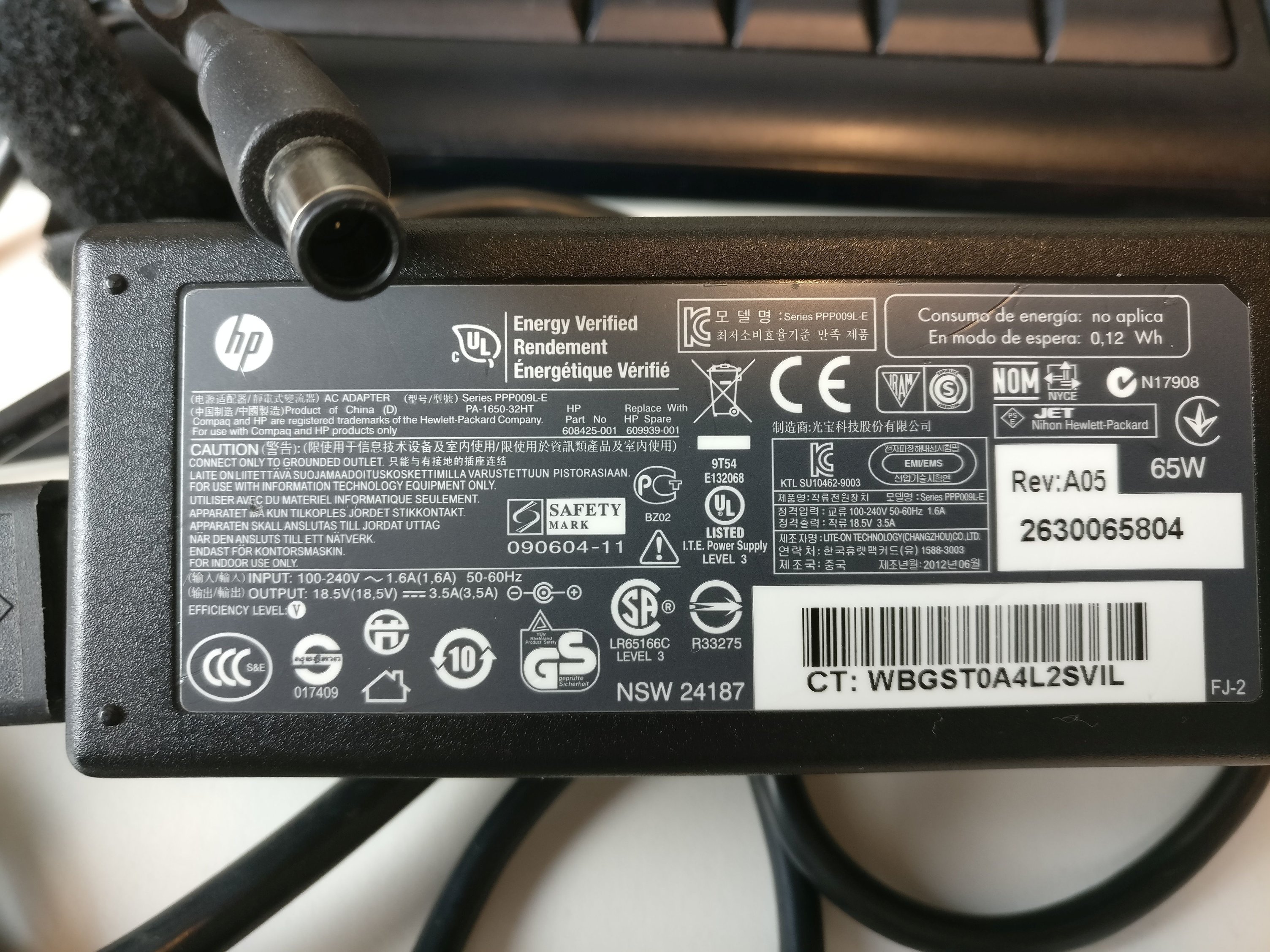
Fingers crossed then! It's this one - the end is a larger one than many laptops so I've tried to get it into the picture - which is the 1st picture I've taken on my shiny new OnePlus 3

-
As the title suggests, I'm looking for a source of genuine HP laptop power supplies - the laptop in question is the 455 G1 which is a 3.5a, 18.5v PSU - I believe that this is a 65w PSU whereas the 455 G2 one is a 45w PSU that is physically smaller. We've used compatibles in the past but have had mixed results so only use originals now. I'm going to need a few of these - 20+ and all I can find on a popular auction site are either compatibles or being shipped from overseas whereas I am looking for original from the UK I've looked at HP but a) their prices are top notch and b) I get a headache every time I have to go to their website. Thanks in advance
-
Anybody else getting this? We've been using Office365 for some time (although only a few months on this tenant) and I have never seen this even though I log in every single day. Clicking 'next' prompts me to add users to the company.onmicrosoft.com domain which is one we have never used - it was used as a holding area when we transferred to the new tenant about 12 weeks back. It doesn't appear to be doing any harm - all my users still exist - but is a bit annoying as it's screen real estate! I've hit 'exit and continue later' which has removed it for the moment but I suspect it will be back at some point.
-
I did think that but at the moment everybody has the licence assigned as part of Office 365 plus for Education (or whatever it is) so I'll need to remove if from everybody - not looked ito that but hopefully there is a way to do so without needing to do them all individually.
-
Posting here instead of the Office forum so apologies if it's in the wrong place. I'm looking at Azure rights management and am keen to give it a try - but don't want to set it up for all users in the organisation, is there a way to enable it for specified users only or is it a global on/off setting? The last thing I would want to do is enable it and find we (IT) suddently start to receive hundreds of calls about it! Even a way to add it to a specified domain only would be good - we have several domains on our O365 tenant a couple of which are no longer used but retained for historical purposes. Any feedback or experiences would be helpful Thanks in advance
-
We had issues with Sage and Office 2013 so had to leave the accounts people on Office 2010. Currently trialing Office 2016 (in other words I'm using it on my laptop) with a view to gradually push it out over the next few months. Still using Win7 on the majority of the machines as later versions clash with some of our examination software - e-volve for example will randomly crash on 8.i and 10
-
I'll call them in the morning, thanks
-
Ah, I never realised it wasn't included - although it is odd that it lists as available. I guess that explains his repeatedly asking if it was 2015 or LTSB (he may have been asking if it was 2015 LTSB, I was having difficulty understanding).
-
We've renewed our OVS/ES agreement with Microsoft and have the new licence added on the VLSC. As we are currently using Windows 8.1 I decided that I would be the guinea pig and go with a manual installation on Win 10 enterprise on my laptop. A couple of days later I need to activate it so go back to the VLSC only to find the following... I call the freephone number listed for the UK and eventually get through only to be asked to stop using the speakerphone and to use the handset instead - I was already using the handset but the person at the other end of the phone could not understand me and hung up on me. 2nd attempt managed to get through to somebody that could hear me and although there was a bit of a language barrier all went well until he asked me which version of Windows I needed a key for: Me: Windows 10 Enterprise (which is quite clearly listed on the VLSC) Agent: Is it 2015 or LTSB? M: Not LTSB, it just says Windows 10 Enterprise A: Does it say 2015 or LTSB? M: Neither - just Windows 10 Enterprise A: Can you describe it? M: (resisting obvious jokes and assuming he means to read the description as given in the 'description column) *starts to read description* A: But is it 2015 or LTSB? M: (Getting fed up by now) Can I just have both? A: I need to know if it is 2015 or LTSB M: Neither - I have some options that are both but this one is just listed as Windows 10 enterprise without 2015 or LTSB A: On your agreement number you have LTSB and 2015, which one is it? M: Neither - do you want to open a remote session so you can see what I am looking at? A: I'll put you through to the Enterprise team, they will help you I then get put through to somebody else I had a hard time understanding (and quite possibly he was having a hard time understanding me as well) who asked for my number and offered to call me back. Gave him the number (3 times) and he read it back to me correctly. 30 minutes later I'm still waiting for the call and still don't have a bl**dy key! I could use the LTSB version - the key for that is listed on the VLSC - or one of the other versions but having gone with enterprise versions of 7 and 8.1 I wanted to stick with it this time around. Is dealing with Microsoft always this frustrating? Any hints or tips?
-
I kickstarted it to the level required for a lifetime pass with all future expansions and access to the beta but have never logged in - or even installed it. I remember playing the original Elite and jumped for joy when this one was announced but on the odd occasions I went to the forum it was looking more and more like becoming a simulator and less and less like a game.
-
Thanks both - For desktops I'm thinking of what I can use the replace the base operating system plus all of the common applications (we run desktop version on Office including the Outlook desktop client). I'm not sure what alternatives Google can offer for servers but would look at the implications moving to a *nix OS Not much of this will happen in the next 3 years but I want to have a long term plan - which will of course include Microsoft
-
We currently use Office365 and have just renewed for a further 3 years. Looking further ahead and knowing that Microsoft are reducing/removing educational discounts over the next few years so want to start looking at alternatives. GAfE is an obvious possibility but how far can you integrate itwhilst still using O365? I would like to have a few people using GaFE to trial it but obviously our email domain is on O365 so no email integration but are there other issues I would need to be aware of? GAFE? Gafe? GafE? Google Apps for Education - so GaFE?
-
That's it! I feel al bit of a fool now for not knowing that but as you can probably tell I'm not an iPad user
-
That's the problem - we don't know which one it is! The user is a technopohobe and the iPad is in a Griffin Survivor case so the odds on getting them to check it are remote. They do come to the office about once a month so I can grab the SIM serial then and marry it up to the actual number but I was hoping for something similar to my Android where I can read the number through the settings without having to physically take the iPad out of the case.
-
We have a remote user who uses an iPad that has a data SIM in it. What I am trying to do is establish what the telephone number assigned to that SIM is and ideally, I want to do this through software. Is there a way to read this through IoS 9.3.2 or have we got to get the user to bring it in?
-
Mobile games are for the bus/train/taxi - I walk or drive
-
An hour or so most weekday mornings before work. An hour or so most weekday evenings before bed. 3 or 4 hours Sat/Sun mornings as I get up well before the wife does and maybe the same again weekend afternoons / evenings depending on what else is happening. Definitely 20+ for me although I don't watch TV and we are at a stage in our iives where we have a few close friends that we see on occasion rather than being out every night
-
Many years ago my brother in law went out with about £600 and instructions to buy a CD player (decent ones were just coming onto the market). He arrived back home after a visit to a local hi-fi shop with a Shure v15 III cartridge instead claiming that he wanted to hear the quality of the music and his previous (non-Shure) cartridge was too heavy for the toneam that he had at the time. My sister was not impressed! Edit: This is the shop he went into - good to see they are still trading as lots of independents have gone under. Price =/= quality but would be nice to see (hear) the difference between a £500 setup and the one here - Make sure you are sitting down!
-
Who's got a Pearson Vue Test Centre at their school?
DavePa replied to pete's topic in Educational Software
I have been looking at EXACTLY that same thing this afternoon. One thing you missed is the £500 annual cost. Another issue for me is the requirement that monitors are connected by DVI, Displayport or HDMI, what's the problem with VGA? How are they going to access the CCTV - it looks as if this will need a dedicated CCTV setup independent of the rest of the college/school otherwise they will have access to all of the CCTV? -
A little late to be of use in this instance but useful tool for checking replication status is Microsoft's active directory replication status tool which is a free download from Microsoft.
-
Have you tried giving explicit permissions and manually mapping the folder? How about creating a new user in the same OU (Good old Stew Dent or Pugh Pill) - does it work then? It sounds like a permissions issue and those are 2 relatively simple ways to check
-
I always include my account number in the subject field and email: [email protected] Automated responce within a short while but an actual responce can be next day - one of the reasons I am looking to change later in the year
-
OSTickets here - came free with the hosting package and does everything we want. It is only used internally by the IT team and nobody else - this is by design as we want to have some consistency on fault reporting.