ADMaster
-
Posts
1,402 -
Joined
-
Last visited
Content Type
Forums
News
20th
EduGeek EDIT Conference
Blogs
Everything posted by ADMaster
-

Active Directory - Password blacklist software
ADMaster replied to localzuk's topic in Enterprise Software
Hello all, I’ve come across this as we have had users getting phished with the we hacked your webcam scam. I’ve come across OPF and the yelp blog, but can’t find good directions on it. Has anyone impended it. One set of directions suggested creating your own rules with hashcat, The other said to just dump all the hashes into SQL. I do have azure AD p1 so should have access to the MS implementation of this. However I think the password changes are done on my local DC and synced. I do have write back enabled, so they can change it via the web page. I’d also want to only use the banned passwords for staff and not students. Is this possible with either solution? Thanks, -
Hello all, I have a few Hyper-V questions. I have a three host cluster on server 2016 with shared storage and I also run SCVMM on my SCCM box. Although I don’t use it that often, day to day tasks I just use the Hyper-V manager. This morning I found a VM had moved itself to another host, looking at the logs this happened near the time I attempted to take a backup. I’m working on a script that will look at what VMs are on the machine and if they are in the list of machines to be backed up, then do so. I use export-vm and 7zip then copy them off site. This is in addition to my normal backups with DPM. I do this once every month or two. One of the VMs was stuck at 30% archiving all night. I killed the job and attempted the backup again only to find the VM was no longer on that host. I looked through the event logs and found SCVMM moved it, but I didn’t see a reason for the move. How much compression should I expect with vhdx files? I’m running 7zip with max compression, but don’t know how much its helping. Unless I redo the archive step several times with each level. I’m hoping someone already has an idea. I’ve also had some strange issues with checkpoints. From my W10 machine (1709) with Hyper-V manager I can create or revert to the most recent checkpoint. However I cannot see any checkpoints, that section is empty. If I log onto the host where the VM resides, I can see the checkpoints. Thank you,
-
They have a demo on their website if you want to take the interface for a test drive. https://www.librenms.org/ https://demo.librenms.org I'm trying to sort out alerting now, I just spammed my self with 100 messages or so.
-
I've installed 3 nms's in 3 days. Librenms looks brilliant. Opennms is Ok I've used it in the past. I also have to check off each port I want polled. Zabbix didn't want to pull any data from my devices. Librenms has such an easy intuitive interface. I can use the global search box to quickly find a port by name. The lists are sortable. It polls every interface from the start. Once I've added one device, it is auto discovering the rest. The search and filtering by various criteria is great. I've been discovering all kinds of cool features it has today. It did have more install steps then the others, but the docs were straight forward and it wasn't difficult at all.
-
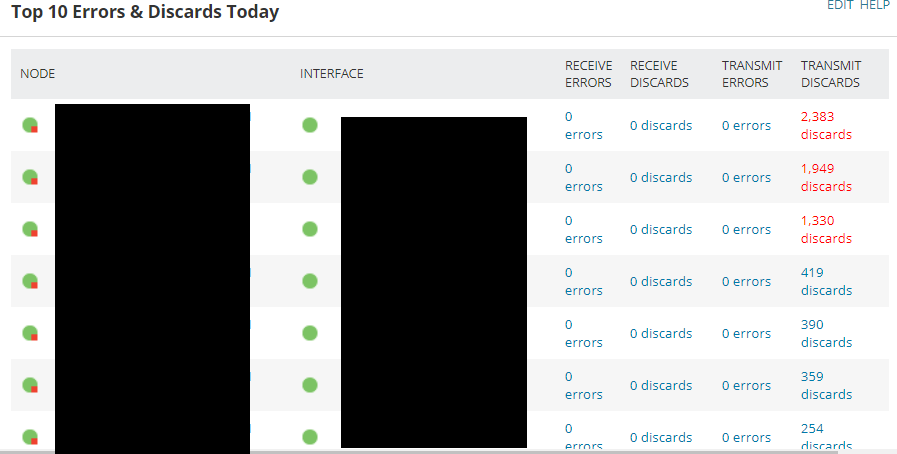
I’m looking for an alternative to NPM that is free and not limited on the number of nodes / interfaces I can monitor. I just installed opennms this morning and from searching the forums it looks like several folks use zabbix. Opennms may do what I want and I just haven’t figured out how yet but… I want a report / table that will show the top X interfaces with errors and discards. I can go into a specific node and interface to see the chart of discards, but that requires me to know what interface is having problems. I want to get a list of interfaces that may be having problems. I have attached a screenshot from solarwinds NPM if anyone knows of a product that will give a similar report. Thanks

-
[closed] bug/error: Connection time out on search
ADMaster posted a topic in EduGeek.net Site Problems
I get this message when doing a search. [color=#3E3E3E][font=Helvetica]connection to 172.31.32.87:9312 failed (errno=110, msg=Connection timed out)[/font][/color] Is this a port / IP that I should be able to reach directly, or something proxyed through the front end web server. If I'm meant to access it directly, it could be firewall as I'm at work. I can try searching at home later. As I did another test search to see if chrome reported anything in the network tab, the search went through. Its still something you may want to look into. Thanks
-
@garethedmondson Its been a while since I used MDT, but I thought it had an option to install software during OSD. Do you have PDQ, if so you can call pdq to push a set of apps from within the TS?
-
Thanks all, I’ll look into this, HP’s are the minority of my machines, SCCM usually pushes the right driver. A few updates on the current issue; Pnputil successfully installed the driver when I pushed it out. Preliminary test suggest the graphics glitch in the software is fixed. The teacher was supposed to report back to me yesterday. I guess no news is good news. The driver also imported into SCCM and one machine I reimaged had the good driver from the start.
-
I've been overlooking the simple answer. pnputil has an install switch. pnputil /add-driver device.inf /install
-
The WDK I downloaded doesn't contain dpinst so I'm back to square one.
-
I’m not sure where to put this so please move if you think it fits better somewhere else. Windows / Hardware / scripting? I have a program with some very weird graphics issues, most of my machines run it fine but by HPs do not. On 1703 when I right click and choose update driver it says I have the latest dated 8/2015 I found on 1709 it installs the 8/2015 driver by default but I can update to a 2/2018 version. This driver appears to work for the program. I went to HPs website and downloaded the latest they had, it was dated 7/2015 and also appeared to work. The AMD silent install switches were not working, but I’ve not put a lot of effort into it. The driver from device manager update is newer so I’d like to use it. I’ve used the export driver powershell to get the files and they are currently importing into SCCM so the next time I image I should have the latest. However is there any command line tools I can use to just install the driver? I’ve come across a power shell script, but it doesn’t seem to work. Script to install or update drivers directly from Microsoft Catalog I’ve found devcom, and dpinst, but they are a part of the WDK. I’ve tried pnpuntil but that just adds it to the driver store and doesn’t make it the active driver. I just want to deploy an updated driver to my machines. Thanks! EDIT: I found this shortly after posting. https://www.kraftkennedy.com/sccm-deploying-driver-updates-existing-machines/ Its using the WDK but looks like I can just copy the exes from it.
-
@jmak, Can you reproduce this issue? Image a VM with 1809 and log in for the first time as the main default domain admin account. Security / admin accounts have been discussed several times already, so I'll be brief in an attempt to keep on topic. If you wish to discuss further we can take it to another thread or PM. I've worked to improve security, enable cred guard, create gmsa's, use a dedicated client admin account for deploying software etc. I've just always logged on with the administrator account after an image. I can think of a few reasons why I did this in the past, but things have changed and those reasons are no longer valid. Its just a bad habit at this point. If I'm imaging 1 PC for a user, that is the account I'd use to make sure everything installed correctly and also when testing images in a VM. I don't do this when I image a full suite so I didn't want users getting a first logon of 10 minutes after image and also didn't know if it indicated other underlying problems with my image. Now that I know the cause / fix I can move forward and just not use the admin account. However I'm still curious if anyone else can reproduce the issue.
-
I'll look through the default profile stuff to see if I can improve first log in for other users. I've found the long log in only happens to domain admin, I've posted the details in the main 1809 thread.
-
I have a weird update to my 10 minute first log in issue. It only appears to effect the main domain admin account. If the domain admin account is the first user to log on after an image it takes 10 minutes, all other users first log in takes 2 minutes. If another user logs on first after an image, then the domain admin first logon is only 2 minutes too. Can anyone else reproduce this or have suggestions to fix this. Yes I know its not good practice, but I'm an IT department of 1.
-
I'd make the effort to learn about task sequences and figure out what works best for you. There is a trade off when testing a new build. Running my app removal script during OSD takes about 3 minutes according to the logs. Running the script on the wim takes over an hour. My script on the wim is also applying the latest CU, but the majority of the time is mounting and dismounting. When I'm testing changes it is much quicker to edit the TS and try again vs modifying the wim. When I have all the changes in place, modifying the wim should take a few minutes off each deployment, but for a few minutes I've never bothered. Also with a TS, I can apply different changes without having multiple wims.
-
When I say first log in, I mean the very first log on after install. This is what takes 10 minutes. Other users first logins are 2 - 3 minutes, I’ve not timed it this time around. I have detailed tests I did on 1803 and this is 1809 doing the same thing. Here are my tests from then http://www.edugeek.net/forums/windows-10/197560-1803-very-slow-first-logon.html#post1688159 There is a screen shot of my TS on here somewhere, before this script, I have not modified the wim. During OSD I disable startup repair, consumer experience, defender first run, chrome first run, 3d objects folder, remove apps, onedrive, and install printer drivers, needed software and the latest CU. There is probably a thing or two I’ve missed but I’d have to look at the TS when I’m at work tomorrow. A couple of the steps require mounting and modifying the default ntuser.dat. My next step is to start disabling TS steps starting with those to see if things change. But for this thread, I’m curious on what others take out of the wim and what it offers. Time savings in login / unwanted garbage such as the apps, or features simply not needed / security risk. I could understand removing smbv1 but its not in the OS anymore. All this is being done on a VM for now.
-
Scope of IT Manager for cashless catering system.
ADMaster replied to genesis's topic in Learning Network Manager
It depends on the nature of the issue. The food service supervisor and I have worked together for many years. She is pretty good at determining what is a program support question vs an IT issue. If she is unsure she will ask me. If it is a computer / network other IT issue, I will fix or be the middle man. If it is how do I do X or generate report Y, then I don't want or need to be the middle man. Sometimes she will ask if I know how to do X, but if I don't then I say call support. -
I’ve always done everything during OSD, but I’m testing new methods because of my 10 min first log on. I’m rewriting @Arthur’s script to remove appx packages and I’ve also explored NTLite. NTLite lists several language packs that we will never use. However when I run this code Get-WindowsPackage -Path $mount | where{$_.PackageName -like "*Lang*"} | ogv I only get a few results and they are all English. Do the language packs take up enough space to bother with? What features do you remove and why? I noticed the script has a section where it removes features. One thing I am adding to my script is exporting the Education edition into a new wim so there is only one index. Thoughts? Ideas?
-
Has the amazon household stuff changed then or are child accounts different. The biggest thing I don’t like about household is you have to share your payment methods with each other. Not that I don’t trust them, it just cuts down on human error. Amazon is always pushing the buy it now button and such. Currently if my parents need something in a rush I log into my amazon for them. They have now added their card to my account. The last time they bought something the payment screen didn’t show up the same way. It was billed to my card, we were able to change it right away though. If I could share my prime with them without sharing payment info, that would be great. If your school has amazon for business, you can share the shipping benefits with your work account. Also prime reading.
-
Can you browse the internet, but not update, or no network connection at all? I don't know what the Pi's run, but for apt has its own proxy config files. Take a look at this. https://www.serverlab.ca/tutorials/linux/administration-linux/how-to-set-the-proxy-for-apt-for-ubuntu-18-04/ I used to setup Acquire::http::Proxy when I used Apt-Cacher for multiple Ubuntu servers.
-
Consider Veyon, its free. I wouldn't want to attempt to mass deploy / configure, but for home it should do fine. https://veyon.io/
-
Windows 10 recipe Ingredients: 1 MDT or SCCM server, 1 VM for testing / reference image, a dozen scripts and plenty of patience. Add wim to TS Add custom scripts stir well Mix in a dash of apps Bake 30 minutes Seriously it depends on your environment. I didn’t write up a plan I just upgraded in stages. If you don’t have it already get SCCM / MDT setup to deploy windows 10. There is plenty of debate on if you should create a reference image or deploy straight from the wim. I prefer the thin image approach straight from the wim. Then do all customizations during OSD. Install software / updates, brand / theme / background, remove apps, disable start up repair etc. Deploy this to a VM to get all your settings and group policies the way you want them. Once you’re happy with the build, deploy to a few machines / student lab. I also deployed to a few tech savvy teachers who I knew would give accurate feedback. Once you have the base in place, GPOs, scripts, MDT / SCCM infrastructure; subsequent releases are a breeze. I didn’t plan anything for office 2016, it just went with windows 10. I’ve not gone to 2019 yet. Once I knew the build worked I deployed site wide as machines needed reimaged. Hope this helps
-
All the apps I remove via the OSD script were gone. So it must only effect mounted wim.
-
@Arthur what log is that from, smsts? I removed the appx package the way I always do during OSD and it seamed to work. I didn't check the log for errors though. I've found 3 new packages to remove in this release. Mixed reality portal is finally gone. Microsoft.MixedReality.Portal Microsoft.XboxGamingOverlay Microsoft.YourPhone
-
I've just done a test image of server 2019 and 1809. First boot, first login of server 2019 was under two minutes, I didn't put a watch on it. First boot, first login of 1809 was 10:50, again over 10 minutes like 1803. Does anyone else experience this long first logon?