ADMaster
-
Posts
1,402 -
Joined
-
Last visited
Content Type
Forums
News
20th
EduGeek EDIT Conference
Blogs
Everything posted by ADMaster
-

[ms office - 2016] Users cannot open older 97 - 2003 format files
ADMaster replied to ADMaster's topic in Office Software
After reimage the user gets the same behavior. Works after the first logon, but subsequent logons they cannot open 97-2003 format word / excel and cannot open publisher files. These are all identical machines about a dozen in service at the moment. The first half were setup a month ago with no complaints. The second half were setup last week. The middle 2 have issues, the first and last 2 also have no problems. This is very strange. To clarify that is the order in which they were setup, not physical location. The issues are the same if the PC is on their desk or mine. -
[ms office - 2016] Users cannot open older 97 - 2003 format files
ADMaster replied to ADMaster's topic in Office Software
I deleted her profile again and was going to call it fixed, but then it stopped working again. After a bit of testing it quits after a log off and log on of the users actual machine. The VM backup I took to test with, the issue appears to stay fixed. The trust center is the first place I looked, I've attached a screen shot of settings, are these what you're asking about? I've uninstalled office and reinstalled with no updates. I've not removed any windows updates yet, but that is likely the next step. Although I'd like to rule that out as logging on as admin on her machine, and my own machine the files work fine.
-
[ms office - 2016] Users cannot open older 97 - 2003 format files
ADMaster replied to ADMaster's topic in Office Software
I deleted the profiles of all three users and the issue has reappeared for user 1 and user 3. I'm sure it is only a matter of time before I hear from user 2. Ideas? -
[ms office - 2016] Users cannot open older 97 - 2003 format files
ADMaster replied to ADMaster's topic in Office Software
Deleting the profile works, but I'd rather find a better way if I could. user 1 has alot of local stuff as it is a laptop. user 2 and user 3 have folder redirection so it wouldn't be as much trouble to delete their profiles. I used disk2vhd on user 3 machine and have done some testing. Deleting the profile worked. Deleting the office folder from appdata did not work. Deleting the office folder from registry did not work. Deleting the entire microsoft folder from appdata did not work. Any idea what I can do to fix this? -
I’m having a strange issue where a few users cannot open 97 – 2003 format documents in office 2016. This just started a few weeks ago. User 1 cannot open any .doc files, word says it is in use and gives the option to open read only copy etc. All options fail with a message about a corrupt file or wrong permissions. User is on W10 1809 and at signs of first issue was still on April CU. I’ve since updated to August CU and all the latest office updates. I’ve run an office repair, full uninstall and reinstall. If I log on documents load fine. It is not a permissions issue as I made them a local admin to test, then quickly reverted the change. I can open the file save as a docx and they can work. User 2 got a new PC fresh install of 1809 so has October CU and cannot open xls files. Similar tests run, I can open the files just fine logged in as admin. Same corrupt file / permissions error message. User 3 new PC October CU etc has the same issues and also has a publisher issue. If just opening the file by double clicking, it flashes and does not open. If I open publisher and browse to the file I get an out of memory or low disk space error from publisher. Neither is true. I’ve not tried logged in as me on the PC, but I can browse to the share and open on my PC without issue. For users 1 and two I’ve adjusted trust center settings to allow all file types, that did not work so I reverted to defaults. I have the same new PC with updates and don’t have these issues, there are a few other users who have new PCs that don’t have this issue either. I’ve setup a VM with a fresh install to attempt to replicate the issue and it worked too. The only thing I can think of is a profile issue. I’ve deleted the office folder from appdata local and roaming for user 1 and it did not solve the issue. I hesitate to delete the entire profile, but that might be a last resort. Any ideas on what I can do to get office working again on these PCs? Thanks
-
Yeah I'm finding out its a lot more effort then I wanted to put into it. I was hoping to roast them for a snack. However one site I read suggested the more surface area, the more tannins would be removed. So I'd have to grind them into a meal or flour. Here is some acorn info closer to home for you folks. https://britishlocalfood.com/acorns/ https://britishlocalfood.com/leaching-acorns/
-
The Old Farmer's Almanac says different. https://www.almanac.com/content/how-prepare-and-cook-acorns Also wikipedia https://en.wikipedia.org/wiki/Acorn#As_food There is lots of other info online, but these two are not just random blogs. One source I found calls them grain of the trees because it can be used as a flour. Several sources contradict the almanac on caps though, caps still on is a sign that it isn't mature yet. I've never thought of them as food until now either, but that begs the question why? Are they too difficult to process in mass, or fallen out of favor for some other reason? Regardless, the boys enjoyed collecting and shelling them even if it didn't turn out in the end.
-
Anyone ever processed acorns and can give advice. Calling @elsiegee40 I know you are into nature and wildlife and may know who else to tag. We have a few oaks in the yard and a week ago my nephew asked about eating them, so I’ve done some research. I decided to use the boil method for leaching the tannins as I wanted to roast them for a snack instead of making flour. I’ve spent 1.5 hours changing the water about 5 times and they are still bitter. I read that the skins should come off during the boil process, but that didn’t happen. I think my next attempt will be the cold water method, but I don’t have a flowing stream, so it make take a lot of soaking. I’d like to roast and eat them like peanuts as a snack, while retaining as much nutrients as possible. Anyone done this and have advice, most articles online talk of cooking with them. Some were tougher than others to shell, I think I’ll dry them in a mesh bag before shelling next time. Some sites said the smaller the pieces the better for leaching tannin. Others said keep them whole and they will last longer. I did my best to keep them whole, but a few were halved or quartered. I think it is a red oak, which are mid-range on the tannin / bitterness scale if I recall. I’ve attached a few pictures if someone thinks it is a different variety. P.S. Pictures appear normal on my phone and PC, but rotated on the post preview.
-
Papercut approved / web release printing?
ADMaster replied to ADMaster's topic in Enterprise Software
We do have follow me setup and I forgot to mention I have one PC release station setup. I could setup another PC release station here, but seams it will waste a lot of time for students to log in if the teacher can just click a button. However I don't want teachers to release their own follow me jobs to the MFD from their PC, that would defeat the purpose or to accidentally release jobs from the PC release station across the site. -
I'm trying to figure out the best way to prevent random prints from across the building. A teacher has been approved for a classroom printer. We have Chromebooks in this class, if it were PCs, I'd just deploy to those devices. I think I found the place in the admin console to deploy to only an OU of devices, but they can so easily leave the room, I'd like to use papercut too. The web release appears to be disabled, but I'm not sure how or when I did that. When a user logs into the web interface they have an option to cancel their jobs, but not print. I'd also like to lock web release down to just this one queue for one teacher. A bonus would be able to assign a different teacher / manager to different queues. I don't want teachers to be able to release their own MFD jobs unless they are at the machine. I do want them to approve / release student jobs for the printer in their own classroom. Is this possible?
-
To fix the logon screen mess go to device settings and find sign in screen. Set it to Never show usernames and photos. This will force everyone to type username / password every time, and retain profiles if you have changed the other setting.
-
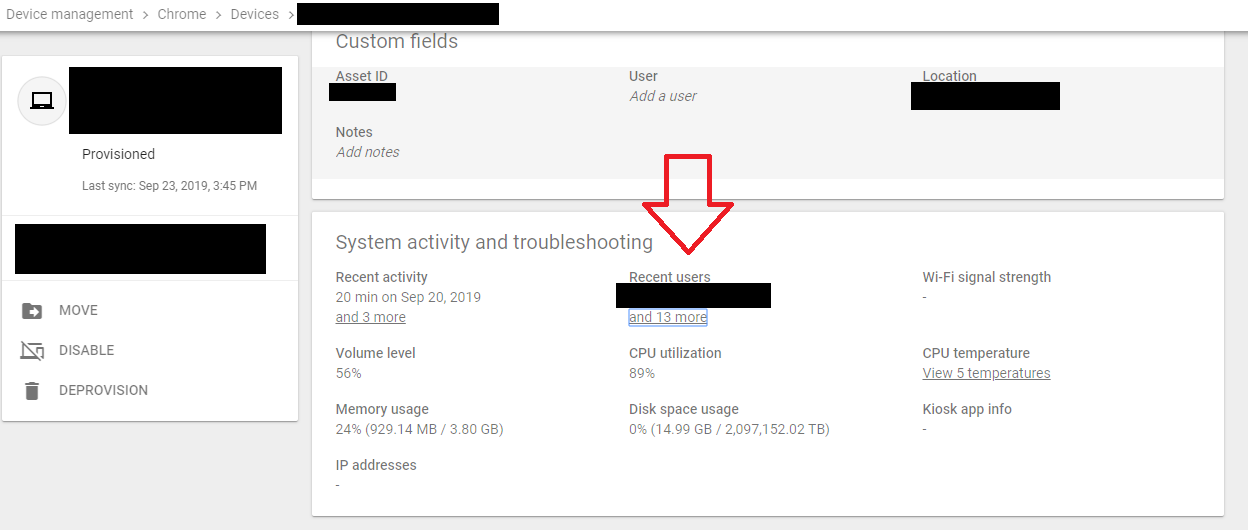
Are you looking below custom fields as within that heading or below that entire section? It is within the system activity and troubleshooting section, first row second column titled recent users. Big red arrow. If nothing is populated there I doubt gam will tell you anything.
-
I'd guess that difference comes down to the specs we are looking at. For PCs I target i5 8GB at a minimum. I think I target mid-range for both classes of device. I don't want something so cheap it doesn’t last, but the high end stuff is overkill for the job. For the average user, they are functionally the same. However I have windows in places that need the Adobe suite / auto desk, robotics programming etc. Staff always had it for Office, whiteboard software and grade book. The gradebook software is now web based, so a lot of staff and students could work from a Chromebook without issue.
-
I’ve been told that our area is 80% Google / Chromebook. I don’t recall all the reasons I first setup Google. I know our mail system at the time charged per user and Google was free. I had some questions about providing students with an email address so I researched the options. At one point I had spun up a Zimbra server. In all the comparison I did back then and recently, Google comes out on top. If I recall correctly, to get the same feature set on O365 I am getting on Google, I’d need a paid plan. After the phishing thread, I believe Gmail is better at spam. After a few years of Google we bought into Chromebooks, at this point we are effectively 1:1 I know there are budget models and deals, but I’ve spent an average of $700 on windows laptops and $200 on Chromebooks per device. I didn’t volunteer / take the initiative to setup O365 at first because I am in partial agreement with @jthompson If I’d been asked by higher up, I would have set it up sooner. I want to provide choice, but I also want to provide consistency. If it is a free for all I can see a lot of incompatibilities and confusion. As of a year ago I went ahead and setup O365, but don’t advertise or push its use. It’s a cost savings exercise and I’m still learning. I mostly use it for Intune and looking at some Azure AD password stuff. MS changed their license agreements. I had the basic OVS desktop bundle that gave me office windows ent / edu and I bought my server licenses. They changed the SKU to include O365 Intune etc. The cost to setup Intune and not renew the other MDM saved us money. In hind sight Intune is a bear to work with. If I had to make the choice all over again today, I may go with O365 as primary. Yes it costs more than Google, but not much more than I was already paying for an MDM. Chromebooks now have AD Join so the device cost doesn’t change. Google does have better email / spam though. Back then it was an easy win for Google, today it would be a tough call that requires more research.
-
Not fiction, but I’ve read a lot on nutrition this last month. I’m about three quarters way through “Nutrition and Physical Degeneration” by Dr. Weston A. Price DDS I’ve read all the sciencey nutrition bits from “Nourishing Traditions: The Cookbook that Challenges Politically Correct Nutrition and Diet Dictocrats” by Sally Fallon and Dr. Mary G. Enig Ph.D. The cookbook starts out with about 70 pages of nutrition information, then every recipe page is half recipe and half scientific study / nutritional anecdotes. The cook book references Dr. Price’s book often along with many other sources. They are an interesting set of books that really make you think about what you are eating.
-
Finally fixed, an extra reboot in the TS has done it. After figuring out the extra reboot fixed the time and ts listing issue I thought it was worth trying. I have no idea the root cause, but I can get this one off my desk and back in the classroom.
-
A few updates If I don't reboot the computer after the failed image I get the time sync error when trying to log in. A reboot will allow me to log in. Also if I allow the computer to boot into windows and reboot again before attempting another image I don't get the no TS errors. I've found a few references to an old DC in DNS I've removed now, but that didn't change anything. Running tzutil / g shows the correct time zone Running test secure channel returns true I have a user across the site who has connection issues that appear to be DNS related, I'm not sure if it is the same issue, my browsing is fine and there are no other tickets on it. I've used repadmin to get a report and all is synced, I've also forced a sync. I think the pinging with different addresses was just round robin, but shouldn't it realize it is offline. pinging the netbios name of the domain returns DC1 and pinging the FQDN returns DC2 even when DC2 was offline. However my PC returned dc1 for both, again just thinking round robin. I also used nltest to check what DC I was on and forced a switch, still the time error.
-
I'm leaning toward a DNS issue now, but not sure what. I brought up the cmd prompt again and attempted w32tm, all times look good. I did another net use \\server\share and got the time error I tried net use \\ip\share and it connected. I suspect the first half of the image is using dc1 and the second half dc2 as the dns server. running dcdiag looked fairly clean doing an nslookup on the sccm server returned the same IP from both dns servers nslookup on the domain name returned differed order of addresses depending on dcs nslookup domainname dc1 dc2 dc1 nslookup domainname dc2 dc1 dc2 to the event logs I go
-
@DJ-1701 I'll try that but... Winpe works fine to download the OS, drivers etc. Reboot into windows to finish the image is where it fails. Also w32tm /resync reported successful. Without doing a time sync just running the date / time commands reports the correct time. The bios time is correct too. I'll start another image and report back on the /computer switch. Thanks
-
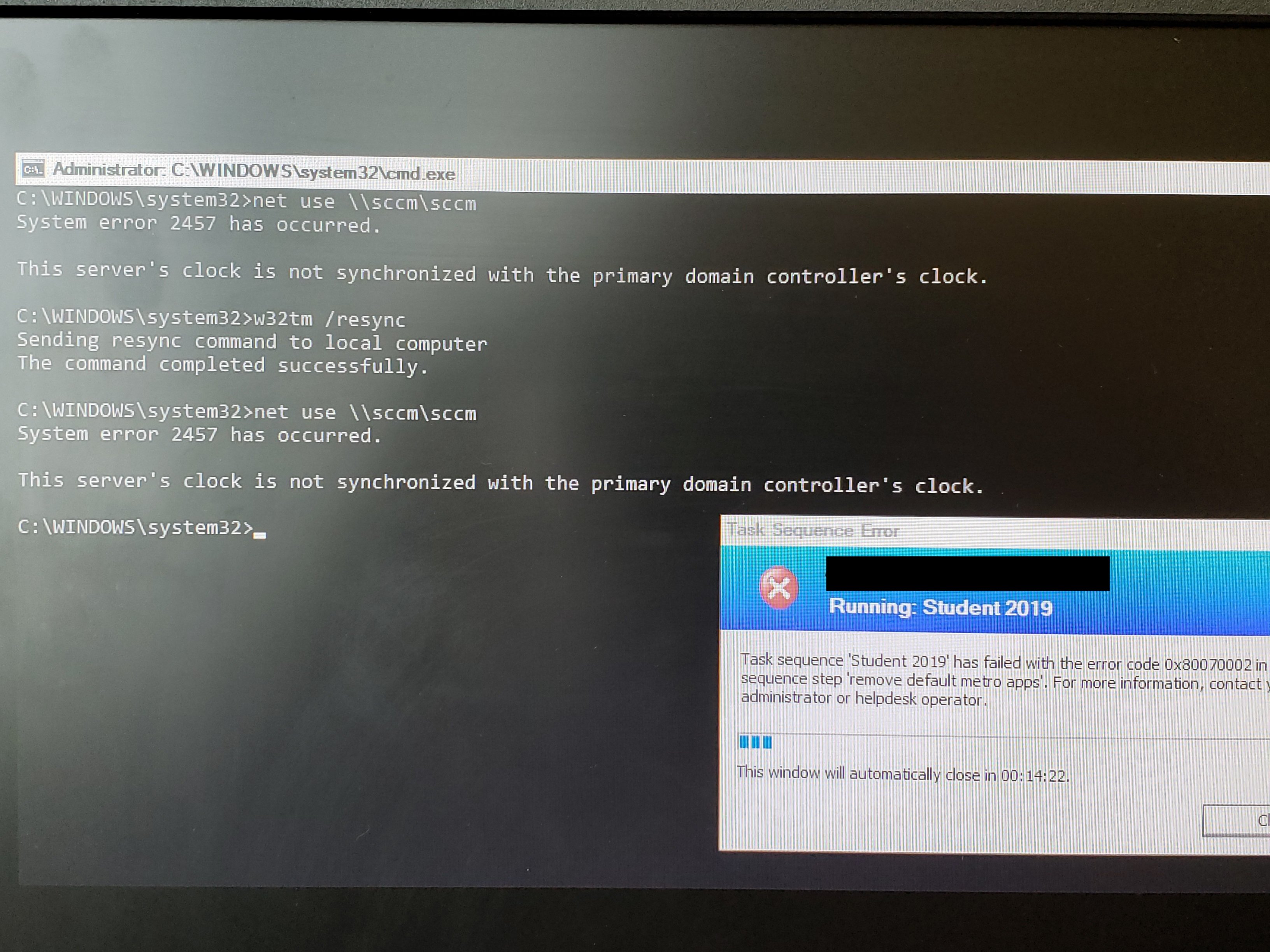
Bump these are the symptoms I have. https://deploymentresearch.com/debugging-80070002-and-80190191-errors-during-configmgr-sccm-osd/ I have a network access account setup and other PCs image fine I have windows authentication installed and again other PCs image fine. Slow connection.. possible, but I've moved it to another location / socket / cable etc. I have also tried net use \\server\share and get the domain controller time sync error. It applies the OS / drivers during winPE then reboots to install apps etc and fails. I tried add a w32tm /resync to the TS. Here is a screenshot of the failing TS and my attempts to fix the time. Ideas?
-
Slightly older thread, but anyone pushing this as their schools default search engine.
-
I've got a weird OS Deploy issue. The smsts log says it cannot connect to the server so I've brought up the commend line at different stages to check. During apply OS / Drivers still in win pe net use \\sccm\smspkge$ connects After the first reboot when it starts apply customizations I get an error the clock is out of sync with the domain controller. I have checked the date and time on both DCs, the SCCM server, the client OS and the client bios. All were correct. Another weird issue with this one is I must delete the computer from SCCM before I can image again, otherwise I get an error stating no TS's available. Here is the background on what I've done to get to this point... I set a few computer labs to image via required TS They all imaged except this one. I attempted to run the TS again via pxe and it failed with no TS's I removed the required deployment and went back to available via PXE Tried again and same result, I then deleted the computer from SCCM it was listed twice for some reason. Now I get a list of TS's and it goes as far as the first script needing to download a package then fails. If i want to try the image again, I must delete the computer from SCCM. This is a strange one, any ideas?
-
Looking for Helpdesk software for my team
ADMaster replied to m0bov's topic in Learning Network Manager
Sophos is a UK company last I knew, did they get bought out? Anyway I've used Webhelpdesk for years now, before SW acquired them. -
@computer_expert I agree the 5 years is too much, I was just brainstorming. @Davit2005 The NPS server cert is fine, the clients do have the root cert, but the client side of the cert has expired. I've come up with the powershell to get the cert expiration info. get-childitem Cert:\LocalMachine\My\ -ExpiringInDays 90 | where {$_.Issuer -like "*MyrootCA*"} | select subject,notafter,thumbprint I've not found a built in powershell module to renew the cert yet or got the certutil / certreq commands figured out just yet. My thought is to use the powershell command to get the expiration date, if it expires in 90 days / over the summer then renew. This would be scheduled to run in May.
-
The certs are 1 year. I thought of 2 years, but isn't that just delaying the problem. If I do either 6 months or 1.5 years I'd end up with the same problem I think. Going far out like 5 years might solve it, because by then they may have reimaged / had a new PC. What do others do, anyone else encountered this? Just had another thought, a script with certutil to force renew before summer break?