coolhands
-
Posts
326 -
Joined
-
Last visited
Content Type
Forums
News
20th
EduGeek EDIT Conference
Blogs
Everything posted by coolhands
-
If I use the little clock symbol and go to take a teacher's register, with one teacher it is too short see pic. It doesn't extend to 15:30 as it does with other teachers. She even has lessons this afternoon (ie not blank) but they can't be seen. What can explain this? I don't understand why it's like this. The capita documentation terminology is 'Timeline Configuration' (if anyone's searching) but it doesn't apply to this particular section as far as I can see any ideas

-
FYI if anyone else is searching in the future this is my report I made. It's not perfect but it allows you to see between 2 dates new admissions that have date of leaving of previous school. If there is no date of leaving it normally means you have not imported a CTF from them. (Don't include start of term in your date range otherwise you will get all the new Y7s on the list and it will be too large) edit - oh! we can't attach RptDef files! well here's a pic of the beginning but it doesn't include filters etc which help it to work
-

SIMS reports> mail merge via remote desktop failing
coolhands replied to coolhands's topic in MIS Systems
cheers. I don't know that's the problem (I'm not IT). Was hoping for a simple solution! -
Hi a member of staff is trying to produce letters while working from home. (from Design reports>students on roll etc then Word Mailmerge, New). It fails. Unable to cast com object.... The IT dept don't know, anyone here know?
-
OLD! bump - but does anyone know how to do this? I can't see it. I want to change a whole bunch of Results sets from eg Y11 Data 2 to Y11..... Is this possible? without going into every template & manually updating
-
I have an aspect for each subject (eg 'Engage Ar' for Art) in all year groups marksheets. I want to change their results sets from eg 'Y7 Data 4' to 'Y7 Engage 1'. But there are other aspects within Y7 Data 4 so I just want to get these particular aspects and change their result sets. So ordinary I would go in to the subject marksheet, right-click and change the result set. But rather than do this for each subject for each year group (as I have so many to do) is there a quicker way? I suspect I know the answer really...but just checking! I really want to be able to change the result set for a whole bunch of aspects from one screen eg when you gto tools>performance>delete a selection of results or whatever (if you know what I mean)
-
Here was their solution: Hi SIMS uses the default mail app defined on the workstation in Default App settings. You can select an app from here (if there is a G Suite Client available this may be possible). Best wishes,
-
Just bumping this - we use google for our emails not outlook. We have staff emails saved in sims. Is there any way to email them and especially use the email username / password when I have to reset their passwords? I just want to do something so simple - click the email button and it emails them! Anyone know how / if this can be done? is something like https://www.mapi4gmail.com/ or https://www.affixa.com/enterprise/ the only options? (do they work has anyone tried)
-
I can't work out where you are 'pasting' your numbers. But anyway I don't believe it is possible. I think it operates in this way: that you have to select all the people you want to send a message to from within the Intouch programme (eg Focus>Intouch>Send Message), by clicking on the magnifying glass etc
-
Hi those setting just helped me in 2021! My macros had become disabled recently for some reason (red). the little tick box trusted locations solved it
-
SIMS is black when using Remote desktop access
coolhands replied to coolhands's topic in MIS Systems
yes but it only happens on sims via remote access. If I do suggested key method it makes all my normal stuff high contrast, yet sims remains the same. I have asked them previously they didn't know hence me asking here. It seems to be the version it connects to via remote desktop is high contrast somehow, even though nothing else is. -
I got this email. Would this affect your system at all? (my intouch seems ok) > We are aware of an issue relating to the Schoolcomms plugin within SIMS.net What is the issue? Users of the plugin are currently unable to see the Schoolcomms option in the focus menu or in other areas of SIMS.net that would usually be accessible. Additionally, this is also affecting access to Capita HR and Payroll from the Focus menu. Who does this affect? This will only affect customers who have access to the Schoolcomms product via SIMS.net
-
see pic. When using remote access my sims is black (inverse). Very hard to read. I believe my colleagues are not. Is there something I can tell my IT team to do to solve this?
-
(SIMS) I have a set of aspects Trial Exam Grade Ar, Trial Exam Grade Bi etc. They all have a 'Numerical fine grades' gradeset associated with them eg 9+, 9, 9- etc. I want to change the gradeset to a 'Numerical whole grades' gradeset eg 9, 8, 7 etc so teachers cannot enter fine grades. But because the aspects have previously had results entered (last year) with fine grades it won't let me. It is very frustrating! Are my only options to either a) edit the current 'Numerical fine grades' gradeset with a new start date so the grades and values are simply whole grades (I don't like this as then the title of the gradeset ie Fine won't match the grades which are now only Whole); or b) to make a whole new set of aspects that are only attached to the 'Numerical whole grades' gradeset? I am leaning to b) make a whole new set eg called whole Trial Exam Grade Ar etc and using those in the marksheets and hiding the old ones. seems crazy to have to do that. Any thoughts?
-
[sims] Sys manager>Manage user> I can't reset password? Why
coolhands replied to coolhands's topic in MIS Systems
ah thankyou - it arose becuase we had salamander change all username formats yesterday (from eg J-bloggs to Joe.Bloggs) and this one came up as an error, because the log said she was still logged on (I assume left sims logged on and pc locked and has gone off on hols), along with a few other errors who all seem to be cleaners or catering staff so don't care as they don't use sims - but this one is receptionist so needs fixing. But last night I updated sims to Autumn release using solas, so I presumed it would boot her off? Perhaps it hasn't/didn't? I will wait until she returns then see if we can log her off and try again. ps when you say "Checked the user access logs .." I assume this is not possible in sims, so you mean from an IT network perspective? (I am data manager but not IT network manager) thankyou -
I have a problem with one user - normally when I reset a user's password using the above route, I can see the new password after I save it until they log on, use it, and change it. With this user it (the password) disappears from the box as soon as I click save (after I have Reset it). Why is this happening? If I then try and log on as her, using this new password it says Invalid user name/password. Her sims role is Employee, User (same as other staff), she is Active. Only difference I can find is in Employee Details tab of staff records she has an employment start date, but the Cont Service Start is blank (for most other staff this seems to be filled in). Is this a necessary field, or nothing to do with problem? (I can't find duplicate record or anything like that for this member.)
-
As I happen to have a private parent account (for my children) I just tested - I was able to change my password. So it's just the full on school admin password that can't be changed which is a) odd and b) annoying. To be honest I find their whole system awful anyway. Having to upload staff manually through MISsync?, woeful instructions on anything you try to find out etc etc
-
you need to find the capita sims exam organiser guides
-
well on the back of this I just went to change my password to new random password - they appear to have blocked it! So can't change my own password! That's nice going, stuck with their insecure system!
-
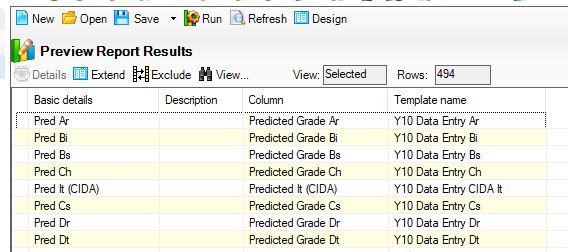
If I design a report, eg in Assessment Manager>Aspect I can have the names of aspects used and the templates they are in. (on the Define filter page I have aspect where > Aspect name begins...Predicted (or whatever). I can't see it to add anywhere But I need to know (from a report) if certain aspects are hidden or not hidden? Is this possible? This is to save me going into each template to open it and check if the aspect is hidden or unhidden. Output:
-
I have a problem with google classrooms - (I seem to have a problem with every 3rd party provider) - with rotation subjects. Can anyone help? Some subjects DT etc rotate. So we use the rotation wizard in sims all works perfectly. The students move to the next class. Now apparently google classrooms removes the old students, sticks the new ones in, and thus any markbook or submissions etc for the original students are gone? Sounds a bit crap. Salamander have suggested changing the classnames of the new rotated classes in sims. We have done so, but although these have been transferred to google classrooms with the correct new students, it has still added those new students to the old originally-named classes in google classrooms too! IMO I shouldn't have to rename classes in sims because of some 3rd party anyway! It's so bl**dy annoying dealing with this nonsense day in and day out So main question: how do you deal with rotation classes?
-
I don't understand why that was so cheap, for us it was £2.5k. We got rid of it and PE staff etc use edulink now to enter registers.
-
Hi all - the above worked, thankyou. That way we still have the number, but in the phone number box it shows 'do not phone'. ta!
-
It says this is possible once you're on spring 2020 or later, see below. But obviously when you go to import via that menu it is for students, not contacts. I can't find anywhere how you choose a menu-in route for contacts emails. Am I missing something? [TABLE=width: 100%] [TR] [TD] Is it possible to bulk import email addresses and phone numbers for students, employees or contacts? [/TD] [/TR] [TR] [TD]Workaround[/TD] [/TR] [TR] [TD] It is possible to bulk import this information from a CSV file. [/TD] [/TR] [/TABLE] Routines | Data In | Pupil Data | Import from Spreadsheet. For further details on how to complete this, please refer to Pages 201-207 of the Managing Pupil/Students hand book found in the Sims.net Documentation Centre.
-
yes we had note in box DON'T CONTACT FATHER....etc but a teacher didn't see it and phoned dad, so wondered if I could hide dad's contact details from staff!