Disease
-
Posts
1,906 -
Joined
Content Type
Forums
News
20th
EduGeek EDIT Conference
Blogs
Everything posted by Disease
-
To be honest in my real network I have a L3 switch as the core but we are not using any vlans at the moment so this is more of a learning excercise at them moment to be translated into my real network when up to speed with it. I only have packet tracer student I don't think it has 3 switches available in it.
-
Nice one thanks, any pointers in the right direction are greatly received, I have enjoyed my journey so far just need to get over this wall to continue it.
-
No problem will do, here is the interface details on the router in case I have missed something there, (all new learning as I go along ) Router(config)#do show ip interface brief Interface IP-Address OK? Method Status Protocol GigabitEthernet0/0 unassigned YES unset up up GigabitEthernet0/0.10 10.217.0.1 YES manual up up GigabitEthernet0/0.20 10.217.10.1 YES manual up up GigabitEthernet0/0.30 10.217.2.1 YES manual up up GigabitEthernet0/0.40 10.217.1.1 YES manual up up GigabitEthernet0/0.99 10.217.99.1 YES manual up up GigabitEthernet0/1 unassigned YES unset administratively down down GigabitEthernet0/2 unassigned YES unset administratively down down Vlan1 unassigned YES unset administratively down down Packet_Tracer.zip
-
Tried the command, no difference. Tried pinging sub interface ip from client with a static address in same range, nothing. But I can ping the MGMT sub interface from a machine with a static IP. Both machines are attached to the same switch, config below: Current configuration : 1231 bytes ! version 12.1 no service timestamps log datetime msec no service timestamps debug datetime msec no service password-encryption ! hostname Switch ! ! ! spanning-tree mode pvst ! interface FastEthernet0/1 switchport access vlan 20 switchport mode access ! interface FastEthernet0/2 ! interface FastEthernet0/3 ! interface FastEthernet0/4 ! interface FastEthernet0/5 ! interface FastEthernet0/6 ! interface FastEthernet0/7 ! interface FastEthernet0/8 ! interface FastEthernet0/9 ! interface FastEthernet0/10 ! interface FastEthernet0/11 ! interface FastEthernet0/12 ! interface FastEthernet0/13 ! interface FastEthernet0/14 ! interface FastEthernet0/15 ! interface FastEthernet0/16 ! interface FastEthernet0/17 ! interface FastEthernet0/18 ! interface FastEthernet0/19 ! interface FastEthernet0/20 switchport access vlan 99 switchport mode access ! interface FastEthernet0/21 ! interface FastEthernet0/22 ! interface FastEthernet0/23 ! interface FastEthernet0/24 switchport trunk allowed vlan 1-150 switchport mode trunk ! interface Vlan1 no ip address shutdown ! interface Vlan20 no ip address ! interface Vlan99 ip address 10.217.99.15 255.255.255.0 ! ! line con 0 ! line vty 0 4 login line vty 5 15 login ! ! end
-
Router Current configuration : 1396 bytes ! version 15.1 no service timestamps log datetime msec no service timestamps debug datetime msec no service password-encryption ! hostname Router ! ! ! ! ! ip dhcp pool Student network 10.217.10.0 255.255.255.0 default-router 10.217.10.1 ip dhcp pool Staff network 10.217.2.0 255.255.255.0 default-router 10.217.2.1 ip dhcp pool MGMT network 10.217.99.0 255.255.255.0 default-router 10.217.99.1 ! ip cef no ipv6 cef ! ! license udi pid CISCO2911/K9 sn FTX1524P918 ! spanning-tree mode pvst ! ! interface GigabitEthernet0/0 no ip address duplex auto speed auto ! interface GigabitEthernet0/0.10 encapsulation dot1Q 10 ip address 10.217.0.1 255.255.255.0 ! interface GigabitEthernet0/0.20 encapsulation dot1Q 20 ip address 10.217.10.1 255.255.255.0 ! interface GigabitEthernet0/0.30 encapsulation dot1Q 30 ip address 10.217.2.1 255.255.255.0 ! interface GigabitEthernet0/0.40 encapsulation dot1Q 40 ip address 10.217.1.1 255.255.255.0 ! interface GigabitEthernet0/0.99 encapsulation dot1Q 99 ip address 10.217.99.1 255.255.255.0 ! interface GigabitEthernet0/1 no ip address duplex auto speed auto shutdown ! interface GigabitEthernet0/2 no ip address duplex auto speed auto shutdown ! interface Vlan1 no ip address shutdown ! ip classless ! ip flow-export version 9 ! ! line con 0 ! line aux 0 ! line vty 0 4 login ! ! ! end Switch ( There are multiple switches in the test this is the one connected to the router) Current configuration : 1365 bytes ! version 12.2 no service timestamps log datetime msec no service timestamps debug datetime msec no service password-encryption ! hostname Switch ! ! spanning-tree mode pvst ! interface FastEthernet0/1 switchport access vlan 10 switchport mode access ! interface FastEthernet0/2 ! interface FastEthernet0/3 ! interface FastEthernet0/4 ! interface FastEthernet0/5 ! interface FastEthernet0/6 ! interface FastEthernet0/7 ! interface FastEthernet0/8 ! interface FastEthernet0/9 ! interface FastEthernet0/10 ! interface FastEthernet0/11 ! interface FastEthernet0/12 ! interface FastEthernet0/13 ! interface FastEthernet0/14 ! interface FastEthernet0/15 ! interface FastEthernet0/16 ! interface FastEthernet0/17 ! interface FastEthernet0/18 ! interface FastEthernet0/19 ! interface FastEthernet0/20 ! interface FastEthernet0/21 ! interface FastEthernet0/22 ! interface FastEthernet0/23 ! interface FastEthernet0/24 switchport trunk allowed vlan 1-150 switchport mode trunk ! interface GigabitEthernet0/1 switchport trunk allowed vlan 1-150 switchport mode trunk ! interface GigabitEthernet0/2 switchport trunk allowed vlan 1-150 switchport mode trunk ! interface Vlan1 no ip address shutdown ! interface Vlan20 no ip address ! interface Vlan99 ip address 10.217.99.2 255.255.255.0 ! ! line con 0 ! line vty 0 4 login line vty 5 15 login ! ! end
-
Messing around with routers and Vlans in packet tracer at the moment, I have set up sub interfaces and dhcp for my vlans on the router and trunks on the switches with the switches having a management vlan ip address but........I can not seem to get a dhcp address on my clients from the router nor can I ping the gateway I created for each sub interface, I can get one for a management PC, do I need to set up an IP address for each vlan interface on each switch? Also my real world network uses a mask of 255.255.0.0 I assume this means that I am unable to use the following vlan structure of x.x.10..x x.x.20.x x.x.30.x etc. as when I try to set up sub interfaces initially it would give me an overlap error but when I changed the ip structure to 255.255.255.0 I could create them. Many Thanks
-
I have the same problem although it doesn't help that when it happens I rip my shirt off and reveal my google superhero costume and shout "To the Google'ma'Tron" at the top of my voice.
-
So effectively I need a shared Iscsi drive set the current hosts to cluster and it will copy all the VMs on the hosts to the shared cluster?
-
I was hoping for a little more detail, unless you mean I have to kidnap Harry Potter, push him in the server room and close the door
-
I have 3 blades that I use for VM and am wondering is there a way to cluster them for failover without affecting the VM's that are on each one at the moment. They are Dual Quad Xeons each with 128GB ram with their own ISCSI volume from our Nimble Storage. In hindsight I wish I have looked into this before creating VMs on them so is there a way to do this after, using Hyper-v by the way. Many Thanks
-

Problem coming out of Exchange 2003/2010 coexistence
Disease replied to Disease's topic in Enterprise Software
@win Mailboxes are already moved. @3s-gtech I removed all routing connectors using the Exchange control panel on the 2003 server for both admisitrive group and when I type Get-RoutingGroupConnector on the 2010 server it shows none. -
Had this problem for a while so I have been stuck in 2003/2010 coexistence for years now When ever I delete the Routing group connector I can not receive any external mail. Internal mail sends fine, I can even send mail externally fine, but incoming internal mail just gets stuck on the 2003 server. Setup is as follows: Barracuda Spam Filter- Points to 2010 exchange with a 2003 exchange still in the final stages of coexistence. The mail seems to come into the Barracuda, where it is sent to exchange 2010- which sends it to exchange 2003 which then sends it back to the 2010 exchange server. Removing the connectors on the exchange 2003 machine and the mail gets stuck in the cue on the 2003 machine. Re-create the connector and bam the mail spews through. Desperate to get out of needing the exchange 2003 server to make my mail work. Any Help/Insight appreciated.
-
Opensource or cheaper alternative to Dreamweaver
Disease replied to zag's topic in Educational Software
I am looking at Kompozer as an alternative to Dreamweaver but our head of IT who does not know HTML has described it as inadequate for GCSE compared to Dreamweaver, obviously without stating any of these inadequacies. -
After a bit of investigation it might look like that my problem is STP, in the fact that I have enabled it but never configured it on any of my switches past the defaults. Everything looks like they are set to edge ports (apart from the switches that auto sense edge)and I have a load of TCNs on certain ports. The cisco switch (internet/WAN)supplied by the council connects to my core on port 37 and in the last 2 hours has sent 73 BPDU and received 3312 BPDU, does this sound normal? Many thanks for all the advice so far.
-
Will take a look, we have mostly HP procurve with a few odds and sods linksys non managed left over.
-
Yes, same results regardless of machine or server. No impero running, tracert only shows one hop, we run lanschool but no tech console, SCCM runs on the network.
-
Hi all, I have strange ping fluctuations across my curriculum network (image attached), I have no idea what is causing it, but there seems to be a pattern to it. Any pointers in a direction to what could be causing it and finding the root cause? It's almost like some service that runs every my that chews all my network bandwidth or maybe I am clutching at straws.

-
These are ours, Staff, Student and exams controlled assessment which is a slightly older one.
-
Data Protection - Third Party
Disease replied to Bernie's topic in Data Protection & Information Handling
UPN should not be given out to any website, the DFE guidance is quite clear on that: The UPN must be a ‘blind number’ not an automatic adjunct to a pupil’s name. It must be held electronically and only output when required to provide information to the LA, central government or another school/academy to which the pupil is transferring. Under the Data Protection Act 1998, the UPN is designated as a ‘general identifier’ making its use for any purpose unrelated to education illegal. A pupil’s admission number, rather than the UPN, should be used as the general pupil reference number on the admission register or paper files. So I would not be outputting that to SAM Learning at all, we have just gone through removing the UPN from all our student record folders as well. Link to the UPN rules DFE UPN Doc -
Hardly ever in general computing terms, but on one particular storage box which uses Seagate ES.2 SataMDL drives I get around 2 or 3 failures a year out of 12 disks. I should really buy WD Red disks instead of the HP recommended Seagate part.
-
[ms office - 2013] What have I done to my outlook :)
Disease replied to Disease's topic in Office Software
Thanks all, Compact view and damn separator bar moved slightly. -
[ms office - 2013] What have I done to my outlook :)
Disease replied to Disease's topic in Office Software
Sorry, misunderstanding, it's not resolved I was just stating that on the box that works show conversation is not ticked anyway. -
[ms office - 2013] What have I done to my outlook :)
Disease replied to Disease's topic in Office Software
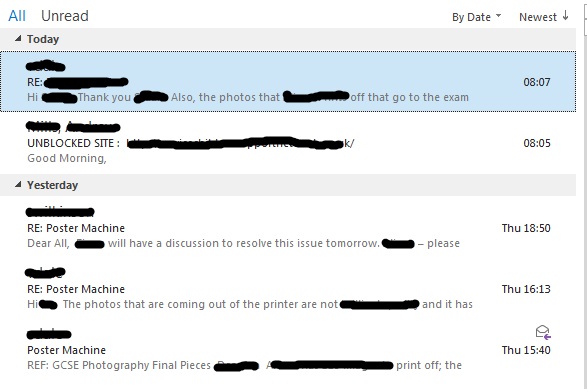
It appears the difference is that the From, Subject and 1 line preview are on different lines, wheres as the messed up one is not. -
[ms office - 2013] What have I done to my outlook :)
Disease replied to Disease's topic in Office Software
Show as conversation is not ticked on the way I normally have it. I can't even understand how how I did it, it happened in a a second when I was moving my mouse across the screen near the ribbon. -
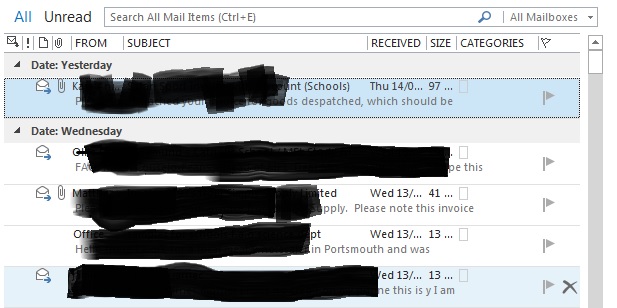
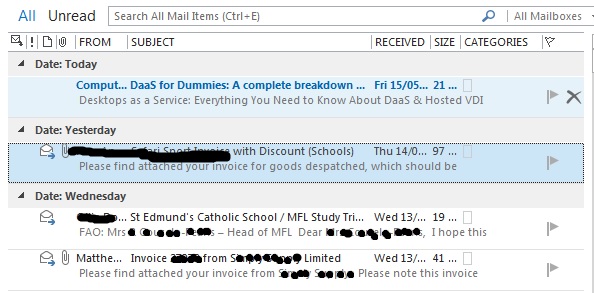
I have somehow clicked something to screw with the formatting of my outlook and for the life of me I can not seem to get it back, anyone have any idea how to reverse it Do not like it like this: Way it was and the way I like it: