fleXx
-
Posts
22 -
Joined
-
Last visited
Content Type
Forums
News
20th
EduGeek EDIT Conference
Blogs
Everything posted by fleXx
-
We were having this same problem yesterday, turned out it was actually the driver. Updated the driver from Windows update and everything then seemed fine. Only thing that was different between the drivers as far as I can tell was the fact that the driver type had changed from type 3 to type 4.
-
If anyone is still struggling with this - we found that changing the shortcut location from %ALLUSERSPROFILE%\Microsoft\Windows\Start Menu\Programs\Accessories to C:\ProgramData\Microsoft\Windows\Start Menu\Programs\ instead, actually resolved the pinning of apps for us. Using this method, we can now pin IE and various other apps that we were struggling with We managed to pin sims buy just copying the Pulsar.exe to C:\Program Files\SIMS\SIMS .net\ (creating the directory if it doesn't exist) and creating a shortcut to it and placing it in C:\ProgramData\Microsoft\Windows\Start Menu\Programs, and pinning that. Hope this helps someone!
- 27 replies
-
- 1
-

-
- classic shell
- start menu
- (and 1 more)
-
The issue we would have with that is a lot of staff and students save pretty much ALL of their work in their desktop folders... even though we try and drill it into their heads that they shouldn't be doing this...
-
Redirecting Desktop folder to %homeshare%%homepath%Desktop Not granting user exclusive rights and moving the contents of desktop to the new location.
-
Do you not find that this slows logins? We had various things being deployed to users desktop via GP but we found that it had a dramatic effect on logon speeds so we try not to.
-
How are you doing this? GPO at user login?
-
Staff don't roam between machines, teachers have their own laptops and admin staff have their one desktop. Although if I could find one layout to suit all, then staff not being able to pin their own shortcuts potentially wouldn't be an issue.
-
I have thought of doing this but the problem with that is that once you apply a start layout with GP, the user can't pin their own items to the start menu which a lot of staff are likely to complain about.
-
If you manage to get SIMS pinned, please let me know how you did it I can't get this working because SIMS isn't installed at the point of the start menu layout being applied. I've tried adding a shortcut to the application and placing that in the start menu and was hopeful but that didn't seem to work either >< I've seen lots of people using classic shell but like you said Michael, its not ideal. I don't really like the idea of using a third-party tool to manage something that should be easily manageable as its part of the OS. Shimmer45: You could try using DesktopApplicationLinkPath instead of the applicationID? Just point the DesktopApplicationLinkPath to a shortcut that's placed in %ALLUSERSPROFILE%\Microsoft\Windows\Start Menu\Programs\Accessories.
- 27 replies
-
- 1
-
-
- classic shell
- start menu
- (and 1 more)
-
Are you using the same layouts for staff? I'm trying to do layouts for various departments like you, but those are for students. How are you applying your XML file(s)? I am using the Import-StartLayout command in a powershell script for different XML layouts (depending on whether they are staff or student computers) in an SCCM task sequence as a template, and then deploying another XML for students via group policy. Not doing this for staff because it disables the ability to pin your own apps to the start menu. I'm actually wondering whether there is any point in deploying the start menu layout with group policy for students because once they log out the profile will be wiped anyway so all of the custom pinned apps that they have will be removed.
-
Something that may help you both with resizing the start menu, try putting "" on the second line of the xml file. E.g. This worked nicely for us, although still having lots of problems with Windows 10 inconsistently pinning the apps we want such as IE.
-
As a test, try enabling Item level targeting and applying it to a computer in a group, and see if it works then?
-
Rather than doing this via GP, how about doing it via a script? I'm no good at scripting myself but an idea could be to create a vbs script that checks to see if the shortcuts exist, and if they do remove them? Have you thought about creating a default profile and removing the shortcuts that way? Obviously that would mean reimagine all of your machines though...
-
Why they are only supporing chrome I do not know. You would of thought that IE would have been their main concern as this (I assume) is the most used browser when it comes to business use...? We have repeatedly had talks in the office about using an alternative browser but no one wants to be responsible for managing it
-
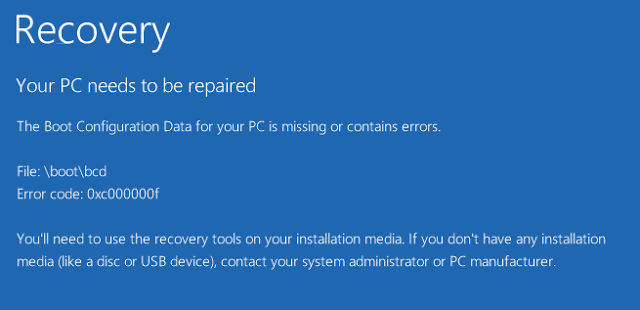
Yes, at which point I get the blue screen imaged attached above.
-
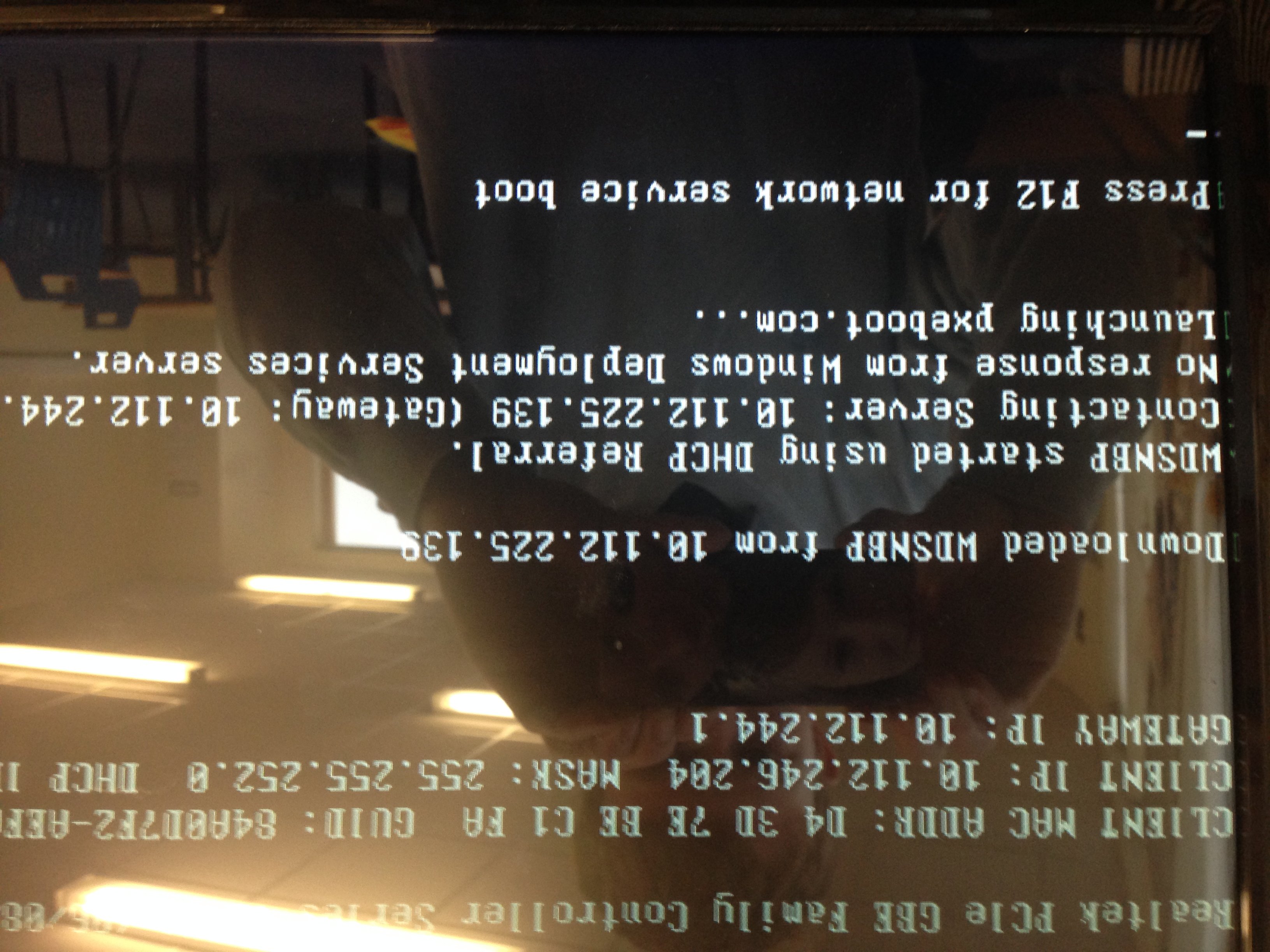
Good morning all, We are having a problem with our SCCM server and re-imaging machines. Recently we got some new Dell laptops, and I was given the task of building these machines via task sequences etc. to get the drivers installed and all the required software etc. This was the first time I had done anything like this with SCCM, so I was following a guide on how to do this. I managed to get these laptops imaged via our sccm server and they are now working. However, since I have done this, some of our existing machines, which are Viglen machines, not Dells, can no longer image. When I tell the machine to boot to the network via PXE, I get the following screens; Note - I could not get my image of this to upload properly, It kept uploading upside down? :S so this is one I have grabbed from Google images, the error message is the same as ours, but the IP addressing/MAC addresses etc aren't. After I press F12, I then get this screen; The strange thing is, we have lots of these Viglen machines, and this error is only happening on 4 of them. The other 300 (ish) machines seem to be fine. I have checked the bios in these machines and compared it to a machine that does work, and they are identical. The only thing I can think of that could potentially be the cause is that when I was following the guide on how to import the drivers into sccm, it told me to import the NIC drivers for those laptops and inject them into the boot images, both x86 and x64 versions. So I removed the driver from the boot images by right clicking, going to properties, drivers tab and simply removing the driver, not sure if this is the proper way of doing it though? However, if this was the cause, surely all of our Viglen machines would fail with the same problem? But they don't, its only the 4, not the whole bunch? Any help is greatly appreciated Thank you in advance!

-
For all who are having a similar issue, it turns out that Java version 8 doesn't play well with IE proxy settings, so I had to manually specify the proxy in the Java control panel, rather than telling it to look for IE for proxy settings and it seems to have fixed the issue. I then deployed these settings via GPO using the java deployment.config and deployment.properties method.
- 16 replies
-
- 2
-
-
- ie11
- internet explorer
- (and 3 more)
-
Thanks for your reply Michael, sorry, I obviously forgot to include that as one of the things I have tried, I have been working on this for so long now that I cant quite remember what I have and havent done, but I will read your guide anyway as I'm sure that this will come in handy in the future, thank you Will do Webbobfc, and the same to you if you find a solution please
-
Hi all, Our students are now required to take tests on an online test environment that is run by a company called "EnlightKS", which we were only told about last week.. When students go to start the test, some system checks are run before you can actually start the test. It tests things like whether it can open office and opening pop up windows etc. One of the tests it does is testing whether Java is installed and whether it can run, and we are having an issue with this. The test requires you to accept and run a Java security warning in order for it to actually test whether Java is installed and can run, which is fine, if we were using chrome or firefox... In chrome and firefox, we get this pop up box, and students can click run, and the test runs and completes, and users can start the test. However, in IE11, which is what we are using, the popup box will not load up, and I cannot figure out why. FYI we are using Java version 8 update 31. I have tried entering the domain name into the Trusted site list in IE, I have entered the domain name into the security exceptions in the Java control panel, I have ensured that java scriplets, activex controls etc are enabled in IE's security settings for Trusted sites, I have enabled absolutely everything in the security settings for Trusted Sites, windows is fully up to date, I have tried using a different proxy etc and I cannot get this pop up box to show. If i revert a test machine back to Java version 7 update 71, the popup box then shows, and users can click run and do the test, so at the moment as a temporary fix, that is what we have done, reverted a bunch of machines to that version of java and they are running the tests. This would be fine, however, we have other software installed that requires the lastest version of java.... On rare occasions, the popup box will show up using version 8 update 31, and we can click run and the test will run, but it is so inconsistent that we cannot role it out properly to all machines. Has anyone got any ideas at all? I am willing to try anything at this point... Thank you very much in advance
-
Multiple Icons that are the same program
fleXx replied to fleXx's topic in Network and Classroom Management
Thanks for the reply russdev, I re-installed the NET framework and Impero is now working again. -
Hi fellow members, We run Impero as our remote control system for the machines around the building, but we have found one problem with it. On one particular user account, there is 6+ Impero Icons showing in the system tray and only one of them needs to actually show. When you go over them with a cursor then they all disappear other than one which is meant to happen because only one is meant to be showing. Any ideas?