steven_layton_sl
-
Posts
2,557 -
Joined
Content Type
Forums
News
20th
EduGeek EDIT Conference
Blogs
Everything posted by steven_layton_sl
-
Just had an odd instance where if I was on my OneDrive, and clicked the Discover link, I could see all of the Deputy Headteachers documents. Chatting to him, he checked and all his folders were shared with me and the head of post 16. He is tech savvy, didn't set this on purpose, but doesn't know how it ended up like this. When he was poking about, trying to work it out, he sent to "Tools>site settings>site permissions", from OneDrive and saw that myself and the head of post 16 had permission to access everything on 'my site' for some reason. When I check this setting on my own OneDrive, I see the below. Is this normal? What is it actually giving "Everyone Except external users" Read access to? Confused, and slightly worried....
-
I'm doing a lot of updating of my documentation at the moment, with the ideal goal of having end to end documentation of what is plugged into what. I've recently completed updating the core to edge switching documentation, and am moving onto the edge switch ports. Ideally l'd like to know the host names of what is plugged into every port on each edge switch. Is there a quick way of pulling this information off the HP ProCurve switches, without having to do the manual check of looking at the wall point, and tracing that back to a switch/port?
-
Can't ping new 2016 server
steven_layton_sl replied to steven_layton_sl's topic in Educational Software
Many thanks - pinging happily now! -
Can't ping new 2016 server
steven_layton_sl replied to steven_layton_sl's topic in Educational Software
Bingo. Disabled the firewall and its now working. Looks like I need to tinker, thanks! -
I have built a new Windows 2016 server, to replace one of our 2008r2 servers. I can ping FROM the new 2016 server, but I can't ping the new server from other existing servers. All of the network settings look right. This is likely a DNS thing, I think, but I can't work it out. The new server is, amongst other things, taking over as the Spiceworks server from the old one. While I have migrated Spiceworks across and it works on the new server its now on, it isn't working from other servers or stations. Ideas?
-
Black screen problems with Windows 10 at login
steven_layton_sl replied to timbo343's topic in Windows 10
Guys. I've had a ticket logged with RM about the black screen issues for quite a while as I thought the issue might have been with the CC4 stuff. They stated that they were working with Impero to try to identify the issue, as they were clearly seeing it at other CC4 schools. At the time I was still in support with Impero. Knowing that I was going to have to drop support with them for budget reasons, I logged the ticket with Impero, and specifically asked them whether they would allow me to update to a future version of Impero, even if I was out of support, if it was known that that update would fix the black screen issue. Impero agreed to this via email, just before Christmas. Fast forward to a week or so ago, RM updated my support call with them, stating that Impero had identified an issue, and would be fixing this in a future v6 release. I contacted Impero, who have said they'll honour their agreement with us, so in April (or when the v6 version is released), I'll be updating to that version. We're still seeing a couple of instances a day, so it'll be immediately obvious if the updated version of Impero fixes the issue or not. -
Office 365 - Loss of menu applications
steven_layton_sl replied to steven_layton_sl's topic in Cloud Services
Thanks guys. I'm going to assume that all is well here, and I don't have any users with the problem who just haven't reported it. -
Office 365 - Loss of menu applications
steven_layton_sl replied to steven_layton_sl's topic in Cloud Services
Anyone still having any issues with this? I've had no one here report it, but I never had any idea of how widespread it was anyway, given the apparent randomness of who it affected. Its difficult to know if some users still have the issue. -
Office 365 - Loss of menu applications
steven_layton_sl replied to steven_layton_sl's topic in Cloud Services
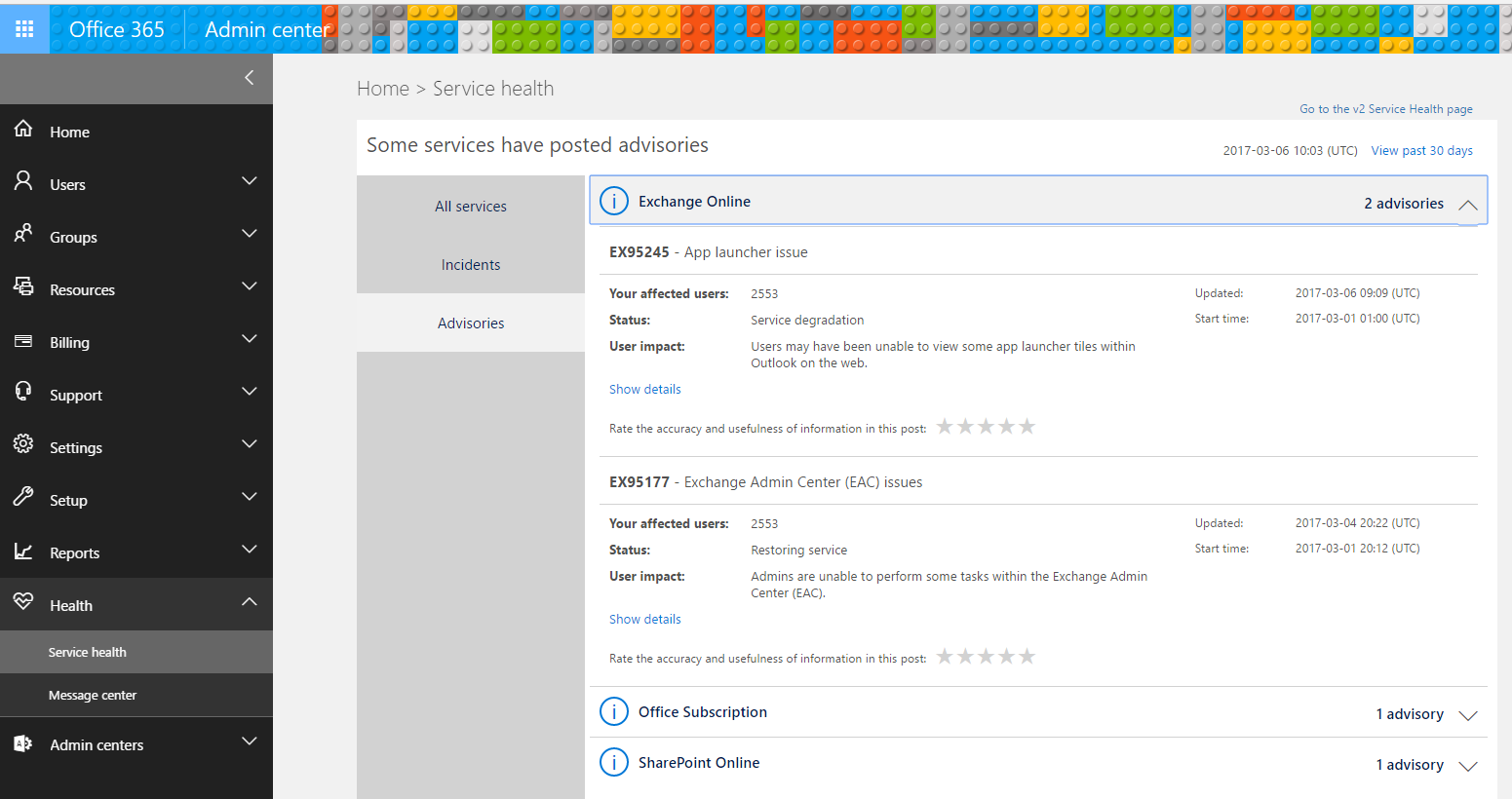
@witch If you log onto https://portal.office.com/ and look at the Health Status section, it lists it here.
-
Office 365 - Loss of menu applications
steven_layton_sl replied to steven_layton_sl's topic in Cloud Services
Spoke too soon. A Post 16 student just reported the issue. Damn. I have no idea how widespread its affecting our users. If its just one or two, or its a larger number. -
Office 365 - Loss of menu applications
steven_layton_sl replied to steven_layton_sl's topic in Cloud Services
All of the users that I knew were affected are now working again. Of course, this doesn't mean that their aren't affected users that I just don't know about. -
Office 365 - Loss of menu applications
steven_layton_sl replied to steven_layton_sl's topic in Cloud Services
The users who had the issue yesterday, still have it today. Is this the case with you guys? Do I need to contact MS for them to fix my tenancy, or are they fixing it globally? -
Office 365 - Loss of menu applications
steven_layton_sl replied to steven_layton_sl's topic in Cloud Services
@Jam_lane - Yeah, hate those times when you make a change, and something external happens which makes you doubt yourself! -
Office 365 - Loss of menu applications
steven_layton_sl replied to steven_layton_sl's topic in Cloud Services
Good to know I'm not alone. Misery loves company, lol. -
Office 365 - Loss of menu applications
steven_layton_sl replied to steven_layton_sl's topic in Cloud Services
@Jam_lane is the issue impacting all, or just some of your accounts? It just seems to be some here. For instance, I'm fine, but my technician has the issue. How would he access the admin portal directly, if the tile is not present? Whats the URL? Edit - ignore, having a dumb moment, I obviously know the URL, as I can click it. -
Office 365 - Loss of menu applications
steven_layton_sl replied to steven_layton_sl's topic in Cloud Services
So, we're using RM Unify as a single sign-on. Not sure if that's related or not. But when I get an affected user to browse to Office.com, the menu works. -
Office 365 - Loss of menu applications
steven_layton_sl replied to steven_layton_sl's topic in Cloud Services
Hi Jay - I'm not sure the ones we use Office 365 Education Plus for Faculty/students does expire.
-
Some of my students and staff have found that they have recently lost access to most of the applications via the menu button, and only Tasks, Calendars, People and Outlook are present. Its happening on Chromebooks and Windows PCs, and on any browser. This makes me wonder whether its a fault with Office 365, or a licencing issue. Looking in the Admin console, I can't see any differences between those affected, and those not. Any ideas?
-
Remote Access from a Chromebook
steven_layton_sl replied to steven_layton_sl's topic in Cloud Services
Ericom AccessNow looks useful. Do you have a rough idea of costs? -
Hi We have a outward facing Remote Access Server (2008r2). There seem to be a few Remote Access apps in the Chrome Store, but does anyone have any opinions on which is 'the best'? Don't mind spending money of a good one.
-
Thanks everyone! That did it. I now have version 12.15.31.4 installed on my test station and this does now wake on LAN via Impero. I now just need to work out the quickest way to get this driver on another 50 of these stations....
-
Since moving from Windows 7 to Windows 10 we have a number of stations that used to wake on LAN, but no longer do, most of these are RM One Mk 3 machines of which we have about 50. These machines are fairly old with Pentium Dual Core E5200 processors, but with RAM upgraded to 4Gb and new SSDs added. They actually run well, and all are just used in admin offices or light use rooms, with MS Office, Internet and SIMS use. As they previously worked with WoL, the issue must be linked to the move to Windows 10. Nothing was changed in the BIOS, so I am guessing its something to do with the NIC driver that Windows 10 is using, which has turned off something on the NIC. Device Manager on the machines reports the NICs as Intel 82567LM-3 Gigabit devices. Does any one have any ideas where to start looking?
-
@PhilNeal - Yes, sorry it was SIMS .net. Should have said. Thanks for letting me know. Nothing more I can do about the wrong update then. Thanks
-
I have entered a behaviour log and checked the next day to see that the wording had been changed. I think it was a mistake as it has the name of a different student and incident in it now! I'd like to be able to track down whoever changed this as clearly the record they thought they were editing hasn't been updated. Is it possible to look through any logs to see who did it?
-
Adobe Acrobat DC - Printing issue
steven_layton_sl replied to steven_layton_sl's topic in Office Software
Hi @Passat1983IC Tech No Windows updates that I'm aware of, and after taking control of an affected user and computer, its not linked to printer and drive mapping. I have re-downloaded Acrobat Reader XI, installed it to the affected computer and this works perfectly. I think I have found my solution. Adobe Acrobat DC seems buggy!