steven_layton_sl
-
Posts
2,557 -
Joined
Content Type
Forums
News
20th
EduGeek EDIT Conference
Blogs
Everything posted by steven_layton_sl
-
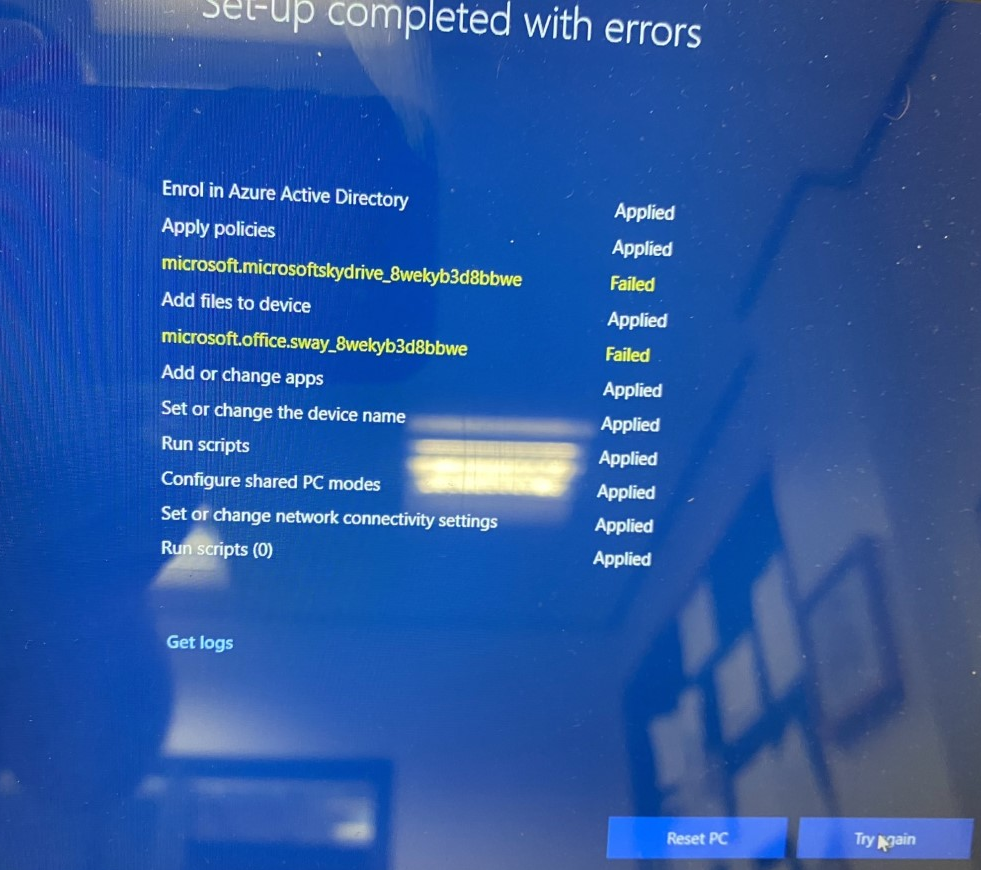
Hi I am getting the below error message when trying to add some laptops onto the managed Intune for Education / Endpoint Manager. Anyone seen this error before? Steve

-
Teams - Chat meeting permissions
steven_layton_sl replied to steven_layton_sl's topic in Cloud Services
@tapb Speaking to the member of staff (and if you noticed the names, its actually my wife who works at the same school!), she has confirmed that she sets meetings up via the channels. Can you confirm the steps needed to "Mute students to disable meeting chat for channel meetings"? -
Hi guys A member of staff just asked me how to make sure that chat is turned off in a Teams meeting. I asked them to edit the meeting options and make sure that chat was disabled, sharing the below screenshot. They just replied with a screenshot of their own, which does not have that option. Any idea why that is the case?
-
Aruba Instant Wi-Fi - Bonjour/AirPrint/AirPlay
steven_layton_sl replied to steven_layton_sl's topic in Wireless Networks
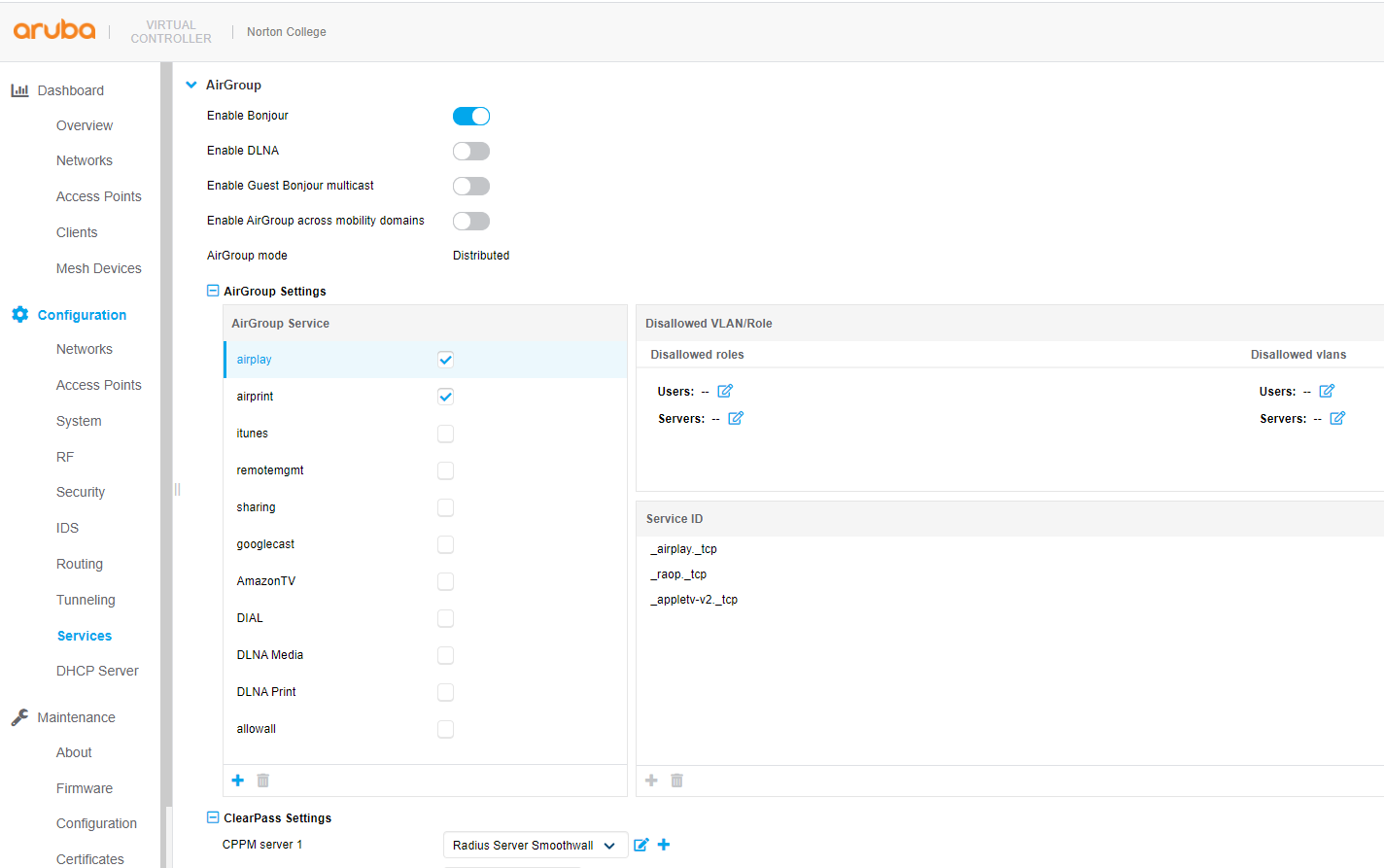
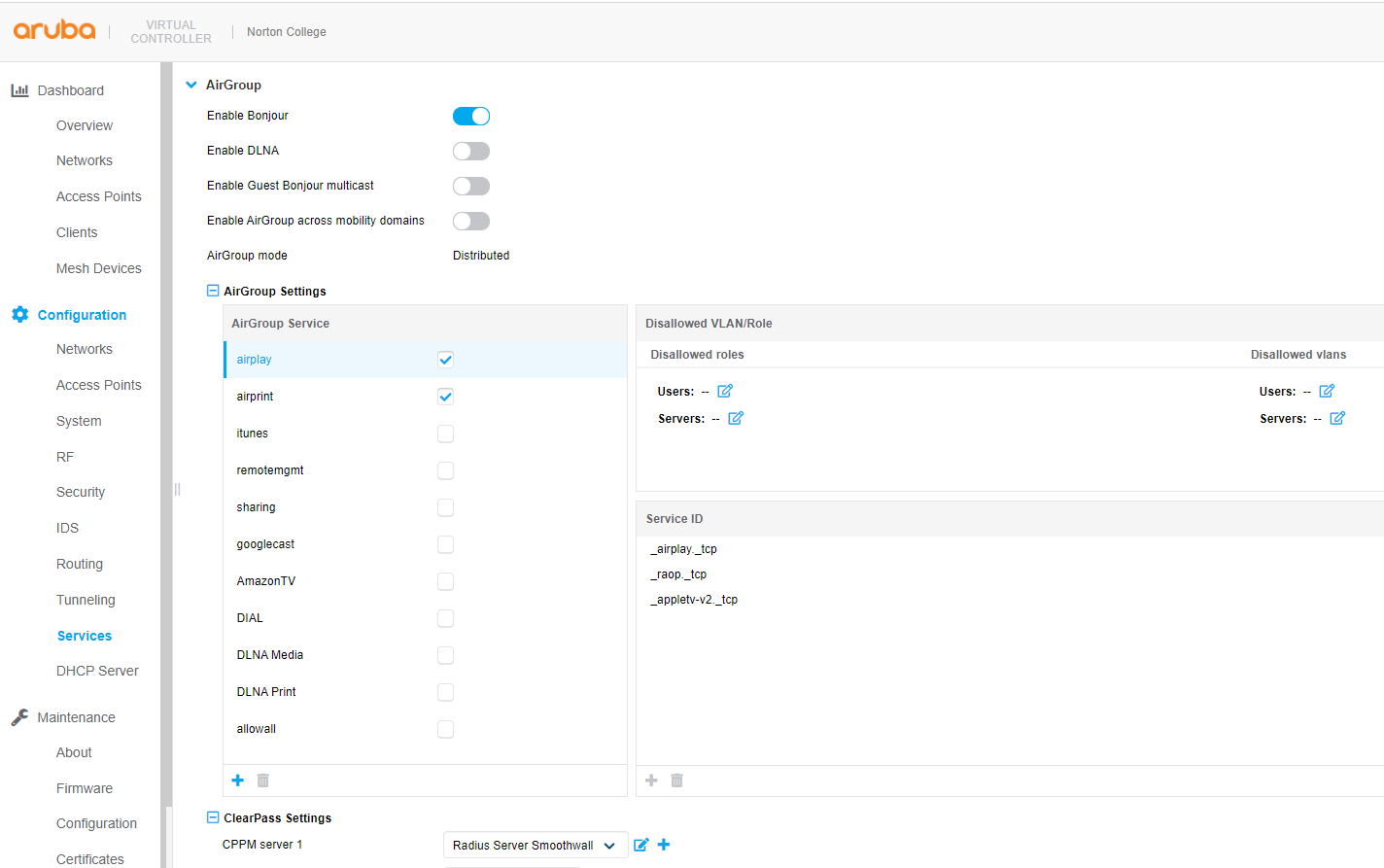
Yeah, I thought so, but its not what I was expecting to see. I was expecting to see a table where I set something like Protocol "AirPlay" State *Allowed" From "VLAN2000" To "VLAN", or something like that. As I can't see anything like that, I am wondering whether all selected protocols are allowed to move between all of the VLANs, unless I add them in the "Disallowed VLAN/role", but its not working without firewall rules set up in my Smoothwall UTM, which is not the way I expected it to work. I "cheaped out" when we bought the Wi-Fi and didn't buy support, so Arube won't help andI can't find anything online about it.
-
Hi guys Is anyone using an Arubra Instant Wi-Fi network, and using Bonjour/AirPrint/AirPlay. Could we compare configurations? I've clearly got something set up wrong, as I still need to have Smoothwall Firewall rules in place to allow the trafficto jump across the VLANs, which should not be the case. Below is a screen grab of my settings. What I really want is to allow all AirPlay and and AirPrint traffic to pass between VLAN2000 (my staff mobile devices network) and VLAN1 (with my Windows 10 PCs) Steve
-
I am trying to get my InTune for Education / Endpoint Manager managed Windows 10 laptops to work 100% with Smoothwall CLoud filter. I am 99% of the way there, and just need some final help. The directory mapping (https://help.smoothwall.net/FilterFirewall/Content/4Services/1Authentication/2Directories/7AzureAD/Add.htm), looks like it is working.... [ATTACH=CONFIG]60804[/ATTACH] ....and I have deployed the Chromium Edge Cloud Filter extention and Powershell script out to my stations via Endpoint Manager. The user I am testing is a member of one of the Azure AD groups that is mapped to a Smoothwall local group. However, my user is only being filtered by the baseline filtering, and not via the staff filter policy. When I browse to "Smoothwall://" and go to the Diasgnosics the "Directory Groups" panel is empty and the "Group Mappings" shows only "Default User". Any ideas?
-
I am trying to get my InTune for Education / Endpoint Manager managed Windows 10 laptops to work 100% with Smoothwall CLoud filter. I am 99% of the way there, and just need some final help. The directory mapping (https://help.smoothwall.net/FilterFirewall/Content/4Services/1Authentication/2Directories/7AzureAD/Add.htm), looks like it is working.... ....and I have deployed the Chromium Edge Cloud Filter extention and Powershell script out to my stations via Endpoint Manager. The user I am testing is a member of one of the AD groups that is mapped to a Smoothwall local group. However, my user is only being filtered by the baseline filtering, and not via the staff filter policy. When I browse to "Smoothwall://" and go to the Diasgnosics the "Directory Groups" panel is empty and the "Group Mappings" shows only "Default User". Any ideas?
-
Hi all We're using the meeting feature of Microsoft Teams in school to facilitate distance learning. At the moment if a member of staff creates a Teams meeting with students, by default we currently allow students to use the chat function to communicate with the teacher. We disable their webcams and audio, so this is the only method within the Teams meeting of students asking a question of the teacher. I'm sat with a test meeting infront of me, set up between a test student and myself. If a student messages something inappropriate, only the creator of the message (the student) seems to be able to delete it. The teacher can't. Is it possible for a staff user (who are all members of different policy groups to students) to be able to delete other peoples messages in meetings? I don't seem to be able to see anything in the Teams Admin console to set this. Steve
-
Thanks guys. This has really helped.
-
@Ratcliffepg How often can you revoke the licences? If there isn't a limit, whats to stop me installing on all of our computers at just revoking every day (on the basis that while we have about 300 computers, we are unlikely to have more than 125 in use at any one time)
-
Are the Shared Station licence a concurrent licence? So, I have 125 licences, and I install Adobe to 126 stations, does the 126th person to use the stations get some sort of 'access denied' message? Does this count reset at any point? Or is it nailed down to the first 125 stations and I need to uninstall from one station to be able to install to another?
-
Hi We've been using the Adobe Creative Cloud for a number of years now, and have recently moved to Shared Device licencing. I'm slightly confused as how the active licence count works. I have allocated at least one Adobe application to 107 computers out of my allowed 125 stations. However, the Admin Console is stating that I have only have it in use on 76 machines. What is worse, is that since moving to Shared Device licencing, I no longer seem to be able to see a list of stations that are claiming one of the licences. Can anyone explain what might be causing the difference in what I ahve allocated, and what Adobe is saying is in use? Also, is there a secret hidden button I have not yet found that allows me to see the station names of the stations Adobe is installed to?
-
Impero - Stopping Minecraft!
steven_layton_sl replied to steven_layton_sl's topic in Network and Classroom Management
Hey @Joh619, setting it to a caption block seems to be working, thanks! The students now hate me, lol. -
Hi @jon-senso I've fired over a web form request from your site, but I'll ask here as well. I'm interested in Senso Cloud, and keen to trial, but any move to you would occur in September 2019, with a new budget. We have about 320 Windows 10 PCs, 15 iMacs and about 180 Chromebooks. Would you guys be willing to let us trial now (for whatever length of time your trial period is), and then purchase in September if we liked? Or do we need to trial closer to any potential purchase date?
-
Quick question - Is it possible to trial Senso, whilst still having Impero installed on your workstations? Or would I have to take Impero off the stations I'm trialling with Senso?
-
We have a Minecraft club for students that runs in one of our IT Suites, each lunchtime. Unsurprisingly, students sneak a game on it during lesson times. We'd like to stop students playing during lesson times, without impacting the club. Minecraft runs from "C:\Windows\InfusedApps\Packages\Microsoft.MinecraftEducationEdition_1.7.1.0_x64__8wekyb3d8bbwe", with the APPLICATION "Minecraft.Windows.exe" How do I create a rule in Impero to stop the students from running it, anytime except 12.30pm to 1.10pm? I had a stab at a rule, but it does not seem to work edit - I have applied a schedule to the rule, as suggested below by @Lister, but the rule is not working, regardless of if the rule is set to enabled or scheduled.
-
Impero 7.0.65 iPad client
steven_layton_sl replied to steven_layton_sl's topic in Network and Classroom Management
Hi Andy, thanks for the info, as this is useful to know. However, in this instance, I'm wanting to use my iPad to monitor devices that are primarily Windows and Chrome devices (which I can currently monitor from my Windows PC) -
Impero 7.0.65 iPad client
steven_layton_sl replied to steven_layton_sl's topic in Network and Classroom Management
We're out of support, so while I'll ask, I guess they have no obligation to provide it. We currently have no MDM, though this is something that a few different factors has started me to look into one. I'd hoped there was a simple link that would find the App in the App Store. -
Hi I'm wanting to install the Impero client onto my iPad, but a search of the Apple App Store doesn't find anything. We're currently using version 7.0.65. How do I find the correct Impero iPad client for this? Steve
-
Okay, this seems like it could have been a case of user error (mine own). It looks like I may have been selecting the incorrect groups, and applying the Power Management settings on those incorrect groups. This may have caused conflicting settings. Now I'm aware of this, I have been sure to just make the changes on one group and will monitor. Many thanks to Vik at Impero for your help.
-
Hi @phil_support thanks for replying. I do not not have any other power rules that I am aware of, in fact, I deleted some WoL and shutdown rules when we decided to use Impero to keep as many stations powered off as possible. All stations will have had several reboots since the change was made, so I assume that they have contacted the Impero server. When I look again at the Power Management schedule, it is completely different to how I left it set (which had everything selected), where when I checked this morning, it was just week days between about 7 and 6. Which MIGHT be how I had set it originally on day one of its use, before changing my mind and setting it to everything. Would it be at all possible for someone to arrange a remote session? Additional question. How long is the delay between making a change in Impero (say turning the Power Management On or Off), and those changing getting to the stations?
-
Wow, okay, so after a great first few days, the Impero Power Management is now just not reliable and seems to have a fracking mind of its own, or certainly not doing what it says on the tin. Below is a screen grab taken from Impero just now, clearly showing that Power Management is turned OFF. It wasn't off last night, and I didn't turn it off. But regardless, I assumed my colleague had turned it off for some reason, and began to do some updating of computers....to find that they powered OFF half way through, messing many of them up. So, I turned it 'ON', then to 'OFF' and its STILL turning un-used stations OFF every 10 minutes. What gives? Yes, I'm out of support with Impero, but if you're reading this, please reach out to help.
-
@timbo343 - Cool, so there is. I'll test this out of hours. I don't fancy the situation where it powers down active sessions.....
-
Hi I'd like to use Impero to power down stations that aren't in use throughout the day. Something like a rule that runs every 20 minutes and powers down stations that aren't been used. Any ideas on the best way of doing this? We're using version 6.4.43.
-
Impero - Workstation Usage stats
steven_layton_sl replied to steven_layton_sl's topic in Network and Classroom Management
Yeah - thanks. This has given me all the info I need.