theeggmaster
-
Posts
641 -
Joined
-
Last visited
Content Type
Forums
News
20th
EduGeek EDIT Conference
Blogs
Everything posted by theeggmaster
-
I chose 'No device, we use chalkboards only...' as we don't issue devices to teachers. PCs are provided in classrooms to teach, we have banks of Chromebooks, but they aren't issued to anyone, they are part of the furniture of the room and the infrastructure in school, in the same way that we don't issue projectors to teachers. You go into a room, and everything you need is in there. I've spoken to many teaching unions in my years in schools and the overall consensus is that if schools are issuing laptops to teachers to take home, then there is an underlying expectation that they are required to work from home, and that puts the school in an uneasy position.
-
Very good!
-
Which Android devices are you using?
-

GNU Image Manipulation Program forked to fix name
theeggmaster replied to bald_pig's topic in Office Software
I might finally be able to get rid of our Macs once the name change happens. -
Accessing applications outside the network
theeggmaster replied to oododkodkdo's topic in Recommended Suppliers
£25000? Option C with RemoteApp and give the curriculum areas money to spend on pens and books. That's more than my entire hardware budget. -
Do you block staff from accessing their work accounts from their own personal devices which may be compromised? I'm sure a Chromebook has a much smaller attack vector than a Windows PC/Laptop.
-
That's why I'm replacing a laptop trolley of Acer C720 Chromebooks that went out of support in June of this year. I'm going to give them out to staff so they aren't on my infrastructure.
-
You can check Google's Update Policy (i.e. when they are supported until) here.
-
I've worked with the SIMS team in two Local Authorities, and both of those SIMS teams required corporate IT to install the actual software on their corporate machines/servers as it was just another piece of software to the corporate IT team.
-
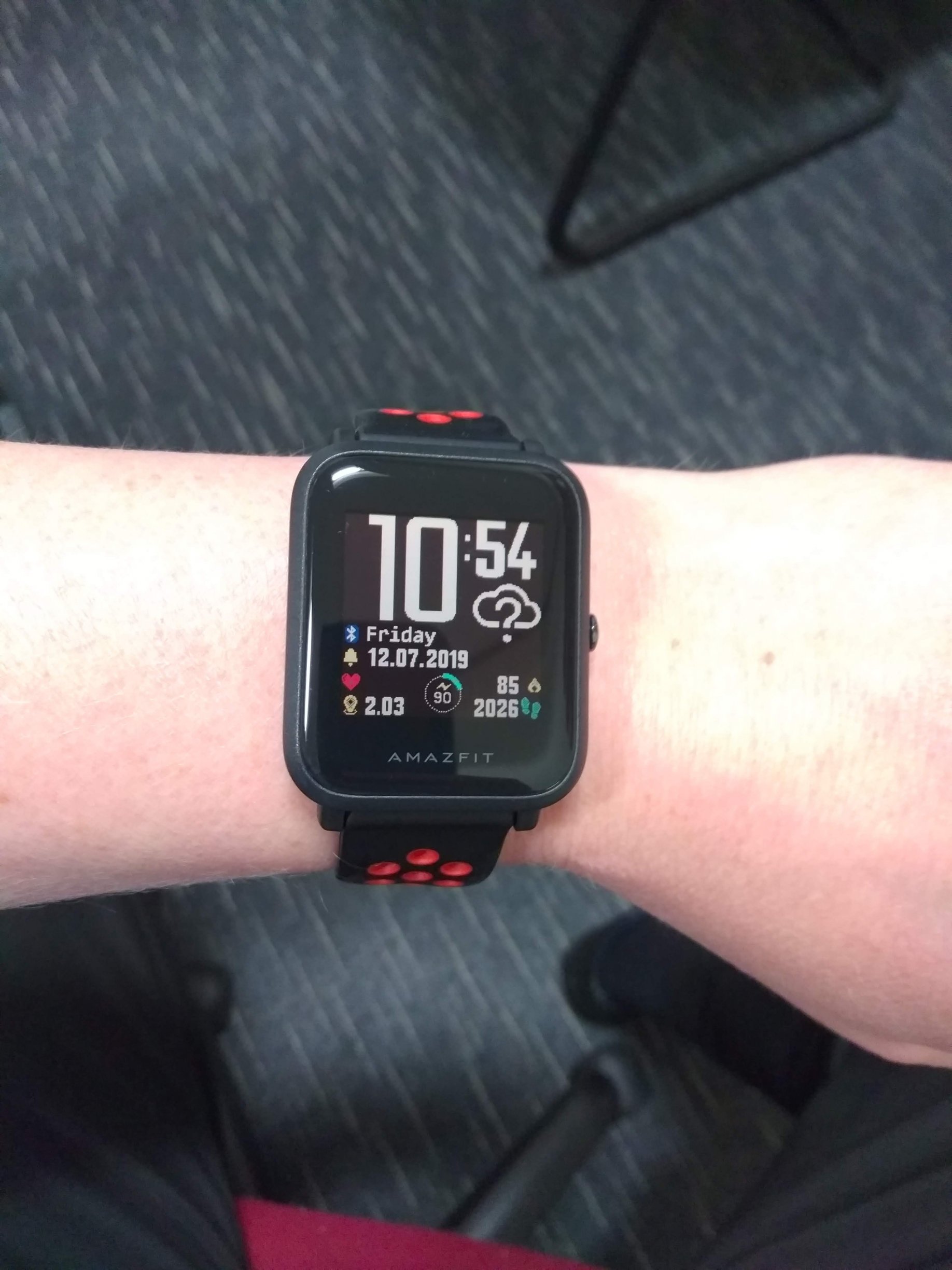
I have an Amazfit Bip. Month-long battery life, has GPS, heart rate monitor, sleep monitoring, step counter, always-on screen, customisable faces.. It's small, light and cheap. Best thing I could find to replace my Pebble.

-
20th Century - "Be careful on the phone, the government might be listening" 21st Century - "I can't wait to buy an always-on microphone that sends data to a private company!"
-
G Suite - Data Export - Does it work for you?
theeggmaster replied to TwistedHelixis's topic in Cloud Services
I would contact Google Admin and see what they say. -
Sibelius asking for admin username and password
theeggmaster replied to theeggmaster's topic in Educational Software
Actually, it turned out that the way the software was installed was with individual licences, rather than the team at the time setting up the license server, so when machines were rebuilt, they didn't have the licence key on and tried to contact the licence server, hence the admin prompty. Eventually I found the individual licences and put those on each machine. -
G Suite - Data Export - Does it work for you?
theeggmaster replied to TwistedHelixis's topic in Cloud Services
The 'Learn more' link in my post takes you to the help page for this tool. We have over 1000 users, so we'd have to request for the tool to be enabled. -
G Suite - Data Export - Does it work for you?
theeggmaster replied to TwistedHelixis's topic in Cloud Services
Under the text you posted, I get the following: Data Export Data export is not available through the Admin Console for your organisation. Please contact Support to request a data export. Learn more -
Chromebits are set to have their updates suspended from November 2020.
-
We use Chrome Sign Builder. It's not free as you'll need to have managed Chrome devices, but if you're looking to buy an Intel NUC, getting a Chromebook or repurposing old Chromebooks might work out cheaper. I use Chromebooks that have damaged screens for ours, as the HDMI out still works.
-
Recommendation to switch off 3G/4G/5G for staff to improve safeguarding
theeggmaster replied to Mark182's topic in e-Safety
The language mentions adults, not just teachers, so in the context of outside agencies not taking pictures and uploading them using 3/4/5G, then that makes sense. Less so for teaching staff. -
Recommendation to switch off 3G/4G/5G for staff to improve safeguarding
theeggmaster replied to Mark182's topic in e-Safety
We've just had some recommendations through from our LA to improve safeguarding. One of the recommendations is to get staff to switch off their 3G/4G/5G data on their phones to improve safeguarding. I've been asked why this would help, and the only thing I can think of is so that any use of data on mobiles goes through the school BYOD system where it will be filtered and monitored. Can anyone else think of any other reasons for this recommendation? -
We moved everyone to Google Apps back in 2012 and made our shared drive read-only. Microsoft Office is mainly used for legacy documents/presentations, communications with the LA and exports from SIMS.
-
I can see why you would do that. I made all of the teachers machines end with '01' so that I could have a group in Impero that excluded ICT101 and included ICT1?? to get all the machines in ICT1 in the same place and it also means that the teacher isn't locking their own PC out when they do a screen blank to get student's attention.
-
That yellow one is a TV remote. I've tried TV learning remotes in the past and it couldn't 'learn' the projector codes, which is why I went for the universal projector remote that I linked to.
-
I buy these. Cheap, decent quality with good buttons and programmable to any projector. I have one set up as a backup to the hall projector remote as it will, one day, go missing.
-
I need to get three competitive quotes for a server replacement for a Primary school. I have two already but I was hoping someone on here could recommend any companies that could get me a quote quickly? I'm looking to replace an old Dell which has 8Gb of RAM and 2Tb of usable storage. Looking to virtualise on the new server with Hyper-V and split the roles into two VMs.
-
PCs are named after the function of the room shortened to three characters, followed by the room number (if it's the only one, it gets a '01'), followed by the number of that PC in the room, clockwise from the door. Teacher PCs are always '1'. e.g. Maths 1 with only one PC in would be MAT101. ICT 2 with 31 PCs in would be ICT201 (teacher PC), then ICT202 (computer closest to the door), ICT203 (next computer clockwise) up to ICT231.