mrstrong
-
Posts
755 -
Joined
-
Last visited
Content Type
Forums
News
20th
EduGeek EDIT Conference
Blogs
Everything posted by mrstrong
-
Hi, I've been given an old laptop (not on domain) with unknown local admin user / password. Think it was bought and setup for doing some audio/video stuff off the network. No one seems to know admin login so whats the quickest way to get local admin. Don't want to start searching for hack/crack password tools! Maybe I could just login as standard user and join it to domain ?
-
Hi, got a touch screen with no freeze screen option PC VGA output goes via a splitter box: one to monitor, one to touchscreen. Is there any way I can get a freeze screen just on touchscreen whilst teacher works on PC ? She's on windows 10, we tried extend which creates a new screen you can drag stuff to but it is not visible on PC.
-

Bare metal recovery can't find any system images
mrstrong replied to mrstrong's topic in Windows Server 2008 R2
Thanks, sorry didn't reply, only work term time and just got back to expected start of year chaos. Unfortunately that server has now died so I'm trying to fix that first http://www.edugeek.net/forums/hardware/209241-troubleshooting-server-wont-boot.html -
no its an old super micro SC 743 chassis with a SAS743TQ (backplane with drives). Managed to get side off yesterday it looks pretty cramped and dusty in there. Not got any further as been swamped with the usual first day/week back chaos: loads of classrooms reported faults mostly stuff not plugged in but still lots of genuine issues to sort before I get time to have a look at server
-
Before the holidays I powered down an old server (2008R2 doesn't get much use (was planning to upgrade it this term and maybe put on WDS)) Anyway come in today and press power button and nothing, no attempt to boot, just dead :-( Checked power cable ok. When it is plugged in there is a very slight "electrical hum" noise. If I press power button the LAN light does come on and usb drives lights come on though not the mouse. Maybe faulty power supply, or dead motherboard? Not sure how to diagnose.
-
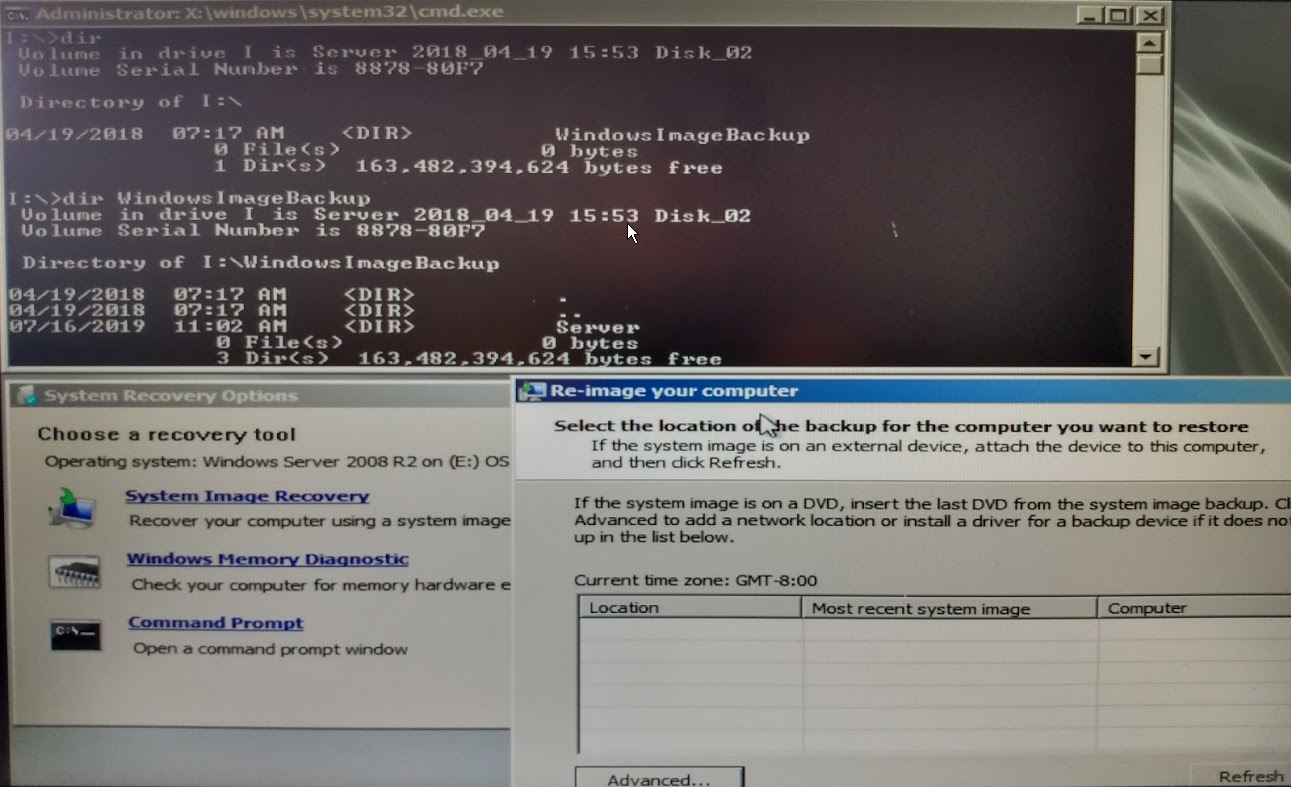
Hi, got an old server 2008 R2, going to decommission soon (then maybe try installing a later server OS for testing etc). It's not "actively used" so thought I'd try a bare metal recovery (windows server backup) to "test my disaster recovery" Booted from 2008 R2 iso off a usb, gone into repair but scan does not find system image but they are there as you can see in screenshot (I: drive external seagate usb) so not a driver issue ? Doesn't give me much faith in WSB :-(

-
Thanks for helpful replies, I've not heard of these before: SSO, kiosk, SAML, cloud ready so will need to do some frantic googling me thinks
-
bit of background: some of our laptops (shared use) are running out of space (windows 10 32GB SSD) so I'm thinking of removing ms office (2016) from them and looking for an alternative lighter office suite. I was thinking of looking at the free alternatives like libre office but not evaluated these yet for size / suitability. Then I thought a quick fix would be to just use google docs (as we have one to one chromebooks further up school). However some of the kids are only 5 years old (year 1) so would struggle with individual logins e.g. typing name@domain and remembering password, remembering to log out and not save password etc (these laptops are used by several classes and kids will not always use the same numbered laptop every week) Then I thought about having a generic login e.g. class5@domain that all the class use. So is it possible to create a shortcut which does an "autologin" to google docs e.g. to a generic account e.g. class5@domain ?
-
It looks like its not happy but at least its stayed on 1709! When I've got a bit more time I think I'll try an in-place upgrade direct to 1809 e.g. by running setup.exe from mounted 1809 iso whilst logged in forgot to say clicking check for updates finds none e.g. you just get back image above Update history still says needs a restart for "Feature update to Windows 10, version 1803 x64 2019-07B" Maybe if I blow away complete C:\Windows\SoftwareDistribution\ folder rather than just download will fix but then I think I'd loose all the update history.
-
Thanks Zourous, I'd read your thread this morning and turned on "Do not allow update deferral policies to cause scans against Windows Update" Reviewing my settings I noticed for workstations I've got "Extra Registry Settings" Software\Policies\Microsoft\Windows\WindowsUpdate\DisableOSUpgrade 1 I don't have this for servers (including my PC), maybe its "deprecated" back from lunch and its stuck at 3% on KB4346085 going to try another restart see if that sorts now all policies in place Anyway
-
damn its still there, where the f*! is it coming from? had a look in C:\Windows\WinSxS for a pending.xml to delete but only a migration.xml (from suggestion here https://www.thewindowsclub.com/delete-downloaded-failed-pending-windows-updates
-
thanks, didn't have it: just added to gpo and done gpupdate /force also stopped windows update service and deleted %temp% and C:\Windows\SoftwareDistribution\Download contents rebooting now, lets see ....
-
Hi, on wsus here. Thought I'd set it up to stop feature updates (upgrades classification not checked) but apparently not My own PC is about to update (see attached) Is there any way to stop this while I figure out why update "got through". I really don't want to come in monday morning to any 1803 "issues"
-
after some testing started rolling out LTSC 2019 with office 2016, seems pretty solid, you can add onedrive, bring back photo viewer with a reg hack, what else do you need ?!
-
Have any Schools moved their file storage to G Suite entirely?
mrstrong replied to fiza's topic in Cloud Services
Just wondering if any of you who moved to G suite considered the Microsoft/onedrive alternative and if so why did you go with google ? -
I've used screencast-o-matic free version before https://screencast-o-matic.com/ basic but good and portable (no need to install) I think free version puts watermark on vid. Also seems to produces small file sizes but still good quality
-
I've been experimenting with MDT recently and windows 10 LTSC 2019. Trying on some very old laptops that originally came with XP, now running win 7 I was expecting to have driver issues but so far it seems to have found working drivers for everything (apart from a cardbus slot). Haven't had to import a single driver (must all be in the LTSC 2019 iso?) so may be worth trying a deploy first and then checking in device manager for anything missing you need.
-
Thanks for heads up, we are using ubiquiti unifi APs. Will keep testing
-
thanks, just looking at adobe reader, there seem to two options, e.g. classic or continuous track? I'd be tempted to go classic if it means fewer updates ?
-
Hi, need to upgrade some (very) old win 7 machines and trialling LTSC 2019 with Office Pro Plus 2016. Deployed via MDT and looks pretty good so far but am missing the photo viewer for starters. Can anyone post the reg hack / gpp to bring it back ? Also I seem to have "OneDrive for business" which I think is part of Office Pro Plus 2016. When I run it it asks "Which library do you want to sync?" !? I just want the "standard OneDrive" that you login to with your office 365 account (like you get with windows 10 ed). I think I can exclude OneDrive for business from the office install using MDT. Can anyone post a link to the msi / exe for OneDrive I should be using in LTSC so I can add it as an application via MDT? Finally what do you use for pdf view/print? Chrome works ok but I think staff would prefer adobe. Is Reader DC 2019 the way to go? E.g. latest version AcroRdrDC1901220034_en_US.exe Noticed it's 171 MB vs e.g. Sumatra 3.1.2 at 4MB ! Thanks
-
Thanks j224, not seen that blacklist urls settings Bald_pig, I think you are correct, as from reading https://support.google.com/a/answer/1668854?hl=en It says I think the best way is to use the web filter but thats seems to be giving me issues too. I'll post a separate thread about that
-
Hi, some students have their own chromebook and sign in with their g suite user account. I've put these users in their own OU and disabled the youtube service for this OU as per https://support.google.com/a/answer/6304948?hl=en But youtube still works for them. I've noticed once they log in to their chrome book and go to e.g. https://docs.google.com they are automatically "signed in" to their account , e.g. can see their docs etc but if they type https://www.youtube.com/ it loads the page and there is a button top right saying "sign in". I'd assumed once they logged in to the chromebook that was it but it looks like there is also a seperate login needed for the chrome browser e.g. for youtube but not for docs / drive etc ? Can someone explain what's going on here and how best to block youtube on chromebooks! PS just found a force sign in policy https://support.google.com/chrome/a/answer/7572556?hl=en but that appears to be only for windows / mac.
-
Hi, we use office 365 here and staff access via OWA i.e. in a browser. I've created a calendar and shared it with a mail enabled security group giving staff edit access. When I did this they all got an email invitation. Now a new member of staff starts, I add them to the mail enabled security group but they don't get the email. I can send them an email by sharing with them but is there a way of automating this or can they add the calendar themselves? FYI the calendar is for booking laptops so maybe there is a better way of doing this? Thanks
-
Took me a while to find this in the GPO as I was looking for "PromptForDownloadLocation" when it is: Computer Configuration\Administrative Templates\Google\Google Chrome\ Policy Name: Ask where to save each file before downloading Is there any documentation that shows these "mappings"? e.g. from PromptForDownloadLocation => Policy Name: Ask where to save each file before downloading
-
yes please It looks pretty powerful / worth learning. Somebody has just asked me for audacity on laptops so I might have a go doing an msi for that.