maniac
-
Posts
3,169 -
Joined
Content Type
Forums
News
20th
EduGeek EDIT Conference
Blogs
Everything posted by maniac
-
I've found the only way this works properly is to give staff 'Account Operator' privledges in Active Directory. This allows them to change users passwords, but not administrators passwords obviously! It is quite a high permission to give, as potentially they can affect any Users account on the system, but it's the only way we can get it to work. To stop this our password reset program is multiple choise, so they can't change staff passwords. Mike
-
We have a right old mixture here. All our main cabinets are linked via 1GB uplinks directly back to the core switch, the exceptions are two, one which serves a large cunk of one building which has a 3GBs trunk to the core switch. That then distributes to lots of other switches at 1GBs over fibre and some copper. There's a second in a simelar situation which has a 2GBs trunked link to the core switch and distributes to lots of other switches in the same cabinet and one on the floor underneath via copper Gigabit (all on cat5e, and all works well) A few areas of our network are linked at 1GBs to desktop but we've found it makes little difference to be honest. One machine on its own logs on quicker, but a class of 30 still takes the same sort of time, as the uplink is the limiting factor. All our servers are connected at Duel Gigabit to the core switch using teamed HP network cards, although our existing 4108gl which acts as our core switch can't cope with more than 8 trunks, so some of them don't work at their optimum. New core switch going in next week thou, it all arrived on Friday We do have some segments of our network with old unmanaged netgear switches on which are all 100MBs uplinked, but we are slowly phasing these out. Mike.
-
This is our server room, nice a large, 2 x racks so they're not over crowded, air conditioned and no windows. The servers are spaced a bit better now than when the pic was taken, that was just after the summer in 2006 and the 2 servers at the bottom were old ones due to be decommisioned once their replacements were fully tested. I like it, it's one of the better server rooms I've come across, although the air conditioning is on its limit now keeps the room cool, but not cold any more. Just behind it you can see our main comms cabinet (that was a bit of a mess at the time) and in the back corner, some of the old servers we had just replaced! Mike

-
We use Windows Deployment Services because it's a free addition to Windows Server 2003 and my philosophy being why pay extra when there's a free version that does what we need fine! Once you got it setup, which can be a bit fiddly admitedly, it works really well. Have used this for the last year or so (prior to that we used RIS) Mike.
-
We use Joomla for our intranet, set up by me about 2 years ago. It works, but it over complecated. We've given a few of our SLT members rights to login and publish articles, but anything more than a basic item, and we have to do it ourselves as they can't get the hang of uploading PDFs to it etc. Mike
-
If you really want to do this, then you can and you can still utilize all the Extra GPO's in Vista on a windows 2003 domain, BUT you have to do your group policy management from a vista workstation and make sure your server is set up correctly to let this happen. This Technet article will help you a lot, and explain what can and can't be done with Vista in a server 2003 environment. Microsoft Corporation Mike.
-

[ms office - 2007] Office '07 Graphics Printing Trouble
maniac replied to new-2-this's topic in Office Software
I've had some weird printing problems from office 2007 mainly from Excel (not printing gridlines at all) or outlook (Printing message header, but not the body) We solved most of them by turning off Advanced Print Options (or something like that!) in the printer driver on the server, ours are all HP printers, so don't know if Brother printers have an equivalent. Mike. -
I've used RIPlinux which installs onto a memory stick easily. I like it because of it's quite small file size, and it's relatively quick boot time, and it has a lot of useful tools built in. Information from wikipaedia, Recovery Is Possible - Wikipedia, the free encyclopedia Link to Download it http://www.tux.org/pub/people/kent-robotti/looplinux/rip/ Mike.
-
I don't, our MIS system is Serco CMIS which uses MSSQL server as its backend. I do however use mySQL extensively for web applications like Moodle, and it's been 100% reliable for the 3 years+ that I've used it for those type of things. Why do you ask, is there something specific you'd like you know about it, or just queries about the general reliability, security of it etc. Mike.
-
We only use ghost on our aging Fujitsu Desktops, and a few other random machines, all our others are imaged using WDS as it's free! We run ghostcast server from a 2yr old laptop believe it or not, which is loaded with all the images we need. That way when we use it in Multicast mode, the traffic is confined to the area of the school we're in, as we plug the laptop into a spare port in whatever room we're in. As the machines only have 100mbs cards, you only need a 100mbs card in the server as the clients can't accept the data any quicker, in multicast mode the process only goes as fast as the slowest machine anyway. We do 20-30 machines at once with no problems. Mike.
-
[ms office - 2007] Outlook 2007 Crashing repeatedly
maniac replied to maniac's topic in Office Software
Eventually found the solution to my troubles! - http://forums.microsoft.com/TechNet/ShowPost.aspx?PostID=3331615&SiteID=17 describes a simelar problem to what we were having, freezing up and crashing, and the suggestions in the last post worked. Removing the Windows Security Update KB946983 solved all the problems I was having! Apparently Microsoft Hotfix 950282 also patches against this problem, so if anyone else gets the same or simelar problem, there's a solution! Mike. -
I do the same as ittech, if you disable the igfxtray utility from running at startup, it stops all the shortcuts working and gets rid of the trayicon too. Still good job, as it will patch any machines I may have missed doing this to. Cheers, Mike.
-
I seriously doubt you'll need support for papercut much, it's exceedingly reliable. We have had it here for over a year now, and it just works! Their support although in australia, has a UK number which is forwaded by them to australia, so you can call them at local rates, and there was someone there when I called them once with a query a while back. Top marks from me, and if you want to try it before hand, you can install it in monitoring only mode for free Mike.
-
check the paper tray guides are definitely set to A4 as some HP printers sense the position of the paper tray guides to determine what paper is loaded in the printer. If it miss-matches with the size of document that is printed to the printer it will prompt for a manual feed, which is why you have to press the button for it to continue. Mike.
-
I know you already solved the problem, but something I find handy to solve VBS script problems is to use the msgbox function to put a message on screen showing whatever data you're having trouble with. e.g in this case I would have added msgbox time to the script to actually display what time the program is seeing in a messagebox, then it might help give you an idea as to what the problem is. I use it all the time to check the correct data is being used by scripts when I'm writing them, very handy. Mike.
-
Make sure you're never likey to want to put add-on cards in the micro cases, as quite often they will only take one full height or half height card, or sometimes no expansion at all! We fell foul of this with our music department when we decided we'd like to put better sound cards in them than the standard on-board ones, but we couldn't find any decent half height sound cards. We're might have to add firewire to them for the proposed media course this year, although I'm pretty sure we can get half height firewire cards, but still not as convenient as it may have been if we brought just some of our machines with full size cases. Also another consideration with micro cases is when the machines go out of warrenty, can you get decently priced spares that will fit them? I've always tried to get cases that will take a normal sized motherboard, so if we do still have them when the warranties expire, we've a good chance of keeping them in service. Some micro cases take a very customised board. The workstation specs look good, they are overkill at the moment, but if you run Vista in the future (which is likey if the machines have a lifetime of say 4 years) then you'll be glad you brought over the top machines, so if it doesn't kill your budget to get them at that spec, then I would do so. 8GB of RAM in the server is probably over the top. I'd only go for 4GB, but leave room to expand in the future if you find you need to. Our DCs both have 2GB each and they cope absolutely fine with a 650 station network. Saying that, our DCs don't handle any data storage as they are purely DCs and there are 2 of them to share the workload. None of them ever shows any sign of being stressed thou, the second is there more as redundancy than load sharing. For the hard drives, I would consider changeing the configuration for 2 x smaller capacity 10,000rpm drives in RAID 1 to load the operating system onto, then 4 x drives in RAID 5 for the actual data storage. This keeps your operating system totally independant from your network data, which is good practise, it will also speed up the booting of the server and allow nice fast disk access for directory operations and swapfile. If the budget allowed, I'd change it totally and opt for an external drive array for your storage which will allow you to expand easily in the future. Also this has the advantage that if the server dies totally you can attach it to a new server easily to get access to the data. If that's totally out of reach (don't discount it, some external SATA arrays are getting very affordable now) just make sure you choose a server chassis with plenty of space for drives, as some only have room for 6 disks which won't give you enough room for future expansion (or none at all if you do the disks as stated in the other paragraph) We've had to add 4 new disks to our 1.2TB array after 2 years, as the amount of data on it expanded 4 fold on what we predicted, it's on a steep up hill trend still mainly due to the amount of video material teachers are using now, and filling up our network servers with! Saying that, we're on a larger scale than your system is, so it may not be necessary in your situation, but just a few ideas. Mike.
-
Ranger - is there anything that can also do:
maniac replied to burgemaster's topic in Network and Classroom Management
We ditched ranger in August last year and we havn't missed it that much. We replaced the logon restrictions using a VBS script (probably the same ones that FN_Greatermanchster has) which works quite well, although if a user doesn't log off properly it won't let them logon again until you reset it manually. We get about 10 students a day with this problem on average. Lan ranger didn't have that problem as it constantly 'talked' to the workstations and updated itself. We tend to suffer this on laptops if they don't have a wireless signal when the user logs off, it won't run the logoff script. To replace the ability to see what workstation a user is logged on, I've written some PHP scripts which read the information from VBS script logon/logoff tracking file every minute to give an almost live view of logons on a web page, that works pretty well. I've also written some reporting features which allow you to search this data so you can see where users were logged on in the past etc. This works very well. We havn't managed to replace title checking, but we don't miss it that much the uses of it were limited. The other feature we did miss was the ability of staff members to reset users passwords using the user manager program in staff mode, but I've written a VB.NET program which replaces that, and it works quite well. You're welcome to copies of the above PHP scripts and programs if you'd like them, they are taylored to our network so you'd need to alter them accordingly and my coding in them isn't brilliant, but they work! You'll also need a webserver with mySQL installed to run them. Mike. -
Well ours is set up like this; the range 192.168.0.1 - 192.168.0.254 is reserved for manually assigned IP numbers, and is divided as follows; 192.168.0.1 is the default gateway. 192.168.0.2 - 192.168.0.4 are reserved not used 192.168.0.5 - 192.168.0.24 are reserved for Servers. 192.168.0.25 - 192.168.0.49 are reserved for Workstations requiring a static IP 192.168.0.50 - 192.168.0.99 are reserved for managed swithes and UPS's with management cards etc. 192.168.0.100 - 192.168.0.179 are reserved for network printers 192.168.0.180 - 192.168.0.199 are reserver for 'other' (One LAN box, Telephone Switchboard, Network access for the CCTV etc.) 192.168.0.200 - 192.168.0.254 are reserved for wireless Access Points. We don't have any IP phones at the moment, if we did we may introduce another manualy allocated set just for them, probably the beginning of the next range. 192.168.1.1 - 192.168.3.254 is our dynamic range allocated by DHCP. We use a subnet of 255.255.248.0 to enable us to widen this easily if needs be, and we're not too far from needing to! The key is not to restrict yourself too much when reserving addresses for manually allocation to devices, else you'll find yourself having to reserve more addresses, and then things end up all over the place. e.g we have 80 addresses reserved for printers, we only use just over half of these, but who knows what might happen in the future? Cheers, Mike.
-
You might be better off using a duel output video card in clone mode (if you can) rather than a splitter. I find the VGA splitter boxes lower the picture quality substantially.
-
That'll be this house when the key meter doesn't get topped up then!
-
We had a demonstration of this from their bods, and although it's impressive looking, and integrates beautifully with CMIS, I had the following reservations about it. 1) it's hosted on their servers off-site, which means if it does become a core part of your teaching and learning, you may end up having to upgrade your internet link to handle all the extra traffic. 2) When we were looking at it, they only allocated 10GB of space with the initial purchase, and you could buy extra space a GB at a time, which was very costly! This may have changed now, as it was almost a year ago when we were looking for a learning platform. 10GB of space is not a lot when you're dealing with over 1000 students. Apart from these, overall it seemed to be a good product, and certainly looked the part. Saying that I don't actually know of any school that uses it I'm afraid, but I know plenty of schools who have looked at it like I did. Mike.
-
I had a demonstration of this system a month or so back, and was dead impressed. I'm not sure how well it works in practise, but the theory behind it and demonstration is certainly impressive. Mike.
-
I installed it on my workstation today, and it definitely seems to have sped things up a bit. In particulalr office 2007 seems a lot more happy, but I'm not sure if this is just my imagination Mike.
-
[ms office - 2007] Outlook 2007 Crashing repeatedly
maniac replied to maniac's topic in Office Software
Thanks for the replies. RSS feeds are turned off, this is a user specific setting anyway, but the problem seems to be tied to the machine, once it starts doing it on a particular machine, then it will affect all users on that machine. Office was installed from the CD onto one machine, then our laptops are imaged using WDS. The image was of course syspreped before hand in the usual way. Office 2007 SP1 was rolled out by my WSUS server, it only seems to have become a problem since SP1 was installed on the machines. Still puzzling me this one is! Any other ideas?? Incidently I installed XP SP3 on my machine today, and it it seems to have sped up office 2007. Not sure if this was just my imagination thou? Mike. -
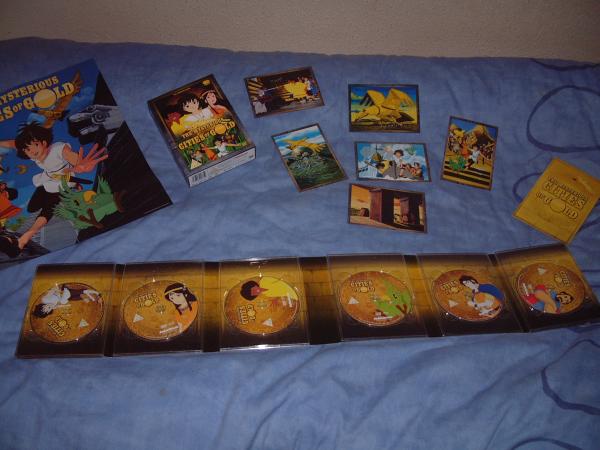
You can actually already get the MCoG box set from HMV, been available for a few weeks now. Link here Of course I already have mine and very nice it is too!