psydii
-
Posts
5,195 -
Joined
-
Last visited
Content Type
Forums
News
20th
EduGeek EDIT Conference
Blogs
Everything posted by psydii
-
It depends. Delivering IT to good standard is not low cost. Many schools continue to underinvest so for them doing anything properly appears to be "far too costly" However if you are delivering IT assets and infrastructure such that it meets or gets close to the DfE published standards, then 1-1 might be cost neutral, or even save money. Once you have cleared the hurdle presented above, the two key pieces of the challenge are not actually the kit or the tech but the Head Teacher and the Head of Finance. What is successful and how it is accounted for? A change in Head or a change in Finance manager can result in a programme that was successful and cost effective being viewed as neither of those things, while no other variables change! Here, we could do 1:1 and it could be lower cost than what we do at the moment. However we would not be delivering that same capabilities to staff and students as we do at the moment. We would reduce the number of computer suites by 50%. We would reduce the number of laptop trolleys by 50%. We could even perhaps swap the remaining 50% of high performance laptops into the IT suites we might otherwise retire - though these rooms would need costly works to make them dual purpose suitable for the practical classes that require the high performance laptops. If we restructured our curriculum offer we could reduce the high performance laptops and IT suites by a further 50%. We would also need reduce the density of our printing and reprographics facilities. "Paperless" is a myth, but we could certainly choose to reduce our paper consumption by 50-75% by having all department restructure their teaching and learning materials based around a 100% access to IT. With the reduction in wired devices (desktops, printers, photocopiers) we would need 90% fewer active switch ports - while not an immediate cost saving, certainly one that would kick in over a 5 - 10 year period. MDM has been the only sane way to manage 1:1 devices for a while now (yeah I have, can and occasionally still do 1:1 device management with AD/GPOs but Intune / MDMs are better). We could remove server infrastructure from the refresh - or at the very least dramatically reduce it. Again not an immediate saving, but over the 5-10 year period, significant. Finally (again for us, your local circumstance may vary) a significant minority of parents are able and will to contribute financially to supporting a 1:1 programme. When all these things are considered, I have found that I can model for a 1:1 programme making considerable savings, and the 1:1 programme being more expensive and come with substantial risks. It just depends.
-
Assuming you haven't taken steps to completely block the Windows Recovery Environment, you don't even need a USB There is a script to bring legacy machines into autopilot. The (now former) Microsoft Employee who made the original get-autopilotinfo script's blog is a fantastic place to know about: https://oofhours.com/. He 'endorses' a community lead update to his script since it seems nobody at MS is maintaining his script since changes in MS Graph sometime last year. https://oofhours.com/2023/06/09/get-windowsautopilotinfo-ps1-updated-but-not-by-microsoft/ https://andrewstaylor.com/2023/06/14/get-windowsautopilotinfo-and-windowsautopilotintune-community-editions/ (MS did update their script later in June, however as of February 2024 I could not get the Microsoft one to work and had to swap it out for the community edition) You need an autopilot profile that applies to the tag you specify when running the script. I use the self-deploying option. We have a dynamic AAD groups that pick up devices with these tags as members. Intune configuration profiles (a completely separate thing to AutoPilot profiles) are deployed to these groups (as appropriate) (dynamic group / autopilot / intune configuration profiles used to be highly unreliable for us, it seems that things have got more consistent and this combination of tech now works 98-99% of the time) The tag from autopilot is exposed as the OrderID in Entra/AAD so the rule for the AAD/EntraID group(s) need to look something like: (device.devicePhysicalIds -any (_ -eq "[OrderID]:TAGNAMEINAUTOPILOT")) https://learn.microsoft.com/en-us/autopilot/enrollment-autopilot Tutorial: https://learn.microsoft.com/en-us/autopilot/tutorial/self-deploying/self-deploying-workflow (we have shared devices, student one to one devices, and staff one to one devices as both Autopilot Tags and AAD groups to which profiles etc are deployed this so far has covered all requirements and is markedly simpler that our 20 year old+ AD OU/Group and Group Policy / SCCM collection arrangement) Once a device is AutoPilot registered, autopilot profiles and Intune configuration profiles are assigned to the appropriate groups that your computer will become a member of you can issue the following command on computer to re-image it without needing a USB: shutdown /o /r /t 0 You will end up in the Troubleshooting / Maintenance screen - step through that to reset the PC (wipe data option) and it will wipe itself and reinstall from the recovery partition(*). The Windows install process will detect it is an Autopilot'd device and everything will happen automatically. https://techcommunity.microsoft.com/t5/windows-it-pro-blog/windows-recovery-environment-explained/ba-p/2273533 With a correctly configured Azure AD Connect set up, your AAD/EntraID devices should be able to get Kerberos tickets for themselves and the 365 users who log on, simplifying access to legacy network resources. I haven't explored this much. You can check if you are good to by following the step in the "lab sign in" section of this page: https://msendpointmgr.com/2021/08/15/sso-to-domain-resources-from-azure-ad-joined-devices-the-mega-series/#see-it-in-action
-
Them: Psydii can you hop on a call with the architects about a new site we're opening. They need to know what spec to work to. Me: New Site? Them: Yeah were just finalizing the details before they start work. Me: [[grumbles profanities in BSF]] Yeah sure. When's the call? Them: In 15 minutes. Anyway, while speed reading the DfE's School Output Specification Generic Design Brief (December 2023), I came across "Section 4.8.4 CCTV" which seems relevant this thread: https://assets.publishing.service.gov.uk/media/65803d561c0c2a000d18cf3c/GDB_GenericDesignBrief-A-C17.pdf
-
Just jumping in naively here (no MAT experience but I saw similar done during BSF). To me (as an NM) it seems that buy in from the NMs would be the key. I'd look at bringing them together to share how they are working and what they've done to get their tenants to meet their school's needs. They are a resource you should be able to call upon to do the work, support each other and you. You also need their Head Teachers to be be 100% bought in to standardizing across the Trust, and it is mostly for them to help settle the local team into the idea of change and collaboration. Once they are on board with that, they can work together to standardise how they create users in their local AD's and then develop a plan as a group to migrate to a new super tenant. The initial buy-in process is the most crucial and will need a very softly softly approach. Just this bit will probably take months. Only when you have got people all on the same page and working together can you begin the technical piece. A chunk of this work is strategic Trust director-Head Teacher stuff, that you need to witness (and learn from), so when you start to work with the local NMs you are equipped to handle their (inevitable) concerns. I will note however that there are now enforced limits on edu tenants which probably isn't an issue for a handful of primaries, but bringing together more than a couple of secondary's could be a problem. You might want to talk with your CSP about this. I wouldn't start migrating the primaries until the Secondary NMs are on board. They need to feel they have collective ownership of the new tenant, and that will be difficult if you've already laid it out and its full of primary teachers.
-
We've noticed this too. Damage is way up this year on screens, but on review nearly half of the broken screens occur from interactions that I consider normal. On more than one occasion I've seen a student react to a peer turning a monitor to show them something (and the screen does that lovely colour thing an LCD in distress does) advising them not to move the screen like that, to which the response is always "what like this?" while repeating the action and then the screen is broken. Produce monthly IT management reports for the Finance Officer and your Line Manager - include device damage, cost of repair, department responsible. Also include other things like tickets open close/time to fix/first fix, change requests handled, new things done so it demonstrates what things you(r team) are able to do well. In a summary page allocate costs of maintaining the service to departments. Offer commentary as to the root cause of the damage (poor supervision in many cases, cover teachers (also poor supervision) in others. Suggest these costs should be marked against a nominal that links back to staffing / teaching and learning rather than IT. I doubt they would acquiesce but these costs *are* attributable to staffing issues and should be included in the management reports (as produced by the Finance Team/SBM and reviewed by SLT and presented to governors) reports as such, even if the "fixing it budget" sits with IT at the end of the day its all the schools money so it doesn't much matter which pot it comes from. (We don't quite do this - the finance system is set up to make analysis like this possible with a quick export from there, export from the service desk (where we have custom fields and a strict format for ticket descriptions/categories) and vlookup on the Purchase Order number for the repairs. The reports are more comments at meetings, and from time to time an email with summary of the above gets sent if repairs/breakages start to escalate.)
-
Yes. This is why when you get an "give me *everything*" request, the DPO crafts a careful response to get them to agree to a limited set of data, even if that set of data ends up including the 80,000 emails that had their child's name in them. Typically the DPO response will offer an understanding of what they mean, and within that will not even mention CCTV, Door, or IT Audit data. The data subject gets the data they want, and we don't have a mare trying to execute (well except for those 80,000 emails they insisted upon). Of course you can also get requests that explicitly request CCTV or logs, and there the DPO crafts a careful response to narrow down the scope to a very narrow time period, or location, again so the data subject gets what they want/need and we don't have to flog ourselves to death executing the request.
-
We have external sharing enabled but also restricted who can share externally using the option described in this page.
-
In my experience*, teachers who turn up, stand at the front of the classroom, and then leave at the end of the day (without doing any other work) are in the minority. There are a a whole heap of tasks expected of teachers at almost all levels that are more efficiently executed using IT. Many of these tasks are undertaken out side of the classroom. The seamless transition between working outside the classroom and working inside the classroom that a well thought out and supported set of 1:1 laptops, reliable wireless, reliable classroom av/interfaces has been praised by all staff here. If we had nay-sayers on SLT or the Head was against it, I'm sure this narrative would be different. Once when (thanks to external forces) we were inflicted with a technology stack that was not designed around the principle of 1:1 mobile first, the attempt to meet teachers' expectations of working in a "1:1 mobile first failed"-way with dramatic effect, and everybody declared wired desktop to be the best. It took a long time to move the chess pieces around to get back to the correct way of working. Done right, it is the best solution. Done badly it is terrible, or expensive and mediocre. Build modern, get the basics/fundamentals right and don't have any truck with those who criticize/bad mouth/want it to fail it and it will work well.
-
There may be a website that I don't know about and the internationally managed/curated web categorization platforms certainly don't, set up by students here that proxies for a curated set of web games. I expect (if I knew about it and had checked it out) I would find it even filters to work only from our external IP to prevent it getting too much traction and coming to the attention of the aforementioned web filtering companies.
-
We expect (but because we didn't want to get a ping on the union reps radar about this) don't require (generally) staff to take their laptops home (because its part of the Business Continuity Plan*). From where I am sitting, a person on any sort of leave has "gone home". Thus we need to have a device available if they don't come in the next day... which is bugeted for much like a pot to pay supply staff. *and this is the justification we used when we changed tack and told them to take them home every day early in 2020.
-
As someone who had been doing this with GPOs since GPOs were invented, I can say we moved to Exam Write Pad a couple of years ago and have not looked back.
-
I may have extended an old 10Base2 network to the pool edge a few times (I probably should have said "three decades" in my earlier post)
-
We have the capacity to have 20% of all students at a computer at any time (excluding the 4% coverage from SEN provision and the BYOD option in sixth form) Typically we have 10-17% utilization each period. Last week we had several periods where every IT Suite, every iPad, and every laptop was booked and in use. (which is actually 22% of all students). We run many IT heavy courses, and several vocational courses where "word processed" work forms a considerable component of the assessment. Most of our Humanities courses make heavy use of them with work set and returned via Teams, though they are careful to ensure that handwritten work is produces with sufficient regularity to appropriately prepare the students for exams without devices. FWIW (incoming anecdote, and opinion) I have observed the use of computers in education and management for over two decades (including close working with the SEN teams). There are two types of people: 1) those who with very little encouragement can organise themselves to get things done. 2) those who need scaffolding to organise themselves to get things done. Of those who are highly successful the overwhelming majority use paper based systems for getting things done. Obviously they interface with online tools, and use computers to produce work and file work, but for note taking and task management paper based systems offer most people the best results. Most people who try to use digital tools for organising themselves fail and those who learn from that move to paper based systems. It is much easier to teach and monitor paper-based organisation and note taking systems than it is for computer based ones. Additionally quick visualisations (sketches, graphs, arrows etc) are much easier on paper than on any digital platform (and the experience on digital only becomes good on the more expensive digital platforms) Therefor the teaching of paper based skills is foundational to a student's success. IT based work is important, but with limited resources students working primarily in excise books is probably the path to greatest success.*, **,*** * SEN support is a specific potential exception depending on the needs of the specific students being considered. ** If you've got the paper based methodology down, ramping up IT as a method for "doing the work" is absolutely a path that schools could/should take based on the skills/support/mindset/culture present in the school. *** It's much like behaviour management being foundational to teaching and learning. There is a "correct" way that works in 90%+ of schools, but schools can vary, and for some apparently to be putting the cart before the horse can lead to success. But this success is because the local leadership actually know what they are doing and there is way more going on to make things improve than it might appear). For others who miss the nuances of the successful deviations from "one true the correct way" end up in a proper mess, and they should have in fact accepted the collective wisdom and focused themselves purely on the basics.
-
HR registering a person with a start date in the MIS is the trigger for provisioning accounts which is the trigger for us to check all the other bits are in order (is it a new person or a replacement, who is their LM, what dept, what other roles etc etc which in turn dictate what assets we allocate) We track and report on "new" staff and long term sick / mat/paternity leave where they don't appear to replace someone with an existing allocation, to make sure we are being allocated sufficient funds to maintain a reliable service.
-
Very predictable, and budgeted for. Make sure the plans for this include the Finance Manager - "Hey, you know how people can't hire new staff without telling you. Did you know new staff, temporary staff, new roles all require more IT that we started with at the beginning of the year to provide a service? So for each new hire (that isn't a direct replacement) we need to buy a new laptop and pay for the relevant licences. I wonder if a better way would be to plan to allocate the following to my budget ((staff_role_number*((device cost)/5)))+annual_licence_cost)*1.15 and I'll make all these problems go away! We'll need to regularly review the staff_role_number with you and I meeting with HR Monthly, because you and I know that the number always bigger (and more ephemeral) than everybody (SLT) says it is!"
-
And it can change within a school over time Oh definitely. It is also less prevalent when the kit is branded something recognizable like HP or ThinkCentre or Microsoft. Though it doesn't make them immune. Things that have coincided with an increase of vandalism in my experience: the post lockdown return (in line with general behavoiur issues) "IT" Clubs run by "not teachers" who do not supervise as effectively as someone whose Performance Review depends on the kit working well enough that they can deliver the next lesson and get the grades from the kids. Aging and poorly maintained kit. Blocking access to sites that allow them to be off task. The more locked down the system and web, the more likely (in my experience) it is that an off task kid "chooses" to rip the keys off/ destroy a mouse. With available distractions online they tend to be using the keyboard and mouse to engage with the distraction. Sure they aren't learning, but they aren't stopping the next student at that seat from learning either. Supply teachers. (see the "not teachers" item above)
-
I was poking fun at the notion they are a state sponsored security threat. Not to be taken too seriously in the context in which we here on Edugeek operate. But yes. If they were (a state funded security threat), then having the cameras drop a zero-day on to the viewing laptop is exactly the sort of thing I would do if I was tasked with breaking out from their isolated network. FWIW nation state hacking groups do keep secret zero-day vulnerabilities and exploits for (almost) precisely this sort of activity, but they don't burn them with low value targets like a School's Premises Manager's laptop. Of course VLAN them off (just like we do with all IoT devices) because 1) We don't want the headache of the DPIA around them phoning "home" to somewhere out side of the purview of GDPR 2) We probably aren't going to keep the firmware up to date, so we need restrict inbound network traffic to be allowed only from trusted systems / services. 3) we don't want the students probing them because they've got enough time to figure out how to do something we haven't even conceived of. Also (and I am again leaning into the unproven/undemonstrated "nation state threat actor" piece for funsies) updating the firmware simply increases the chance they have an up to date cache of zero-day exploits ready to drop on your users!! I think I've now spent more time writing in this thread than I have spent securing the vlan where our cameras are running.
-
But but but if you let a vpn in, then those zero-day laden foreign IoT devices will find a way to break out! Since I'm not sure the site team being able to remote into the cctv is really worth the paperwork, the data protection part of my brain is tempted to lean into that actually: "if you want remote access, buy something that isn't considered a national security risk" At the moment if any alarms go off at night a security/premises company get the call and handle things, and to wake up the Head of Facilities / Business Manager if its serious enough to warrant urgent decision making. Last time there was a fire, they had the good grace to wait until the morning-after* before asking me to conjure up remote access. *Sunday morning mind you.
-
Modern Outlook truncating Distribution List expansion...
psydii replied to psydii's topic in Cloud Services
Good question, and potentially a thing that could have happened (certain automations hide accounts in certain circumstances). Just checked, but no, they are not hidden (msexchhidefromaddresslists is not present) and they have the same entries in the showinaddressbook property. -
Hybrid Joined SCCM Devices and Intune Woes!
psydii replied to mdrabble's topic in Enterprise Software
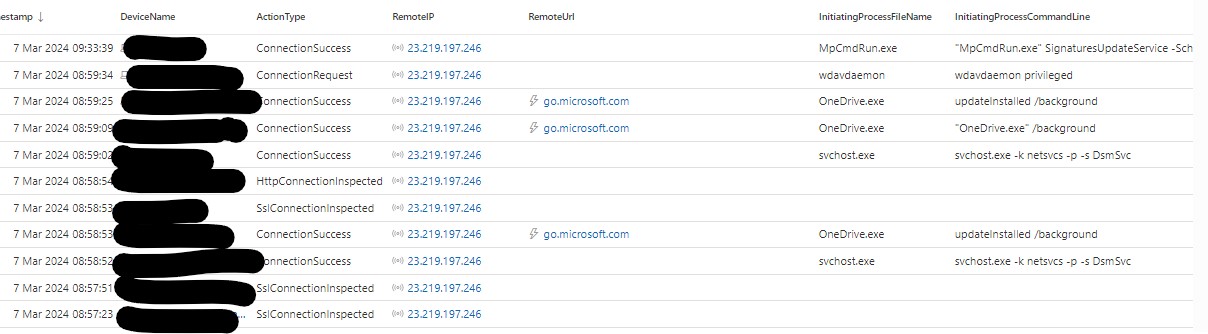
Yes. Lots of Microsoft processes are accessing it: svchost.exe msedge.exe onedrive.exe wdavdaemon (on a mac) are all initiating the connection. Often the ip resolves to go.microsoft.com It is very much not all the time though, on the records for a single device I could scroll back and read off the screen all the times a device here communicated with that IP over the last week.
-
Just come across this, and wondered if anyone else has seen it? We needed to email a large number of people (internally) about a thing. A distribution group exists that contains all these people. But it also includes 6 people who should not receive the email. So we do what we always do, expand the distribution list in Outlook and then remove the specific email addresses we don't want to send the email to. Except today, when we can't find one of the addresses to remove from the list! Copy paste into Excel and we find we are about 75 addresses short. A quick PowerShell query of the AD group and all the members are present. (obvious solution to the problem in front of me is to copy paste out of the PowerShell query, remove the 6 and paste the result back into outlook, which is fine for me, but less fine for a DH or HoY) I've checked and confirmed a sample of the missing members are mail enabled and have expected licenses for 365. Just before I expand the group in Outlook, the banner warning that this email will be sent to about 258 people which agrees with what powershell reports. But on expansion 75 are missing. What is going on?!
-
Yes, fine for schools hospitals and recycling centers etc (who aren't actually in scope for the current or likely future restrictions on Hikvision). Baroness Neville-Rolfe even said as much in the House of Lords (as recorded in Hansard), knocking back the amendments that would have automatically blocked various companies from further public sector contracts: "
-
Wow. That's a curve ball. Literally anything (including full manual, handwritten double entry accounting and an abacus) is better than FMS. We ditched it and kept SIMS. I seem to recall this did not confer any reduction in fees from Capita either! Of the alternatives: Access (formerly HCSS) Finance easily implemented, and both simple enough for non-finance specialists, and powerful enough that an overworked underskilled finance team wont look back, and a skilled finance manager will also be very satisfied. PFS needs huge amount more confidence and competence up front. However even though it is massively more powerful the most praise I've heard for it is: "its better than FMS" Not looked at the offers from the other MIS providers so I'll leave that to others. But really moving off FMS is the least disruptive cloud migration possible and transformative for managing, reporting and planning the schools finances.
-
The clause(s) that would have blocked further installations (on Human Rights grounds) and the removal of previously installed equipment across the public sector (on national security grounds) were voted down in the second reading of the bill. They, I believe, are still banned and to be removed from sensitive sites, the definition of which has been clarified (and to paraphrase: if your site handles material that should be officially marked SECRET, then you need to be removing Hikvision et al.), though this is separate to the Procurement act. That said a National Security Unit for Procurement has been defined and is to be part of the body that assess the list of firms to be debarred under the more relaxed set of rules that actually became law. So Hikvision aren't quite in the clear just yet, but the case for them getting debarred is massively weaker in the Act than it was in the Bill just a year ago.