sister_annex
-
Posts
899 -
Joined
-
Last visited
Content Type
Forums
News
20th
EduGeek EDIT Conference
Blogs
Everything posted by sister_annex
-
No experience with JIRA however, we use this across multiple departments and it works really well and is relatively cheap: https://www.supportpal.com/ If you're a small team there are options out there for helpdesks with free use up to a certain amount of Techies
-
You don't know our staff That being said, I know most would relish the opportunity to have something that would work on a phone or at home but that we've decided to wait for now. No doubt there will be some outcry from those stuck in their ways but the way I see it is that it's almost 2022, things change, the world of teaching, the ICT systems in use and how they all integrate with the curriculum and in a pastoral sense too is an ever evolving landscape that teachers (and support staff) need to evolve with alongside.
-
We're starting to look (after a number of years trying to convince SLT that it is a good thing to do) however, it is looking likely that we wont be switching till next academic year at the earliest. After discussions with the powers that be they are willing to accept the loss if we do get tied in to a contract but at the moment with the threat of the big O in the new year and having staff at breaking point with workload etc we decided not to push them over the edge with a massive change like this would be on top of everything else.
-
Have people read the FAQ's here: https://ess-sims.co.uk/sites/default/files/2021-12/SIMS-Contract-Changes-2022-FAQs_0.pdf The language used, the indirect (direct) digs at other competitors and the patronising tone it takes against schools/MATs wanting to do the best for their school is honestly a joke (imo) I was going to quote a few parts but then one that made me laugh the most was this: There are too many points in there to pick at, but just that first line... no those two words on the first line... 'Functionally Complete' yeah that's why we have to spend an absolute fortune a year in third party bolt-ons that make it work.
-

Lightspeed Relay - Slow
sister_annex replied to mattysmith80's topic in Internet Related/Filtering/Firewall
Which version of the agent do you have running on your machines? We have had no reported issues onsite today at all. -
Looking for web filtering solution
sister_annex replied to Asmodeus's topic in Internet Related/Filtering/Firewall
@Wave9_Lee is your man to speak to! Brilliant company, great price and the support is excellent too! -
8Gb should be fine for such a low number of users however; it is not recommended practice to install ADFS on a DC: https://docs.microsoft.com/en-us/previous-versions/windows/it-pro/windows-server-2003/cc778681(v=ws.10)?redirectedfrom=MSDN#account-store-requirements However, If you're running AADConnect you should not really need ADFS and in most cases now, MS are recommending AADConnect over ADFS due to other features that are available. https://docs.microsoft.com/en-us/microsoft-365/education/deploy/aad-connect-and-adfs
-
If you stop them changing their picture in Exchange, it should stop it being changed in Teams too This is the link I followed when I set this up for us: https://www.codetwo.com/admins-blog/prevent-users-from-changing-profile-photos-microsoft-365/
-
Visigo SCCM Deployment
sister_annex replied to dmason2's topic in Internet Related/Filtering/Firewall
Ours is set to this: msiexec /i "Visigo_1.5.2_x64.msi" ORGID=OUR ID (no quotes) /q on the install properties the content location is set to where the MSI is stored -
Issue with Inventry drive mapping inconsistently
sister_annex replied to Jaan's topic in MIS Systems
For us it allows everyone to connect however YMMV - I'm not sure if that's how Inventry set it up or whether it was asked for by our site -
Issue with Inventry drive mapping inconsistently
sister_annex replied to Jaan's topic in MIS Systems
It would appear you are correct (not actually needed to check this since the XP days) As for how we do it here: we create a shortcut on the specific users desktops that points to the Console executable i.e. "\\192.168.xxx.xxx\InVentry\V4\Console\InVentryConsole.exe" The Inventry folder is shared on the main console machine and there is no other need to access the folder other than for accessing the console -
Issue with Inventry drive mapping inconsistently
sister_annex replied to Jaan's topic in MIS Systems
If you're mapping to the Inventry Console there is a 10 concurrent connection limit afaik. This is due to the version of Windows that they use. -
You could use this: https://1.1.1.1/family/ I've used it to force DNS settings on a laptop for my Niece, that way wherever she is I'm pretty sure she can't access anything inappropriate It works great, there isn't any reporting however.
-
Was down for me also, seems to be back now though
-
Teams - School Assembly for staff and students
sister_annex replied to genesis's topic in Learning Network Manager
Live events will be more than suitable. I would stay away from using Meetings however, as there is a 300 user limit. You will need a license to do Live events. -
if ($obj -contains "") {$FinalResult = "True"} This line... I think the $obj should be $Obj you have two variables with very similar names Again difficult to test but if you run the script through the PowershellISE on a machine you want to check you should be able to add breakpoints in the code and step through to find out what's happening
-
$BIOS = Get-WmiObject -class hp_biossetting -Namespace "root\hp\instrumentedbios" May be worth checking this line. Calling that calls the local machine, if you're calling a remote computer you will need to specify a -computername option I am guessing as this is an SCCM script that it is running locally on each machine though?
-
I can't test this but, I believe that Functions should be declared outside of the foreach $ConfigRootPath = "\\server\source\BIOS Config" $DeviceModel = Get-CimInstance -ClassName Win32_ComputerSystem | select -ExpandProperty Model $ConfigFile = Import-CSV "$ConfigRootPath\$DeviceModel.csv" $FinalResult = "" Function Get-BIOSSetting { param( [parameter(Mandatory=$true, HelpMessage="Setting")] [ValidateNotNullOrEmpty()] [string]$Setting ) $BIOS = Get-WmiObject -class hp_biossetting -Namespace "root\hp\instrumentedbios" $BIOSSetting = $BIOS | Where-Object {$_.Name -eq $Setting} | Format-Table Name, Value $a = $BIOSSetting | Out-String $b = $a -replace '\s+',' ' $result = $b.Contains("*$($ConfigItem.Value)") Write-Output $result } foreach ($ConfigItem in $ConfigFile) { $obj = Get-BIOSSetting -Setting $ConfigItem.Setting $Result1 = $Obj if ($Obj -contains "False") {$FinalResult = "False"} Write-Output $Obj } if ($obj -contains "") {$FinalResult = "True"} echo $FinalResult
-
They're still working on it - however we have found that the check update/ restart solution has worked for us in the most
-
Hiding the team may help with that, not sure about emails, but i'm pretty sure hiding stops the in app notifications
-
I have an open support call with Microsoft about this, it's been happening since monday on both Mac and PC variants of the app (even after an update) - to be honest we've not had many reports of it today so it may have been fixed. Not heard anything from MS yet though. We found that disabling the New meeting experience fixed it (however has it's own downsides)
-
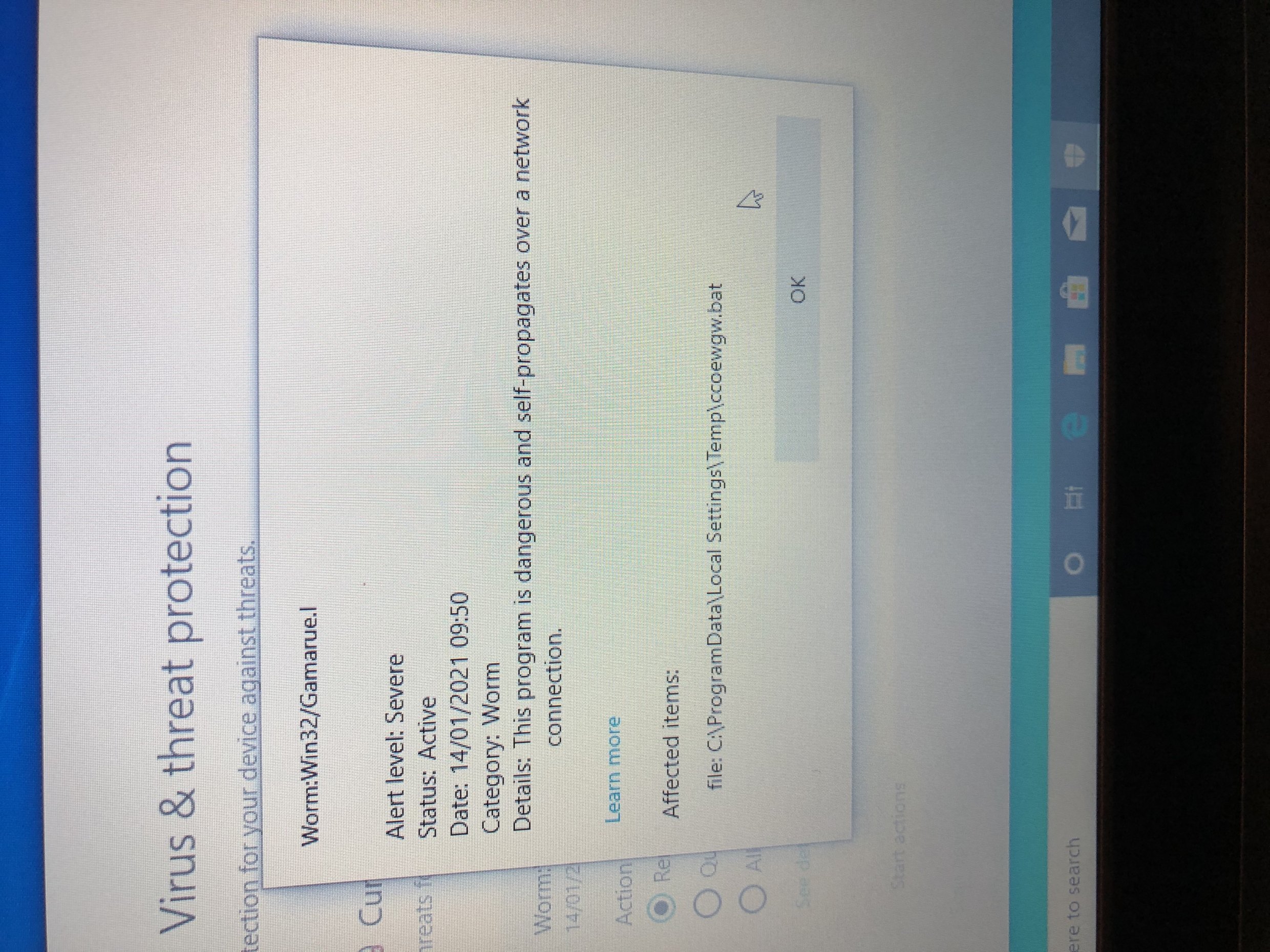
Yup, that's exactly what we had: http://www.edugeek.net/forums/hardware/218211-geo-geobook-1e-education-laptops-horrible-8.html#post1881301 Update: Thankfully it seems that only 10 out of the 160 we have seem to be infected but it now seems that it is a build thing
-
TO be honest we've not looked, mainly due to the AV removing it before we could start. On multiple devices it's a different random filename ending either .bat .com or .exe all found under the same category. This is a relatively new batch (we had 128 delivered last week)
-
Hello all, I know bad news isn't what we need right now but we've just fired up a bunch of these to prep and number of them have alerted via the built in AV that a WORM has been found. These are the non DFE spec laptops The virus in question is labelled as Worm:Win32/Gamarue.l For those not wiping and rebuilding these it may be worth rechecking these before giving out. And just for clarification, this has shown up on devices that have not been connected to our network in any form, have had no internet access and the only process that has gone on is running through the OOBE. No USB devices plugged in either.

-
So with the start of a new term (and the madness that has ensued with lockdown) we're still trying to run a 'normal' timetable and and as such the usual timetable rotations are going to take place. The question I have is how does this translate in Teams. For clarity, we use the free Salamander tool to pull the info from SIMs and then upload the CSV to SDS. In terms of classes, the Teachers stay with the same class, and the students move (not the other way round) - What we would like is for new Teams to be created for the rotating classes. I hope this makes sense. SLT want the new rotations to start on Monday and as seems to be the theme of 2021, notice of change hasn't been too forthcoming. Any help, or guidance would be appreciated TIA