david_willcock1991
-
Posts
6 -
Joined
-
Last visited
About david_willcock1991

-
Hi, Yeah, There's a reason for it. I'm actually no longer working in education. I now work for a 24/7/365 manufacturing firm. We don't get downtime. Data is worked on all the time, So DFSR is the option to use. Also DFS has been used like this before. just for some reason on our live environment it won't let me enable windows 2008 mode for the name space. Currently, I don't think it's going to cause me an issue, Not sure yet. We've managed to get replication groups to work now: It was a service restart and a historic permissions issue. way back before any of my team had started working for the company. when they setup the common data area, they removed "SYSTEM" from permissions. we didn't even think to check at first, then we saw a specific event log start showing. googling that error we got ourselves on the right track and fixed it. Even without our 2008R2 box in the loop. it doesn't let you enable 2008 mode. going to look into someone else' suggestion about domain config. because I built our test environment and it works fine. Neither of us created the live domain. Either way. We've achieved what we needed regarding Live migration using DFSR after fixing permissions issues and restarting the two services. Just wanted to share our findings
-
Hi, I'm having a problem and i think I know the issue: I've got a test environment where i built 2 windows, both running server 2016. Create a name space. create a folder add my second server to it. create a replication group to replicate data from \\servername1\c\test\ to \\servername2\c\test\ everything works fine and dandy as expected. our live environment is a new server 2016 file server. our old server we wish to migrate the data from is a 2008R2 box. when i create a namespace in DFS managment on either 2016 or 2008R2. when i chose the namespace type; "enable windows server 2008 mode" is unchecked and greyed out. I believe this is causing my issue as if i carry on and create the name space and file replication group. replication doesn't work. event viewer gives a few errors: ------------------------------------------------------------------------ Log Name: DFS ReplicationSource: DFSRDate: 16/10/2019 14:30:20Event ID: 2104Task Category: NoneLevel: ErrorKeywords: ClassicUser: N/AComputer: Description:The DFS Replication service failed to recover from an internal database error on volume F:. Replication has been stopped for all replicated folders on this volume. Additional Information: Error: 3 (The system cannot find the path specified. (0)) Volume: 92BAE86A-0000-0000-0000-100000000000 Database: F:\System Volume Information\DFSREvent Xml: 2104 2 0 0x80000000000000 89 DFS Replication 92BAE86A-0000-0000-0000-100000000000 F: 3 The system cannot find the path specified. 0 F:\System Volume Information\DFSR ------------------------------------------------------------------ Log Name: DFS ReplicationSource: DFSRDate: 16/10/2019 13:30:20Event ID: 2004Task Category: NoneLevel: ErrorKeywords: ClassicUser: N/AComputer: Description:The DFS Replication service stopped replication on volume F:. This failure can occur because the disk is full, the disk is failing, or a quota limit has been reached. This can also occur if the DFS Replication service encountered errors while attempting to stage files for a replicated folder on this volume. Additional Information: Error: 9014 (Database failure) Volume: 92BAE86A-0000-0000-0000-100000000000Event Xml: 2004 2 0 0x80000000000000 85 DFS Replication 92BAE86A-0000-0000-0000-100000000000 F: 9014 Database failure --------------------------------------------------------- p.s. The disk isn't full., there is no quota set. any ideas? currently un-installing and starting from scratch....

-
Working WDS except 1 PC
david_willcock1991 replied to david_willcock1991's topic in Windows Server 2016
just trying to update the Bios on it, it keeps failing and I'm not sure why. i made a post regarding it and hopefully someone can help with that issue then i can come back to this one haha. cheers for the advice mate -
Lenovo Thinkcentre Edge72 - BIOS Update Fails
david_willcock1991 replied to david_willcock1991's topic in Hardware
cheers for the reply bud! unfortunately both done. the biso flashing setting is literally only "require admin password to flash previous version" no other settings regarding flashing bios. secure boot was disabled for installing a windows image via WDS, however that's my first issue, this PC won't boot into Windows PXE via WDS even though other PCs do. so been recommended in another thread to update BIOS -
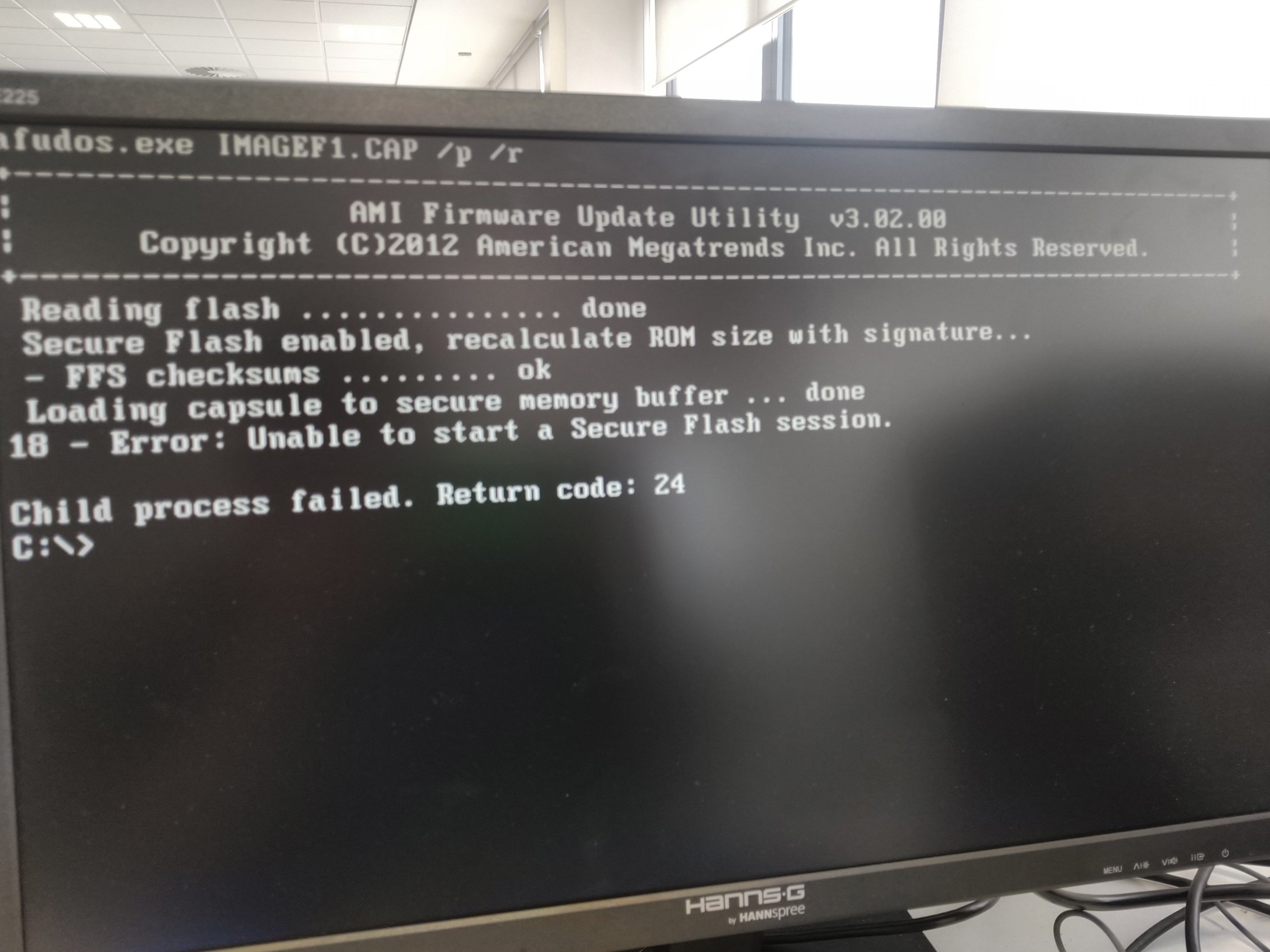
Hi, I'm trying to update the BIOS of this machine to fix another issue, but in doing so I've come across another issue. I've tried to update the BIOS via USB and within the operating system running CMD as admin both yield the same failed result. I've attached a photo of the USB attempt. I've scoured google and found many with the same issue but no resolution to the issue.
-
Hi Guys, I've setup WDS many times, this time is the first time I've ever set it up on a network with multiple VLANs and having WDS installed on it's own server, usually I've had it installed on the domain controller. I have it running, it works on multiple VLANs and I've used t to deploy multiple custom images to various Laptops and desktops. My images are x64 UEFI. I have a work bench setup solely for deploying images via WDS. So my Switch and switch port are exactly the same, there's been no network changes and i can still use WDS on other devices successfully. This one PC (Lenovo Thinkcentre Edge72) I've went through BIOS multiple times. I've disabled secure boot and changed the boot time to UEFI Only. I've checked all other settings and nothing else is relevant. I used to get something along the lines of "NBP File too large for memory" Now after fiddling I get "TFTP Error, access violation" I can't seem to get past this for this single machine. Any ideas other than grab a large hammer?