mehball
-
Posts
68 -
Joined
-
Last visited
Content Type
Forums
News
20th
EduGeek EDIT Conference
Blogs
Everything posted by mehball
-
Is there a way via GPO to allow flash to run on certain websites? The GPO called "Allow flash plugin on these sites" does nothing.
-
Photos app and Microsoft.net Native Runtime 1.4 and above
mehball replied to alfatec's topic in Windows 10
I'll have it please Skell -
Running Get-AppxPackage -AllUsers | Select Name, PackageFullName Still shows .Net Native Runtime 1.3 1.4 1.6 and 1.7 installed so can't be the same problem as described above? Must be another strange issue why they have disappeared.
-
What's strange though is that some PC's are fine and still have store and photos? Is not having Microsoft.NET.Native.Runtime.1.4 likely to be a problem in the future as I can love without store and photos as we now push our Windows Photo Viewer as the default photo application.
-
Very strange. So I have a 1709 education build. As part of the SCCM task sequence we remove the following apps with this powershell script: $packages = @( "Microsoft.XboxApp""Microsoft.XboxGameOverlay""Microsoft.XboxIdentityProvider""Microsoft.XboxSpeechToTextOverlay""Microsoft.MicrosoftOfficeHub""Microsoft.Office.OneNote""Microsoft.OneConnect""Microsoft.WindowsMaps""Microsoft.ZuneVideo""Microsoft.SkypeApp""Microsoft.ZuneMusic""Microsoft.BingWeather""Microsoft.MicrosoftSolitaireCollection""Microsoft.WindowsAlarms""Microsoft.Messaging" )ForEach ($packages in $packages) { Get-AppxPackage -Name $packages -AllUsers | Remove-AppxPackageGet-AppXProvisionedPackage -Online | where DisplayName -EQ $packages | Remove-AppxProvisionedPackage -Online } All has been working fine however I've now noticed that store and photos has disappeared from some PC's. Strangely other store apps like calculator work fine. Store access is blocked from running with group policy but still would like to know why.
-
I'd like to take a look too please.
-
Brilliant thanks. I just found my old username.
- 4,289 replies
-
- 1
-

-
- assistance
- background
- (and 2 more)
-
Afternoon all. I used to be on here years ago but left education forgot my username. I'm now back in Education as IT Network Manager at a private school.
- 4,289 replies
-
- 2
-
-
- assistance
- background
- (and 2 more)
-
We do. There is no option to export every GPO as a list.
-
How? Im a noob.
-
Any other ideas?
-
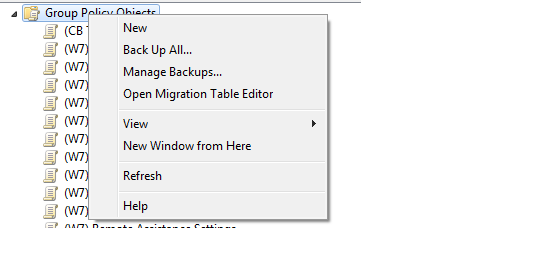
Yes thanks that is there. I am just after a list of every policy under group policy objects. We do not need the settings for each one just simply a list in text format or every policy name if that makes sense?
-
Cannot find an export button. Basically I want a list of everything under Group Policy Objects. http://img802.imageshack.us/img802/822/gpo.png

-
Hi Guys I am trying to get a list of all the software we have deployed in Group Policy so we have a list to work on for Windows 7. Does anyone know a way to export a list of Group Policy Items to say a text file? Thanks
-
WIN!!
-
When clicking on a PDF within sharepoint it prompts you to save the file locally. We are looking at forcing this to open the PDF within the browser like out external website.
-
Fixed it!! Now to try and work out how to make PDF's open within the browser and not save them from Sharepoint. Cheers sukh
-
Not officially but in the link above the writer added "At time of writing (March 2010), Adobe has published PDF iFilter 9 for 64-bit applications, tested on SharePoint 2007 but not yet listed as tested on SharePoint 2010. So far, it is working fine on my builds of SharePoint 2010 (Beta versions)"
-
Using the free Adobe one Adobe - Acrobat : For Windows : Adobe PDF iFilter 9 for 64-bit platforms
-
Thanks. Tried every step in that guide but the search still does not show the text from within a PDF.
-
Hi All Does anyone know how you can set up Sharepoint 2010 to search the text within a PDF file? It currently works with MS Word etc but at the moment only searches the filename of the PDF rather than the text. Cheers
-
Hi Guys I am after some auto defrag software which can Defrag the PC in the background when the PC is idle so the user does not notice anything is happening. I have had a look at Disk Defrag | Smart Defrag | Free Disk Defragmenter | Best Defragment Server But most of these comes as .exe and will require repackaging. Does anyone know of any solutions which are easy to roll out campus wide and can defrag in the background silently? Thanks Shane
-
Just a quick google and it shows this is spyware windows protection suite - Google Search
-
Thanks all The Aruba stuff worked wonders for XP and Vista Has anyone got any ideas on automating this for windows 7??
-
No one got any ideas??