lionsl2005
-
Posts
639 -
Joined
-
Last visited
Content Type
Forums
News
20th
EduGeek EDIT Conference
Blogs
Everything posted by lionsl2005
-
 Hi is it possible to share your GPO settings. Thanks
 -
Hi All, We have deployed Windows Hello via intune. Windows hello works really well but we have noticed the network takes at least 40 senconds after the user is logged on. Will wait for network gpo work with Windows hello? anyone tried it? Thanks
-
We have zoom installed. They use zoom for whole virtual assemble and open day too. All seems cool.
-
Our External relations Office send newsletter email to parents via isams. attaching the links in isams. Some parents complaining they received this error message. See attached email. Any idea, is there some setting which says in office 365 sends links without ATP. Thanks

-
Hi We used to have SSCM and students desktop , start menu (program menu) are locked and applied via GPO ( found in net logon). Now we have intuned shared devices. Teachers wanted the same setting as before locked start menu where they can just click on start menu and go for the shortcuts. How can we enable this with intune? I have assigned a new gpo with folder redirection and start menu, but this is not working. any pointers please. Thanks
-
How to deploy network installed software shortcuts in intune
lionsl2005 posted a topic in Windows 10
Hi All, We have some network installed software. Any pointers on how to push out this network location shortcuts in to work stations via intune ? Thanks lionsl2005 -
Hi All, We have set up one to one teacher laptop with Intune with auto pilot with MDT ( Hybrid domain joined). Now we are aiming to replace our ICT suite PCS and updating the existing windows machines ( shared devices ) to intune. How did you do it? What is the easiest way to update the existing PCs to win 2004, hybrid joined and manage by intune. any intel would be appreciated. Thanks
-
I cannot see any other ADK is installed, Is it anything related to VMAT? See pic
-
I have noticed the new version is installed in C:\Program Files (x86)\Windows Kits\10 old one is in C:\Program Files (x86)\Windows Kits\08 I am confused. See image below
-
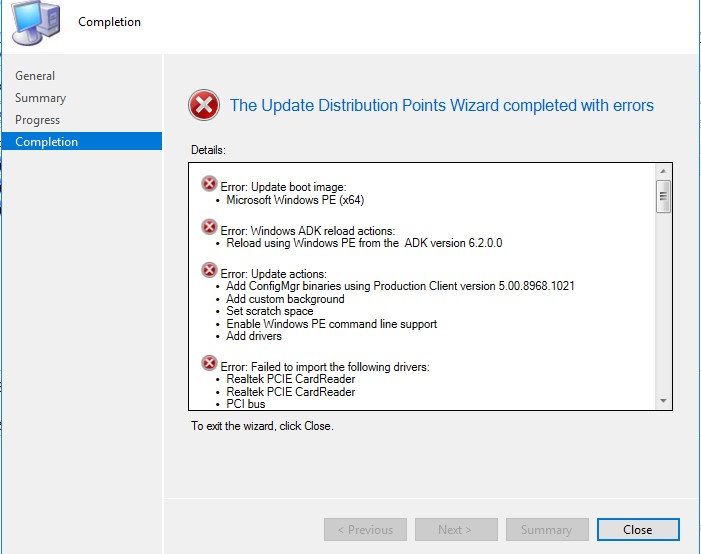
I did check, There are some error below Error setting property (TransformAnalysisDate) 0x80041002! Error setting property (TransformReadiness) 0x80041002! and some execute SQL and Failed to load WIMGAPI.DLL from C:\Program Files (x86)\Windows Kits\8.0\Assessment and Deployment Kit\Deployment Tools\amd64\DISM\wimgapi.dll due to error 126 ( why it is looking in this directory ? New ADK installed in C:\Program Files (x86)\Windows Kits\10 This is the error message after updating Error: Update boot image: • Microsoft Windows PE (x64) Error: Windows ADK reload actions: • Reload using Windows PE from the ADK version 6.2.0.0 Error: Update actions: • Add ConfigMgr binaries using Production Client version 5.00.8968.1021 • Add custom background • Set scratch space • Disable Windows PE command line support • Add drivers Error: Failed to import the following drivers: • Intel® 82579LM Gigabit Network Connection • Intel® Ethernet Connection I217-LM • Intel® 82580 Gigabit Network Connection • Intel® 82579LM Gigabit Network Connection • Intel® Ethernet Connection I217-LM • Intel® I350 Gigabit Network Connection • Intel® 82579LM Gigabit Network Connection • Intel® Ethernet Connection I217-LM • Intel® 82580 Gigabit Network Connection • Intel® 82579LM Gigabit Network Connection • Intel® Ethernet Connection I217-LM • Intel® I350 Gigabit Network Connection • Realtek PCI GBE Family Controller • Realtek PCI GBE Family Controller • ASIX AX88772 USB2.0 to Fast Ethernet Adapter • ASIX AX88772 USB2.0 to Fast Ethernet Adapter • ASIX AX88178 USB2.0 to Gigabit Ethernet Adapter • ASIX AX88178 USB2.0 to Gigabit Ethernet Adapter • ASIX AX88178 USB2.0 to Gigabit Ethernet Adapter • ASIX AX88179 USB 3.0 to Gigabit Ethernet Adapter • ASIX AX88179 USB 3.0 to Gigabit Ethernet Adapter • ASIX AX88179 USB 3.0 to Gigabit Ethernet Adapter • DisplayLink Network Adapter NCM • Realtek PCI GBE Family Controller • Realtek PCI GBE Family Controller • Realtek PCI GBE Family Controller • Intel® Advanced Network Services Virtual Adapter • Intel® 82579LM Gigabit Network Connection • Intel® Ethernet Connection I217-LM • Intel® I350 Gigabit Network Connection • Intel® 82599 Multi-Function Network Device • Intel® 82579LM Gigabit Network Connection • Intel® Ethernet Connection I217-LM • Intel® I350 Gigabit Network Connection • Qualcomm QCA9377 802.11ac Wireless Adapter • Realtek PCI GBE Family Controller • Qualcomm QCA9377 802.11ac Wireless Adapter • Intel® 82579LM Gigabit Network Connection • Intel® Ethernet Connection I217-LM • Intel® I350 Gigabit Network Connection • Intel® Dual Band Wireless-N 7260 • Intel® Dual Band Wireless-AC 7265 • Intel® Dual Band Wireless-AC 7265 • Intel® Dual Band Wireless-N 8260 • ASIX AX88178 USB2.0 to Gigabit Ethernet Adapter • ASIX AX88179 USB 3.0 to Gigabit Ethernet Adapter • Aquantia AQtion 10Gbit Network Adapter • Realtek PCI GbE Family Controller Optional components: • Scripting (WinPE-Scripting) • Startup (WinPE-SecureStartup) • Network (WinPE-WDS-Tools) • Scripting (WinPE-WMI) Error: The wizard detected the following problems when updating the boot image. • The SMS Provider reported an error.: ConfigMgr Error Object: instance of SMS_ExtendedStatus { • Description = "Failed to inject OSD binaries into mounted WIM file (often happens if unsigned drivers are inserted into x64 boot image)"; • ErrorCode = 2152205056; • File = "..\\sspbootimagepackage.cpp"; • Line = 5482; • ObjectInfo = "CSspBootImagePackage::PreRefreshPkgSrcHook"; • Operation = "ExecMethod"; • ParameterInfo = "SMS_BootImagePackage.PackageID="001000CA""; • ProviderName = "WinMgmt"; • StatusCode = 2147749889; };
-
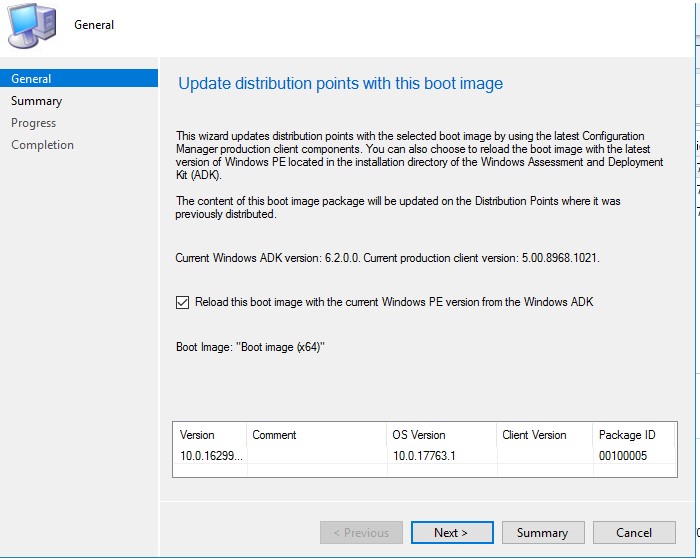
Hi All, I have updated the SSCM to 2002. We had 1809 SDK. I have updated the SDK to win 10 2004 and ADK win PE to 2004. after this i went to update the Boot image from software library - > operating systems - Boot image. I did this right click and update distribution point. The process is failing. We wanted to update to the computers to 1909 later in summer. See attached pictures . any advise how to fix this. Thanks
-
How to deploy Adobe creative cloud via Intune
lionsl2005 replied to lionsl2005's topic in Cloud Services
You are correct. All apps are huge. We may need to deploy the lite version. is there a guide somewhere? Thanks -
Hi All, We are moving to intune as hybrid setup. is there a guide how to deploy adobe creative cloud via intune for the hybrid ad joined laptops? Thanks
-
Hi We have Ericom access access pad which used for users to RDP in to our system. Wanted to find out how to pass through the Microphone and webcam via remote session? Currently this is not passed through from native computer. Thanks lionsl2005
-
Hi All, We have Teams group to Year groups. We have found some Year 12 students can change group members ( add or delete users) How can this be prevented. Thanks Lionsl2005
-
We have done it by Using Directory aync and password sync. Its easier than you think. Speak to Google support. They are super helpful. They can show you how to do it. Thanks
-
This is what been shared https://support.office.com/en-us/article/onenote-update-and-best-practices-for-educators-and-students-dde775f0-8b06-4263-8b54-1e9ddc3dd146
-
Hi All, We have moved to office 365 which comes with onenote 2016. Now staff finding onenote app is better than oneNote 2016. Microsoft also recommending this. Is there a way to push this via SCCM or any easy way? Note: We have direct access for the staff Thanks
-
Hi All. I am new to the establishment. Currently all our staffs are working from home via direct access. Recently we have introduced teams. However we didn't install teams client on teachers laptops. ( Teachers do not have local admin rights to install software) Is there a way that I can install team on direct access and available for the teachers when they connect via direct access. Thank you
-
Hi All, Is there a way we can disable right click open file location in windows search bar. Currently students can search and right click to open file location. Thank you
-
HiAll, Is there a gpo to disable enabling the hidden filed to be seen in folder option in windows. see image below? Thank you
-
Hi All, Just wanted to know how are you managing the toner inventory in you school. any recommendations please. If you are using a spreadsheet could you please share? Thank you Regards lionsl2005
-
Gsuite can manage them well. It is free
-
Hi All, In pour campus currently we have deployed office 2016. We are moving to teams and sharepoint setup for academic staff. We are looking to deploy office 365 with new image? Do you think this will be better than going with office 2016? Thanks lionsl2005
-
Thank you, If you could share your setup that would be great.