KK20
-
Posts
969 -
Joined
Content Type
Forums
News
20th
EduGeek EDIT Conference
Blogs
Everything posted by KK20
-
Remember that if you have ISA you need to import them on the ISA server also - not just your IIS machine (and exchange IIS if you have a different machine for OWA etc). To swap over your ISA SSL Listener certificate at the same time you swap over your IIS directory security certificate too. The first time I installed the intermediate (old) certificate I did need to restart ISA2006, the second time I when I was "renewing" my certificate I did not need to restart the ISA server in order to serve the intermediate certificate. As for godaddy - yes, PO's are a problem. It is one of the only two occasions that I pay on my credit card and claim back (the other is a foreign laptop spare parts company)
-
I fixed the internal machines by added the KB (suggested above) to WSUS. The 2 laptops that still had issues were standalone teacher personal ones (I couldnt be bothered fault finding so I simply installed the same KB). since these machines were personal ones (with automatic updates switched on) then they might have some odd firewall or other MS updates issues - either way you might have fun with some external machines not playing ball.
-
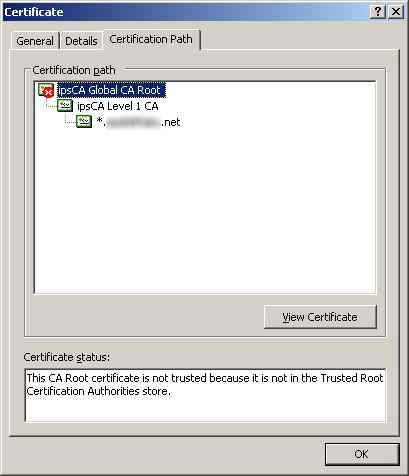
If I install the cert pack update then all is well. However, this screenshot is taken from a staff laptop that has automatic updates enabled. It is windows XP and has IE7 on it. The new intermediate cert is being served up along with the chain reporting back to the new root CA - however the root CA is not trusted. Some (maybe most probably) will have little difficulty - perhaps there is some rhyme or rule that gets IE to check for new root CA's. Although there are other large establishments out there who have identical issues (when I was googling the problem). It all boils down to what you want. If you want a seamless no problems SSL cert then IPSCA isnt the one for you at the moment (hey its free!). If you are using it for internal use and maybe staff only then go for it.

-
I have teachers telling me they get the cert error message at home. I think i'll bite the bullet and get a 5 domain godaddy cert for a year until I am confident that MOST peoples machines will have updated as I have difficulty in explaining email to some of them, let alone getting a certificate pack installed. I knew "free" was too good to be true.
-
interesting.... I still have the original certs in the cert stores on both the IIS boxes and my ISA box so I might switch back to see if that cures things temporarily. Just ran MS update locally on a client giving the CA root error (sp 3, IE7) still giving root cert error. As you can see it is the global certificate giving the error.
-
I'm guessing that a few people here use ipsCA as a free SSL cert provider. Following the recent root CA change, I find that browsers reject the root CA. I was assuming that IE (at least) would have grabbed the root CA from "somewhere" in an update? Perhaps I have somehow missed an update in WSUS but I will check. Im not too up on how the root CA's get updated on client machines but I would have guessed from an MS update. Anyway, I must have set up the cert renewal correctly in IIS and imported the correct *new* intermediate and root certificates in both IIS server and the ISA 2006 server as my browser correctly states the new intermediate and new ipsCA Global CA Root. What action have other people taken for the change? Have you installed the ipsCA Global CA Root certificate on your local machines or was there an update I have missed? Telling the teachers to install a certificate at home will be a nightmare....
-
I would just like to say that you are my hero After tearing my hair out for the last day this sorted my identical issue out. Indeed it is taking display name rather than logon name.... Ta!
-
Dansguardian not letting HTTPS through
KK20 replied to KK20's topic in Internet Related/Filtering/Firewall
OK! I revisited this since I had some spare time on my hands and it now works! I am using compiled versions of squid and DG on a fresh installation of debian. path is: users -> switches -> DGBOX (2 NIC as a bridge) -> router The bridge is using ebtables/iptables to force traffic to DG 8080 (https included) and can act as a proxy, squid is local traffic only so no bypass. There is a .PAC *and* .WPAD file available on the network. I have rolled out I.E. settings via GPO to accept the .PAC and the .WPAD is there for visitors via DHCP. I am using NTLM with the usernames being grabbed from an LDAP scraping script (10 seconds execute time) that is running hourly. The list self creates and updates with an administrator exception list. MOST traffic that tries to circumvent the proxy (i.e. browsers on a USB pen) will simply return "not authenticated" and thus they will have to automatically detect the proxy via the .WPAD on the DS. I can loan out authentication usernames as necessary for visitors. DG *will* filter https traffic based on URL now so no more pesky https proxies! Obviously one bright 6th former decided to set a proxy up at home but luckily he was on a static IP and he was disciplined over it. I dont plan on adding domestic ISP ranges to the blocklist anytime soon.... This finishes a 3 month journey into linux and can happily say that it works and means I can finally throw that fortinet box in the bin. -
I use a script that trawls users from an LDAP request. This is scheduled twice daily (takes under 10 seconds to run with 700 users in the domain). Compares current list to new list and creates my 3 filter groups from it. I have an "exceptions" list where I can redefine users (such as administrators). That way DG can look at the lists. This is not a LIVE option but will cut down on network traffic. I imagine the throughput could get quite large with hundreds of LDAP requests per second on a heavy network hence me wanting to script it to static lists. Anyway here is my script if you want it - define your own LDAP string and groups. #!/usr/bin/perl #Use use File::Temp qw/ tempdir /; #Globals $global::tmp = "/tmp"; $global::last_update = "/etc/dansguardian/lists/lastupdate.filtergroupslist"; $global::admin_location = "/etc/dansguardian/lists/admins.filtergroupslist"; $global::dansguardconf = "/etc/dansguardian/lists/filtergroupslist"; $global::template = "/etc/dansguardian/lists/template.filtergroupslist"; @global::results; #$global::ldapsearch = "/usr/bin/ldapsearch"; $global::ldapsearch = "ldapsearch"; $global::ldapbind_options = "-D \"cn=****,cn=users,DC=****,DC=****,DC=****,DC=****,DC=****\" -w \"****\" -h YOURSERVER -x -s sub \"CN=*\""; # filter1 => "", $global::groupmap = { # filter1 => "ou=impossiblegroupname", filter2 => "ou=Pupils", filter3 => "ou=Staff", # filter4 => "ou=Administrators" }; #make a temp directory my $TempDir = tempdir( 'dansgroups.XXXXXXXX', DIR => $global::tmp, CLEANUP => 1 ); #Main open (INPUTINFO,$global::admin_location)|| die("Could not open file!"); @global::adminarray=; close(INPUTINFO); print "\nStarting\n\n"; foreach my $filtername ( sort keys %{ $global::groupmap } ) { my $ldapgroup_target = "$global::groupmap->{$filtername},dc=****,dc=****,dc=****,dc=****,dc=****"; #Now remove subgroups -mgt $filtername =~ s/(filter\d)[a-z]/$1/; #Open Pipe from Ldapsearch with grep filter my $command_line= "$global::ldapsearch -b \"$ldapgroup_target\" $global::ldapbind_options | grep 'sAMAccountName: ' |"; print "\nParsing : $ldapgroup_target\n"; # open(LDAP, "$global::ldapsearch -b \"$ldapgroup_target\" $global::ldapbind_options | grep 'sAMAccountName: ' ") || open(LDAP, $command_line) || die "Unable to open ldapsearch: - $!\n"; while (defined(my $line =)){ chomp($line); $line =~ s/^sAMAccountName\:\s+//; $line = lc "$line"; $found="false"; foreach $admintest (@global::adminarray){ #print "-$admintest $line\n"; if ($admintest =~ $line){ print "$ldapgroup_target - $line (ADMIN override)\n"; push @global::results, "$line=filter4\n"; $found="true";}} if ($found eq "false") { print "$ldapgroup_target - $line\n"; push @global::results, "$line=$filtername\n";} } #my @search_results = LDAP; close LDAP; #Loop over results cleaning it up #foreach my $line (sort {uc($a) cmp uc($b)} @search_results) { # chomp $line; # $line =~ s/^sAMAccountName\:\s+//; # $line = lc "$line"; # push @global::results, "$line=$filtername\n"; #} } #Writeout tmp open(RESULTS, ">$TempDir/ldapdata.txt") || die "Unable to open $TempDir/ldapdata.txt - $!\n"; for my $outline (@global::results) { print RESULTS "$outline"; }; close RESULTS; #Now diff system("/usr/bin/diff -b $TempDir/ldapdata.txt $global::last_update"); if ($? == 0) { system("/bin/rm -f $TempDir/ldapdata.txt"); print "\nNo changes since previous list update!\n"; exit; } elsif ($? == 256) { #They differ lets update system("/bin/cat $global::template $TempDir/ldapdata.txt > $global::dansguardconf"); system("/etc/init.d/dansguardian restart"); system("/bin/cp $TempDir/ldapdata.txt $global::last_update"); system("/bin/rm -f $TempDir/ldapdata.txt"); print "\n List file changed\n"; } else { #Must be an error on the diff log it system("/usr/bin/logger -p daemon.err 'Active Domain update failed diff test for Dansguardian! Needs helps."); } exit; # vi: shiftwidth=3 tabstop=3 et
-
software restriction policy with mapped drive
KK20 replied to KK20's topic in Windows Server 2000/2003
sussed it. I needed to use the FQDN in the software restriction policy. -
software restriction policy with mapped drive
KK20 replied to KK20's topic in Windows Server 2000/2003
no, quite visible. I even did a gpupdate /force just in case but I know this was desperation as I only need a log off/back on again for any change in the software policy to take effect straight away. -
An odd one. I use GPO software restriction policy with default disallow. This has been working fine for me. However, I have installed some software that requires to be run from a mapped drive (installed on the server, mapped on the server). Not a problem thought me, simply roll out the mapped drive in the login script and add the network share to the software restriction policy as allow. However, it wont run. I can create a shortcut to the share (\\myserver\myshare\mysoftware\myprogram.exe) and that runs the .exe at least. I tried adding the drive letter that I map to software restriction policy but again no go. The mapped drive is nothing special (and everything works just fine if I take out the software restriction policy) the share is nothing weird either - a plain \\myserver\myshare - same as I have for other mapped drives on the system (that I *dont* want executables running from so I deliberately left those out of the software restriction policy) This share isnt on any DFS or such. I must be missing something, any ideas? edit: I am using windows server 2003, domain and no other issues.
-
We couldnt afford the bandwidth. Plain and simple. My budget barely stretches to a 2mb SDSL never mind the xxmb required for a full school offloading a lot of work.
-
Internet Connections - What do you have?
KK20 replied to Virtual_Jas's topic in Internet Related/Filtering/Firewall
2mb SDSL line for email and vpn with a separate ADSL2 12mb/1mb for internet traffic with DG/squid. Internet traffic does not touch the leased line although the DNS server does use it for external DNS resolution. In the coming year I will most likely be adding another ADSL2 load balanced with the SDSL for an cheap extra 1mb upload for burst traffic. SDSL has been flawless. -
Dansguardian not letting HTTPS through
KK20 replied to KK20's topic in Internet Related/Filtering/Firewall
Agreed but it should still filter the https traffic based on the header. In fact there should therefore be an option in DG for a filterlist *for* https traffic. What is to stop people using https://proxy.org/ and bypassing everything? Squid seems quite happy at blocking https traffic (hence my kludge using a split proxy.pac file). -
Dansguardian not letting HTTPS through
KK20 replied to KK20's topic in Internet Related/Filtering/Firewall
For reference I managed to fix this. *but* I soon went back to my kludge! I had originally installed DG from the debian repo - version 2.9.9.4 I removed this and compiled 2.10.1.3 and the HTTPS passthrough works perfectly. BUT DG doesnt filter the https! No matter what I tried it will not filter it - I presume because it cannot garner the username from the HTTPS header (being encrypted) therefore is defeated by the NTLM. So I went back to my original split proxy of https going through squid directly (and thus using the blocklists for proxies and games) and all other traffic through DG. This isnt perfect as all HTTPS are treat at the same maximum security but it works. -
Instead of wasting more time on it, I implemented an ACL in squid, something like: acl badlist1 dstdomain "/etc/dansguardian/lists/blacklists/proxy/domains" http_access deny badlist1 etc etc. That way I still use the same blocklists but it is done as a blanket rather than dansguardian's ability to use multiple filter groups. I still would have expected DG to pass through my HTTPS but somehow something in my setup borked it. no matter I have a working scenario now - it was always going to involve a .PAC file anway I just needed to add a separate entry for HTTPS
-
Internet monitoring/managment software
KK20 replied to Rick2134's topic in Internet Related/Filtering/Firewall
used to use fortinet now on dansguardian +squid + debian. -
I had the same problem here: http://www.edugeek.net/forums/internet-related-filtering-firewall/38794-dansguardian-not-letting-https-through.html I use a .PAC file on our clients (they cannot change connections settings) the PAC directs https -> 3128 and all other traffic to 8080 and I use a whitelist of HTTPS I couldn't find a way of making dansguardian filter HTTPS
-
Dansguardian not letting HTTPS through
KK20 replied to KK20's topic in Internet Related/Filtering/Firewall
Indeed that was a redundant line for when I was experimenting with squid->DG (That line sends the NTLM authentication to squid so that the clients do not need to see a pop up box asking for their usernames and passwords - but I found that squid wouldnt log the usernames hence me needing to go DG->squid) Ive commented it out now as it isnt needed with DG->squid but it still makes no difference unfortunately. In either case here is a snippet from the DG access.log 2009.7.17 8:28:45 testaccount 192.168.2.123 http://www.google.co.uk/csi?v=3&s=webhp&action=&tran=undefined&e=17259&ei=KihgSt-uIManjAfj39j4Dg&rt=prt.130,xjs.1993,ol.2123 GET 0 0 1 204 text/html - 2009.7.17 8:28:45 testaccount 192.168.2.123 http://mail.google.com/mail/?hl=en&tab=wm GET 439 0 1 302 - - 2009.7.17 8:28:56 - 192.168.2.123 https://www.google.com:443 CONNECT 0 0 1 200 - - -
Dansguardian not letting HTTPS through
KK20 replied to KK20's topic in Internet Related/Filtering/Firewall
If you set reportinglevel to 3 then you can see that DG is grabbing the HTTPS but only knows the IP not the username (unlike the HTTP) so DG is clearly grabbing the https but not tunnelling it correctly. I might look at adding squidguard just to deal with HTTPS - possibly on a whitelist based on usernames. -
Dansguardian not letting HTTPS through
KK20 replied to KK20's topic in Internet Related/Filtering/Firewall
Right. I have a very very dirty workaround. Since I run GPO with pretty much everything locked down - the users cannot change the connections properties so all my systems are run from WPAD with respect to the proxy. I have changed the proxy setup in the clients so that the proxy is 192.168.1.5:8080 for all *but* https which is 192.168.1.5:3128 This isnt ideal and doesnt fix the underlying problem but it at least gets me working until I can find a better fix .... -
Oh I totally understand (hence the smilie)
-
Only a short post as I had already compiled the mammoth post in my original thread Hi, i'm KK20 and im an alcoholic sysadmin.
-
I have dansguardian 2.9.9.4 squid 2.7.stable3 on a single box. The network map is as follows: . users 192.168.2.x -> DG (192.168.1.5:8080) + squid (127.0.0.1:3128) -> router HTTP works fine (and blocks where necessary) but HTTPS timeout after a minute or so. Browser is IE with manually configured proxy address If I configure clients to bypass DG by using port 3128 (and adding the necessary http_port 192.168.1.5 in squid) then I can access HTTP and HTTPS just fine. I use NTLM authentication, the box is part of the domain and I have no filterlists other than default at the moment. ClamAV is not installed. here are my configs dansguardian.conf reportinglevel = 3 languagedir = '/etc/dansguardian/languages' language = 'ukenglish' loglevel = 2 logexceptionhits = 2 logfileformat = 1 anonymizelogs=off filterip = 192.168.1.5 #filterip = 192.168.1./255.255.0.0 filterport = 8080 proxyip = 127.0.0.1 proxyport = 3128 accessdeniedaddress = 'http://YOURSERVER.YOURDOMAIN/cgi-bin/dansguardian.pl' nonstandarddelimiter = on usecustombannedimage = on custombannedimagefile = '/usr/share/dansguardian/transparent1x1.gif' filtergroups = 2 filtergroupslist = '/etc/dansguardian/lists/filtergroupslist' bannediplist = '/etc/dansguardian/lists/bannediplist' exceptioniplist = '/etc/dansguardian/lists/exceptioniplist' showweightedfound = on weightedphrasemode = 2 urlcachenumber = 1000 urlcacheage = 900 scancleancache = on phrasefiltermode = 2 preservecase = 0 hexdecodecontent = off forcequicksearch = off reverseaddresslookups = off reverseclientiplookups = off logclienthostnames = off createlistcachefiles = on maxuploadsize = -1 maxcontentfiltersize = 256 maxcontentramcachescansize = 2000 maxcontentfilecachescansize = 20000 filecachedir = '/tmp' deletedownloadedtempfiles = on initialtrickledelay = 20 trickledelay = 10 downloadmanager = '/etc/dansguardian/downloadmanagers/fancy.conf' #downloadmanager = '/etc/dansguardian/downloadmanagers/trickle.conf' downloadmanager = '/etc/dansguardian/downloadmanagers/default.conf' contentscannertimeout = 60 contentscanexceptions = off authplugin = '/etc/dansguardian/authplugins/proxy-ntlm.conf' authplugin = '/etc/dansguardian/authplugins/proxy-basic.conf' recheckreplacedurls = off forwardedfor = off usexforwardedfor = off logconnectionhandlingerrors = on logchildprocesshandling = off maxchildren = 120 minchildren = 8 minsparechildren = 4 preforkchildren = 6 maxsparechildren = 32 maxagechildren = 500 maxips = 0 ipcfilename = '/tmp/.dguardianipc' urlipcfilename = '/tmp/.dguardianurlipc' ipipcfilename = '/tmp/.dguardianipipc' nodaemon = off nologger = off logadblocks = off loguseragent = off softrestart = off mailer = '/usr/sbin/sendmail -t' squid.conf http_port 127.0.0.1:3128 transparent #the next line is for testing only. We only want people connecting # to port 8080 to go through dansguardian but for testing we can # allow people to bypass dans at port 3128 http_port 192.168.1.5:3128 transparent auth_param ntlm program /usr/bin/ntlm_auth --helper-protocol=squid-2.5-ntlmssp auth_param ntlm children 5 authenticate_ttl 180 seconds auth_param basic program /usr/bin/ntlm_auth --helper-protocol=squid-2.5-basic auth_param basic children 5 auth_param basic realm Squid proxy-caching web server auth_param basic credentialsttl 2 hours cache_peer 127.0.0.1 parent 8080 0 no-query login=*:nopassword acl all src all acl manager proto cache_object acl localhost src 127.0.0.1/32 acl localserver src 192.168.1.5 acl to_localhost dst 127.0.0.0/8 acl localnet src 192.168.1.0/255.255.0.0 acl ntlm proxy_auth REQUIRED acl SSL_ports port 443 # https acl SSL_ports port 563 # snews acl SSL_ports port 873 # rsync acl Safe_ports port 80 # http acl Safe_ports port 21 # ftp acl Safe_ports port 443 # https acl Safe_ports port 70 # gopher acl Safe_ports port 210 # wais acl Safe_ports port 1025-65535 # unregistered ports acl Safe_ports port 280 # http-mgmt acl Safe_ports port 488 # gss-http acl Safe_ports port 591 # filemaker acl Safe_ports port 777 # multiling http acl Safe_ports port 631 # cups acl Safe_ports port 873 # rsync acl Safe_ports port 901 # SWAT acl purge method PURGE acl CONNECT method CONNECT http_access allow manager localhost http_access deny manager http_access allow purge localhost http_access deny purge http_access deny !Safe_ports http_access deny CONNECT !SSL_ports http_access allow CONNECT SSL_ports http_access allow ntlm http_access allow localhost http_access allow localserver http_access deny all icp_access allow localnet icp_access deny all hierarchy_stoplist cgi-bin ? access_log /var/log/squid/access.log squid refresh_pattern ^ftp: 1440 20% 10080 refresh_pattern ^gopher: 1440 0% 1440 refresh_pattern -i (/cgi-bin/|\?) 0 0% 0 refresh_pattern (Release|Package(.gz)*)$ 0 20% 2880 refresh_pattern . 0 20% 4320 acl shoutcast rep_header X-HTTP09-First-Line ^ICY\s[0-9] upgrade_http0.9 deny shoutcast acl apache rep_header Server ^Apache broken_vary_encoding allow apache extension_methods REPORT MERGE MKACTIVITY CHECKOUT hosts_file /etc/hosts coredump_dir /var/spool/squid Any ideas? Thanks in advance... edit: not sure if this question is best served in here or in *nix - can I point from *nix to here or is that a board no-no?