Geoff
-
Posts
13,543 -
Joined
Content Type
Forums
News
20th
EduGeek EDIT Conference
Blogs
Everything posted by Geoff
-

GDPR and Open Source
Geoff replied to mikemcsharry's topic in Data Protection & Information Handling
Took about 2 hours to setup on a CentOS VM. -
GDPR and Open Source
Geoff replied to mikemcsharry's topic in Data Protection & Information Handling
I just vulnerability scan internally. That usually does a better job of picking up out of date open source stuff than it does with propriety stuff. For an extra kick in the crotch to this scaremongering article, the vulnerability scanner I use is open source. OpenVAS. OpenVAS - OpenVAS - Open Vulnerability Assessment System -
We have a 10Gb core at the main site. Larger offices have 2Gb bonded links. Smaller offices are still on 100mbit with 1Gb uplinks. Honestly given the utilisation, I think most would be fine on 100mb to the desktop here. 1Gb links only get stressed when we image machines.
-
How about a Windows phone? A Lumina 435 is about 50 quid. https://www.amazon.co.uk/gp/offer-listing/B00U2AWFVU I have had two Luminas (A 625 and now an 840) for work that I use just the same as you describe. I usually get 3 days out of the battery. That's also with email sync.
-
[ipad] Which iDevice MDM solution would you use today?
Geoff replied to DJ-1701's topic in Mobile Devices & Tablets
We use Mobile Iron. They are covered by Privacy Shield. -
From a technical point of view we had a similar issue with our own database based product here (non-edu). I retro fitted auditing to it using SQL Triggers. It took me about a week.
-
SCCM is best if you have it, MDT if you dont. As you do, the best guides I find is the System Centre Dudes one. https://www.systemcenterdudes.com/sccm-windows-10-deployment/ Generally you don't customise an image in SCCM (well you can if you want). Instead you do all your customisation in the task sequence to get the newly imaged machine in the right state. https://www.systemcenterdudes.com/sccm-windows-10-task-sequence/
-
Normally you set 'Everyone' to have 'Full control' on the share permissions as the NTFS permissions take care of things in more detail. However this can come unstuck if you formatted the drive with FAT32.
-
The Debian people found a processor bug affecting all Intel Skylake and Kabylake processors. This only occurs with hyperthreading enabled. So the current work around is to disable that in your BIOS/UEFI until a proper fix can be deployed. Linux users need not to worry as updated microcode has been pushed out to most distros by now. If you are not running Linux be on the look out for an updated BIOS from your motherboard vendor and/or a microcode patch from your OS vendor. https://lists.debian.org/debian-devel/2017/06/msg00308.html
-
I have my BMW serviced every 12 months, so all the filters get swapped as part of that.
-
Best way of asking person to turn down music in heat?
Geoff replied to nicholab's topic in General Chat
We started a water fight. Next doors Bluetooth speakers were taken out in water balloon related collateral damage. -
DirectAccess and user's ISP compatiability.... what do you do?
Geoff replied to dry's topic in How do you do....it?
We have Direct Access (With all the Win10 bells and whistles) SSL VPN, and Citrix Access via Netscaler. So there is various ways to do remote access for our staff. We also purchase and support the home internet connections for the Equity Partners (I know that's not applicable in a school situation but I mention it for completeness). -
It expects a string array. Close-OpenFile @("C:\testfolder\testfile.txt", "C:\testfolder\testfile2")
-
All my servers are in the same OU. Sanity can prevail if you use WMI filters (like you are supposed to). So there is a GPO for Hyper-V hosts and one for VMs which specific settings for both over and above what the standard settings do. Hyper-V Host: Win32_ServerFeature where ID=20 Hyper-V VM: SELECT * FROM Win32_ComputerSystem WHERE Model = "Virtual Machine"
-
About 5 of them sat there all day doing manual reports in excel that could easily be done in SQL Analysis services/ ETL / Data Cubes / sharepoint. The rest were typing up dictations. We trialled automatic voice recongition software and noted its accuracy. We got rid of the typists who were less accurate than the software.
-
I automated 20 members of staff out of a job last year, does that help?
-
<# .Synopsis Closes Files Opened in Network Share .EXAMPLE @("file\path\1", "file\path\2") | Close-OpenFile Attempts to close "file\path\1" and "file\path\2" if they are open. .EXAMPLE Close-OpenFile @("file\path\1", "file\path\2") Attempts to close "file\path\1" and "file\path\2" if they are open. .EXAMPLE "file\path\1" | Close-OpenFile Attempts to close "file\path\1" if it is open. .EXAMPLE Close-OpenFile "file\path\2" Attempts to close "file\path\2" if it is open. #> function Close-OpenFile { [CmdletBinding()] Param ( [Parameter(Mandatory=$true, ValueFromPipeline = $true, ValueFromPipelineByPropertyName=$true, Position=0)] [string[]]$filesToClose ) Begin { $netFile = net file if($netFile.length -lt 7) { Throw "No Files are Open" } $netFile = $netFile[4..($netFile.length-3)] $netFile = $netFile | ForEach-Object { $column = $_ -split "\s+", 4 New-Object -Type PSObject -Property @{ ID = $column[0] FilePath = $column[1] UserName = $column[2] Locks = $column[3] } } $count = 0 } Process { ForEach ($file in $filesToClose) { ForEach ($openFile in $netFile) { if($openFile.FilePath -eq $file) { $count++ net file $openfile.ID /close > $null } } } } End { Write-Output "Closed $count Files" } }
-
CPU and memory is reserved for the network switching. The gui admin is a low priority process. Try accessing the switches when your network isn't busy. This could also be a sign you need an upgrade.
-
[hosting] Web host refusing to release data - what can I do?
Geoff replied to gshaw's topic in Web Development
Only Northern Ireland. Otherwise you are off to the Irish Data Protection Office. https://www.dataprotection.ie/docs/Home/4.htm -
[hosting] Web host refusing to release data - what can I do?
Geoff replied to gshaw's topic in Web Development
The other end of that scale is 'I've paid Ivan 500 euro and he's coming round with his mates to show you how his Kalashinkov works' (Pro tip - Cheap Ukraine web hosting has unique problems). -
[hosting] Web host refusing to release data - what can I do?
Geoff replied to gshaw's topic in Web Development
Data loss is a DPA / GPDR violation btw. Just a thought, depending on the nature of the data (e.g. even a forum user database would be covered by this) you could throw them under the bus with the ICO. -
[1511, nu] Windows 10 1511 expiry, have I got this right?
Geoff replied to Zourous's topic in Windows 10
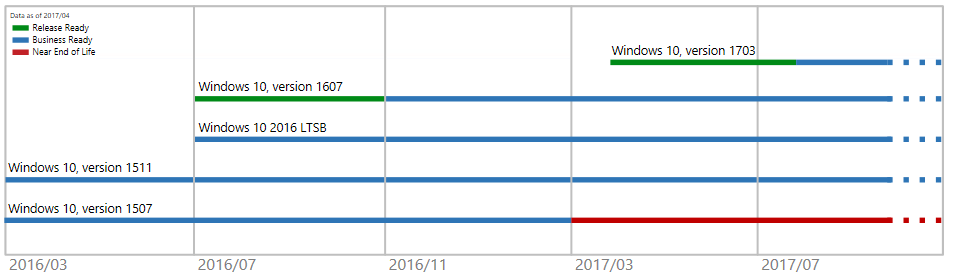
I think if you want to do things as you did with Win7, etc then you need to be using LTSB versions of Win10 (Can you guys on Edu licensing even get it?). Microsoft says not to use it for standard desktops but that's a lot of nonsense. It works just fine. However I agree with @Blue_Cookeh that if you can then get SCCM and use Win10 Current Branch for Business to manage it and control your roll outs. I suppose smaller schools could manage manually, but over 50 - 100 PCs I don't think it would scale. Besides, you get a pretty graph in your SCCM Win10 servicing so you don't forget when stuff goes out of date.
-
[1511, nu] Windows 10 1511 expiry, have I got this right?
Geoff replied to Zourous's topic in Windows 10
LTSB might work better for you if you don't have SCCM to control the in place upgrades properly. -
Yep, I need power cables. Both with a plug on the end and the male to female extension sort. Technically known as IEC (C13). I imagine there's boxes of them out there that seem to breed so I expect it should be pretty easy for some people to help me out. I am willing to pay postage. PM me.
-
Regardless of whatever is confusing the GUI, Powershell worked. $Date = [DateTime]::Now.AddYears(30) $SystemServer = Get-CMSiteSystemServer -SiteSystemServerName "SCCM.DOMAN.COM" Add-CMDistributionPoint -InputObject $SystemServer -CertificateExpirationTimeUtc $Date -PrimaryContentLibraryLocation F -PrimaryPackageShareLocation F