gshaw
-
Posts
3,895 -
Joined
-
Last visited
Content Type
Forums
News
20th
EduGeek EDIT Conference
Blogs
Everything posted by gshaw
-
Depends how the file is opened and the API the program in question is using from since testing we've done recently. Think we've managed to find a few with a path length of 450+ on the shared drives bit hopefully not on the homes!
-
Sounds the same as what I'm aiming for, have you hit any problems with file path lengths at all? Just thinking the path to a Document could end up being: \\XYZ.sch.uk\dfs\StudentDocuments\10JimJim\Documents\AFolderWithaLongName\DocumentName.docx That's around 90 characters just to begin with. Maybe not such a problem on redirected Documents as shared drives where the real horrors are path length-wise for us
-
Very quick question, we'd like to move our Documents redirected folders into DFS but have a query around the namespace path. If I create a namespace called "Home" and have the documents stored on a different server am I correct in understanding my path may have to end up being... \\domain.tld\Home\Students\auser\Documents Where "Home" is the name of the DFS namspace and Where "Students" is the label for the linked server UNC path actually hosting the files e.g. \\fileserver\studenthome$ I've seen other examples where people are storing the user directories within the DFS Root i.e. \\domain.tld\Home\auser but that suggests they're storing files directly in the DFS Root, which I thought was against best practice? I'm guessing it would also make the files more difficult to migrate later on as the whole DFS Root storage would have to move servers and then modify DFS settings for that particular server, rather than simply moving a Folder Target?
-
Seems like the hardware quality isn't being matched by that of the software. Not hanging around for bug fixes that may never arriven so will have to live with my cracked screen M8 until the HTC Nexus gets released later in the year...
-
One thing I've learnt from that list is that Microsoft lie Had quite a few times new URLs have appeared before the list has updated and as for IP ranges, no chance of keeping up with it (we tried and thanks to CentralOps knew they were all MS ranges but hadn't been published in the documentation as such) I guess the AAD Join is more of a Win10 \ Azure platform thing so probably uses different domains I'd guess.
-
@EduTech can you PM me your contact details to send it over to? I've had similar issues with WPAD and other Office 365 apps in that I have to put explicit rules in for certain domains otherwise we get connection problems (i.e. the final * rule doesn't seem to get interpreted properly). For example I had to add these to sort out Outlook and Word connection issues a while back, where X.X.X.X is the IP of our proxy server: /* Send Office 2013 login via proxy here*/ if (shExpMatch(url, "*odc.officeapps.live.com*")) { return "PROXY X.X.X.X:8080";} /* Send Outlook MAPI traffic via proxy here*/ if (shExpMatch(url, "*outlook.office365.com*")) { return "PROXY X.X.X.X:8080";} If there's a particular set of domains for the Azure AD join that you're aware of post them here and I'll try adding those and see if it does the trick. In the past I've found the URLs using Fiddler but seeing as some of the process happens on the login screen it's a bit more awkward in this case.
-
Another interesting question, if we use the Setup School PCs wizard do they get assigned to whichever person joins them to Azure AD as "their" device? Seems AAD is geared towards BYOD scenarios and without InTune or similar system it doesn't seem to list "All Devices" or something along those lines in the Azure UI?
-
Funny you say that, just renewed my VF contract to get 8GB data then my mate finds a 16GB EE offer a few days later, typical! EE were awful for me which was why I went to Vodafone in the first place. This was around the time they were upgrading all the masts and merging networks so may be better now that's all done? Back on my M8 the 4G is rock solid here where it dropped back to 3G on the OP3 so there is something on the latter device that's either more sensitive to signal strength or a bug in network handling (apparently some people have similar issues with Wi-Fi too)
-
It's on its way back this week until I can get some definitive answers on the signal strength issues. Are any of you running 3.2.2 btw? Some people suggesting that update has been responsible for the problems and it did install on my OP3 during initial setup.
-
We're on Office 365 and have been for a couple of years now, also activated Google Apps this year for a Chromebook pilot so have a foot in both camps. In terms of the O365 environment we went with it initially to get our staff accounts onto a more scalable system for email etc. then followed the students on afterwards. It works well and MS have added a lot to the platform recently but... ...the end user device side of things is more clunky, MS just don't have anything that truly competes with the Chromebook and Win10 hasn't really helped make things much easier in that regard. I love the fact it's now possible to buy a rock solid bit of kit (Dell Chromebook 11 etc.) for under £200 which boots in seconds and won't ever get infected with malware etc. In comparison low-cost Win10 devices are cheap and nasty and still need AV etc. Currently trying out Azure AD join to see if that gives a nicer user experience but seems we then lose a lot of management features (or pay again for InTune?) so is it really any better? OneDrive, which should be a killer product is a pain on shared devices whereas Drive seems to work fine on a Chromebook without needing to sync everything locally. For that reason alone I've been sitting here pondering if we should move but it's difficult as so much work has already gone into Office 365 and we do have a sizeable desktop estate. What we can't do is provide 1:1 (large college) or force BYOD so shared carts are the way to go if we want to move to more flexible learning spaces without desktops dominating the floor space, which is where OneDrive \ Win10 are at their worst. SharePoint seems to be slowly getting dismantled into more user-friendly chunks but that also leads to competition within the Office 365 suite e.g. should documents live in a managed SharePoint site or do you go with Groups, which are more user friendly but more liable to spiral out of control. All that said when we've piloted the Chromebooks the first thing users are reporting back is Office document compatibility and whether they can open up Word. Right now one pilot option was to use SSO to auth to either platform from the first logon then put shortcuts to O365 web apps on the Chromebooks, how about that for a frankenstein setup! Probably won't go ahead in production as it's a bit risky but says a lot about what MS are missing with Win10 right now imo. All in all both platforms have their pluses and minuses but if you're going in from fresh Google Apps seems to be a bit lighter and simpler overall.
-
Vodafone, with their coverage going LTE only will give me a lot of black spots but will give it a try
-
Well that didn't last long, looks like it'll be going back on RMA within the next couple of days. 4G signal stability is appalling, keeps falling back to H mode the majority of the time and it seems I'm not the only one with issues judging by threads in the UK subforum No one else on here had the same issues? It's a shame as I like the phone generally but a smartphone without stable mobile data isn't all that smart.
-
I've always turned off the policy "Predict network actions to improve page load performance" as it used to cause those exact issues, may be worth trying
-
Just received my OP3 today, first impressions... - quick delivery, arrived well before the predicted delivery date - lovely design, screen goes right to the edge of the chassis, who needs an SG7 Edge! Nice touch to have the pre installed screen protector already fitted as well. - it's fast, very very fast... installed all my apps quicker than I could tap them in the store - Dash Charge is fantastic, never managed to get hold of the Quick Charge kit for my One M8 so very impressed having this in the box - AMOLED screen is different to the M8, nicer blacks but slightly less true colours somehow. Tried the sRGB mode but didn't like it so reverted back - camera very snappy, bit too dull outside to get a good idea what it can do so jury out on that so far - launcher icon DPI looks a bit low, some icons seem to be a tad fuzzy where they've been scaled up too large. Needs a little tweak to allow the small icons option from home screen to also apply to the launcher. Overall rather pleased, done my best to make it look like HTC Sense as I'm so used to that UI having had it for the best part of 10 years across many devices but like how Oneplus have kept their tweaks subtle. The only worrying thing is some users reporting issues with Android Auto, really hope it works OK for me as I use it heavily in my Leon, especially after the last update where Google finally sorted out the connection issues that have plagued it since launch.
-
Since Win10 first went into beta I've been intrigued by the Azure AD join functionality and wanted to do more with it now we have the 1607 update and "shared PC" setup option. There's a couple of niggles I wanted to iron out though and hoping we can get some insight via the forum... @Arthur @EduTech may have some views on the below? Azure AD join wizard never succeeds when connecting via a proxy (WPAD) - seems odd it can't handle any form of proxy? Has anyone managed to get it to work in this scenario? I've always thought of the Azure AD join as something for roaming devices, staff issued kit etc. but this article seems to be suggesting applying it to internal domain joined machines? What would you gain by doing this if ADFS is already performing SSO to O365 services? https://azure.microsoft.com/en-gb/documentation/articles/active-directory-azureadjoin-devices-group-policy/ is there any way to join to Azure AD without seemingly issuing a device to a user at install time? The Set up School PCs wizard seems to be able to do it but can't find much about automating with MDT. Reason being would be to ideally join the device to Azure AD before issuing to a user then they just sign in with O365 credentials when it's given to them. On the Surface 3 devices we've tried it with so far we have to go through a rather lengthy setup process that's a bit clunky to do in front of the user.
-

Configure Windows 10 taskbar (new Anniversary Update feature)
gshaw replied to Arthur's topic in Windows 10
About time too, wanted a proper MS method of doing this since Win7 days -
When will the Anniversary Update appear on the VLSC?
gshaw replied to FragglePete's topic in Windows 10
Link was dead when I tried it earlier? -
When will the Anniversary Update appear on the VLSC?
gshaw replied to FragglePete's topic in Windows 10
That's a right pain, so there's a ready-made clean ISO that we can't access because it's only published to MSDN that we don't have access to with our EES subscription (only got TechNet listed as Software Assurance Benefits and DreamSpark Standard only gives server OS and SQL)... ...unless you know of another way to get hold of it or a suitable MSDN subscription? Using the standard VLSC download at the moment but a little part of me wants to have the en-gb version just in case there's something different in there localisation-wise Edit: Media Creation Tool wants a reboot to run when I've got loads of stuff open, remember when software installation reboots were meant to become a thing of the past -
When will the Anniversary Update appear on the VLSC?
gshaw replied to FragglePete's topic in Windows 10
Yup, 30-35 seconds to set up a new profile with a user who's never logged into the machine before. On a Hyper-V VM stored on HDD. -
When will the Anniversary Update appear on the VLSC?
gshaw replied to FragglePete's topic in Windows 10
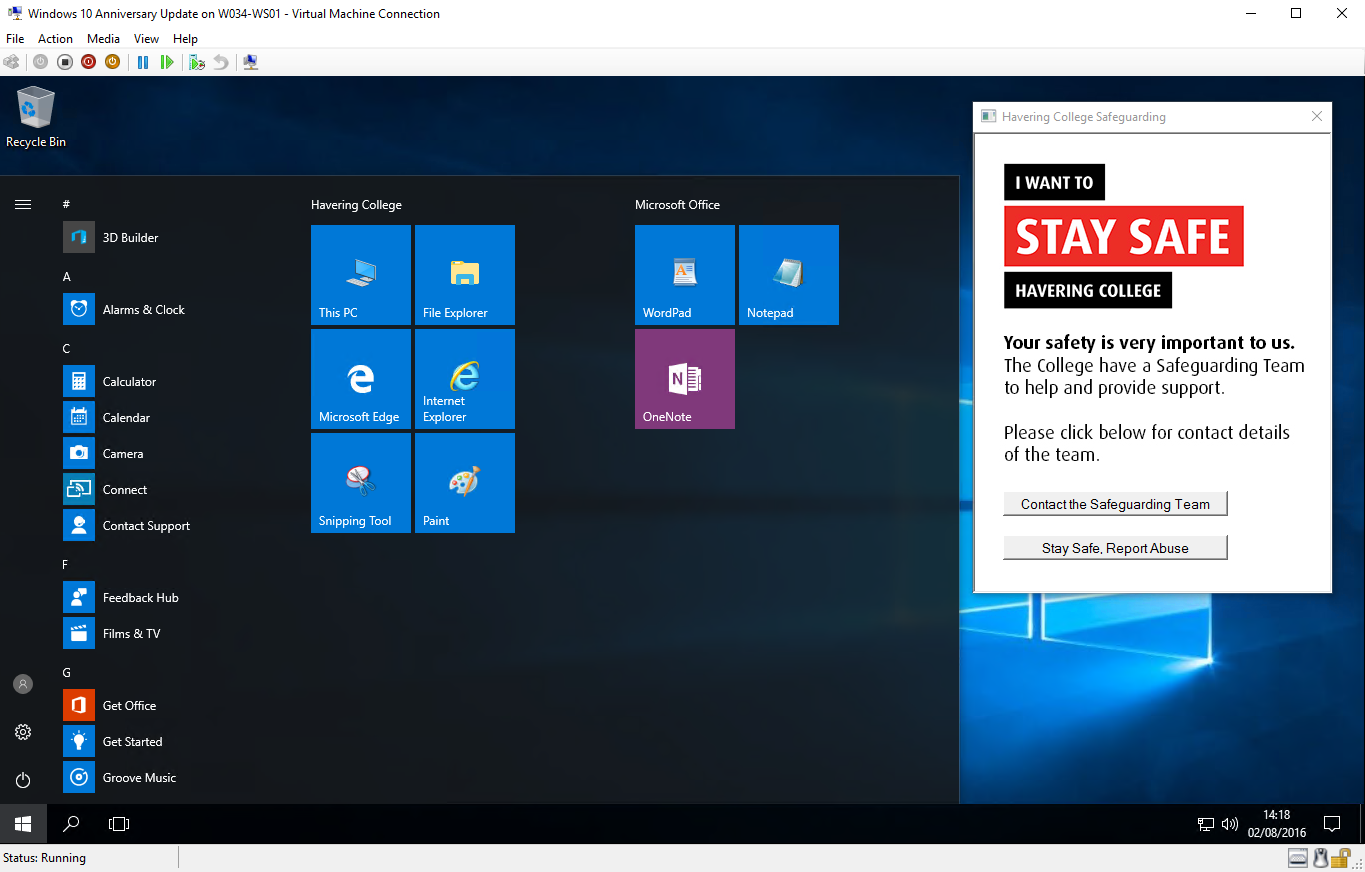
Yup had to pin it manually but after a reboot here's the result
-
When will the Anniversary Update appear on the VLSC?
gshaw replied to FragglePete's topic in Windows 10
Just did it and it seems to have worked Didn't keep the resized menu (I shrunk it down a column) but the apps I pinned are there as well as the renamed column heading. XML file is stored in netlogon -
When will the Anniversary Update appear on the VLSC?
gshaw replied to FragglePete's topic in Windows 10
Set Start Menu layout from XML file on a network share (as opposed to having to do it one-shot at image time) -
When will the Anniversary Update appear on the VLSC?
gshaw replied to FragglePete's topic in Windows 10
Has anyone tried the Start Menu GPOs for layout etc. yet? Just about to give it a go - hoping it's finally been fixed in this release. -
When will the Anniversary Update appear on the VLSC?
gshaw replied to FragglePete's topic in Windows 10
@FragglePete any chance I could be cheeky and ask for a copy of your script? We have an app removal script on our 1511 build but would be good to double check it against the one you're using. Logon times for me were similar to your findings -
When will the Anniversary Update appear on the VLSC?
gshaw replied to FragglePete's topic in Windows 10
A bit of quick testing looks promising - a new user profile on a domained machine gets in within 30 seconds rather than previous miserable attempts with 1511 that took 1min30s or above. That's on a VM running on HDD so may even better on an SSD machine