-
Posts
468 -
Joined
-
Last visited
Content Type
Forums
News
20th
EduGeek EDIT Conference
Blogs
Everything posted by Asgard
-
Hi I’ve had some productive conversations over the last two days with a member of their customer success / JISC team. Also one of the links posted above included a comment from Alister Black from Adobe who has also been included and a good conversation ensued. They asked for an example of a external system we use that does exactly what we all want. So I sent them this; For example we use a cloud based HR system called PeopleHR It directly ties into our AzureAD / ADFS. https://www.peoplehr.com/includes/educate/Steps_taken_to_implement_ADFS.pdf We currently use the ADFS method but will be transitioning to the azure method below https://help.peoplehr.com/en/articles/1020117-configure-sso-microsoft-azure-ad They do acknowledge that making it less intrusive is best for everyone so are defiantly willing to entertain looking at it.
-
It’s an odd one. And it caused a fair bit of angst from some of the larger institutions. Previous to moving to Adobe CC2020 we used it on VDI. “ https://helpx.adobe.com/enterprise/using/creative-cloud-deployment-on-vdi.html Adobe’s Creative Cloud for enterprise, Individual, or Single App Terms of Use permit the deployment of its Apps in Virtual Desktop Infrastructure on cloud environments in an AS-IS model with no support of guarantee software performance or stability. “ They pulled it for Shared Device Licensing It went down like a lead balloon when I told them SDL doesn’t allow it; https://helpx.adobe.com/uk/enterprise/using/sdl-deployment-guide.html#Frequentlyaskedquestions Can I install shared device license packages on a virtual machine? No. Shared device license packages cannot be installed on virtual machines. Relevant to this topic; Does Shared Device Licensing offer passthrough authentication? No. Currently, Adobe's SSO setup doesn't support passthrough authentication. Even if you have set up Federated identity, students have to sign in to the machine and then re-enter their credentials when signing in to Creative Cloud.
-
Hi Adrian We are in a similar boat to you, we are a Sixth Form College just shy of 2000 users. I was on an Adobe webinar late last month with their educational specialists and JISC looking at the roadmap and discussing Covid-19. I’ve tried to anonymise who I am ha Before I go down the rabbit hole.... Some of you may be using the free extension they gave to let staff/students use Adobe CC from home during the current pandemic. This is being removed by Adobe on the 6th July. Also they said that running CC in a VDI environment is not supported (or allowed). This didn’t go down well. A little bit of a “heated” discussion from a few huge universities about it stating how good Microsoft are with their licensing and it was basically “you can’t compare apples”. But they did take onboard that some places are playing many 10’s of thousands on software that can’t be used because they don’t allow it on VDI or any form of connecting into a local desktop. Now it’s down the rabbit hole ! I have been discussing their implementation of SSO , or lack of , with them for a while. I raised it with the enterprise support team But to summarise my call to them “ All of our users are federated. The issue we have is that each time a user roams to another machine they have to re-login to Adobe CC. Is the registration / activation stored in the registry which would allow us to export it / import on login as we can see that it’s not true SSO. The frustration for the users is that each time they login, they are asked to re-login to Adobe Creative Cloud. Alternatively is there no true SSO as we are already federated via AzureAD. Effectively a user could roam on upto 5 devices a day and if they don’t have a cached profile on the machine (we delete after a week) then they have to open Adobe CC and login before they can proceed – it causes further issues when people open PDFs directly from within Outlook / web, so we have had to force a change to make Chromium Edge the default reader for PDFs. Worse still, you cant save a PDF in Word unless you have first opened Adobe Acrobat or use the inbuilt Microsoft Save As PdF (not the Save As Adobe PdF). We use a number of Shared Device License/MultiUser licenses that are linked to our Azure SSO / ADFS and they seamlessly authenticate. Really my query boils down to making the opening of AdobeCC less intrusive/obstructive. “ The reply was disappointing, essentially they said it’s by design. When you login it stores the authorisation into the local credentials manager. But they said that it could be a change in the future that it could work seamlessly. To be honest I’m not holding out hope for easy 12 months. So we’re stuck with giving users workarounds because the software/implementation is flawed. The webinar was actually pretty good and all the people from Adobe/JISC especially Howard Moody do listen and Howard especially tries to push adobe for education. They are going to look into Adobe licensing on VDI etc even if short term because of the pandemic. But yeah Adobe CC 2020 and their “SSO” makes me sad.
- 10 replies
-
- 3
-

-
- adobe cloud
- federated id
- (and 3 more)
-
Hi Steve You have mail [emoji108]
-
Hi Sir I’ve sent you over that email.
-
drop me a Pm or email [email protected] Regards John Paul
-
We have just started rolling out our latest build (1909) - decided to go with a fresh install as it’s been inplace upgraded since 1511. We have an iso that’s extracted, then the junk we want removing from the .wim then we inject/pre-provision Sway Whiteboard To-Do unmount the wim and it’s thrown into SCCM. Happy to send you my notes if it helps, but we have also started to use SCCM with the store integrated to add apps to machines that way which has been pretty cool.
-

Newbie setting up Microsoft Teams for a college - Teams or Channels?
Asgard replied to BJG's topic in How do you do....it?
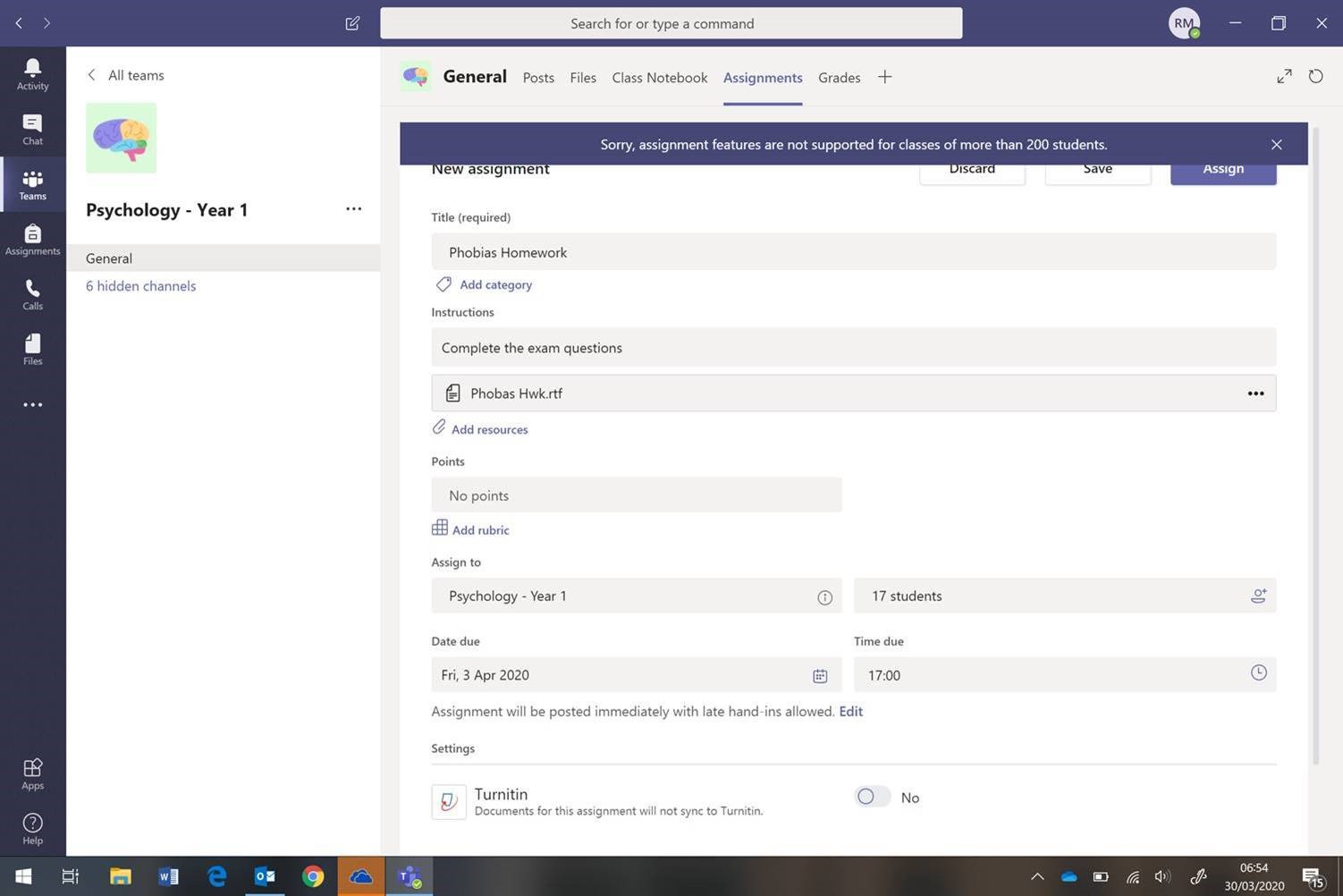
We are a Sixth Form College and we went with a teams per course then created channels per class The only issue we seem to regularly hit is assigning an assignment to a subset of the users you get hit with; Also the assignments appear to only be in the main area and not within the channels - unless we have done something glaringly obvious incorrect
-
Seen this posted by a few trusted sources on LinkedIn. Microsoft facepalm. Does this mean Microsoft 365 in its current incarnation will change names..... or will Windows be rolled into this in some way shape or form.
-
Have cracked it sir If the machine has a battery it puts “lap-“ at the front of the serial number if not it just uses the serial number - I’ll put it up here just in case it’s of use to anyone Expanded on this to check the name and then apply the WiFI profile further down the line in the task sequence Now if I could just get the Modern Driver Managment to recognise non Dell Drivers ha
-
We opted to copy @MW_NetSupport having been impressed with their customer service; Tawk.to for some limited real-time chat outside of Teams and then DualMon for accessing users computers - direct them to a login page enter a code and away you go Works an absolute treat across our trust and we have dealt with about 50 users this way since Thursday last week.
-
Yeah we use OSDComputer name now but was thinking more for complete zero touch but in the interim we might just stick with OSDComputerName. Thanks for the reply
-
Do any of you clever souls do anything complex with the naming of devices in SCCM. We want to name our PC's based on the serial number, but if its a laptop , put 'LAP-' at the beginning. Contemplating if something like this would work; just typing it out as we would envisage it WMI Query IF Win32_Battery where batterystatus > 0 then name the device LAP-%serialnumber% if no battery just name the device %serialnumber% obviously that's the really simplistic way of looking at it, but I cant seem to find much answers on the web. Got the idea from here https://www.jeroentielen.nl/run-a-specific-task-sequence-job-only-for-laptops/
-
Hi sir Just a note for you from our experience We standardised on Broadcom 57810 10GB cards for our Clusters. Probably 16 servers (live and a replica cluster) at our main site and Intel X540-T2 on our other site (5 node cluster) We also killed Virtual Machine Queues as per some guidance on AindanFinn on our Broadcom cards as it causes grief. John
-
Drop me a PM and I’ll sort it out for you @talksr did you get the info ok and did it seem Useful?
-
Hi, we are about to inplace our 1803 to 1903 using wsus with a postoobe script to remove some silliness. Drop me a PM and I’ll email you my docs, then I’ll update this thread just in case it’s of benefit to anyone else
-
COMPETITION TIME: Introducing ICTDirect_Phil!! Win a 960GB SSD!!
Asgard replied to ICTDirect_Dave's topic in Windows
ICTDirect Rises
-
Get yourself a Startech MST Hub - I think your graphics card needs to support DisplayPort 1.2 https://www.startech.com/uk/AV/display-and-video-adapters/Displayport-Adapters/mst-hub-displayport~MSTMDP124DP This is the one we have running off an Intel Nuc displaying four 50” screens - in a matrix but we can have them independent if we want. @Jobos for our 3 monitor setups we use GeForce 1050ti cards
-
I make many tears when I sign ours off. Granted it’s a large Sixth Form and a High School with a combined FTE of 215.
-
Fire streamer is [emoji108] isn’t it
-
Hi We use DPM and have been for years - just in the process of moving to DPM 2019. We have an onsite box with 72tb and then an offsite box with 96tb at another institution as part of a reciprocal offsite backup. IPSec vpn tunnel between both sites. Works an absolute dream and was part of a JISC & Microsoft Case Study Drop me a PM John Paul
-
I’m on one of the JISC security forums and it’s been the main topic of conversation today; JISC themselves replied to us all on the list. “ Good morning all, With regard to the article in the news today. These reports represent a sensationalised take on a serious policy paper that was unfortunately not linked-to in the BBC article. The paper is a high-level overview of well-known threats to the education sector and has sought to bring together a number of themes already widely reported. The main focus of the paper was that cyber risk is a Board responsibility informed by, but not driven by IT. The press release sought to highlight the importance of training and awareness strategies for all staff, as echoed in the cyber security assessment survey which lists phishing as the number one threat faced by the education and research sectors. The policy paper can be found at https://www.hepi.ac.uk/wp-content/uploads/2019/03/Policy-Note-12-Paper-April-2019-How-safe-is-your-data.pdf Regards “ If the policy paper was linked to the article it would of cast an entirely different light on the situation ... but hey at least it’s not more talk of the B word [emoji848]
-
cost of impero education pro
Asgard replied to EducationTech's topic in Network and Classroom Management
Hi @EducationTech +1 for NetSupport A school we encompassed into our academy trust we’re using (and having major issues with) Impero and whilst I don’t want to get into an Impero bashing, they were shown NetSupport and the choice was pretty unanimous and we haven’t looked back. We also deploy their Helpdesk and Notify apps across the trust. What I will add is that their staff are fantastic, from the main man Al Kingsley to all of the support team we have ever had to deal with, which to be fair I can count on one hand in the last 12 months across our trust. -
If you run short before you swap over give me a shout and I’ll post you a couple out. There only sitting on a shelf. [emoji106]
-
It was Ruckus direct. We seemed to have a bat phone to an account manager directly in Ruckus which helped but the swapping of the company seemed to be bad timing for us. If it’s ok I’ll drop you a PM and we can discuss off list ?