GreyFox
-
Posts
91 -
Joined
-
Last visited
4 Followers


About GreyFox

-
Hi johnpd, I think this was a piece of finance software. A colleague of mine managed to get this working. I can't remember exactly what he did, but he was able to install the software via Powershell. Thanks GreyFox
-
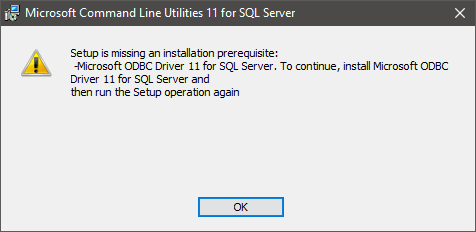
Hi all, I'm not sure if this is the correct part of the forum for this, so apologies in advance if it's not. We have a third party trying to install a piece of software on one of our user's PCs. It's Windows 10 Education Edition, v1803, with the latest Windows Updates etc. Before they can install the software, they need to install two other bits of software - file names in the title. 'Microsoft ODBC Driver 11 for SQL Server' (msodbcsql.msi) and 'Microsoft Command Line Utilities 11 for SQL Server' (MsSqlCmdLnUtils.ms) 'Microsoft ODBC Driver 11 for SQL Server' seems to install ok, ensuring you change it so the 'ODBC Driver for SQL Server SDK' feature installs as well. However, when trying to install the 'Microsoft Command Line Utilities 11 for SQL Server', we get the following message. The driver is installed! I've seen this elsewhere, but can't remember how I got around the issue. Any ideas please? This occurs on my user's PC, my PC and a VM I've tested it on, so it's not a one off. The VM and other user's PCs are both freshly reimaged. After some more playing it now seems to install on my VM (with an SQL Server 2014) popup appearing asking if I want to make the change to my PC. To do this, I had to install the first file, run it again and choose 'Modify', keeping the settings the same. I've managed to get it to install on my PC previously, by running the second file as a different user. This doesn't work on my user's PC though, with the same 'other user' account. All the account I've used when trying to install these files have local and network admin rights. Any help would be greatly appreciated. Thank you GreyFox Edit - I forgot to mention. These are specific versions we're trying to install. The third party company has had no issues installing them on other PCs elsewhere, earlier in the day.

-
Hi AButters, Thank you for your reply. I believe I set this as Mirrored. We've only got half of the total storage space available, so that would support this. I don't think you could do Parity with just two hosts. I can't remember what read speeds were showing, but the read-world write performance is as I mentioned above
-
Hi all, We're currently looking at moving to Storage Spaces Direct, but I've been experiencing a few issues, mainly with speed. A bit of background first. We've been having a lot of issues with our current clusters (one Hyper-V and the other for storage). I think the storage is ok - a DataOn setup with two Server 2012R2 machines and a huge storage pool. The Hyper-V cluster, with VMM (eugh!) consisting of three hosts, seems to get upset when it shifts VMs around on its own - such as when restarting for an update. They get stuck, can't turn on/off or move. We have to restart the hosts. Because of this we had been running off just the one host for a while. Not great, but they are beasts, so are capable, plus it was a lot more reliable than what we had some time ago! We're currently using two hosts, with one of them being a bit suspect. The third seems to be the one that causes the problems. This has had hardware changes, a complete rebuild etc, but seems to cause the majority of the issues. We've had an external support company working on this (for quite some time), who's been in contact with Microsoft. They say this could be down two one of things. One being something do do with our domain name and I can't remember the other. Either way, this is why we're looking to move. To S2D. This is pretty new to me, so I've tried to follow a couple of guides. We've got two hosts, although three seems to be the most common way of setting this up. I've installed the correct adapter, and packed them with disks. We have a mixture of disks in each host, but they do mirror each other. In each host we have a couple of 300GB SSDs for the OS (mirrored), five 1.75TB SSDs and seventeen 1.2TB 10k HDDs. I've created the cluster and added a file share witness. Then created a storage pool. All looks good. For network, each host has two teams, 2x 10G for management, 2x 10G for storage. I have managed to get it up and running nicely (ish), with a number of VMs moved over. Failover works nicely and I thought we were all good to go. However, the transfer speed is incredibly slow. Manually copying a file to the shared disk tops out at around 100MBps, but can be slower. Normal transfers to a non-cluster disk can be around 800MBps. I’ve moved the VMs back and have started again. However, one thing I may have missed during the setup was the tiers. On the second attempt I noticed we only have a capacity mirror tier, with no mention of a performance tier, using the SSDs. They are showing up as ‘journal’ though, but I’m unsure if they are actually being used for anything. I don’t know if this is normal or not with just a two node setup? We have one or two very large servers to migrate across, or move, if they fail to live migrate. So writing at 40 – 100MBps is going to be an issue and may take days! Speed and the missing tier are my issues. Any ideas please guys, or is this normal? I don't think we saw any performance issues when using the VMs. It seemed to be purely the migration/copying that was painfully slow. Thank you GreyFox
-
Hi Farwell, Kind of...we've got a new firewall. We've gone from a Dell Sonicwall solution, to Watchguard. I've not seen the TLS error since, although we've had a few other ones since swapping. Thanks Grey Fox
-
Hi Martin. So unlike HP, and some other manufacturers, they only have a 10 year warranty? Hmmm. That's something to consider. Thank you
-
Hi Willott, thank you for the info.
-
Hi Mavhc, I think that's what we're looking to do. However, a demo/trial for a short period of time is a bit different to how things behave a few months/years down the line. Thanks
-
Blimey, lots of views, but only the one response. I guess no one else uses them then. Thank you Matthew, that's what I've been told. I guess that's a good thing. Thanks
-
Hi guys, we're looking at replacing our core switches, HP 7506, possibly with Huawei S7700 Series Smart Routing Switches - link. Does anyone here have any experience with Huawei kit in general, or these switches in particular? If so, are they reliable, easy to configure etc please? From what my boss has told me, they sound quite promising. Thank you GreyFox
-
No worries Good luck! Not necessarily. In each sequence you can select driver 'profiles'. I've got a profile that includes drivers for 3 different Dell AIO machines, then I've assigned this profile to a single task sequence for 'Dell AIO Desktops'. So one image and task sequence for 3 PC models. Yet under where you select the driver profile (where you can choose 'All drivers', if you like), there's the option to 'Install only matching drivers from the selection profile'. So in theory you can have one image for all of your devices, but I personally like to have a bit of control over these deployments.
-
Fiza has already answered this one really, but ours is on a Server 2016 VM, with two virtual disks. One for the server OS, the other for the MDT/WDS bits. Mine's already at 117GB used, with updates, packages, OS files and a number of different builds. I don't think it's recommended, but I run two deployment shares from this. A 'Build Lab' and 'Production'. Each one is set up a bit differently, so I thought this would save changing settings all the time. It works fine for me.
-
Another for MDT. I set up FOG (Free Open Source Ghost) at my previous school, which worked great for Windows XP and 7. We would install Office and a number of other applications on the image, sysprep (using MySysprep2), capture, then deploy. There's a bit more to it than that obviously. I can't speak for Windows 8/8.1, but things have changed with Windows 10. I tried FOG in my current school, but found it wouldn't quite do what I wanted. Using MDT, with WDS for the boot images seems to work well. As others have said, you can get programs to install as part of the deployment sequence. However, you could just install some on the base image. It does take a bit of setting up, but once you're up and running it is pretty quick and works well. For SIMS, I'd leave the client off the image, but deploy via SOLUS3 once the machine is ready.
-
Hi amartin, Post #15: 'Well I've solved the problem for me. Turned out that I needed Change as well as Read on the share. As soon as I did that problem solved!' So changing the permissions so 'Everyone' has 'Change' permissions, either on the 'Start Menu' folder, or 'Desktop' (which worked for me). I would give you more information, but this was posted a while ago and I'm no longer at that school, sorry. Thanks GreyFox
-
Hi amartin, Post #15: 'Well I've solved the problem for me. Turned out that I needed Change as well as Read on the share. As soon as I did that problem solved!' So changing the permissions so 'Everyone' has 'Change' permissions, either on the 'Start Menu' folder, or 'Desktop' (which worked for me). I would give you more information, but this was posted a while ago and I'm no longer at that school, sorry. Thanks GreyFox