staylor1972
-
Posts
73 -
Joined
-
Last visited
About staylor1972

-
Hi All Thanks for the input. I'll take Intune off the list then and maybe have a look round at the some other options to. What are the costings like with Mosyle?
-
Hi All Were looking at managing a suite of 50 imacs and 20 ipads. Do we need to invest in Jamf to dish out settings, apps and updates or can Intune handle these things? We already have Intune as part of our campus agreement but wondered if it was an good with Apple products. Most of the places i've looked mention Jamf as the way to go but at a considerable cost. Any comments greatly appreciated. S
-
Hi Snagrat I've had a look round and found out about Background Intelligent Transfer Service so i'm going to set it up on a set of laptops and see how we get on. Is that what you were meaning about setting the bandwidth? S
-
Hi Snagrat Any pointers on where i can do this - is it a feature of SCCM or will i need to look on the Wi-fi controller. regards S
-
Hi All I've configured SCCM to push out the monthly updates onto our Workstations. This had been happening successfully for the past 2 months, I'm now looking at using it to put the updates onto our laptops. We currently have 12 sets of laptops with 24 laptops in each set. IF I push these updates over WI-FI will it end up killing the WI-FI and make it unusable? Each classroom that has a laptop trolley in has an access point. How do you update them? Any help greatly apperciated. regards S
-
Hi All Having a problem installing Access, it seems to install Access Runtime 2016, so when the students click to run it tells them that they have the runtime edition. If I manually remove Access Runtime the software works as it should. I'm using SCCM to distribute the software to the PC's and have gone through the configuration software but can't see Access Runtime referenced anywhere. I've even add this to the config file: but its made no difference. Any advice greatly appreciated. S
-
Hi With SCCM is it possible to Deploy applications directly from the network share rather than the application download to the machine to install? I've got some laptops with 128GB SSD and they require Adobe Creative Cloud on there but by the time the full suite has downloaded and installed I'm left with very little disk space. So I'm hoping I've missed a setting that will allow me to run the install directly from the network share. Thanks in advance regards Steve
-
Hi All back again with another question! I've got 2 Device Groups - Windows 1909 with Office 365 and Reimage. The windows 1909 with Office365 has a TS to installs the OS and is set to Required, the PC's build without any issues. Ive check the monitoring and Deployment Status and its set as Success and the Program will not rerun. Now if I want to rebuild a PC I put it in to the reimage group which TS is set to Available and it reimages the PC without any issues. So far so good. However what I'm finding is after a few minutes the PC will then restart and reimage itself with the Windows 1909 with Office 365 TS. I've also tried deploying the reimage TS to the Windows 1909 with Office 365 Device group but when I PXE boot it says that there are no task sequences available and just restarts. Anyone offer any gudiance as to where i'm going wrong?
-
Thanks for the input folks. I've got it PXE booting to a couple of models of our machines, some need a few tweaks in the Bios to get them to work. Thanks again
-
Not having much luck :-( i'm struggling to get it to PXE boot. Do these DHCP settings look right?

-
Thanks again Sparkeh I've changed those settings now and will give it a go.
-
Hi Sparkeh Thanks for the speedy response! Where abouts do I set the images as being optional? Is that part of when you are deploying the task sequence? is there an easy way to apply a password?
-
Hi All I'm looking to upgrade our PC's from Windows 10 1803 to Windows 10 1909 using SCCM. This is the first time I've used it to deploy an OS as I've mainly been using it for Endpoint protection and App installations which is working well. I've got to a point where I've created a device collection and added a couple of test PC's in there and they seem to build without any issues but my question is how can I quickly rebuild a pc? I'm coming from using WDS, so it was a just a case of hitting F12 and initialising a network boot and selecting the image I want to install. The way i've sort of got round it is by creating a new Device Collection and deploying the Task sequence to that, and leaving SCCM to refresh the policy to instigate the rebuild. But if i have to rebuild the test pc again it wont as it can see that its sucessfully completed the install. Any advice would be greatly appreciated. Steve
-
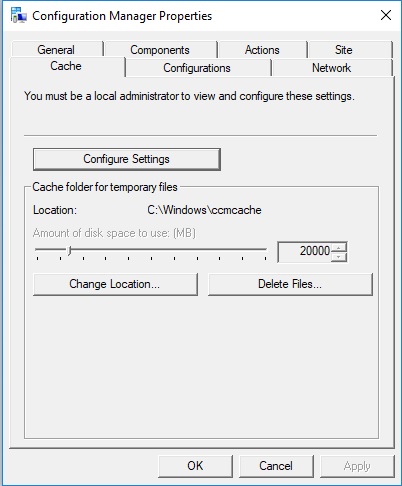
Thanks for that spakeh it reports back the correct size of 20GB. The odd thing is if I logon to a PC and click the config settings and then try and deploy the software it installs without any issues. If I don't then I get various error messages.
-
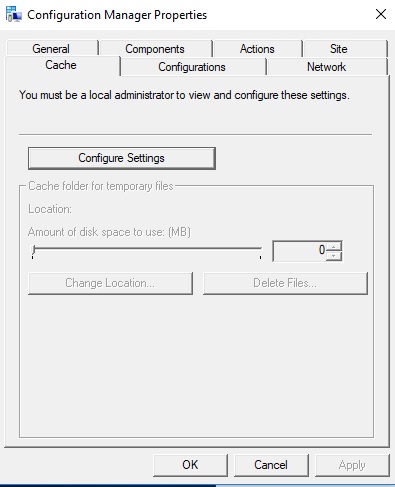
Morning Guys I've ran the computer redesh policy and have looked at the cache settings but it hasn't updated: If I click on the configure settings button however it does apply the correct cache size: Any ideas where i'm going wrong?