tmcd35
-
Posts
6,742 -
Joined
Content Type
Forums
News
20th
EduGeek EDIT Conference
Blogs
Everything posted by tmcd35
-
I've got into YouTube big time of late - KindaFunny, IGN, Jimquisition, Gamespot, Ashens, Zero Punctuation, Crash Course, etc... Beyond that it's mostly a combination of Netflix (House of Cards, Bloodline, Damages, House, The Killing, etc) and BBC iPlayer for documentries (currently watching Back In Time For Dinner). I still have an active NowTV entertainment subscription but question its value. I got it for The Walking Dead, American Horror Story, and Game of Thrones mostly. I got bored watching Walking Dead and American Horror Story weekly and didn't finish the series (or others I found interesting but waiting a week, eh). Probably wait and binge watch Seasons 1-5 of Game of Thrones once the latest season magically appears on my Plex system. Might give the Walking Dead another try later in the year on a similar binge watch if it comes to Plex...
-
Apparently I am an agreeable neurotic! and would best live a few miles further south in Mid Suffolk. Apparently moving slightly north to the Broadlands might be better than living in the big city (Norwich). I can think of nothing worse than living in the country and think Norwich can be too quiet for a city sometimes - so I think the accuracy of these results can be taken with a pinch of salt (that said I agree, I probably am neurotic).
-

Microsoft TAP = kick in the teeth for EES subscribers
tmcd35 replied to StevieM's topic in Licensing Questions
The benefits of EES, and to a lesser extent Volume Licencing in general, are multiple and is probably a good idea even if you are sticking with Windows 7. Volume Licencing give you three important rights: - Upgrade from any Windows OS post XP. Useful for old machines - Downgrade rights from any Windows OS to any previous version - Will Windows 10 machines downgrade to Windows 7? Or Windows 8.1 only? What happens when you buy a new machine with Windows 10 and want to run Windows 7? or Vista? or XP? - Imaging rights. You shouldn't use OEM editions for imaging as you can run into activation problems (been there, done that). To image you need a VL copy. Which means having a VL agreement (even if it is only for one machine) EES adds the following: - CALs. For every new machine you must always purchase CALs, they are not transferable between machines. EES effectively gets rid of this requirement. - Office. Office is transferable under both retail and Volume License, but it's included in EES and is far cheaper. - Anti-Virus. No need to buy a separate AV package. - Price based on number of staff not number of users or devices. Generally speaking EES tends to be the cheapest way to guaranty full desktop licence compliance (OS, Office, CALs, AV) on every machine, new or old, so long has you have more computers than staff. As for massively hiked cost, no. It's just a return to retail prices, the status quo as of 6 months ago. How much the increase will be will vary between manufacturer (not all were part of the scheme anyway) and models. Shop around. -
Devices opting for 2.4ghz N instead of 5Ghz N when connecting?
tmcd35 replied to localzuk's topic in Wireless Networks
If you're using a decent managed AP that supports multiple SSID and both 2.4 and 5Ghz aerials then it should be actively monitoring the clients and load balancing the channels as required. Ideally you should be seeing a mixture of clients across both 2.4Ghz and 5Ghz. If everything was going through the 5Ghz channel you'll just end up over saturating that and performance will suffer. -
For Abe fans - I'm currently playing through the first one on PS1 again and the original has aged very well indeed. The game is one of the best I've ever played, easy. The new 'New n Tasty' version is this months free game on PS+ for PS4 owners (you've got a week left if you haven't nabbed it already). I've had a quick look at the PS4 version, booted it up and played the first level (I'll play it properly later), and I can tell you it is obviously a real labour of love by the developers. This is 100% true to the original game and the new HD graphics look stunning. For PC/XB1/PS3 owners who get to look at it this month - it's more than worth the asking price. Fans of the original really won't be disapointed. If you've never played any of the Abe games then pick this up, either free on PS4 before the end of the week or on PC/XB1/PS3, it's a true classic.
-
For TV 'Smartness' the PS3 can be got new for about the £120 mark and includes BBC iPlayer, ITV Player, 4OD, Demand5, NowTV, Netflix, Amazon, SkyGo, YouTube, DLNA streams, supports BluRay and 3D, and as a cool bonus plays some very fancy video games (if you like that sort of thing). I no longer use either the Freeview or the FreeSat tuners built in to my TV. Most of the time it's YouTube with some Netflix and iPlayer as the mood takes me, NowTV subscription is still running though not sure why - should I cancel it? I beat a non Smart TV costs more than £120 less than its 'Smart' equivalent...
-
Pretty much this. I'm not sure AC is worth worrying about on the client just yet, just knowing the AP's support it for when it does become an issue is enough for now. Getting 5Ghz-N is pretty much the way to go and they are pretty rare. I'm making 5Ghz part of my spec for our next laptop refresh.
-
Microsoft TAP = kick in the teeth for EES subscribers
tmcd35 replied to StevieM's topic in Licensing Questions
Again £57 is unlikely. OEM's, if they are shifting any type of volume, should be able to negotiate better than that with MS. And you need to ignore the EES subscription - that is an additional cost, they don't magically get computers any cheaper because they have EES. The price increase is the same for all. The only caveat is anyone with a Volume License (not just EES) does have the option of buying Home edition OEMs rather than Professional. However the saving won't be that great, especially if the OEM has got good discounts from MS - probably £1-2 per machine. I've often found Windows Pro machines of the spec I want cheaper or the same price as Windows Home machines. -
Microsoft TAP = kick in the teeth for EES subscribers
tmcd35 replied to StevieM's topic in Licensing Questions
Seriously, I've no idea were you get 5700% from or why you think the price increase is any different for EES subscribers. All I know is everyone needs to buy Windows with the machine and everyone is getting a price increase. As for how much that increase will be? That's between you and your suppliers - maybe you need to shop around more? -
[website] How close are you to the political centre?
tmcd35 replied to sparkeh's topic in Jokes/Interweb Things
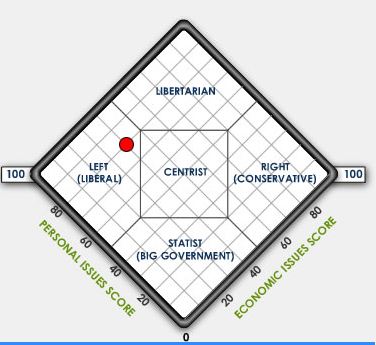
Soo, BBC think I'm a UKIP infiltrator and these guys put me on the nearest Greenpeace ship.... I'll leave it to you to decide which one I is closest to the truth...
-
[website] How close are you to the political centre?
tmcd35 replied to sparkeh's topic in Jokes/Interweb Things
I'm typically a lefty, but this had be 5 points to the right. But then again, there's only 5 questions and a lot can be said about how you interpret them. The first question, about redistribution of wealth, is probably what done it. My answer to that probably had me as an ultra-right wing flag waving nut job. Neither the wording of the question - or my answer to the question based on how it was worded - anywhere near reflect what I actually feel on the subject. -
Virtualistion is about decoupling software from hardware. A traditional server is tied to its hardware, upgrading the underlying hardware is difficult and involves significant down time. In a virtualised environment upgrading the hardware should have minimal effect on the software and require little or (depending on the environment) no down time. Virtualisation also allows you to split server roles into their own servers rather than consolidating several servers in one system. A common traditional example might be to have Active Directory, DNS, DHCP, and your Print Service all on one server. Or possibly worse, your file and print services on the same physical server. What happens when a new print driver requires a server restart.... Virtualisation and splitting file, print, DNS, AD, etc in to their own virtual servers solves this problem. Costs depend greatly on your exiting environment, what you project your VM requirements to be, and the architecture you choose to virtualise around. This thread may give you some ideas where the OP as £20k for a 1100 pupil school: http://www.edugeek.net/forums/hardware/151279-how-do-you-spec-server-2.html#post1296461
-
I think the response here is - most of us aren't blessed with that kind of money, and thankfully the OP is talking about server virtualisation not deskop. £20k should, in the hands of a reputable supplier, get the OP everything they need and be left with some change. Also, SANs are certainly not the only sensible solution for redundancy, but they certainly are a sensible solution.
-
Microsoft TAP = kick in the teeth for EES subscribers
tmcd35 replied to StevieM's topic in Licensing Questions
The answer is here: Microsoft Volume Licensing Brief - Reimaging Licensed Microsoft Software by Using Volume Licensing Media (see PDF) However - you do need to use VL media and a VL key, so you do need a VL agreement (Select/Open/EES) and purchase at least 1 qualifying VL licence through it in order to gain access to the media and key. Also bear in mind that each agreement (Select/Open/EES) also come with their own respective minimum purchase requirements so you can't really just buy 1 license, but don't necessarily have to buy 1 VL licence for every machine either. But, there are significant differences in downgrade rights between the two, and without a VL for every machine you must buy your machines with the latest OEM Pro, where VL can use any OEM Std or Pro right back to XP (I'm sure ICT Direct can do this with referbs?). -
Microsoft TAP = kick in the teeth for EES subscribers
tmcd35 replied to StevieM's topic in Licensing Questions
Sorry, my bad - I tried to cover that off with the 'At worst' sentence - but probably fudged what I was trying to say. The £1 for Windows is a recent thing, and it's gone back to what it was before. At worst the difference between EES/VL and they way you operate is potentially the difference in cost to the OEM for Std vs Pro Windows. The point is EVERYONE needs to buy an OEM copy of Windows with their machines so EVERYONE has the same price increase, which really shouldn't be anywhere near £57. The answer - revise your spec and push your suppliers harder on their quotes. -
When spec'ing host servers the general rule of thumb is to have them run at (n-1)/n capacity were n is the total number of hosts on the network. So, ideally, with three hosts each server should be running at 2/3rds capacity under normal loads. This then factors in redundancy for failover should one of the hosts go off line. So you need to work out how many VMs total you are likely to run, and what the spec of each VM needs to be based on its anticipated work load. Then split the VMs equally between hosts. This should then give you an indication on the required spec's of the host servers. In terms of future proving, I'd probably look to run each host at closer to 1/2 capacity under normal loads (gain assuming 3 hosts) to give room for adding new VM's later as the need arises.
-
How much!?! Most VM's barely need 1 core, SQL servers being the exception where 4 core is probably fine. 4Gb RAM is probably over generous for most VMs, but hey if your running Win2012r2 with full GUI in each VM you can chalk that up to Windows bloat. Again only SQL needs anywhere near 16Gb. As for HDD space. 200Gb per VM is probably more realistic. Refer to your DB provider for their requirements (our SIMS server only has 250Gb). Only your file server will need TB of space. We're running around the 4TB for file services and 4TB for all other VMs on our storage array. We have about 30 VMs and the storage array is a little under half full.
-
Microsoft TAP = kick in the teeth for EES subscribers
tmcd35 replied to StevieM's topic in Licensing Questions
The price for EES and non-EES is the same and always has been. To be properly licensed you should have an OEM license with the PC, a Volume Licences for upgrade/downgrade/imaging, and CALs. At worst EES/VL purchase an shave a few ££'s by buying Std instead of Pro, while those making do without any VL pretty much always need to make sure they get Pro included. Also, as I pointed out in another thread - I'd be shocked if most system builders turning over any kind of volume are paying any where near £50 for an OEM license. Tier 1 manufacturers probably have the cost well under £10 per machine anyway. -
You can do a lot with £20k! 3 decent servers and a SAN easy. Best people to talk to are @VeryPC and Novatech, IMHO. They can work wonders on that sort of money. The most expensive part of all is the physical hard drives, but with creative tiering that doesn't necessarily need to be as expansive as you first think (you don't really need fill a SAN with 15k SAS drives - a mixture of SSD and SATA with fewer SAS might give better performance and more space for less money). The starting point is your existing setup. What are the specs and roles of the existing servers? Do you want to virtualise 1:1 or do you want to split roles on to their own servers? (eg. WSUS and WDS on the same server, or 1 WSUS server and 1 WDS server).
-
I'm torn between Bloody Stupid Johnson and The Duck Man...
-
Mmm, I'll let someone else be brave enough to suggest a Nanny Ogg or Granny Weartherwax... I'll play (relatively) safe and suggest @Dos_Box for Arch-Chancellor Ridcully.
-
The question, is what are you going to use the server for? Single task, multiple tasks - if so which, virtualisation? If virtualisation how many virtual machines? What are they running? AD? DHCP? DNS? File Server? Print Server? MIS? SQL? etc, etc. For an idea of setup, we are a similar sized school (1000 users, 400 clients) and are fully virtualised. We have three high powered host servers connected to a storage array offering SMB shares (rather than a SAN). To give an idea, we tend to go for either Novatech or VeryPC custom builds and spend no more than £2500 on a server. Because they are bought for virtualisation we get as many cores and as much ram as we can squeeze out of supplier (last server was 24 core and 128Gb, I think) and just enough hdd space for the OS. Our storage array cost us £7,500 and holds around 8Tb of SAS storage. If you are looking to buy three servers for virtualisation I'd say budget around the £7,500 mark. Forget the SAN and use local storage with Hyper-V replica running between the three hosts for failover/redundancy. For the £2500 per server mark I'd be looking at 8-12 cores, 48-64Gb Ram, and 1.5-2Tb storage min in each, possibly using tired storage and mixing SSD, SAS, and SATA and getting 4-6Tb in each server (1-2Tb SATA drives are cheap).
-
It's probably worth pointing out that while it's not going to be a cheap as the old TAP deal, most OEM shouldn't be paying the full "£57 OEM cost" you might purchase as an individual system builder from the likes of eBuyer, especially the really big players like Dell, HP, et al. They'll have their own OEM agreements with MS and be under NDA's regarding the price. The volumes they buy in mean it's likely to be closer to the £10-30 price bracket, depending on the OEM. For my part the base cost for a system is, was, and always will be £450 per unit PC or Laptop. All this does is revises down the spec I can get rather than reduce the number of machines.
-
IT Budget 2015 - What's your big spend?
tmcd35 replied to Dos_Box's topic in Budgets and Expenditure
I have an annual revolving budget/replacement strategy so there is rarely a big project so to speak that would be "this years big spend". Usually the biggest spend is a suite of 31 PCs. This year is the exception to prove the rule - we're (hopefully) getting managed WiFi installed over the summer, that will then get assimilated into the annual replacement cycle and the biggest individual spend will go back to being a suite of PCs. -
Technically I *could* do this, I've set VPN up for fits and giggles but... ...The only reason I check e-mails before living for work is it forewarns me of what I need to ignore between the front door and the kettle, that and the smartphone is constantly checking e-mails so it's no biggy.