loxford01
-
Posts
112 -
Joined
-
Last visited
Content Type
Forums
News
20th
EduGeek EDIT Conference
Blogs
Everything posted by loxford01
-
We were told the same about Patch 3, but our issue was fixed before that with URL whitelisting from KB shared previously.
-
And now they've published more amendments on 8th and 16th September. How do we stay compliant with changes every few months?
-
Thanks, thats definitely not the list that was shared with us, I guess because they were busy compiling this KB. I will get these whitelisted on our firewall, hopefully will resolve all the issues for us too.
-
Could you share the KB link? I want to check if it's the same as what was shared with us to add.
-
I can also confirm that the proxy2.rmsafetynet.com:8080 entry in Sims settings has fixed it on an affected PC that originally had http://ssfilter.userproxy.rmplc.co.uk:8080 as proxy. However, another PC with the same http://ssfilter.userproxy.rmplc.co.uk:8080 proxy works ok so the confusion bit continues. Sims support have gone quiet on this too.
-
We are having issues saving linked documents in Sims for student profiles, with the error 'documents failed to save'. This has been ongoing for weeks now and back and forth with our MIS support who established that our proxy is blocking this function. This is after deploying all the latest released patches to resolve this. Their support then shared ip addresses to whitelist and have now added the correct URLs/ ip ranges/ ports to our firewall via RM broadband and the error still exists. Anyone else having the same issue? Could this be anything linked to this update from Sims/ESS Sims 7 document server changes for Sims summer 2026 https://www.sims-partners.com/News/2026/Summer26/DMS
-
Finally an update from Sims ESS support: Good morning, I can confirm the fix to resolve the performance issues was successfully applied last night. The fix was applied through DeX, so if DeX has been turned off, you will need to turn this on for the patch fix to apply. However, we would recommend turning this back on out of school hours, or at the end of the school day, as this may cause some downtime.
-
Its a bit of a strange one but since deploying the latest Sims Summer upgrade our CPU spikes have now disappeared. Still waiting for our MIS support to carry out any fixes on SQL database as they are still waiting for Sims support to reply back to them on their logged ticket.
-
Thanks for this update and looks promising. I dont don't delve into the SQL side of Sims, but have shared this with our MIS support in case this is what needs doing at our end.
-
Just an update on this. So far no response from @SIMS_Customer_Support, no response from Sims to our MIS support provider, no solution provided at all. CPU usage still high, memory usage still high and we have a Sims summer upgrade tommorow night so hoping that goes smoothly. Some staff also having issues running reports in Sims with delays. Not good since we are trying to wrap up things for the summer term.
-
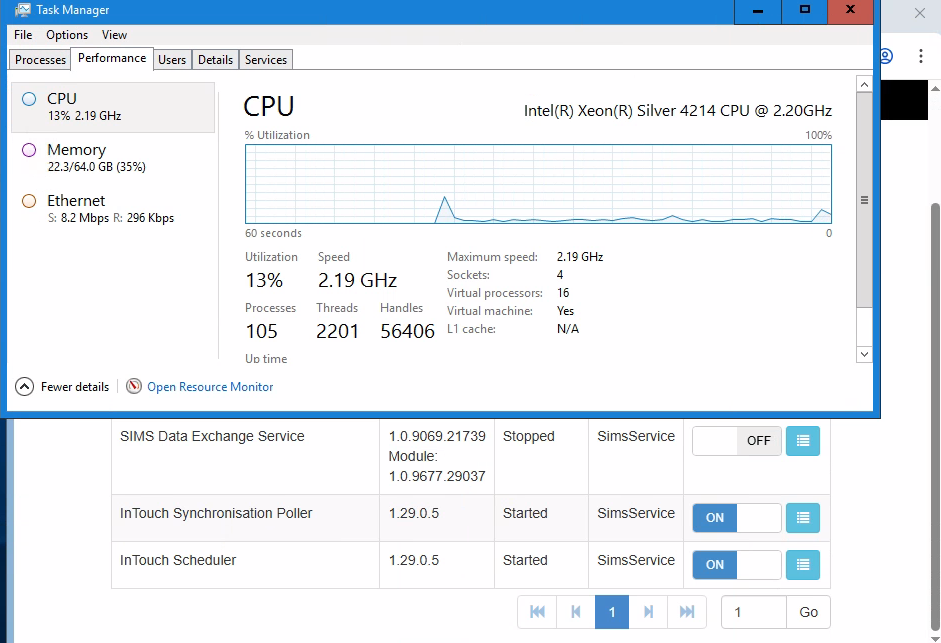
Absolutely. Its 16 vCPUs across 4 sockets sit safely below Microsoft's limits of 24 cores and 4 sockets under our standard SQL licence. Its a temp measure to stabilise our Sims server whilst @SIMS_Customer_Support investigate or explain why its happenning and provide a solution.
-
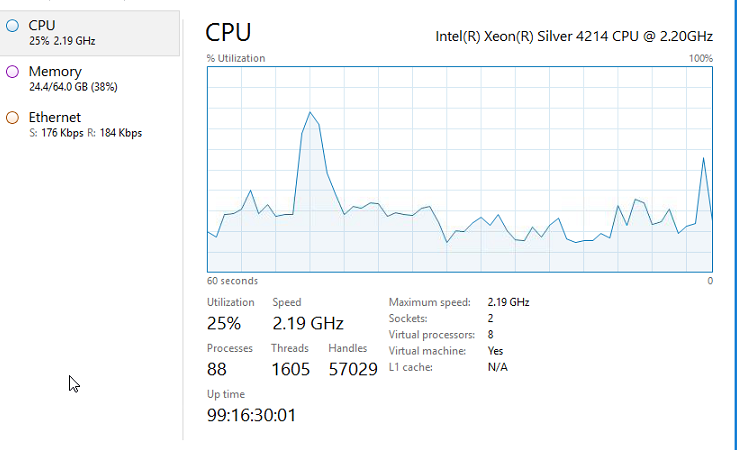
So I can now confirm that the Sims Data Exchange service is the culprit, as soon as I turn it off from SSM, CPU usage drops to 5%. I've done similar as you @Tefters and increased number of CPUs to 16 as had some spare as well and with this DEX service on now it maxes to around 55% so a huge drop from 99%. @SIMS_Customer_Support this needs to be fixed.

-
This is the Sims server VM.
-
We use SQL Server 2019 Standard Edition and our database is just under 50GB. Its does need a cleanup with a lot of old stacked up messages.
-
I guess that might be the one causing the CPU usage issues. We do use next gen for looking up timetables, or registers in assemblies on tablets but the way things are going with next gen forced changes, it seems like more functions on Sims on prem will auto redirect to next gen.
-
I will try that for the suggestion. I'm just waiting for the server restart later today then I can begin to single out services within SSM and see if that works.
-
So we have to now re-enable SSM service as our intouch isnt working now. It doesnt resolve the CPU usage spikes though. We've allocated 64GB RAM and similar 70% usage. @SIMS_Customer_Support any support with this as we cant use the behaviour logging module with intouch and if we re-enable SSM service, the server will spike again to 100% usage causing services to crash. Our MIS support has already reached out to you. I have scheduled a server restart later today.
-
Our Sims server is showing 100% CPU usage with SQL server service. Upon logging with our MIS support they identified Sims service manager is causing the spikes. This has been happenning for the past 2 days so we have disabled the SSM service. They have now logged it with ESS. Is anyone else experienceing similar?
-
This might be a laugh, but we just rely on an email from Microsoft called "Password Hash Synchronization heartbeat was skipped in last 120 minutes" which triggers us to check our servers instantly. A very lazy solution I know and do need to look at something more robust!
-
Their licensing is based on the number of devices you want to monitor, but the Google side can sometimes feel “user-based” because it integrates with Google Classroom/Google accounts for class syncing, so it requires some manual input.
-
RM Slow internet speeds.
loxford01 replied to ICT_GUY's topic in Internet Related/Filtering/Firewall
RM Support isn't great at the moment, with logged tickets not being responded to promptly. We haven't had similar issues as you yet and have a 1 GB connection. I don't know when they last installed their router, and they don't let us access their public firewall, so we are sitting ducks, hoping they have a robust backend network delivering Internet to our schools, but with the current level of poor support, I do worry about how effective their services will be in the long run. -
Running a 8206ZL for over 10 years and I remember someone once told me they come with a lifetime warranty (maybe I'm wrong). I brought another duplicate with all the bits from a reputed supplier (Techbuyer), ready for straight out swap of modules as and when needed/if ever needed, and config backups as well as 3 years tech support from them if required all for just under £1k. I just need to make sure the spare core switch and components don't catch dust for now.
-
Why are we paying for Microsoft 365 and paying again for Copilot to make Microsoft 365 usable in the way it’s advertised. We have 365 for faculty license which gives us office 365 enterprise but no Co pilot feature in the apps as thats an additionally paid service. However I used Co pilot on my Windows 11 desktop to solve the Excel question, and even Co pilot agrees with me that it's absurd.
-
Is anyone using groupcall xporter for Satchel or CPOMs. We have had sync issues and now students cant see their timetables on Satchel, however the support from Groupcall is near nonexistent, as i've been waiting days for a call back. When I phone their support I wait 10 minutes and no answer only to be put to voicemail. When I do eventually speak to someone they say someone will call me back. We may have to re consider using Xporter for MIS sync requests and move to Wonde who do have better support in place.
-
Blocking Co Pilot for Students under 13
loxford01 replied to loxford01's topic in AI in Education & Enterprise
We have left year 9 and above Age Groups set to None. You can try NonAdult with Consent granted and that might enable co pilot for year 9 and above.