AB_IT
-
Posts
305 -
Joined
-
Last visited
Content Type
Forums
News
20th
EduGeek EDIT Conference
Blogs
Everything posted by AB_IT
-
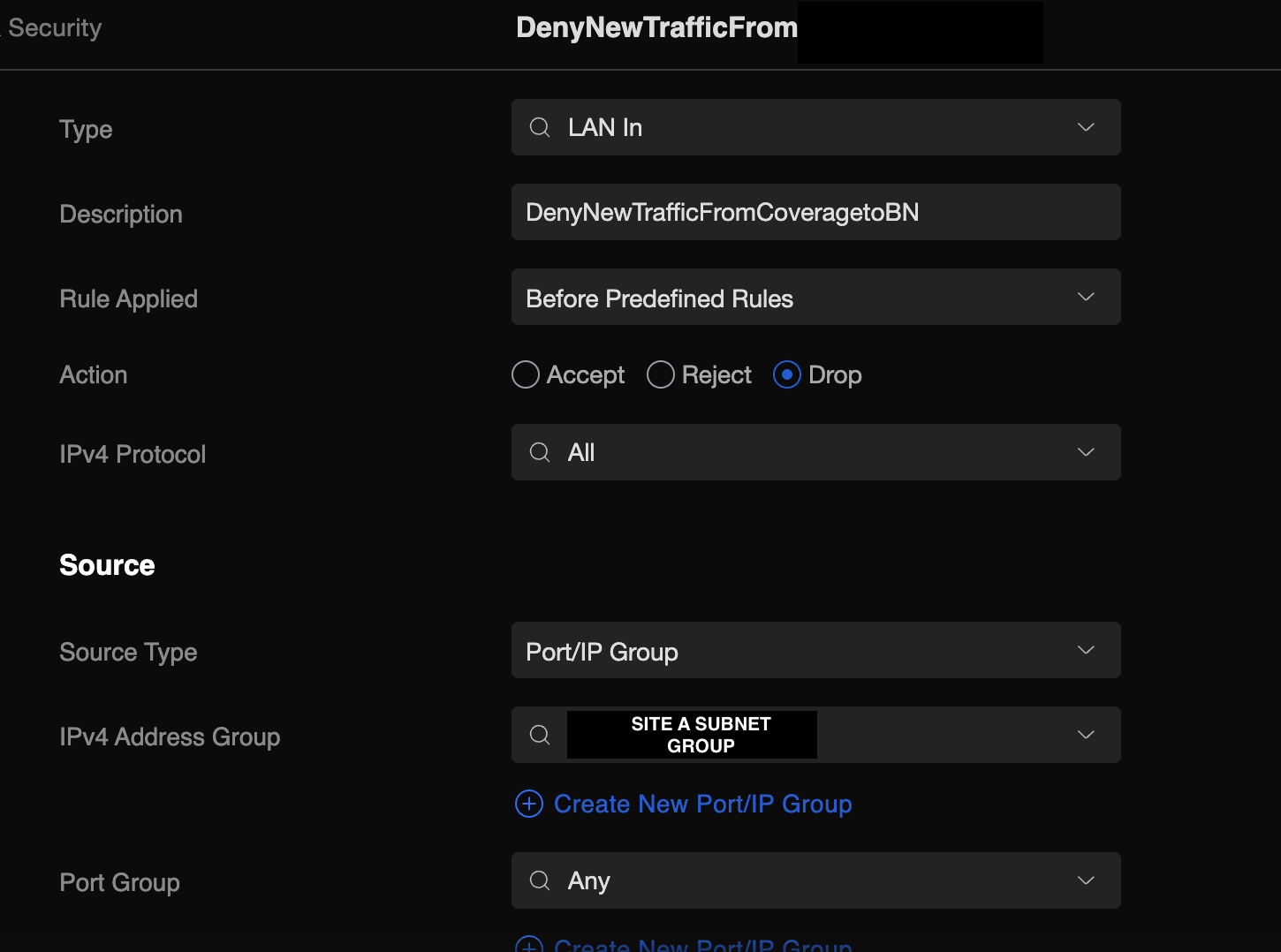
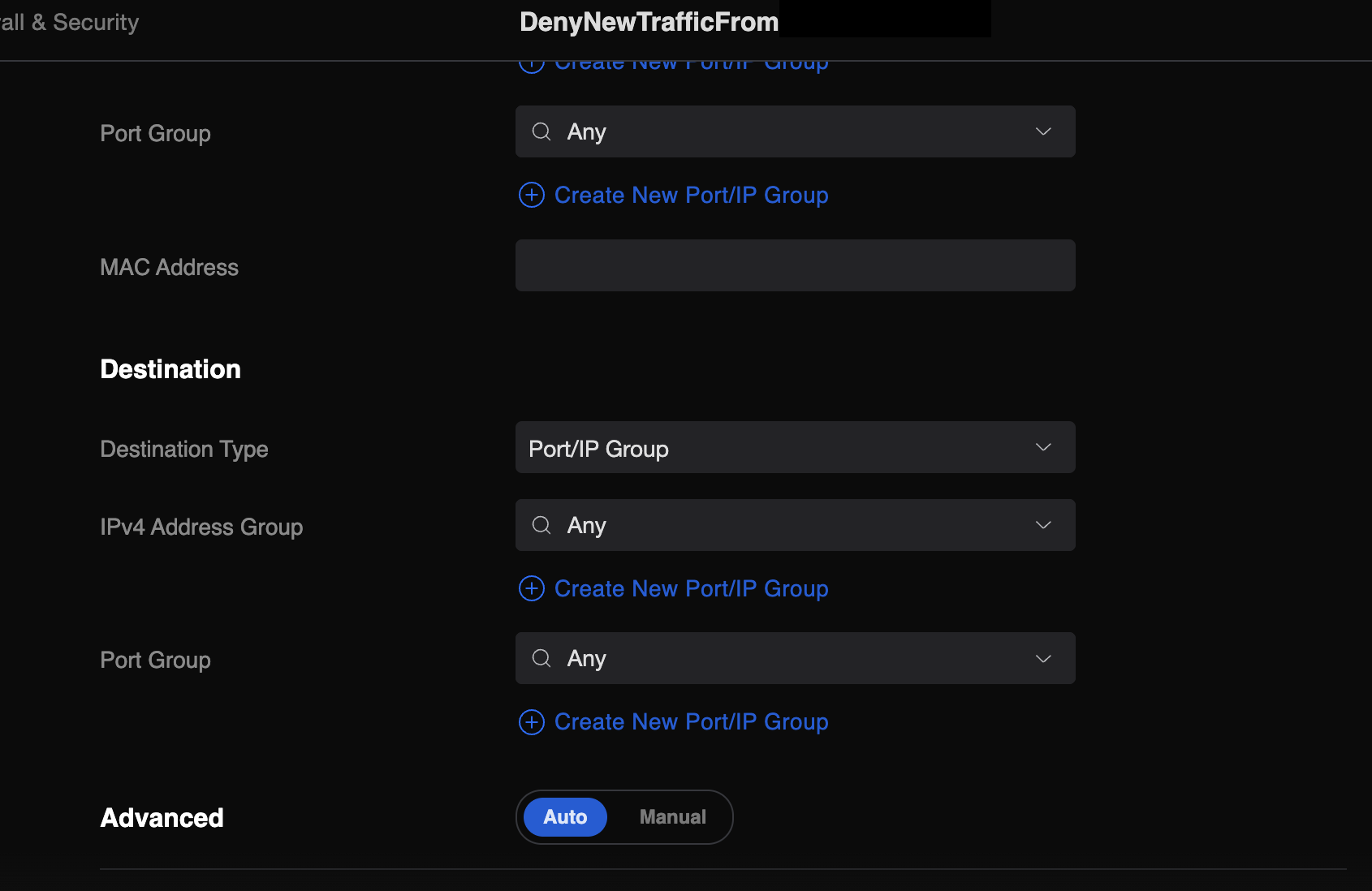
 Thanks for your help, not doing that I'm pinging a seperate device on both networks to test. I thought that's what I've done with the above rule to basically drop all source traffic from A to B?
 -
Hey All, Hoping you can help as I'm really unsure what I'm doing here. I have two sites with the following IP ranges: Site A: 192.196.91.0/24 Site B: 192.168.200.0/24 I want site B to be able to ping site A but not the other way around. I also need the firewall rule controlling this to be on Site B's side of things. I've setup the following which I thought should work but I can still ping from site A to B? The IPv4 "Source" group has it selected as the 192.196.91.0/24 network and on the destination I've tried having it just set to Any network and have also manually added 192.168.200.0/24 but to no avail. Any help from someone much more in the know than me would be most appreciated [ATTACH=CONFIG]70029[/ATTACH] [ATTACH=CONFIG]70030[/ATTACH]

-
I know, bit of a mess. I'd expect them to at least clear up after them if they broke it.. if they didn't there's a leak and that's more concerning. All of which I've raised now to my LM. I don't know myself exactly how many there where in the first instance. I would presume the installers would have to do a survey to ensure it wouldn't effect the server room but again I'm questioning their professionalism after I've seen the mess of the server room. I think it might end up being a trial and error thing. I WFH but in the office tomorrow so will give it a go.
-
This, I don't know. We have a general operations meeting tomorrow and I was thinking about asking this question then whilst raising my concerns. Thanks for confirming. Do you know whether it makes a significant difference or will it still be within 'okay' parameters? Ah, this would make sense. So actually if they where set to generate heat I would presume it'd have the opposite effect as the air con units will then be used to dissipate heat from the server room but additional cooling would put more strain on the system thus making them all overall warmer? There's currently two in the server room and they've installed 3 more around the building. Do you think it'd be worth asking in the meeting this question to find out whether a proper survey was carried out? With the state they left the server room in, I have high doubts they're very good. Walked in on Thursday to find one of the ceiling tiles had been smashed to pieces and was just left, this is how I found out about the new air con install. I told the site manager straight away as my concern was that there's a leak somewhere above which may have damaged the tiles making them snap under the water ingress and their own weight but he seems to think everything is fine and looked at it to say it could have been done by the air con engineers but even if they've left it in that state it's pretty poor. I'm going to have to tidy it all up when I'm next in and find out where there's cleaning stuff as no one else seems to be bothered to do it. I'm also a bit worried about the dust that's in the air from the tiles breaking.
-
Hey All, Sorry I didn't know which best place to put this so thought Hardware was appropriate but please move as necessary. Currently have two air conditioning units in our server room and recently was made aware that about 2 weeks ago they fitted new Air Conditioning units in some of the staff members office's. I'm no expert when it comes to Air Con but I remember in my last place there was something about they shouldn't add additional air conditioning units to the current setup for offices because if they're turned to produce heat in the winter for the offices it could effect how cool the server room's air con can become. Can I just check if this is the case or have I got this totally wrong and there won't be an issue. I haven't brought it up with management yet as I wasn't fully sure. Thanks all
-
Hey All, A company we work with is upgrading it's server infrastructure (cloud based) which our meds software runs from and they've given us a weeks notice to install a new program (exe file) across all our computers. We are quite big with 11 premises and over 2,000 users. We only have an IT Team of 2 and this is quite a large project to go around manually to all the machines and manually upgrade them with the administrator credentials. Is there a script or similar that any of you guys know which would run the installer as administrator with the admin credentials so they could install that one application themselves? The computers that are used for the meds software are not domain joined so we can't distribute it easily using the normal channels. Thanks everyone!
-
Spent £1,000 on Amazon, got Evri delivery... Mysteriously gone.
AB_IT replied to AB_IT's topic in General Chat
It was a UK brand but is also sold in the US. I'm not sure, it could be anywhere along the way I guess. It was Prime so I got the shipping for free and as it was still from Amazon themselves albeit from a US warehouse I didn't think there would be much of a risk. I'll update when I hear back but I won't be happy if I'm waiting as long for the refund as some of the others on here. I'll be chasing them come Monday. I've always thought ordering high value items was safe from Amazon as previous purchases I've never had a problem with. I've learnt a lesson though. I was only trying to save £50 at the time as it was slightly cheaper than going to Scan. I reordered it via Scan and it came today (Next Day) free shipping via DPD. Brilliant experience. -
Spent £1,000 on Amazon, got Evri delivery... Mysteriously gone.
AB_IT replied to AB_IT's topic in General Chat
Thanks. It was Amazon US I purchased it off though so still sold by Amazon just shipped from the US. Do you know whether this applies to me? -
Spent £1,000 on Amazon, got Evri delivery... Mysteriously gone.
AB_IT replied to AB_IT's topic in General Chat
Lol, love the pun! Imma' use that. They took photo proof of the parcel on their tracking, I was out at the time and they delivered it around 8pm. I knew just by looking at the photo that something wasn't right as it was smaller than my wheelie bin wheel next to it. I have a Blink doorbell though so he never rang that or even attempted to go up to my front door, it also has quite wide viewing angles and picks people up walking down my path so he must have come in out of sight somehow. I then also have an outdoor Blink camera pointing at my Wheelie bins down the side of my house and neither picked him up so he must have been very careful to not open my gate very wide and chucked the parcel towards my bins, then he must've took the proof picture whilst hiding between the crack of my gate. The only way I could think of that he possible missed all my cameras. It could be Amazon I guess but the parcels label has the correct weight on it and the weight was scanned when moving from the US to the UK. It wasn't scanned when it was handed to Evri so I think they're the culprit. -
Spent £1,000 on Amazon, got Evri delivery... Mysteriously gone.
AB_IT replied to AB_IT's topic in General Chat
Good to know I'm not alone, thanks for sharing! Just seems awful service and seems quite common with regards to stealing packages especially high value items. Yeah I'm lucky I did, I didn't use it for that reason actually, even though I had the money it weirds me out to see £1,000 come out my account and I haven't got a car to show for it lol so I used my credit card to pay £250 off each month as it's 0% interest anyway. Luckily for me though it brings those extra protections. -
Spent £1,000 on Amazon, got Evri delivery... Mysteriously gone.
AB_IT posted a topic in General Chat
Normally I haven't had a problem with Evri and wondered what everyone was going on about. But today I was recieving a new AMD 7900 XTX GPU I'd ordered from Amazon worth £1,000. I've saved up for ages to buy this. I ordered it from Amazon US and it eventually was delivered 2 weeks later by Evri. It was a tiny box and was left in my back garden. I have CCTV but all 4 of my camera's motion detection was somehow avoided. Got home, opened the parcel which I knew already wasn't what I ordered and video'd the whole thing. Instead I recieved a sample of aftershave. It's quite clear that my original label was ripped off my parcel and re-applied to this one as the label is torn in places. The weight of the original label also said close to 3kg but upon weighing the contents I recieved it was around 100grams. I've reported it to the police, had to have legnthy conversations with Amazon and now have to return the 'dodgy' item back to Amazon before they'll refund me. I'm also going to have to let my credit card company know. The Evri driver didn't even ring my doorbell and must've known where all 4 of my cameras are located before he even delivered it as he avoided every single one. Not impressed and I'll be boycotting any company that uses them. It's cause me loads of distress and now I've got to spend hours of my time trying to get my money back. I've heard it's more of a regional issue and some don't have any problems whilst others have loads? Sorry needed a rant I'm so annoyed. Cheers Evri! -
Fab stuff, thanks both that's fixed it
-
Amazing, I think this is what it is. Just looked at the hosts files and can see it's pointing to the wrong IP. Am I okay to just remove this line from the hosts file from notepad and save over the top of it?
-
Hi All, Hoping you can give me some insight as I can't figure this one out. Basically I have a server linked to the network across a Site to Site VPN. For some reason when I try to ping it via any other device it reacts properly and reports the DNS name as the appropriate IP I'd expect. I've also checked all our DNS servers and the record is pointing to the correct server name also. But for some weird reason if I try to ping this server from our 2 Hyper-V servers is reports back as being the wrong IP address. Again, as far as I can see both these Hyper-V machines are pointing to the same DNS servers and if I perform a nslookup against the name it reports back as the correct IP but as soon as I ping it again it goes back to the wrong IP. If I RDP to the server it won't connect but from any other devices on the network it will. I've also tried flushing the DNS cache to no avail. Any ideas?
-
My hero!! Thank you
-
Hey All, So I'm normally a Mac user unless I'm gaming on my Windows computer and the Remote Desktop client made by Microsoft that I use that you can download from the Apple App Store is pretty perfect. No real bugs, all printers, clipboard etc.. works as expected, also I like that I can easily swap between servers by using the three finger swipe on the trackpad. Just got a Windows work desktop, downloaded the Remote Desktop client from the Microsoft Store as I didn't fancy typing in our servers name manually into RDP and it's just awful. Full of bugs, when I double click to open a RDP session it opens the actual RDP window behind the client, I then have to move the client out of the way and double click on the task bar in order to get it to display properly. Display resolution and scaling is all over the place also. Again all of these things just seem to be perfect on my mac without any extra configuration needed. So just asking about, what Remote Desktop Management software would you use in order to RDP to servers easily? Free one ideally. I just want something that saves all password and usernames for the sessions and that I can just quickly double click on the server I want. I remember back in the day there used to be a Remote Desktop Manager which was perfect for this but apparently this is now discontinued and is a bit dodgy to use. Sorry I know it's a simple question...
-
Thanks I've tried SteamLink but for me I think it's actually worse. Seems to be quite a lot more latency and issues. Works fine using Steam Games I've purchased but with other launchers and things I find it a bit of a pain. Yeah, at least the Fractal way I can have HDR and things something that I couldn't quite get on the Game Streaming applications. Ah, okay thank you. I'll look into it. Question is does it work with *Naughty* versions of the game. Dont judge!
-
I figured out my issue, something I should've wrote on here. I use Moonlight Game Streaming in order to stream my PC games to my lounge TV which is how I was playing Hogwarts Legacy. I picked up my computer and put it in the lounge, directly connecting it and all the stutters went away immediatley. I've also noticed that other games I've played previously seem to be a lot smoother when connecting it directly. Seems that Moonlight effects performance, obviously not normally enough to notice but must just be enough to tip my CPU/GPU over the edge and struggle when playing HWL. I'm running the game now at 4k Ultra and it feels butter smooth, there';s the odd dip but it resolves itself within a second and they're rare. Decided to get myself a Fractal Ridge case along with a new Mobo, RAM, CPU and PSU in order to keep it below my TV and then for games that require a mouse & keyboard like Age Of Empires I'll stream that to my office using Moonlight instead as I only have a 60Hz monitor anyway. The specs I've gone with is as follows: - AMD 7600 (Non-X Variant) Actually bought the X originally until I watched LTT's video on the differences and the tempreature and TDP seem much more efficient on the Non-X for the performance - 32GB DDR5 Cosair Vengance Black @ 6000Mhz - Asus ROG Strix B650 ITX (Did originally go with the MSI B650 ITX but realised there's no future proof support for PCI-E 5.0 so sending this back) - Silverstone SX1000 SFX-L PSU - Samsung 980 Pro NVME SSD - Nvidia 3080 which is in my current rig (I was trying to justify the 4090 because I'm an idiot but the cost is just too insane)
-
Thanks all for your help. I've moved the games files across to my Samsung 980 Pro and it's a little better but it's still not great. Again it runs fine until it'll randomly just start dropping frames and does this for 10-30 seconds. Then sorts itself out and does it again a while after. It frustrating. I'm just starting to believe that maybe the game is just poorly optimised? I've tried downgrading the driver version also but to no avail so I don't think it's that. Bit upsetting really I'm an avid Harry Potter fan and was really looking forward to playing this since it was announced. If it runs this poorly on my spec'd system, god help those running it on a Nintendo Switch... Although it'll probably be much better optimised.
-
Hey All, I can't make head or tails of this. My specs are as following: - AMD Ryzen 2700x - MSI B350 Gaming Plus Motherboard - 16GB DDR4 RAM 3200Mhz, - Nvidia RTX 3080 10GB - Samsung 980 Pro SSD (Boot Drive) 1TB - Samsung SATA 500GB SSD - 2 x 4TB Hard Drives (RAID 1), this stores all my game files. So I've just played other games like Horizon Zero Dawn and Spiderman Mile Morales at 4k with everything cranked right up except for RTX and it's always a smooth gameplay experience. No real frame stutters or issues. But on Hogwarts Legacy of which I've also updated to the latest version, it's smooth for a while but then massively drops the frames and stutters for maybe 10-15 seconds fairly often. I've got everything set on Ultra at 4k (No RTX) with DLSS enabled so it should definetley be able to play it. Even lowering the resolution to 1440p doesn't help. I read online about things to try so I updated the games version of DLSS. I've also added the Ascendio FPS Fix Mod. Nothing seems to improve the experience. I thought about moving the game files onto my SATA SSD to see if this helps but since other games are working fine I'm starting to feel like it's not a problem with my hardware but the game itself. Has anyone else had similar frustrations or is it only me? Any tips/tricks I could try? I was really looking forward to playing this game but it's seriously so bad it's hard to play it especially in fighting scenarios. It's my birthday soon and I've literally book A/L to play it through, now I feels sad!
-
Hi Both, thank you. I've checked both servers and even turned the firewall completely off but still nothing. Where would I look for the SSL inspection? Can't see anything on the server side unless you mean on the Unifi USG? I have IDS turned on that but I've got both the internal HO subnet and public HO IP in the allowed list.
-
Hey All, So I've got a server at another location away from Head Office. I used to have it so our HyperV at Head Office would replicate the server on 15 minute intervals across the internet (utilising our VPN) Though now since I've changed our network over to Unifi switches and a UXG-Pro from our very old Sonicwall it won't replicate and gives me the following error. Not sure if something is blocking it but from my understanding it should just be across port 443. I can Remote Desktop to the server and a ping brings back a reply from head office so I know the VPN etc... is all working. Any ideas?
-
Thank you mate, it's most appreciated. I found another forum with someone else having problems with their Unifi switch and a 10Base-T connection. Everyone was basically saying it's not compatible. What switches where you using out of interest?
-
I've also just discovered that in the manual it says the port is 10Base-T. My new Unifi Switches don't apparently work at 10Base-T so I've ordered a cheap TP Link switch to put in between that can do 10Mbps and see if this solves it. I'm surprised though, it's the first device I've seen that has a port limited to 10Base-T.
-
I also asked him how to restart it but he told me it couldn't be restarted... Said it was on a backup battery and it was all cabled in. I just wanted to pull the power and turn it back on but he tell me how. @Heebeejeebee It's an Intercall 700 system. Do you know of a way to do this? I had a look in the admin menu's and couldn't see anything. I have the administrator password.