LanSchoolUK_Adam
-
Posts
57 -
Joined
Content Type
Forums
News
20th
EduGeek EDIT Conference
Blogs
Everything posted by LanSchoolUK_Adam
-
 Sent - thanks for your patience and best of luck with the rest of your implementation and Easter plans
 -
Hi mrhcarlin, sorry to hear about the issues you've been having with Tech-to-Teacher comms in LanSchool. Hoping we can resolve your issue, and maybe turn around your opinion of LanSchool in the process What you're describing can definitely be configured, but the setup does vary from customer to customer based on your network architecture, VLAN's, etc. to make sure the requests are being routed correctly. Dropped you a PM so we can run through it with you.
-
control mobile devices for pupils
LanSchoolUK_Adam replied to darrents's topic in Network and Classroom Management
Hi Darren - are you looking to manage them in an admin / MDM sense (such as deploying apps to the devices, locking down settings, disabling parts of the operating system, enforcing SSID policies etc)? Or manage them in a Classroom Management sense (screen viewing, screen sharing, screen blanking, blocking website access per-class etc)? If the former, there are plenty of good MDM systems out there - Lightspeed, AirWatch, Deep Freeze MDM...you could even extend Meraki to cover the students since it has an MDM component. If the latter, LanSchool has apps for both iOS and Android to help Teachers manage and monitor these devices effectively in a teaching environment. PM me if this is the sort of thing you're looking for and we can have a proper chat. -
Google Chrome Certificates
LanSchoolUK_Adam replied to joedurham1's topic in Network and Classroom Management
Seconding this - when we wake up our testing VM's from standby, we get the exact same error on Chrome when trying to access SSL sites like Facebook. The system clock needs to be manually refreshed; sometimes rebooting doesn't do it, so we edit the Date & Time Settings in Windows (flipping it from Automatic to Off and back again) which clears the issue. Would take a couple of seconds to try this remotely, just in case! EDIT: Missed it by that much! Glad you got it working anyway -
Disabling internet in one room.
LanSchoolUK_Adam replied to eejit's topic in Network and Classroom Management
For anyone coming to the sticky for ideas, we have just put a video out on this very subject: aBLyOKzxy -
Hi all, With multiple customers reporting the same issue and the same fix resolving it, this has been logged as a bug to be addressed in the next build release. The issue seems to occur only on the 'new' type of screen cast used in LanSchool 8 for both Show and Control, and is present in the Teacher Console but not the Tech Console. You can resolve this on the Teacher machines by implementing the below registry keys (ideally on your staff machine GPO); 32-bit Teachers: HKEY_LOCAL_MACHINE\Software\LanSchool\ Values (DWORD 32): UseLegacyRemoteControl = 1 UseLegacyShow = 1 64-bit Teachers: HKEY_LOCAL_MACHINE\Software\Wow6432Node\LanSchool\ Values (DWORD 32): UseLegacyRemoteControl = 1 UseLegacyShow = 1 Thanks to everyone who helped us replicate/isolate the issue and confirmed the fix. I will update this thread once the new build is made available. - Adam
-
We appreciate that that's a big concern for the majority of schools these days; enrolment numbers perpetually creeping up while budgets continue to spiral downwards - fortunately, our cost-per-client has been flat for at least the past 5 years. I definitely would urge you to look at LanSchool, or at least get it on your radar for when your next renewal comes up. LanSchool 8 (released last year) added a raft of new safeguarding features, as well as an entirely new reporting module, and the price actually decreased.
-
While I don't think anyone would like to be associated with 'cheap' (meaning flimsy, not value-for-money! ), we are certainly priced lower than the costs outlined in your OP. PM'd you my details if you'd like to chat and weigh up your options.
-
LanSchool 8.0 Mouse Cursor
LanSchoolUK_Adam replied to gwendes's topic in Network and Classroom Management
Apologies for any misinformation provided - the predator drones have been deployed as per corporate directive. -
LanSchool 8.0 Mouse Cursor
LanSchoolUK_Adam replied to gwendes's topic in Network and Classroom Management
Hi gwendes, There is indeed a registry fix for this - LanSchool 7 and LanSchool 8 use different methods of broadcasting; it seems the cursor is visible on the old method but not the new - will be raised up to dev to get it added back in In the meantime, you can restore it with the following keys (just tested in-house and can confirm that it works, screenshot attached). UseLegacyRemoteControl (displays the cursor in both 'View' and 'Remote Control' sessions) UseLegacyShow (displays the cursor in 'Show Teacher' and 'Show Student' sessions) 32-bit: Key: HKEY_LOCAL_MACHINE\Software\LanSchool\ Values (DWORD 32): UseLegacyRemoteControl = 1 UseLegacyShow = 1 64-bit: Key: HKEY_LOCAL_MACHINE\Software\Wow6432Node\LanSchool\ Values (DWORD 32): UseLegacyRemoteControl = 1 UseLegacyShow = 1
-
p2p is great for smaller, flatter networks. For anything larger, especially where VLAN's are concerned, we recommend the LCS. Technically you can port-forward your p2p broadcast traffic across VLAN's, but that's why the LCS was created - so you don't have to de-segregate your segregated network Wireshark will show you dropped/broken/corrupted packets (marked in black) if you use the filter tcp.analysis.lost_segment but this might end up being a rabbit hole (as you would have to run traces on the Teacher, the LCS and the Student, and then compare them). There is a Debug Trace/Logging available on the LCS itself - a member of our IT support team will be in contact with you to set this up and grab the capture logs.
-
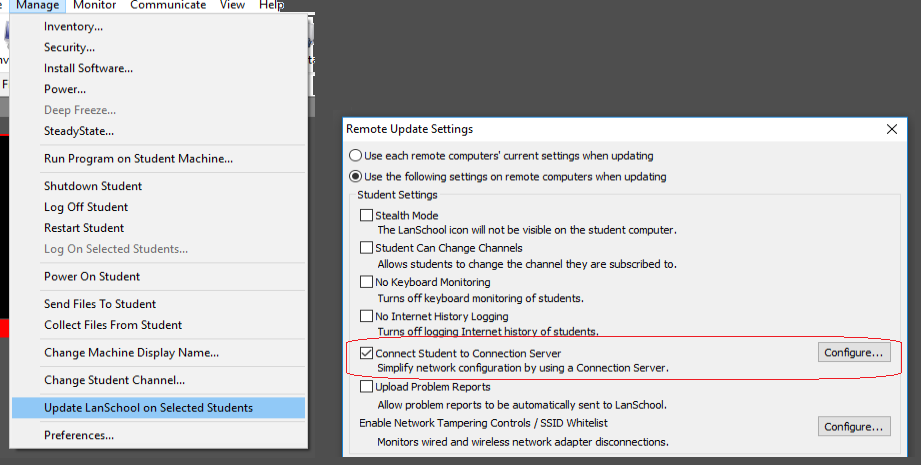
If your GPO's run on machine bootup then you can test it by booting up all the machines in a suite (if they're not already on), authenticating them if needed, and then doing what you need to do in the Tech Console. There is no machine reboot requirement for this; you can do it all in one session; Manage > Update LanSchool > Disable LCS (Teacher and Students) Replicate the issue Manage > Update LanSchool > Enable LCS and enter server IP If your GPO's run on user login, it may be best to temporarily disable them for this room while you troubleshoot, so that they don't revert the settings back.
-
Hi Giles, Sorry to hear about the issues you've been experiencing with LanSchool since moving to the client-server architecture. LanSchool uses the following ports for p2p outbound comms (Teacher-to-Student) 2426 - Discovery Packet 796 - Data Request 1053 - Status Packet When routing it via the LCS, the request goes out (Teacher-to-LCS) on the above ports, and the LCS forwards them to the student on port 8080. In both cases, Student-to-Teacher responses are done on a dynamic port number between 48000-62000 (with the LCS relaying the request). If the machines are randomly flicking between Active and Standby, it would indicate that the status packet is being periodically dropped; the request is going out but not coming back. As the Teacher doesn't receive a response, it assumes the Student is in Standby. To troubleshoot this, I would recommend isolating the issue by moving one affected classroom back to p2p mode (you can use the Tech Console to flip groups of PC's between p2p and client-server) and see if the issue persists. If it doesn't, convert the room back to client-server through the Tech Console and run a WireShark trace on the LCS itself to see if it detects any packet loss.
-
LANSchool Tech Console - Groups?
LanSchoolUK_Adam replied to clockend25's topic in Network and Classroom Management
Hi clockend25, There are three methods of grouping PC's in LanSchool - three of them are supported on the Teacher Console, so far only two are supported on Tech Console (Class List grouping is currently missing). The Tech Console runs on Channel 0 (admin channel) which gives you full visibility over every student client and teacher machine. You can then use the Search bar and type in part of the PC name (assuming your PC's follow a naming convention, like PC-LIB-001 for the library) which will narrow down the scope to only machines with the PC-LIB prefix. Alternatively, you can take the Tech Console off Channel 0 and define which Channel(s) you want to target (Manage > Preferences > Channels). Channel numbers typically refer to room numbers for static devices. Once you have found a PC through either of the above methods, you can move it accordingly with Manage > Change Channel. The Connection Server also has a client list on it that will tell you where each machine resides on your network (IP, MAC, Channel, Version and Status) which can be useful. Screenshots attached, hope that helps. Cheers, Adam
-
Teacher Bulletin System
LanSchoolUK_Adam replied to ConcreteStag's topic in Network and Classroom Management
Hi Stag - interesting request! LanSchool can do this - PM'd you. -
I think it's best we take a look - dropped you a PM
-
Do you have any Teacher Consoles running on Channel 0 (admin channel) - as this will affect all machines regardless of where they are? It might be worth raising a remote support request at [email protected] so one of our guys can take a look.
-
Hi sjpf, Until it is officially supported as a controllable/limitable browser, Edge in considered the same as InPrivate/Incognito Mode and is blocked by LanSchool to force Students to use a supported browser (IE/Chrome/Firefox/Safari). You can disable this easily enough; go to Web Limiting (not App Limiting) and there's a checkbox at the bottom saying to block Private browsers. This remains in effect even if you don't have Limit Web switched on. It's ticked by default, and if you disable it, Edge will work. If you allow Edge, then most of LanSchool's web control features will not carry over to it, such as website activity reporting, URL capture, URL blocking and Co-Browse. I will see if I can get an update from development as to when Edge support will be added. In the meantime, Chrome is definitely the better option if it's available to you. As you mentioned you're running two different versions of LanSchool, you can do a site-wide update by updating your LCS (LanSchool Connection Server) to the latest version (.79) and then putting the Tech/Teacher/Student MSI's into it's root (C:\Program Files\LanSchool). This will force each client to perform a version check when it connects for the first time that day, and will download/update over the top if it's running a lower version than the server itself. This means you just have to keep your server up to date and the rest of the deployment will fall in line
-
offline Classroom management software
LanSchoolUK_Adam replied to asaregeo's topic in Network and Classroom Management
Hi Asaregeo, Can confirm that LanSchool is 100% local/on-premise - none of our data leaves your network. Regards, Adam -
Hi accesstomusic, To chime in here, with LanSchool we can provide safeguarding (keywords/keyphrases/website usage/login times and durations etc) and Active Directory is recommended but entirely optional. We can track users against AD and G-Suite, but in an authentication-free environment (such as in EYFS, where all pupils in a class typically share a common login), we can track by the PC's machine name, which works fine in a fixed-seat environment. For hot-seat, it is possible, through the software, to have a pop-up window appear at the start of class that the pupil simply types their name into in order to continue to use the PC, and we can track against that during their session as well. The same system is used in libraries and drop-in centres where there are no user accounts in place. I believe this meets the description in the OP - dropped you a PM so we can discuss further. Regards, Adam
-
Edulock alternative
LanSchoolUK_Adam replied to Theldron's topic in Network and Classroom Management
This feature is also available in LanSchool ('Network Tampering'). Once the Ethernet cable is unplugged, the student will have a silent countdown of 5 seconds to re-attach it before the screen locks and turns bright blue, with a message stating to reconnect the cable. It stays in this state for five seconds, and then the two messages repeat/alternate on a loop. This gives them a chance to re-enable the adaptor if it was disabled in Control Panel. Not only is the screen bright blue so the Teacher can't miss it, but we have tools on our Tech Console that will monitor intentional/hard disconnects and show who the last authenticated user was at the point of cut-off. -
There's a fix for that - PM'd you so as not to derail this thread :-) Adam
-
G-Suite Super Admin would be your best bet - both the app and the browser extension; Manual Install https://support.google.com/a/answer/172482?hl=en As a Policy https://support.google.com/chrome/a/answer/6306504?hl=en Hope that helps - thanks! Adam
-
Classroom Management
LanSchoolUK_Adam replied to jpfonseka's topic in Network and Classroom Management
Hi jpfonseka, I'm sure we can help you out here - just dropped you a PM. Adam