AngryTechnician
-
Posts
3,772 -
Joined
-
Last visited
Content Type
Forums
News
20th
EduGeek EDIT Conference
Blogs
Everything posted by AngryTechnician
-

Setting Up VLANs between Netgear and HP Procurve
AngryTechnician replied to colly72's topic in Wired Networks
What you're describing is going to be difficult to achieve on your networking hardware. You can't easily set up 1-way access between VLANs as traffic has to be able to pass from Academic > Accounts in order for the Accounts machines to receive any replies to requests for data. If the Fortinet has sufficiently advanced firewalling capability (i.e. it does stateful packet inspection) you could probably get it working, but if I were looking at doing something like this I'd be investigating whether I could do it using Windows Firewall on the Accounts PCs. -
I had similar experience with them in 2009. Their NC10 netbooks were originally missing data from the SLIC table in the BIOS which meant that our Schools Agreement upgrade licenses would not recognise the machine as being licensed. Despite this clearly being a BIOS issue, Samsung refused to help as they would only provide assistance with the original OS. They then stealth-issued a BIOS update 2 months later that corrected the problem. Interesting to hear they haven't improved in 4 years.
-
According to Humax HD 5050 TNTSAT - Non-platform specific satellite TV - Digital Spy Forums, TNTSAT does not provide an over-the-air EPG. However, that ethernet port might download from an Internet EPG service so I would try connecting it up if you can.
-
iPad iOS7 Proxy Password not saving
AngryTechnician replied to davidau's topic in Mobile Devices & Tablets
I've just checked ours and I see what you mean - even without Meraki refreshing its profile the password has vanished. That's going to throw a spanner in the works. -
iPad iOS7 Proxy Password not saving
AngryTechnician replied to davidau's topic in Mobile Devices & Tablets
I've noticed the same thing but I thought it was a problem with Meraki Systems Manager. Is this happening to you even without an MDM profile? -
Agree, dynamic disks are the spawn of Satan. Avoid at all costs. It's been a while since I've had to bugger about with resizing physical disk partitions since all of our servers are virtualised, but in the past I used to use something like Acronis to take a full disk image, then alter the partition sizes when restoring the image. Also, find whoever gave you a silly C: drive in the first place and hit them with something heavy.
-
For the love of all that is holy, do not buy any of these for your school if you still have non-SSD computers. If I bought those here it would be less than an hour before someone stuck it to the side of their desktop "for storage" and then wondered why their computer stopped working.
-
4. Not too shabby.

-
URL Shortcut on All Domain PCs >> Help
AngryTechnician replied to EN4CER's topic in Windows Server 2000/2003
Group Policy Preferences will handle this with ease. It's built in to Windows 7 but you'll need to deploy an update to the XP machines via WSUS. Here's how to set it up if you've never used it before: The Angry Technician’s Guide to Managing Windows 7, you Idiots | The Angry Technician -
This is basically the log folder for the SQL instance itself (not to be confused with transaction logs for the database). The files there are not data-critical, so you can safely remove them as you have been doing, but if that many are being generated you have an underlying problem with SQL Server that should not be ignored. Examine the log files to find out what's wrong, as well as the system Event log.
-
Meraki Systems Manager - anyone got it working?
AngryTechnician replied to rpycroft's topic in Cloud Services
I can't think of any good reason why you would separate them. You can apply your own tags to devices so you can easily filter according to device type if required. -
Since staff have started upgrading to iOS7 I've been getting a steady stream of reports that email from our on-premises Exchange is not coming through to their phone any more. I've seen the problem first hand and the symptom immediately after upgrade is that it simply fails silently - no new mail comes through and if you try to send it just sits unsent without popping up an error. If I remove the account and re-add it, the credentials pass validation when entered but any attempt to check mail results in a vague error message about not being able to connect to the server. This happens on wifi and 3G, so not wireless related, and other EAS clients are working fine. There's a thread on the Apple forums here: https://discussions.apple.com/thread/5322387. Appears to be lots of conflicting information on it, so before I start throwing supposed solutions at my server I was wondering if anyone else has been dealing with similar issues? Exchange server is currently on 2010 SP2, update rollup 7.
-
Where do I sign up for these mysterious emails?
-
Group Policy Preference not applying
AngryTechnician replied to revingtosh's topic in Windows Server 2008 R2
Yes indeed, KB2775511 includes the one I posted, so if you have that you should be OK for GPP hotfixes. The only later one I know of is Windows 8 only. -
It may well have been genuine ignorance. Once on a time I worked in a business services agency and we had no end of small traders who were completely oblivious as to what the regs were.
-
Meraki Systems Manager - anyone got it working?
AngryTechnician replied to rpycroft's topic in Cloud Services
Ours check in fine through Smoothwall. I had to whitelist meraki.com and open a couple of ports on the firewall (not 80 or 443) but I think that's all it took for us. We use WPAD if that makes any difference. -
I certainly didn't. Is it the supervised restrictions that are failing or the regular ones? I only used the regular ones at the moment and they seem to be working OK for us.
-
Group Policy Preference not applying
AngryTechnician replied to revingtosh's topic in Windows Server 2008 R2
Have you installed any hotfixes for GPP on the Windows 7 workstations? If not, try installing KB2561285 and see if the problem still exists. -
Either a shared folder in Exchange Online or a contacts folder in SharePoint would fit the bill. The latter is Microsoft's preferred way of doing things these days, but might be less convenient for webmail users.
-
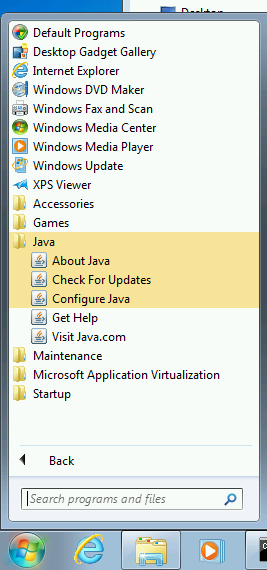
It seems that the newest irritation for Java is that as of update 40 it dumps a load of shortcuts on the Start Menu: Because the .msi is a wrapper and not a true .msi, there's no Shortcuts table to remove lines from. I also can't see anything in the Property table to set that might suppress them. Does anyone know a way to install 7u40 without these or do I have to resort to deleting them using GPP after the install?
-
I didn't even think to check VLSC. So we've got the ISOs on TechNet but the keys on VLSC. I see Microsoft's left hand is still not really talking to the right.
-
Well the Enterprise bits are up but only with MAK keys, so still need to wait for the KMS key next month before we can think about a full deploy. At least we can start on the image.
-
Ridiculously low pricing on Surface RT for UK Edu this summer
AngryTechnician replied to AngryTechnician's topic in Hardware
I ended up DMing our order details to https://twitter.com/microsofteduk. They said they'd be in touch, not heard back yet though. You'll need to tweet them first so they can follow you before you can DM. I'm sure they'll get back to us once the unpaid invoice becomes due. -
I suspect you will all be unsurprised to hear it was not the lamp.
-
I do know what you mean, all the guides I've seen manage to make it look more complicated than it actually is (Microsoft documentation in particular is famous for this). My advice is to just crack on and start - until you change your MX records nothing changes with mail delivery, so you can begin working on the setup pretty much risk-free immediately.