KK20
-
Posts
969 -
Joined
Content Type
Forums
News
20th
EduGeek EDIT Conference
Blogs
Everything posted by KK20
-
Im starting to look at upgrading a few guinea pigs from 2019 to 2021. What did you do with your configuration GPOS? Any "gotchas" you have found so far?
-
VM here. Made sure I had a veeam image, then snapshot and did an inplace upgrade. Ive inplace upgraded ALL of our servers except DC (I promote a temporary, leave to sync, demote the old, leave to sync, inplace upgrade then promote and demote temporary), and I have never inplace upgraded exchange (that would be horrible and seriously unsupported). Hyper-v server is not supported to inplace upgrade neither. Never had an issue in all my years so far. In fact, the "profile and document storage" server started life as a physical 2003 machine and was P2V then upgraded over the years to 2019. Make sure you have a good backup first.
-
not capita. Seriously, dont use capita.
-
we set a computer policy. There is a user policy but that is only one setting - Prevent users from seeing the tutorial in the OneDrive Sign in Experience Here is a screengrab of our computer policy. We have no issues with people signing in automatically. Heavy use and no profile control will fill your drives if many people hotseat.

-
we use manageengine MDMplus. That isnt on your list though. We ran the free version for a long time (20 license I think). Support is good, documentation a bit light but gets the job done. I had no issues doing the usual - lock down ipads, set up multiple "profile" logons, link with 365, roll out software to classes etc.
-
So far this has been the most reliable method for us: 1) Use a dedicated examuser logon for our domain users. This account will be disabled and enabled as appropriate. Ours has limited capacity to email/use our sharepoint and teams etc. It has a simple A1 licence. 2) bypass the proxy if you can - we do have a dedicated way of doing this for guests using a transparent proxy. 3) edit the proxy.xml to reflect a direct "no proxy" 4) install the secureclient to c:\secureclient and give the account in (1) modify rights 5) except the secureclient.exe in our AV and any application block software 6) predownload (if you can or practical) 7) download the invigilator pack as close to the exam as possible - others have reported keys changing 8) on test day - consider disabling the internet for predownloaded clients until they have started their exam - the client double checks for paper updates. Of course the paper COULD have been updated - no idea what would happen in this scenario. 9) leave the client in a secure position if the test does not upload afterwards. The test should retry upload if it fails to do so. The invigilator screen will update the status of each candidate and what stage they are at. 10) use the WebURL if you need to but be advised that this is "Live" and subject to the whims of the internet and their servers. Notes from me. * the client appears to make a call to .surpass.com immediately upon opening. This does not always seem to use the same settings in proxy.xml I suspect this does look at the system proxy settings. I have had some luck setting the proxy.xml to be a known dedicated "low priority user" account and embedding this proxy.xml with all the installs (i.e. copy manually). It has ALWAYS worked for us when I have a method of bypassing the proxy - irrespective of proxy.xml contents. * deleting the proxy.xml sometimes causes the program to go into a lock state. Once in this state the program will appear to open "to check for updates" but simply closes itself with no error. Once in this state only a profile clear seemed to get it going again. Not an issue for us as the account in (1) uses a mandatory profile. * Two log files are created, one in "config files" and one on the desktop. The desktop one appears when the proxy settings cannot be determined. Deleting proxy.xml usually fixes this particular error (copying a known good did not clear this particular error) * If the invigilator screen wont open you usually get a white screen after the keycode has been entered. This is their servers and nothing you can do. good luck. Our session today was better than yesterday at least.
-
our exams officer telephoned all of our candidates internal and external yesterday and arranged for an early start. I predownloaded the ones I could yesterday (internal candidates), the external ones are using their own machines so they could not. I downloaded the invigilator pack yesterday just in case there was a change to the keys or pins. We got going at 8:20 with no issues. Invigilator screen loaded in seconds, the predownloaded worked immediately - key and pin. No apple Mac today, the offsite candidates took around 3 minutes to download to secureclient but all worked. I didnt need the "web only" option today.
-
A mixture for us. We just got white screens for our own candidates (pre downloaded). The external Apple Mac student with their own laptop got to the mac viewer page, entered details and then it locked, after that we got a mix of 404 and timeouts. The external candidates that had not been predownloaded got key errors from the secure client. The URL workaround didnt work. Everything started working about an hour ago (invigilation screen needed a lot of coaxing). We still have one student whose exam must have started somehow as that key is invalid due to being completed. Trouble is the exams officer cannot get through on the phone to get that key reset. Candidate is in pieces and couldnt take the exam now. A note for keys and pins, I had already downloaded and printed the invigilator pack - this has the pin and key for each candidate. Obviously this needs to be kept with the exams officer under lock and key etc. I have the ones for tomorrow already. Ive managed to predownload our "tomorrow" candidates but again we are only authorised to pre download our own internal ones, not the external ones so that might be fun again.
-
invigilate screen is back for us. Mac browser launch ( https://admissionstesting.surpass.com/LaunchTest )works for us now as does the manual web page launcher ( https://admissionstesting.surpass.com/secureassess/htmldelivery/#!/keycode ). Client accepts the key but whitescreens. One client key says exam completed yet they have not been able to get in. They are in tears. What an absolute mess. edit: Spoke too soon. Invigilate screen back but candidates missing now.
-
one candidate brought his own mac and the mac URL ( https://admissionstesting.surpass.com/LaunchTest ) started but then hung and now just 404's We have 7 clients today and another 30 tomorrow for various. Not boding well.
-
good start for us today. Loaded up, went through usual checks, accepted the key and sat at a white screen. Nice. URL for the test giving 404. Even better. Lots of angry BMAT people so far....
-
as i said earlier, when it failed for us we simply used the URL. The URL is in the documentation "on the test day". It clearly says that you can use it if the invigilator is happy to do so, just get them to log it in the incident log and you are covered. For the second one we set the laptop to use our transparent proxy guest network and this was fine. We still have BMAT and Maths to go...
-
try deleting the proxy.xml it will probably pop up with the proxy detail page again. I ended up setting the laptops using our guest WIFI that uses transparent filtering.
-
Plan. Test. TRAINING. do in Stages. Finalise. That is what we did. You have choices! First you can sanitise your behemoth of stored crap that noone has touched for years or migrate the lot. You can move existing shares to document libraries or you can move departmental shares to departmental libraries etc. Know the limitations, especially if you plan on using something like clouddrivemapper (dont try to use multimedia this way!) What we did: 1) I did not sanitise the data. I did not have time nor manpower nor backing of staff to do so. I requested that this was done and would have liked backing but we have what we have. 2) We had 3 major shares so I created 3 document libraries. 3) I migrated a single department using microsoft sharepoint migration. Then locked off the onsite folder for that portion of the share. Tested this for a month. 4) we use cloud drive mapper as a crutch for those who must work with drive letters. 5) Make sure your permissions are sorted beforehand. We dont allow external sharing for any document library but do allow for onedrive (with a maximum 14 day expiry). I have nightmares about people who share root folders externally. 6) train your staff. Manage expectations. Learn to live with the limitations of media going into the cloud. Dont for the love of god try to open that 8gig camcorder file that PE deciced to record of the rugby match last week via CDM. 7) Migrated department by department locking off as I went. 8) enjoy the phrase "this file has been locked for editing" with the knowledge you can do NOTHING about it as an admin. (no you cannot admin release a lock, yes you could onsite.) 9) BACKUP! BACKUP! BACKUP! BACKUP! recycle bin retention is not a backup. 10) it took us 6 months to stop the whining and a year to notice people sending links in emails rather than files. 11) Sync on demand is great unless a user onedrive client is still syncing when they hibernate or log off. Depending on your profiles if a user moves PC then they may lose work if it hasnt synced. Good idea to sort your GPOs out. CDM doesnt have this issue of course as the changes are "live". Monitor your "health" of 365 to make sure you arent being throttled. This has not been an issue for us. Now consider moving documents to onedrive. That was a lot easier.
-
our first large 365 issue. "Tenant restricted from sending email "
KK20 replied to KK20's topic in Cloud Services
Our tenant was being locked every day (although first line support kept unlocking it). Escalation got to the root cause: Not our fault. OutboundSpam24Hours=0;OutboundUnprovisionedMail24Hours=0;TenantAgeInDays=0;TotalSeatCount=0;TrialSeatCount=0;MessageId=;SnapShotStatus=0 Looks like someone or something at MS set our tenantage and licencecount to zero. Thanks for that. In essence, sending any external email would have tripped it... Now I can undo my emergency "send email from onsite" via hybrid centralized mail transport. -
use the webclient version instead. It failed once on ours so our invigilator put it in the incident report and the user used the webclient version without issue.
-
our first large 365 issue. "Tenant restricted from sending email "
KK20 replied to KK20's topic in Cloud Services
update. We have been temporarily unblocked whilst being escalated. Ironically the email from microsoft telling me of this was marked as spam by EOP. You cant make this up. The last word was that we have been blocked for the AI flagging us as sending outside of our normal pattern. The issue with this is that the connector egress graphs would show otherwise, our volume log on a day by day basis would also not show this. The variation is by a hundred or so at the most. Their response then was "this is on the basis of your mailbox to email ratio". So 11k in a week maximum for a tenant of 1024 with no abnormal burst email? The final email before I insisted on an escalation was that we have a new tenant that hasnt had a proper update to EOP with the licence count. I cannot see how a three year old tenant with little variation in licencing would do this. Still, at least we can email for the time being. -
our first large 365 issue. "Tenant restricted from sending email "
KK20 replied to KK20's topic in Cloud Services
nope. No archive, I do remember when I was first in post (back in exchange 2003 days) that is how the school used to archive. Nowadays I dont bother, I have retention rules and run reports on mailbox sizes, when they get over 5gb the staff member gets told to not use their inbox as a storage device, I have yet to have a teacher defy this so ive not needed to do any large pruning (more of an issue in exchange days as you would never truly recover that space unless you wanted to risk a database defrag which I never did!) Lets see what the escalation does. We have been unblocked for the time being but ive asked for the ticket to be escalated and left open since I dont want it happening again - afterall I have changed nothing and cannot see what to change.... -
our first large 365 issue. "Tenant restricted from sending email "
KK20 replied to KK20's topic in Cloud Services
not really much to say. For our younger year groups they are blocked in exchange rules matching OU vs mail direction and deny - this is in exchange admin -> mail flow -> rules. I also have a deny for receiving external email for our younger year groups, there are exceptions for whitelisted education sites that reset passwords and our external library system. For the rest we have "security" -> policies & rules ->threat policies -> anti spam policies. In there I have 4 outbound policies, one for all pupils witha restriction on external recipients per hour and maximum recipients per day. The other 3 are for generic staff (slightly more recipients per hour and day) one which allows forwarding for a single account (we have forwarding disabled) and one for increased recipients per hour and day (for our secretaries). Incidentally this is our 90 day connector profile so internal and external. Bonus points if you spot where term started :-)
-
our first large 365 issue. "Tenant restricted from sending email "
KK20 replied to KK20's topic in Cloud Services
an update, after going through message tracing logs with Microsoft, it turns out the 2x mailshots were not sent to 1072 recipients: They were to 43 and 51 recipients respectively. Microsoft have included all our INTERNAL mail into the 1072 factoring. So the staff briefing email sent to all staff? Microsoft have labelled that as bulk. The reminder for inset training to all staff? Bulk email. Office staff sending trip proformas to school year group going out on a trip? Bulk email. Our tenant as a whole per day doesnt send what they label as a maximum per user per hour. This is insane. There is no evidence of foul play, no evidence of compromised users, we already have limit policies that have never tripped. So we are now supposed to use mailchimp or sendgrid for internal mail? Even going to outlook and selecting a mail group is now bulk mail? Even Microsoft own limits page says this is treat as "one recipient" so I cannot see how they can propose that. Im looking at enabling centralized mail and using our own exchange server to send mail at least in the short term. the exact opposite of what we set out using 365 for. I have asked the case to be escalated as this makes no sense being blocked at all. -
our first large 365 issue. "Tenant restricted from sending email "
KK20 replied to KK20's topic in Cloud Services
it was clunky to find recipients that "failed" if the person didnt save the initial page report. I just use the raw text log and search but the secretaries found it hard to navigate. -
our first large 365 issue. "Tenant restricted from sending email "
KK20 replied to KK20's topic in Cloud Services
they were sent from outlook as a distribution list by the secretaries so it looks like she is going to be learning something new. Ironically we dont use the MIS to send email due to isams not keeping a decent enough log. isams can use sendgrid so I think a chat with their sales is in order. -
our first large 365 issue. "Tenant restricted from sending email "
KK20 replied to KK20's topic in Cloud Services
it gets better. Apparently we arent allowed to send to parents as this violates: • Sending bulk mail. This is because bulk mail violates the Office 365 terms of service. Exchange Online customers who have to send legitimate bulk commercial email (for example, customer newsletters) should use third-party providers that specialize in these services The mailshots were for sports cancellations. I have just sent an email to all staff informing them not to send bulk email, along with bouncing it up the line (I do miss my old exchange server). oh the irony. -
our first large 365 issue. "Tenant restricted from sending email "
KK20 replied to KK20's topic in Cloud Services
Nice one microsoft. Apparently yesterday we sent out 2 mailshots totalling 1072 emails. By two separate people. this was enough to label our tenant as suspicious. From their eyes we "doubled" our usual baseline. I have no idea how I can mitigate that in the future. Awesome. -
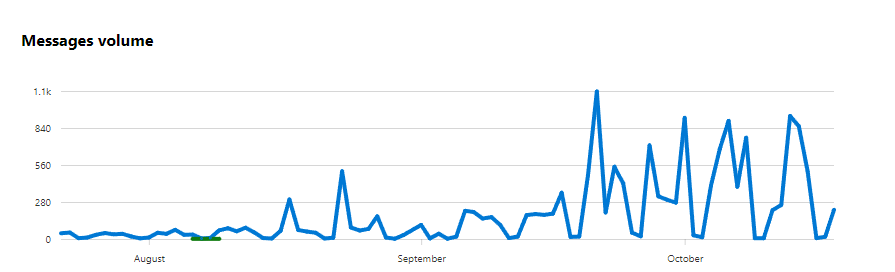
Out of the blue this morning we have been hit with an "Tenant restricted from sending email " security compliance event. Ive raised a ticket with microsoft as I cannot see a single reason why. Email volume has not changed, top senders are the secretaries (who always have been), report by connector is the same as always, we are a fairly low volume "sender" with less than 1000 external email per day - no recent spikes, no changes to infrastructure. Alert was "The majority of traffic from this tenant has been detected as suspicious and the tenant has been restricted from sending email". Looking through the usual screen, security and compliance shows no marked suspicious users. No mailflow anomalies, no spikes in the last 7 days. Ive put a full "show me all outbound email in the last 10 days" report request into the mail flow trace and am waiting for that to be completed for download. That should show any immediate compromised accounts. That also being said, we have a mail rule on maximum 50 external emails per day for pupils, a ban on external emails from younger pupils and even staff have a limit of 500 external email per day (apart from the secretaries). Noone has hit the limits (we would be emailed on alert). we block forwarding except for 2 accounts and there have been a grand total of 5 forwarded emails in the last 30 days. Ive checked barracuda and McAfee DNS reputations which are all good so im stumped. Any advice whilst im waiting for MS to get back to me? Internal email is still working, it is just external that appears to have been blocked.