Dave_O
-
Posts
303 -
Joined
-
Last visited
Content Type
Forums
News
20th
EduGeek EDIT Conference
Blogs
Everything posted by Dave_O
-
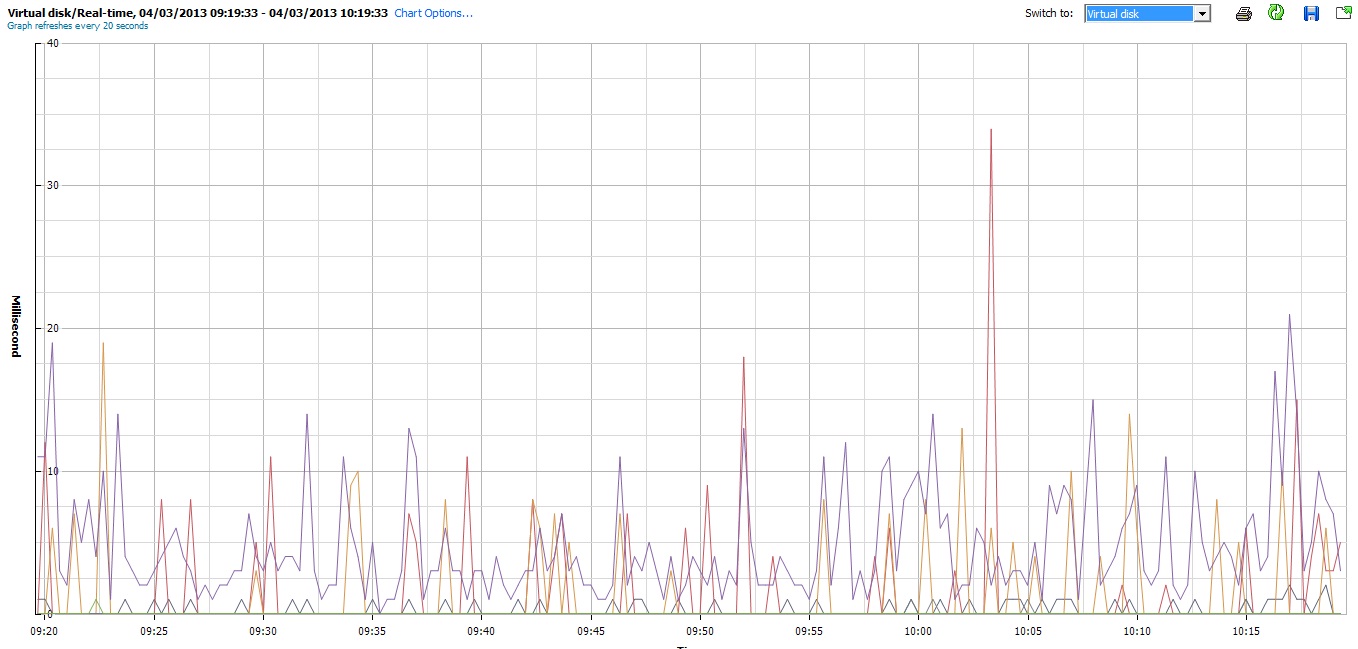
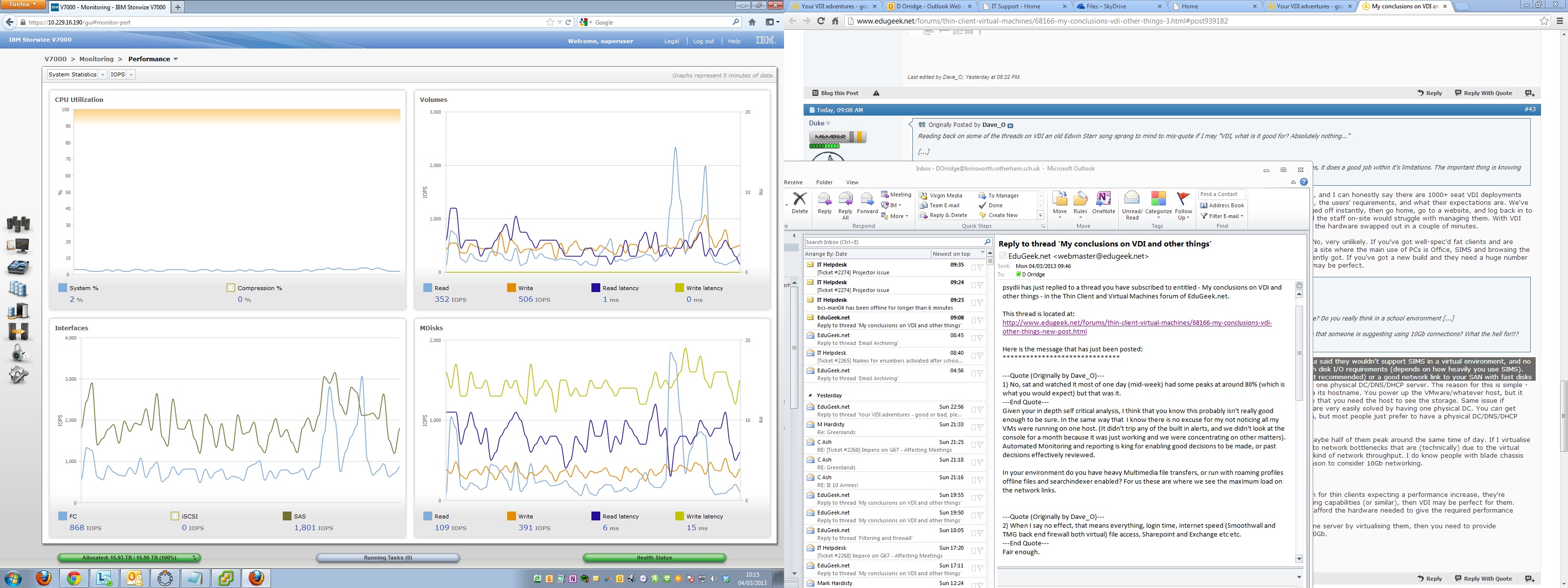
1. We do and it doesn't. Do you have figures you can share that show otherwise? 2. 48 VMs split across 3 ESX that's an average of 16 VMs per host. Given there are 4 nics trunked per host that's theoretically 4 VMs per nic. Now given that there are 6 cores per CPU ie 12 per host that's 12 cores for 16 machines lets say worst case 2 machines sharing one core so the core has to cycle 2 machines for the 4 nics. Let also look at a worst case where 2 file servers are on the same host using the same core and the same nic and are offering 100Mb files to 2 different users. They could then only offer half of the card's 1Gb capability. Explain to me how that represents a bottleneck? 3. 8Gb across 3 hosts a bottleneck??? Not sure what you're talking about here, the SAN fibre or something else? If it's the fibre you're talking about then trust me when I say it really doesn't get any better than that. Look at the screen shot below. This is the V7000 during a school day (usually no more than 3000 IOPS) where I set 3 SAN Veeam backups going (all day) as well, just to see what effect this had on performance and the user experience. Bear in mind that the V7000 (in this setup) is capable of serving 56000 IOPS and has 8Gb cache per controller. It had no effect, no latency in delivering files web pages etc.

-
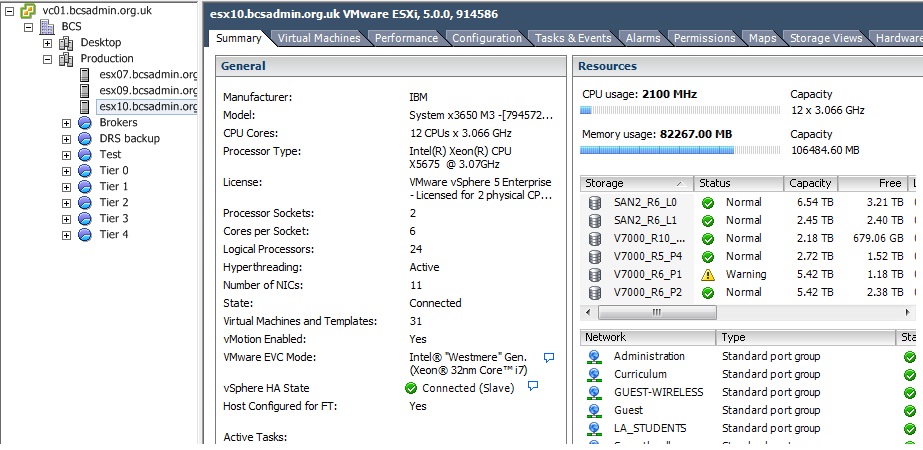
1. That is true, this figure is an average over a period of time (1 half term's figures in fact) taken on a daily basis between 8:80am and 3pm (normal school day) and represents that average for that day (yes there were some spikes each day but none maxed out any of the nics). This figure was then recorded every school day for the half term and averaged over that time period. As for bottlenecks and more information related to possible variables that may affect the setup:- See post #42 on this thread http://www.edugeek.net/forums/thin-client-virtual-machines/68166-my-conclusions-vdi-other-things-3.html for details of ESX specs. All have 100Gb of memory and are at about 80% usage. CPU usage monitoring (again over a protracted period of time) shows a maximum of 15% CPU usage (Exchange & SIMS). Storage is IBM V7000 (46 x 600Gb 10K SAS, 2 x 200Gb SSDs) with 8Gb fibre SAN switches and HBAs. Switches are HP 3500yl aggregators with 5406zl at core and 4200vl at the edge (ie Gb to desktop) all with a minimum 2Gb trunked fibre between each. 2. As to the 48 servers... all sorts of stuff read post #6 on this thread. http://www.edugeek.net/forums/thin-client-virtual-machines/84498-virtualisation-other-stories.html I have collected a vast number of VI performance metrics over the past 6 years and am happy to share specific tests and how they were collected. What I have not seen is any figures that justify (in a school environment) the use of 10Gb fibre. As to the "future proofing" over the next 4-5 years or so, believe me schools requirements will not change that much in the short term, in fact their local bandwidth needs will, more than likely, change downwards as potentially more services move off site.
-
Thanks for clarifying that one! As you can see from the attached image I use two IP ranges 10.blah.131.? for management & vmotion and 10.blah.16.? for standard curriculum traffic (subnets withheld for legal reasons:)). There is another VLAN (5) which uses the curriculum nics which is for DMZ stuff. This has another IP range 192.blah.blah.? Any layer 2 switch can deal with this.. Hope this helps
-
I would be interested to see what the utilisation (percentage wise) of the 10Gb connection is during a normal school day. We have a 4Gb trunked connection from each ESX and have never seen any of the nics that make up the trunks go much above 30%. This is across 3 ESX servers hosting 48 servers including SIMS, Exchange, Sharepoint, file services etc. The basic question is then what is the justification for 10Gb connections in a school environment? I seem to remember having this conversation before and never really getting a satisfactory answer.
-
I'm not sure anyone actually sells non-layer 2 switches when you can pick an 8 port L2 for less than £50 and if you're talking cheaper than that, then you're in the wrong job.
-
Blimey! It would have to be really old kit not to support vlans. I remember back in the 80s we had non-layer 2 device. Not seen one since the though.
-
It's for security reason. So Tommy User can't go scanning around your curriculum ip range and chance upon your VI and also so V motion and management traffic stay separate from the normal network traffic. I know one or two implementations that use the same range and have never had any problems. These are schools were talking about, not high security implementations. Up to you, if you're anal about security then use a different ip range (you don't actually need a separate vlan for that to be fair). If is fear about the amount of traffic then with two hosts in this environment as long as you have Gb connectivity, you won't have a problem
-
My conclusions on VDI and other things
Dave_O replied to Dave_O's topic in Thin Client and Virtual Machines
You've not misunderstood me, just what the difference is between VDI and terminal services. Using Wikipeida as a source, seriously!?? The fundamental difference is the level of isolation afforded by VDI over terminal services. Isolation of machine instances and applications. Not sure what point you are making here? Are you an advocate of physical? If so give me some evidence to support your argument, as I have supplied in my post. ?? This is not a luxury it's by design. If you mean having a secondary Virtual infrastructure then yes. These are schools we are talking about not universities, why quote an example that is, to all intents and purposes, outside the scope of this forum. -
Your VDI adventures - good or bad, please share.
Dave_O replied to Fruity's topic in Thin Client and Virtual Machines
The costs "I" am quoting? These are the figures quoted in the original article! As to the list of hardware and software these are what is need to implement the solution over the stated 8 year period. To clarify I did emphasise Zero client. If it is, then an OEM license is needed to be covered by EES and a VDI/VDM license. reading through the thread I am worried that perhaps the solution is not licensed properly. I'm waiting with anticipation for the cost analysis which will show me without question that these £60,000 savings can indeed be made. -
My conclusions on VDI and other things
Dave_O replied to Dave_O's topic in Thin Client and Virtual Machines
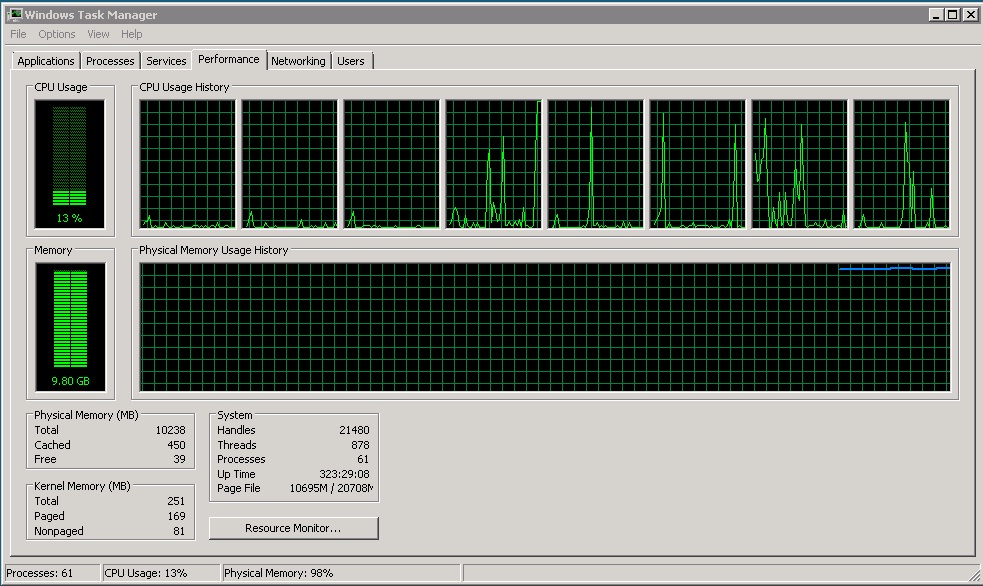
"I'm going to play devil's advocate for a bit.." OK El Diablo bring it on. A. I take it, from your initial paragraph, that you don't work in a school (any more?). Your comment " If you've got a site where the main use of PCs is Office, SIMS and browsing the internet, and they currently have very few or very old PCs, then VDI may offer a major improvement over what they've currently got." Why not use terminal services!!! runs all of these perfectly at a fraction of the cost. At least give me a case where only VDI can be used. 1) "Okay, using your first example of SIMS - I think most people say SIMS has to be physical is because for a long time Capita said they wouldn't support SIMS in a virtual environment, and no one wants their huge MIS system to be unsupported. Also, SIMS is largely just an SQL server, and SQL usually has fairly high disk I/O requirements (depends on how heavily you use SIMS). Disk I/O doesn't always virtualise very well, unless you have good local storage on your VMware/Hyper-V/whatever host (not recommended) or a good network link to your SAN with fast disks (expensive)." Not the case any more SIMS support virtual. Seriously! This is a school and SIMS we are talking about not a ten thousand simutaneous user transactional database. At most we have 200 simultaneous user connections add to that remote calls for Sharepoint etc total no more than 300 (and that's being optomistic). Look at the disk activity and CPU (see below) this morning during peak time, not exactly stressing the system. Note the output of the SAN (V7000 below), given that it can achieve up to 50,000 IOPS not exactly having too push hard is it. Lets base the arguments on things that actually happen in schools not what someone thinks might be the case. To that end, I would also be interested in anyones stats from the following thread SIMS SQLOI "Using your second example of a DC, it's more that you shouldn't have just virtual DCs, you should have at least one physical DC/DNS/DHCP server. The reason for this is simple - dependencies. Say everything goes down (long powercut or whatever) and your VMware/whatever host talks to the SAN via its hostname. You power up the VMware/whatever host, but it can't see the SAN because there's no server up doing DNS. You can't power up the virtual DC that does DNS, because to do that you need the host to see the storage. Same issue if something on the infrastructure side needs AD authentication for it to start up. You're stuck in a loop of dependencies that are very easily solved by having one physical DC. You can get around this by not having anything on your infrastructure that uses DHCP, hostnames (rather than IPs) or AD authentication, but most people just prefer to have a physical DC/DNS/DHCP server that they can power up first, and then start up their virtual hosts and storage." Why would you have communication between SAN and host dependent on name resolution? That to me is a poor design decision. We had one or two power cuts early on and learnt this the hard way. Why is this a case for having a physical DC? With the advent of Server 2012 restoring a virtual DC is possible (no AD count number issues). We have the luxury of having a second virtual setup in a physically seperate location (another block) in which we host a third DC acts just like a physical one. "2) Bottlenecks - Say I run 20 physical servers and they've all got 1Gb connections. Say they all peak at around 80%, and maybe half of them peak around the same time of day. If I virtualise all 20 of those servers and put them on one physical host with a 1Gb or 2Gb link, then at some point it's very likely I'll run into network bottlenecks that are (technically) due to the virtual infrastructure. I don't know anyone running 8Gb or 10Gb links, because in reality in a school very few of us are running that kind of network throughput. I do know people with blade chassis that have very high consolidation ratios and are coming close to maxing out 4Gb links though, and have a perfectly good reason to consider 10Gb networking." The use of "say", "maybe" and "likely" do not fill me with confidence. You give a scenario which is similar to what we have (on average 25 VMs per host) difference is I am actually basing my comments on fact rather than supposition. "VDI can be absolutely awesome if it's put in the right place." So where is this place? Give me a use case that only VDI can fullfil? "You keep some servers physical to either avoid loops of dependencies or single points of failure, or because you can't afford the hardware needed to give the required performance on a virtual server." The only things you need physical are backup (even some of that can be virtual) and firewall. The rest... "You do 10Gb networking if you need it - most of us don't. If you're consolidating a lot of physical servers down onto one server by virtualising them, then you need to provide sufficient bandwidth for all of those servers. For some people that might only be 1Gb, for some people that might be 10Gb." 10Gb please spare me! Perhaps if everybody is streaming video, music and large media files ALL of the time. Show me a place that needs 10Gb networking and I'll show you a network riddle with viruses and classes watching the latest Pixar movie.
-
My conclusions on VDI and other things
Dave_O replied to Dave_O's topic in Thin Client and Virtual Machines
Damn straight! No excuse. You'll be first against the wall when the revolution comes! Yes to multi media - make heavy use of a streaming media server, yes we use roaming profiles (kids profiles are fairly small we controll the desktop, staff profiles are large - they are crap at managing them, No to off line files, seachindexer? don't know. As a starting point on performance, if you have a look at the thread below, I would be interested in your figures for SQI IO. SIMS SQLOI -
Your VDI adventures - good or bad, please share.
Dave_O replied to Fruity's topic in Thin Client and Virtual Machines
There are so many questions that this post raises, however rather than addressing the cost saving (TCO) and energy efficiency issues which I have some reservations over I will restrict myself to generic concerns. 1) What was the consultation process with staff? Who is the driving force behind this initiative? 2) Who implemented the solution? Your comment "A few schools that have complained about VDI did not have the system set up correctly which led to reliability issues." is eluding to something. 3) Why would you want a solution that a) lasts 8 years b) costs a lot every 8 years to replace? 4) Are any of the thin clients laptops? The move now is towards portable devices why would you commit 8 years to kit that is fixed? I spent a long time defending a solution which in the end was not fit for purpose both in terms of cost and usability and it took some considerable self reflection to admit defeat. OK I lied, I am interested in how you arrived at the cost saving figures. I am really struggling to fathom how the cost of the thin clients (with 8 years warranty), back end hardware (with 8 years warranty), VMWare licensing and SnS for 8 years, Microsoft VDM/VDI licensing for 8 years (which you need as there is no coverage for zero clients in the normal EES MS agreement - no OEM license) set against the cost of 550 desktop/laptop/tablets can save £60,000. If you can answer these questions then I am more than willing to change my mind and would love to come and see this solution. -
My conclusions on VDI and other things
Dave_O replied to Dave_O's topic in Thin Client and Virtual Machines
1) No, sat and watched it most of one day (mid-week) had some peaks at around 80% (which is what you would expect) but that was it. 2) When I say no effect, that means everything, login time, internet speed (Smoothwall and TMG back end firewall both virtual) file access, Sharepoint and Exchange etc etc. Bear in mind the rest of the virtual infrastructure was working fine, ESXs SAN etc, given that there are 3 hosts, the NIC load would have been across all 3 as different services (DC, Sharepoint, Exchange file services) would probably been spread across them (don't know for sure as I let VMWare deal with all that stuff ie vmotion, load balancing etc). I probably wouldn't advocate just 1Gb NIC but certainly no more than 2. How come you were not alerted that one of the hosts was not functioning? As for CPU, one CPU in each host is plenty. See below for CPU usage
-
Your VDI adventures - good or bad, please share.
Dave_O replied to Fruity's topic in Thin Client and Virtual Machines
Waste of time see here -
My conclusions on VDI and other things
Dave_O replied to Dave_O's topic in Thin Client and Virtual Machines
Reading back on some of the threads on VDI an old Edwin Starr song sprang to mind to mis-quote if I may "VDI, what is it good for? Absolutely nothing..." OK. That's not strictly true, staff external access yes, in school via thin clients and old boxes... a waste of time, money and effort. Another year on and I do have to say that the thin clients have been no problem at all... when running Terminal services. VDI is still not there by any stretch of the imagination. VMWare were pretty cheesed off when I terminated my SnS just over a year ago. I did ask about new features etc in the coming year (they could not really quote anything major) and my decision has been vindicated, what have they given us since last year? 5.1 (I'm on 5.0) wow massive improvement. As for virtualisation generally I have a couple of question 1) I don' t understand the arguments about stuff having to be physical. Why does SIMS have to be physical, DC physical etc? Is it performance? Do you really think in a school environment (we have 1450 students and 180 staff) that SIMS will be pushed to the absolute physical (excuse the pun) limit? I have sat and watched SIMS over many hours (years), IOPS, network, processor, memory and cannot figure out why it has to be physical? Please someone enlighten me! 2) Why do people think Virtual infrastructures are a bottleneck and try to scale them to be able to run the equivalent of NASA? I read on here that someone is suggesting using 10Gb connections? What the hell for!!? Now I've got 8Gb fibre which I have come to realise is actually stupid, I could have saved money and stayed with 4Gb. It never uses more than 1.5Gb even when running Veeam backups over fibre. If this is for networking rather than attached storage (iScSI) then this is even more insane. As an example, I normally have 4 x 1Gb NICs teamed for host connectivity so I disconnected 3 of these from each host and ran them with essentially just one NIC each for a week just to see what would happen and you know what? no difference. The HP switch monitoring software never registered above 60% on any of the NIC ports at any time even with 720 workstations accessing work at the beginning (read) and at the end (write). Just in case I didn't make it clear at the beginning, forget VDI it's too expensive both for the kit and the licensing and just use terminal services, it does a good job within it's limitations. The important thing is knowing what these limitations are. Deploy in areas where these limitations will never be reached and you'll have happy staff and students. -
It's just over a year since I posted this. Has anyone else done this test? I would be interested in seeing the results both from a physical and virtual SIMS instance
-
I suggest using a Juniper SSG 350M appliance for firewall, anti-virus, anti-spam and base web filtering (you can probably get this at no extra cost if you choose your ISP carefully as we did), TMG for back to back FW/DMZ and then a software only version of Smoothwall (no firewall) for the main on-site filtering. This way you have a fail safe on web filtering and firewall all at minimal cost.
-
Dell's Appasure or Veaam's Exchange addin
-
Contact Salamander Software instead (Richard Willis)
-
General Advice - is it worth it for us?
Dave_O replied to rbjames's topic in Thin Client and Virtual Machines
You've obviously not read any of my posts on this particular forum -
General Advice - is it worth it for us?
Dave_O replied to rbjames's topic in Thin Client and Virtual Machines
God help you if you do! -
General Advice - is it worth it for us?
Dave_O replied to rbjames's topic in Thin Client and Virtual Machines
Seriously don't waste your time. For £30-40,000 you could get a much better physical system (with a virtual backend) -
GameMaker & Thinapp ... Headache!
Dave_O replied to RJohnson91's topic in Thin Client and Virtual Machines
Did this two years ago using ThinApp, VMWare View etc. As you move on I'm sure you'll find just how limited ThinApp & View really are, but it's the process you go through to get there that's important not the realisation that actually the technology just isn't up to it. Still I'm sure you've not wasted lots of school's money and time on the initiative. Just search for "Dave_O" and you'll be able to read my experiences on the whole "desktop virtualisation" issue. -
Server virtualisation, fine. As for Desktop virtualisation... 1. Read this first. http://www.edugeek.net/forums/thin-client-virtual-machines/68166-my-conclusions-vdi-other-things.html Not sure where you are getting your licensing information from but it seems way out. Have a look here for some realistic pricing: http://www.greymatter.com/VMware/VMware-View-Enterprise-Bundle/672575 and that's without mandatory SnS Licensing is based on number of clients you want to run, the cost of the ESX licenses is included but only if you go for the full version rather than the Desktop add ons (which is for people who already have spare ESX server capacity). Remember you cannot run server load on an ESX which is licensed for desktops (actually you can but it breaks, the licensing agreement - with one or two caveats). You will need 2 virtual centers as the licensing does not allow you to run servers and desktops on the same virtual center server (never really understood why, but then I've never really understood VMWare licensing or SnS). On a separate note we have stopped taking SnS on all of our VMWare stuff, I've seen the road map and there is nothing particuarly I think that will benefit school in the next year or so. 2. Read this for differing views on VDI. http://www.edugeek.net/forums/thin-client-virtual-machines/95527-new-vdi-project.html 3. Read this for my views. http://www.edugeek.net/forums/thin-client-virtual-machines/84498-virtualisation-other-stories.html Dave O
-
We've gone from 100 Wyse thin clients using VDI down to about 50 + 20 for staff use externally (total estate is 875 Pc/laptops so represents about 11%). Still got the ESX's and the storage running it. You are quite welcome to come and have a look (Rotherham). If by a full VDI setup you mean across the whole school then "Hell no!! Couple of questions a) Who appointed them? b) Can it be stopped?