Steven_Cleaver
-
Posts
707 -
Joined
Content Type
Forums
News
20th
EduGeek EDIT Conference
Blogs
Everything posted by Steven_Cleaver
-

Interactive Board Callibration
Steven_Cleaver replied to Steven_Cleaver's topic in AV and Multimedia Related
@biggjb yes using Desktop will give your suggestions a go cheers 🙂 -
Interactive Board Callibration
Steven_Cleaver replied to Steven_Cleaver's topic in AV and Multimedia Related
@biggjb yes had one of these had to up date the Drivers and fudge the resolution got the touch working but image sort of displays fractionally off the top of the screen only a fraction so may have to have another go. The others seem ok once worked out the Calibrate bit through CMD. -
Interactive Board Callibration
Steven_Cleaver replied to Steven_Cleaver's topic in AV and Multimedia Related
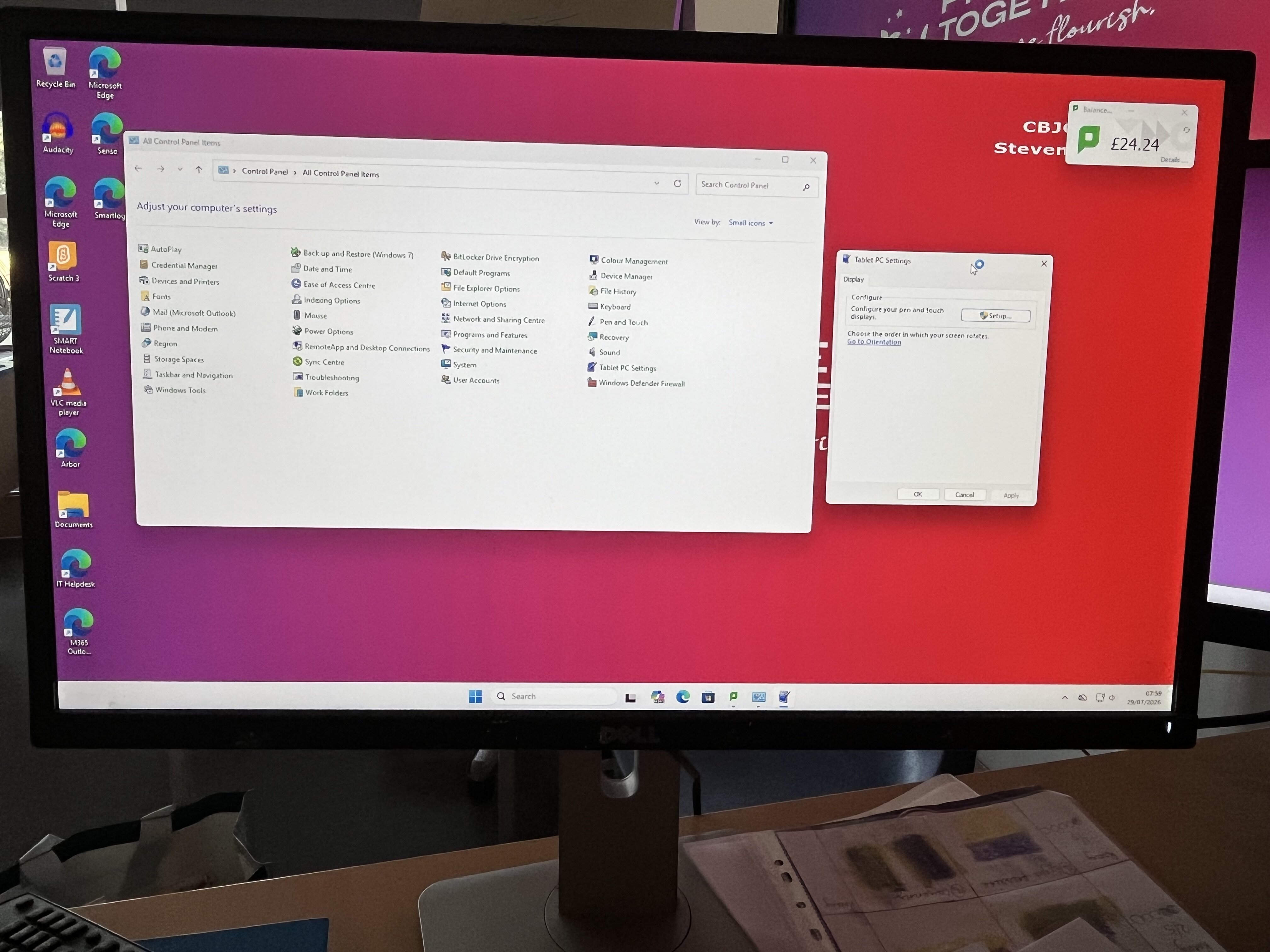
Hi All Just for update and in case helps anyone else looks like the Callibrate option has been removed for (Tablet PC Settings) on recent Windows 11 update some versions. Spoke to someone from Genee was another post on here had put phone number down and he thought use Tablet PC Settings --> I explained Calibrate wasn't showing on there and he was a bit stumped as said that is way to do it where need Calibrating abit more Googling found the option looks to have been removed in recent Windows 11 update good old Microsoft. Can now though get at this via command line Tabcal so CMD then run Tabcal just in case helps anyone. -
Interactive Board Callibration
Steven_Cleaver replied to Steven_Cleaver's topic in AV and Multimedia Related
@DrBeaker Same haven't had to Calibrate boards before but Option was definitely there before in Windows to Calibrate and seemed to sort it but not showing now. I haven't tried resetting to Factory settings just worried might make it worse, I did mess about with the resolution settings as some boards are ok and thought it might be that sort of set to the same settings where board was ok but might have another shot at this as might do it is only about 0.5 to 0.25 inch out but would be a pain for staff. Thanks again. -
Interactive Board Callibration
Steven_Cleaver replied to Steven_Cleaver's topic in AV and Multimedia Related
@synaesthesia I can't find any info on Genee as regards the boards so can't find direct Manufacturer as where I first looked thought might be drivers or some guide on Calibrating them but can't really find anything but might be poor Googling skills @DrBeaker to be honest I have queried with them but is two of them completely re-imaging 4 schools and putting in 3CX in two weeks so I said I would help out here 5th school as felt sorry for them as isn't really my role here but done this thing before but boards I have used before have been Smart or Promethean and those were always ok but it wasn't planned well so they are struggling but as you say at the end of the day may be down to them. -
Hi Hope some one can help please. MAT has just upgraded us to Windows 11 and just having issue with Calibrating some Genee Touch Screens can get Windows it is an interactive screen by us Control Panel --> Tablet PC Settings but sure before (I Think) once I did this we used to get an Option in there (Tablet PC Settings) to Calibrate the screen but only ever had to do a couple until this rebuild now are all slightly out so all need Calibrating but we don't seem to get this now I have tried with Screens in Extended or Mirrored but no Joy tried updating the Drivers through Windows etc again I just can't get an option to Calibrate the screens and first few I have tried are about 0.5 of an Inch out on the touch. Any ideas how to get a Calibrate on these. Other screens just seem to auto Callibrate once I have done the Tablet PC Setting and just select the screen that is touch seem fine but the Genee ones need Calibrating.

-
Hi We are just trying to create\use something that Primary Students can use as a Wiki just wondering what others are using we had a go with Teams and Notebook and Collaboration Space but feels a bit clumsy and have hit a few issues with it with some users not seeing resources even though in the Teams Group as Member. So any suggestions for anything simple that anyone is using would be great. Many thanks
-
Thanks @Synkrox will take a look at that as well.
-
Thanks everyone for there suggestions I have sort of got mostly there using Excel and built in AI but still in the testing stage, had a look at Microsoft Calendars which might be an option and Classroombookings thanks @Gibbo might be an option longer term just trying to find something quick for sort of stop gap, Had a look for Microsoft Booking but does look we are on A3 but sort of MAT IT sort that but again looks good thanks @MYK-IT
-
Cheers @CaptainJama will take a look thanks 😄
-
Hi What I am looking for is a free Laptop sort of Trolley booking system at the moment we can sort of book Laptops in our sort of website Calendar and this works well as can make Calendar events available to groups so normal things showing on the Calendar for Parents\Carers all etc but booking of equipment Laptop Trollies just visible to staff but we are moving websites and doesn't look this will work on the new Website Calendar only shows events to all. We have four Laptop Trollies at the moment and these are sort of booked in pairs so class has a full set so White and Green or Blue and Red booked together. We are though looking at moving to eight Laptop trollies possibly so 4 Class sets. Obviously could look at Outlook Calendar but not sure this would work the best could look at creating something in Microsoft Access or Excel but just wondered if anyone had any other ideas or did this a different way or knew of any free software that was easy to set up and use to do this done a bit of Google searching and on the Forum but can't see anything, any help or ideas would be appreciated. Many thanks
-
Thanks Olliedawg 😉
-
Hi Olliedawg Hope you are well. We have just moved to 3CX and are looking for something like this so creating emergency alerts to the phones in case of Lockdown, @Olliedawg would you be able to provide us with the guide as well and let us know if you feel this works ok. Many thanks Steven
-
Soft Cell co-founder Dave Ball dies, aged 66
Steven_Cleaver replied to 6Foot2's topic in General Chat
So sad was a big fan of these in the 80's remember had some great nights at Snobs club in Birmingham dancing the night away to these and Human League and other New Romantic artists. -
As others have said 3CX is best I have used and most cost effective I have used rolled this out at school I was previously at was coming in less than half of what other systems were coming at that the school was looking at before the Business Manager pulled us in for same functionality was pretty easy to rollout and manage, also used 3CX in a couple of business organisations and been really good from user perspective as well on Service Desks etc.
-
Sign out Edge Profile
Steven_Cleaver replied to Steven_Cleaver's topic in Internet Related/Filtering/Firewall
Cheers all you say makes sense and we can sort of clear the issue on Indvidual basis is just sort of trying to do that globally as it were is our issue thanks again Michael much appreciated. -
Sign out Edge Profile
Steven_Cleaver replied to Steven_Cleaver's topic in Internet Related/Filtering/Firewall
I have a feeling is where this has come for as you say migrating from old Office Tennant to new one and has got setting stuck somewhere but only sort of Microsoft Edge login profiles if we sign them out and in sorts it but don't want to do that for Circa a thousand users and we are not 100% sure this wouldn't come back as a lot of third parties involved multiple sites etc we sort of can't really delete cache if this effects other stuff like Passwords for websites (I know they shouldn't but do) and don't want a thousand calls hitting our help desk also if effects Favourites and want to do it globally so sign them out but by deploying Reg change if possible so need to do it globally. -
Hi A bit of a weird issue we have multiple users multiple sites where users are sort of signed in with old Profile on Edge so example (jsmith.school.com rather than jsmith.school.com) and is causing issues with Office365 online email etc is there a reg setting that can force sign out of Edge or Force to sign in with correct account based on AD or Office 365 account but would possibly need to be a Registry change rather than GPO or through Azure.
-
IOS wifi issues accessing the Internet
Steven_Cleaver replied to Steven_Cleaver's topic in Wireless Networks
Hi Engineer has routed through Google for DNS for now and seems to be working has tested on a few devices he took with him to test and they tested the same devices that were having the issues and all seem to be working for now. -
IOS wifi issues accessing the Internet
Steven_Cleaver replied to Steven_Cleaver's topic in Wireless Networks
Hi Matthew Had engineer go to site and have a look the company have been saying is an IOS issue when they have had a look and is an issue with the DIA and packets been stripped out and the IP for the Wireless Captive portal system the DNS was configured incorrectly looks like they are going out to few sites. -
IOS wifi issues accessing the Internet
Steven_Cleaver replied to Steven_Cleaver's topic in Wireless Networks
As far as I know phones are ok so we have a few remote sites using the same sort of setup but only a couple of sites at the moment reporting issues when support provider have done some testing has only been issue on IOS Devices Android seem to work ok. They all connect to Wifi and from can sort of access some internal stuff as far as I know but have to go through Captive portal to access the internet. -
Has anyone heard of IOS devices having issues accessing websites even though on wifi. So Devices are on the wifi Network but sort of have to go through a portal to access the Internet are able to access some pages but not others specifically more around Https pages. I am trying to get more info but is all I have for now and may relate to IOS versions and think might be around captured portals for IOS devices and dropping hidden ssid's as well. Devices mentioned so Far Iphone 13 pro max IOS version 15.2.1 Iphone 10 IOS Version 14.8.1 Many thanks Steven
-
Cheers for looking does seem intermittent I have three devices at home two that are fine all same version of Internet explorer etc the I get below: so is a bit strange .
-
Hi I completely agree with comments in regards to the move away from IE and to be honest we are using other browsers as regards other things but can't use these for all the Backoffice we do as the company has invested to much time and money and wouldn't be easy to move this to new browser platform and to be honest is way beyond my remit. I was just really after if anyone had seen this in Internet Explorer and had a work around to the Google Maps issue in IE 11.
-
Completely agree is just we use an Internal backoffice system with all sorts of stuff built in reporting, telephony call logging, all sorts of Database stuff but this system is the one the staff use for virtually everything 6 coders virtually permanently employed building extra functionality into this etc. So is just easier if they do everything or majority of stuff in one browser to be honest though some of our HR stuff isn't supported in Internet Explorer so have had to push them to Microsoft Edge for that. Is just that the Google Maps works for some users in Internet explorer so just seeing if their is a fix .